
Compatibility
Minecraft: Java Edition
Platforms
Supported environments


Creators
Details
Licensed ARR
Published 3 years ago
Updated last month
Changelog
- Fixed: Custom blocks can't be opened in caves.
- Improved: Dropped-type custom blocks can be created when there are no other items dropped within a 1-block range, instead of 5.
- Simplified: Removed the credit link display.
- Custom Craft Version: 5 (compatible with the same version)
README
I made the backpack, which is
- Craft a 9-slot backpack, upgradable to 18 and 26 slots.
- Dyeable through the crafting table.
- Easily renamable using an anvil.
How to Use Backpacks
- To store or retrieve items, simply drop the backpack on the ground. It will transform into a barrel, allowing you to manage your items. Click the "Exit" button slot to revert it to a backpack item.
These backpacks can be placed in your chest slot for decorative purposes.
Crafting Recipes
-
Spawning a Working Table:
To craft the backpacks, start by creating the essential "Working Table". Simply drop a stone pickaxe onto a crafting table block. -
Crafting a 9-Slot Backpack:
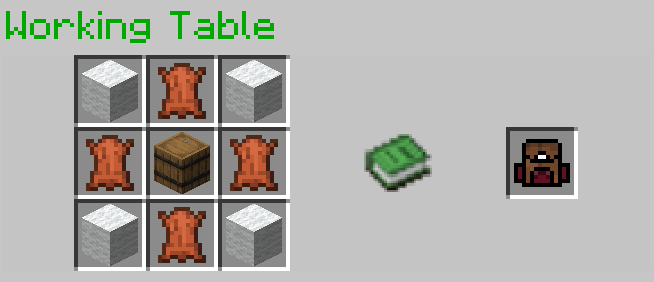
-
Upgrading to an 18-Slot Backpack:
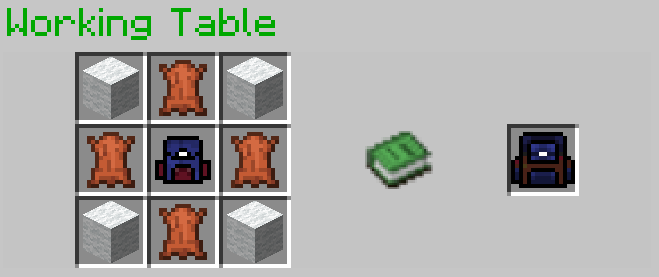
-
Upgrading to a 26-Slot Backpack:
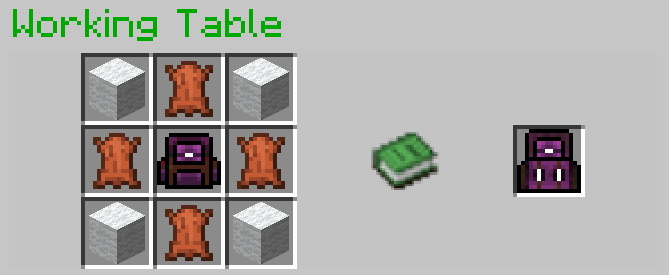
Optional Installation
- To see the backpack on your character's back when placed in the chest slot, you may install Optifine; it's optional.
References
- GUI code is generated by Easy GUI
- The Working Table is a crafting block in Custom Craft.
- ChatGPT for gramma improving
Demo Video
Watch this video to see the backpacks in action!

Files
upgradable_backpack-v10.zip(115.15 KiB) Primary
Metadata
Release channel
ReleaseVersion number
v10Loaders
Data Pack
Game versions
1.17–1.20.2Downloads
5732Publication date
September 22, 2023 at 8:11 AMPublisher

paul90317
Owner