
Compatibility
Minecraft: Java Edition
Platforms
Supported environments


Creators
Details
Licensed MIT
Published 6 months ago
Updated 6 days ago
Sub-levels claim system for Create: Aeronautics
Works and compatible with Open Parties and Claims mod (OPAC).
This is custom claim system, separate from OPAC, but integrates with its parties and allies system and claims amount. Players wouldn’t feel big difference between OPAC and our claim system.
How does it work?
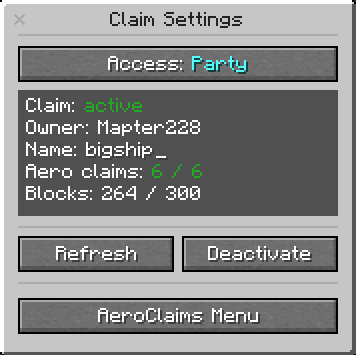
You can claim Sub-level (ship, aircraft, whatever you want) with the Claim block using its GUI.
You also will have to use Aero claims depending on your Sub-level size.
You can acquire Aero-claims by converting regular OPAC claims to the Aero-claims
Each Aero-claim provides protection to certain amount of blocks (can be changed in config).
You can increase the claim size by adding more Aero-claims to Claim block.
Example:
- 1 Aero-claim = 50 blocks
- 20 Aero-claims = 1000 blocks
Feature
- You can place the Claim block only on Sub-level, it scans all the structure. Doesn’t work outside the Sub-level.
- You can set up permissions: party, ally, all or nobody.
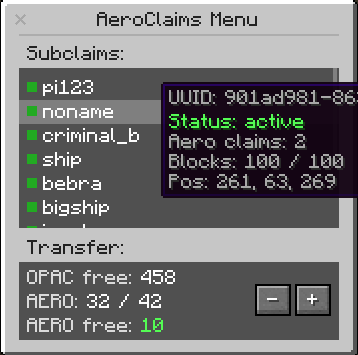
- Simple GUI: claim-activation button, sub-level info, reload borders button. Press "refresh" button after you increased your Sub-level.
- Regular destruction and player-interaction protection.
- Improved create-block-interaction (drills, saws, deployers etc) protection. Protection from the honey glue (from Aeronautics). List will be improved, more items/blocks will be added.
- You can save the Sub-level list with all info as .json-files in the server folder. You can save claimed and unclamed “sub-levels” separately. Mod records sub-level’s - UUID & size, owner’s nickname. The list will be increased.
- Useful commands for admins and regular players. Admin commands provide the control over the amount of sub-levels, which can help with server optimization. The list will be increased.
- Set up with the config. The list will be increased.
Commands
For players:
/aeroclaims menu — Open the sub-level management interface.

/aeroclaims info — Show info about your claimed sub-levels and slot limits.

/aeroclaims tp <shipUuid> — Teleport to your claimed sub-level (if enabled in config).
For admins:
/aeroclaims info <player> — View sub-level claim info for a specific player.

/aeroclaims sublevels unclaim <shipUuid> — Unclaim a sub-level by UUID, returning claim and forceload slots to the owner.

/aeroclaims sublevels teleport <shipUuid> — Teleport to any sub-level by UUID.

/aeroclaims sublevels repair claim-blocks — Inspect sub-levels and restore missing or mismatched claim blocks.

/aeroclaims sublevels repair phantoms check — Find phantom claims whose sub-levels no longer exist.

/aeroclaims sublevels repair phantoms clear — Safely purge verified phantom claims and return slots to owners.

/aeroclaims sublevels refresh (all | player <player> | sublevel <shipUuid>) — Recount ship blocks and refresh claim borders.

/aeroclaims sublevels delete unclaimed confirm — Delete all unclaimed sub-levels from the world (requires enableClearCommand in config).

/aeroclaims sublevels dump — Export debug data about registered sub-levels to world/aeroclaims/