
Compatibility
Minecraft: Java Edition
Platforms
Supported environments

Links
Creators

Details
Petite Inventory
Provides a Resident Evil 4 / Diablo–style inventory layout, where a single item can occupy multiple slots, and adjusts the corresponding replacement and transfer operations.
Features
On first launch, a default rule file is generated at:
config/PetiteInventory/default.json
The rule format is extremely simple and intuitive—one glance and you’ll understand it. Tag matching is supported, and you can reload rules using the /reload command.
After entering the game, you’ll immediately notice that the inventory layout has changed:
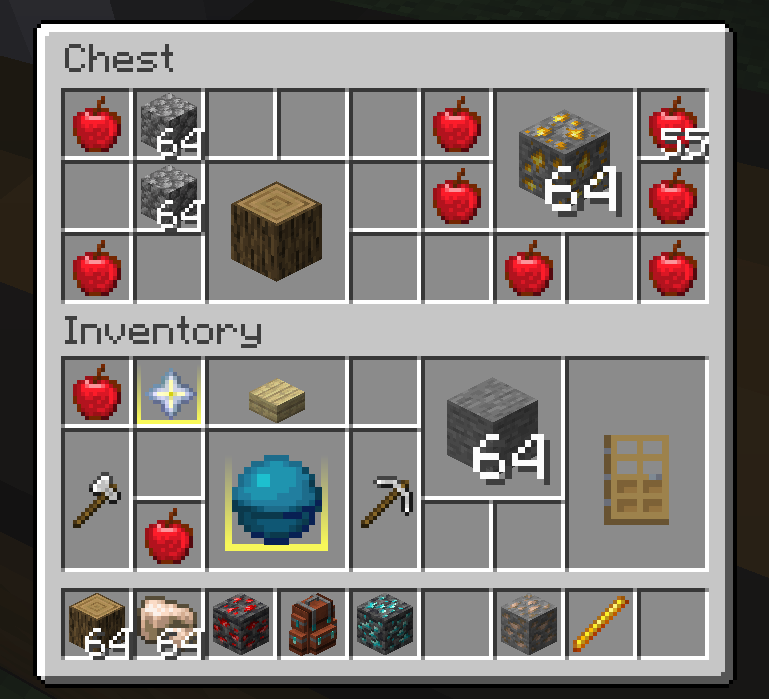
For gameplay balance, the new layout only applies to the player inventory by default. If you prefer not to apply it to the player inventory, you can disable it in the config file.
If you want to enable the new layout for other containers, simply point at any slot of the target container and press the copy key (default: U) to copy its container ID.
Paste this container ID into the config file to enable the custom layout for that container.
Additionally, containers using the new layout benefit from several operation optimizations:
- When moving an item with the mouse to replace another, replacement is allowed as long as the target area contains only one other item type.
- When using Shift + Right Click for quick transfer, if the items cannot stack, the system intelligently finds an available blank area to place them.
- The hotbar is never affected by the new layout—otherwise, the experience would be unbearable.
Notes
- Due to the nature of this mod, some compatibility issues with other mods (e.g., container sorting, slot expansion) are inevitable.
- There can never be a perfectly ideal compatibility solution with auto-sorting mods—not only because of technical conflicts, but also because manual organization is one of this mod’s core design philosophies.
- In containers that use the new layout, click-dragging items with the mouse is disabled. This may return in the future if the technical challenges are solved.
- If you encounter functional issues with important containers from other mods, please leave feedback.
- Works better with Item Borders.
Roadmap
- Port to additional Minecraft versions.
- Compatibility with major container mods such as Sophisticated Backpacks.
- Inventory expansion mechanisms.
- Exploration of non-rectangular, Tetris-style item shapes.