Compatibility
Minecraft: Java Edition
Platforms
Supported environments


Links
Creators
Details
LAN World Plug-n-Play




What Can It Do - 它的作用
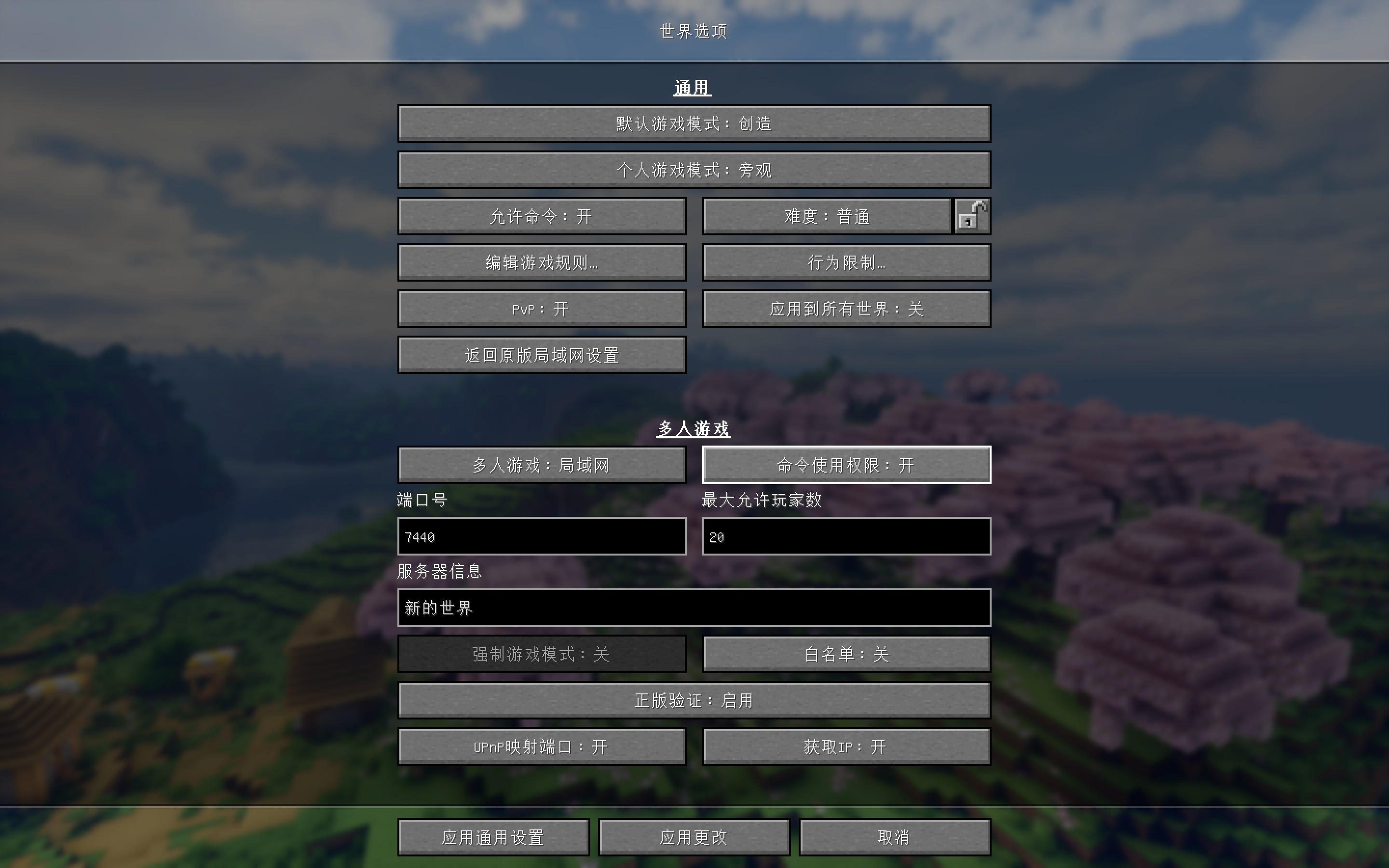
1 对于正版验证按钮,现在有三个选项:
启用:启用正版验证,将会比对Mojang服务器数据库验证登录信息,即只允许使用微软帐户登录的玩家加入;禁用:即不验证登录信息,允许使用离线模式登录的玩家加入;禁用 + 修复UUID:尝试使用离线模式登录的玩家名匹配Mojang服务器用户名称以获取唯一UUID,同时为使用微软帐户登录的用户保留UUID,它也可以防止背包和物品栏内容丢失。禁用 + 修复UUID对应的控制台命令为/onlinemode false与/uuidfixer enabled true。
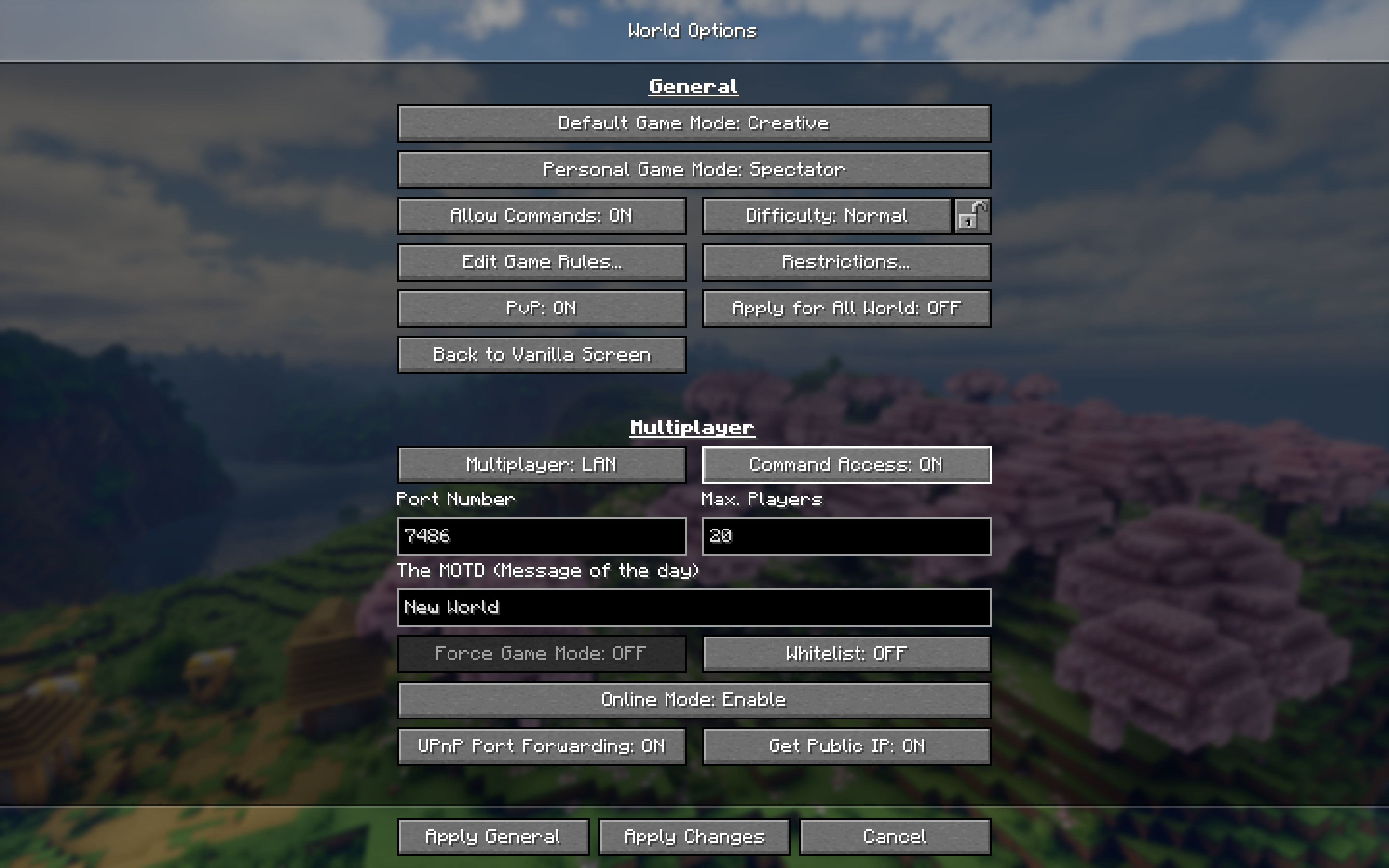
1 The Online Mode button has three options:
Enable: verify login information against the Mojang server database, only allow players with genuine Microsoft account to join.Disable: no verification, allows anyone, including offline players to join.Disable + UUID Fixer: Similar to above, enables the UUID Fixer. The default behavior of UUID Fixer is that, if a player has his name on the Mojang server, the official unique UUID will be used, just like in the "Online Mode". Exceptions can be added using the/uuidfixer forcecommand. This mode can be useful to preserve backpacks and inventories when switching from "Online Mode" to "Offline Mode".- The
Disable + UUID Fixercorresponding commands are/onlinemode falseand/uuidfixer enabled true.
2 新命令 /uuidfixer 可以控制在 禁用 + 修复UUID 模式下用户名如何映射为UUID。
/uuidfixer enabled用于开启与关闭本功能。/uuidfixer list命令可以查看列表中的规则。/uuidfixer force命令可以添加新规则或替换已有规则。/uuidfixer remove命令可以从列表中移除一个已有规则。/uuidfixer test命令可用于检查一个用户名所适用的规则。
2 The command /uuidfixer controls how usernames are mapped to UUIDs in the Disable + UUID Fixer mode.
- command
/uuidfixer enabledtoggles the UUID fixer on and off. - command
/uuidfixer listlists all mapping rules. - command
/uuidfixer forceadds a new rule or update an existing rule. - command
/uuidfixer removeremoves an existing rule. - command
/uuidfixer testallows you to check the policy applied to a username.
3 允许你修改局域网世界的端口号,并选择是否映射这个端口使用UPnP映射到公网(如果你的路由器支持UPnP)。
使用图形界面或者/upnp命令来开启与关闭UPnP支持。
3 Allows you to change server's port number and you can choose whether to map this port to the public network using UPnP (if your router supports UPnP).
Use the GUI button or the /upnp command to toggle UPnP support on and off.
4 允许你启用或禁用PVP。
4 Allows you to enable or disable pvp.
5 允许你自定义MOTD(是玩家客户端的多人游戏服务器列表中显示的服务器信息,显示于名称下方)。
5 Allows you to change server motd (The message displayed below the server name in the server list).
6 你可以控制其他玩家加入时是否有op权限、是否可以作弊,你也可以使用 /op /deop 命令进行控制。你可以使用 /whitelist 命令构建白名单,然后用其控制其他玩家进是否允许加入你的游戏世界。
6 Allows you control other players' permissions when they join your world. Use /op and /deop commands to manipulate the OP list. You can also use command /whitelist to build a whitelist and use it to control players who can join your world.
7 你可以使用 /ban 来封禁玩家、 使用 /ban-ip 来封禁 IP 地址、 /banlist 命令可以查看封禁的玩家列表;你可以使用 /pardon 来解封玩家、 使用 /pardon-ip 来解封 IP地址。
7 You can use command /ban to blacklist players. Use command /ban-ip to add IP addresses to the blacklist. Use command /banlist to list blacklisted players. Use command /pardon to remove players from the blacklist, use command /pardon-ip to remove IP addresses from the blacklist
8 本模组可以自动保存配置文件,并且下次加载世界时会自动载入配置。
8 Your settings will be recorded in a file, and it will be automatically loaded next time.
9 本模组可以获取你的IP地址(比如本地 IPv4,公网 IPv4 或 IPv6),而且你可以选择是否复制IP到剪切板,以方便联机使用。/ip命令可以检索更多IP信息。
9 This mod can get your IP address, and you can choose whether to copy the IP address (such as local IPv4, globe IPv4 or IPv6) to the clipboard. in order to provide the IP address to your friends. The command /ip can retrieve more IP information.
10 服务器启动后,您可以更改上述大部分设置,但某些选项仅适用于新加入的玩家。
10 You can change most of the above settings once the server starts, but some options are only applied to newly joined players.
11 你还可以通过单击更多设置页面【返回原版对局域网设置】按钮返回原版“对局域网开放”屏幕。
11 You can also go back to the vanilla Open to Lan screen by clicking the button [Back to Vanilla Screen] on the Others Settings Tab.
12 你可以打开更多设置页面中选项【替换 举报玩家 按钮】以在游戏菜单中心中替换【举报玩家】按钮
12 You can also turn on the button [Replace Player Reporting Button] on the Others Settings Tab to Replace Player Reporting Button in GameMenu.
13 当本模组安装在服务端上时,只有修复UUID功能可用。只有服务端工作目录下存在uuid_fixer.json时修复UUID才会启用。/uuidfixer命令在服务端上也可用。除此之外,本模组在服务端上什么也不会做。
12 When installed to a dedicated server, only the UUID Fixer function is available. It can only be enabled if uuid_fixer.json exists in the root server folder. The /uuidfixer command is available on the dedicated server side. This mod does nothing otherwise.
Screenshots - 界面截图