

Tags
Creators
Details
Licensed LGPL-3.0-or-later
Published 6 months ago
Updated 3 weeks ago
All versions
3.0.0+1.20.1
A Balanced Diet 3.0.0+1.20.16 months ago 47
Compatibility
Minecraft: Java Edition
Platform
Supported environments
Changes
The format is based on Keep a Changelog and this project adheres to Semantic Versioning.
This is a copy of the changelog for the most recent version. For the full version history, go here.
[3.0.0+1.20.1] - 2026.05.05
This update was made by Pawjwp to add some clarity, balance, and quality of life features. This will be published on a fork of the Diet mod.
Added
- Tooltips
- Each diet group now has a tooltip showing the effects that come from it, in addition to the aggregate tooltip at the top of the screen
- Quality view (optional, data-driven)
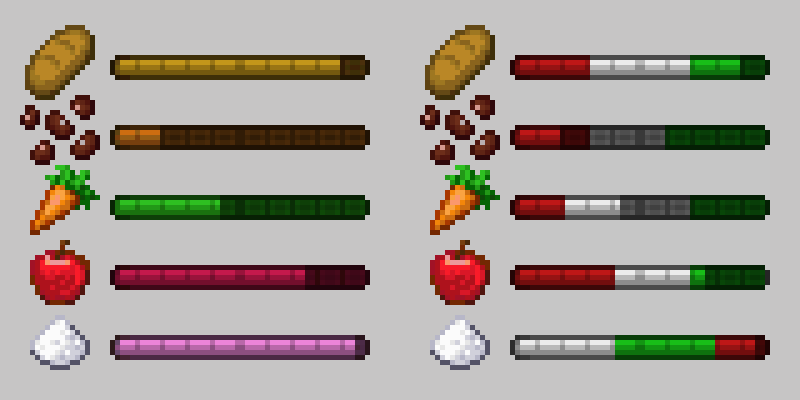
- Adds a system to show the “quality” of a food group to indicate to players what thresholds will provide positive or negative effects.
- The quality display can be configured to appear upon hovering over a group bar, by clicking a button in the corner of the Diet screen, both, or neither.
- Quality values can be defined for any effect in a diet suite using the
qualityfield, which is set to a string containing a hex color code (ex:"#3FDF3F"). This value is drawn over that region of the bar whenever the quality view is visible.
- Per-food nutrient control (optional, data-driven)
- Added a config option that allows nutrition values to be set per-food rather than generated based on tags. When enabled, Diet will reference datapack files at
/diet/food_valuesto get food values on a per-food basis. These are used in place of the tag-based ones. - The default datapack has default values configured for ~20 mods, more may be added in the future or upon request. These default values assume decreased drain rate for fruits and vegetables, and greatly increased drain rates for sugars.
- Added a config option that allows nutrition values to be set per-food rather than generated based on tags. When enabled, Diet will reference datapack files at
- Notification system (optional, data-driven)
- Adds an optional notification system, customizable from within a diet suite. This is handled through a notification object that can be added to each effect block in the suite.
- Fields:
notification_id(required)message, uses translation keys and %s will be replaced by diet group name (required)notification_sets, an array of strings used for bulk-mutingtrigger, what change causes the notification to appear, can be one of:enter, when the player enters the specified threshold (default if omitted)rise_into, when the player enters the specified threshold from belowfall_into, when the player enters the specified threshold from aboverise_through, when the player enters or passes through the specified threshold from belowfall_through, when the player enters or passes through the specified threshold from aboveexit, when the player leaves the specified thresholdrise_out, when the player leaves the specified thresholdfall_out, when the player leaves the specified thresholdall, when the player enters or exits the specified threshold
default_frequency, how many times the notification will appear. A config option sets the default values for whendefault_frequencyis omitted.always, notification will appear every time its trigger is metonce, notification will appear once and then set itself tonevernever, notification will not appear unless triggered by testing commands
- Effects can declare a notification without declaring any attributes or status effects
- Fields:
- Notifications appear in chat based on their triggers and frequency. If a notification’s frequency is set to
once, it will set itself toneverafter being triggered the first time. If a notification’s frequency is set toalways, it will provide a prompt for the player to mute it (set its frequency tonever). When clicked, the mute menu opens in chat with the following options:- Mute this, which mutes this specific notification ID
- Mute set, which mutes all of the notifications that are part of the selected set
- Mute group, which mutes all notifications with the same food group as the current notification
- Mute all, which mutes all diet notifications
- Clicking one of these buttons runs the new
/diet notificationscommand with the appropriate parameters, but these commands can be run by the player to manually adjust their notification settings. The options for the command are:/diet notifications list, which will list the notification defaults and current settings for each individual message ID/diet notifications all, which will change notification frequency for all notifications/diet notifications group <group_id>, which will change notification frequency for everything with the specified group ID/diet notifications set <set_id>, which will change notification frequency for everything with specified set ID/diet notifications message <message_id>, which will change notification frequency for the specified message ID/diet notifications options <message_id>, which will show the mute menu for the specified message ID/diet notifications reset, which will reset all notifications to their configured defaults (this will causeoncenotifications to re-trigger)
- An additional new command has been added to manually test notifications.
/diet notify <target> <notification_id>will trigger the notification with the specified ID. - New config options have been added to the server config:
notificationsEnabled, to enable or disable the entire notification systemnotificationsDefaultFrequency, to set the frequency if thedefault_frequencyfield is omitted from a notification block in the diet suite
- The default diet suite has been updated to include notifications for entering each of its three effects, and a new localization file was created under the “example” namespace to register the messages.
- Adds an optional notification system, customizable from within a diet suite. This is handled through a notification object that can be added to each effect block in the suite.