
Compatibility
Minecraft: Java Edition
Platforms


Links
Tags
Creators
Details

Stop paying for empty Minecraft servers
AutoStopper puts idle Docker-based backends to sleep and wakes them the moment a player connects through Velocity. Players keep using your network normally. You stop running servers nobody is playing on.
Install it on Velocity, list the containers you want managed, and let quiet servers sleep.
Why you will like it
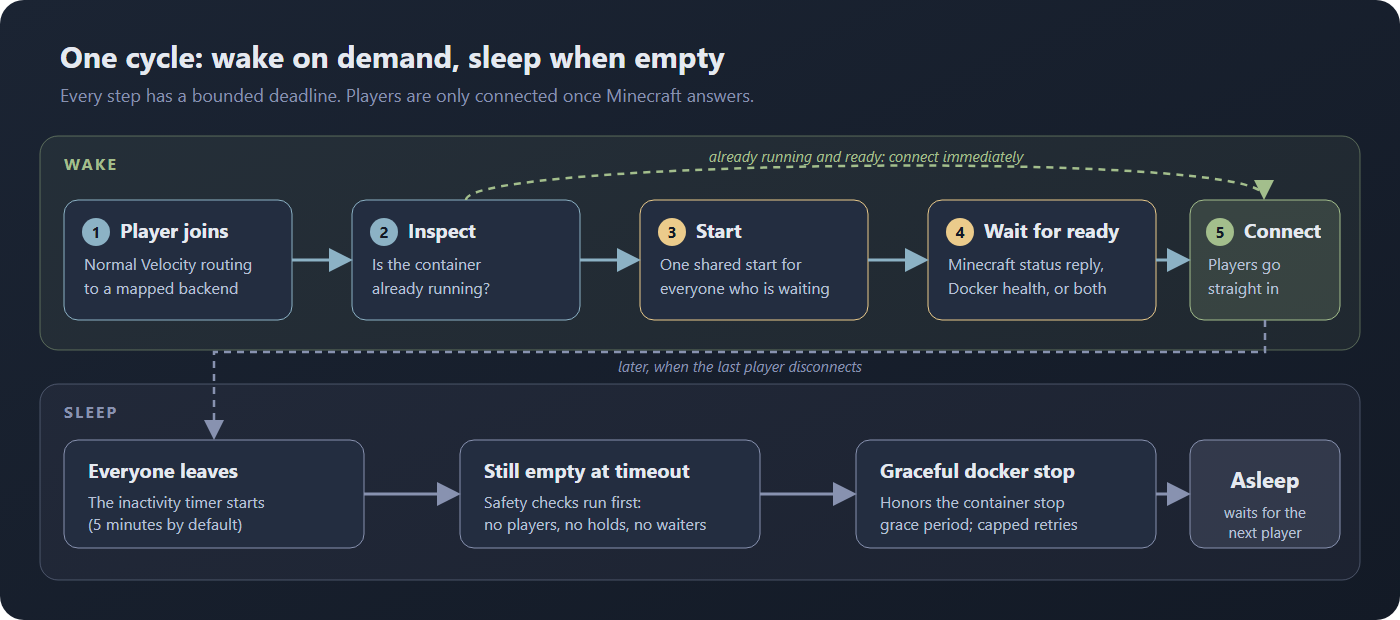
- It wakes servers for you. A player picks a sleeping server through normal Velocity routing.
AutoStopper starts the container and connects them as soon as it is ready. No client mod, no
replacement
/servercommand. - It waits for Minecraft, not just Docker. A running container is not a ready server. AutoStopper waits for a real Minecraft status reply, Docker health, or either one, with a bounded deadline on every probe and command.
- It handles the rush back in. If ten players arrive at once they share one start and are connected together when the server answers.
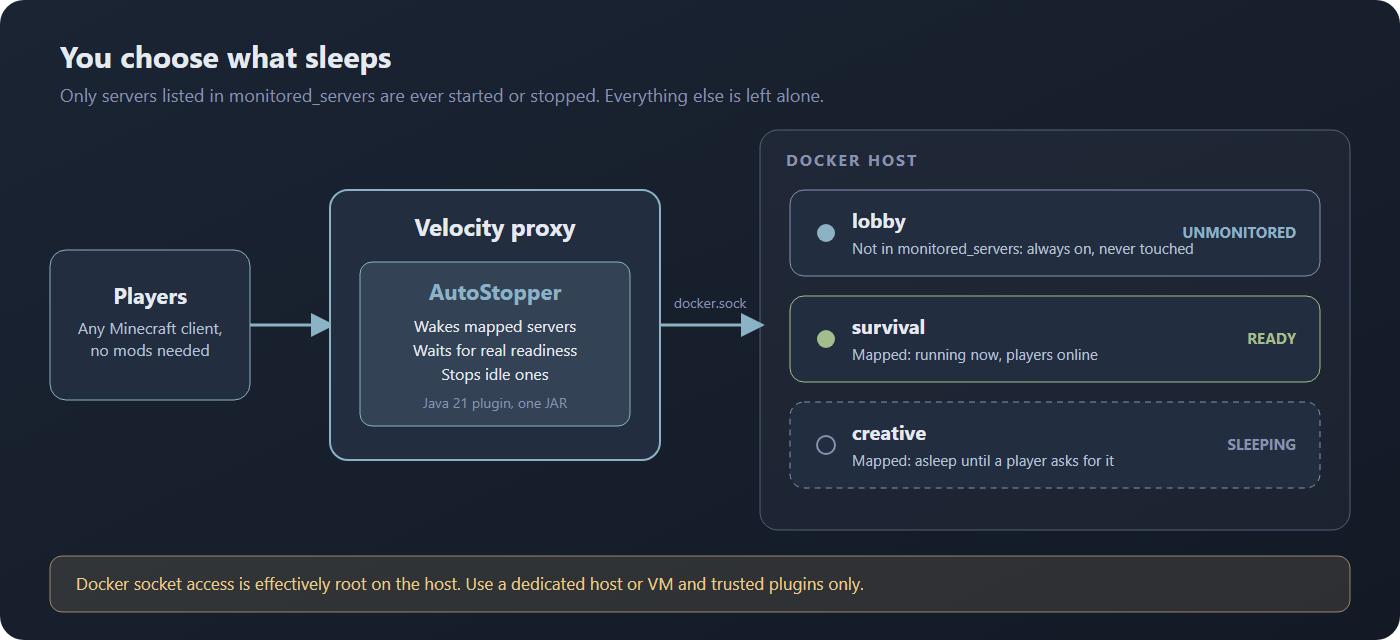
- It only touches what you map. Hubs, lobbies and anything not listed in
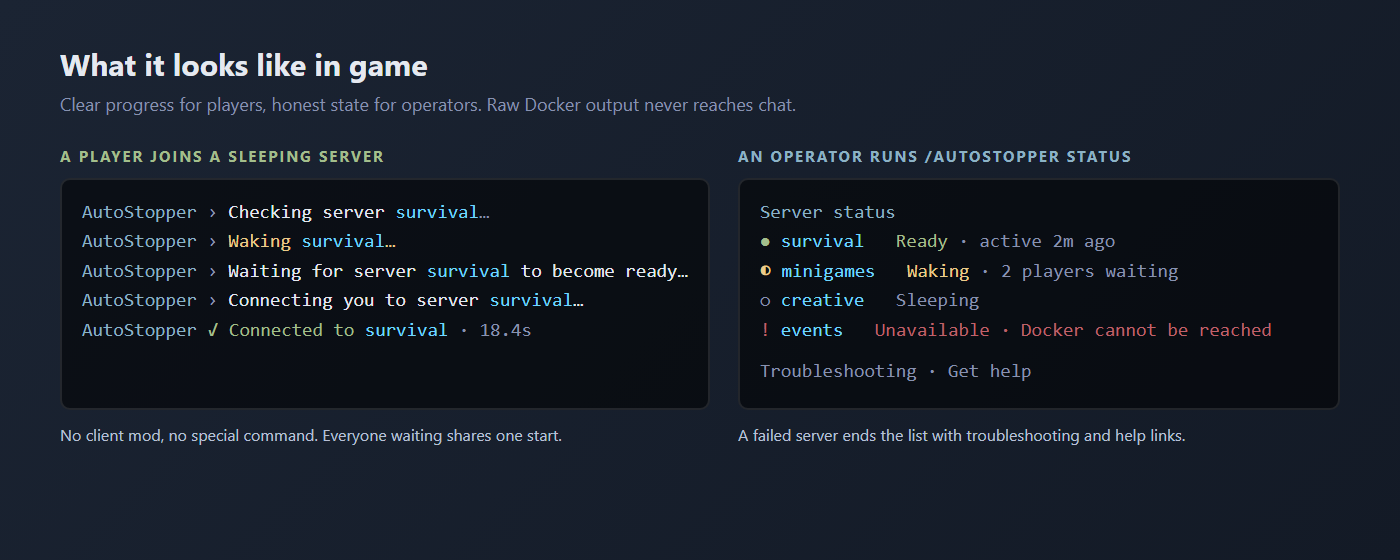
monitored_serversare never started, stopped or intercepted. - It fails clearly. Failed stops retry with capped backoff and never pretend the server stopped. An invalid reload keeps the previous configuration running. Players see short, friendly messages; raw Docker output stays in your logs.
What your players see
Quick start
You need a Linux host with Docker Engine and Docker Compose v2. This sets up Velocity 4.2 on Java 25 with one Minecraft server that AutoStopper puts to sleep and wakes. There is nothing to download by hand: the proxy installs AutoStopper from Modrinth.
1. Save this as docker-compose.yml in an empty directory:
services:
  # Lets Velocity inspect, start and stop containers, and nothing else.
  # It is the only service that touches the Docker socket.
  autostopper-docker:
    image: wollomatic/socket-proxy:1.13.1@sha256:3935b709275e4ec35d6ed5a5c4a1f0d01ed31eec5e7234efc3357ecd47689002
    restart: unless-stopped
    user: "0:0"
    read_only: true
    cap_drop:
      - ALL
    command:
      - -listenip=0.0.0.0
      - -allowfrom=velocity
      - -allowGET=^(/v[0-9.]+)?/(_ping|containers/[a-zA-Z0-9_.-]+/json)$
      - -allowPOST=^(/v[0-9.]+)?/containers/[a-zA-Z0-9_.-]+/(start|stop)$
    volumes:
      - /var/run/docker.sock:/var/run/docker.sock:ro
    networks:
      - autostopper-internal

  velocity:
    image: itzg/mc-proxy:2026.8.0-java25
    environment:
      TYPE: "VELOCITY"
      VELOCITY_VERSION: "4.2.0"
      VELOCITY_BUILD_ID: "30"
      # Installs the latest AutoStopper release at startup. Write
      # autostopper:<version> to pin one. MINECRAFT_VERSION only selects the
      # download (any version from 1.7.2 to 26.2 works).
      MODRINTH_PROJECTS: "autostopper"
      MINECRAFT_VERSION: "1.21.4"
    ports:
      - "25565:25577"
    volumes:
      - ./velocity_server:/server
    networks:
      - minecraft
      - autostopper-internal
    depends_on:
      - autostopper-docker
    restart: unless-stopped

  # A server AutoStopper manages. Add more the same way.
  survival:
    image: itzg/minecraft-server:java21
    container_name: survival-server
    environment:
      EULA: "TRUE"
      TYPE: "PURPUR"
      VERSION: "1.21.4"
      ONLINE_MODE: "FALSE"
    volumes:
      - ./survival_data:/data
    networks:
      - minecraft
    restart: "no"          # AutoStopper starts and stops it; Docker must not restart it
    stop_grace_period: 60s # time to save the world when it is stopped

networks:
  minecraft:
  autostopper-internal:
    internal: true
2. Start it with docker compose up -d. The first start downloads everything and generates
the configuration.
3. Tell Velocity about the server. In velocity_server/velocity.toml, replace the sample
servers and the sample forced hosts, which refer to them:
[servers]
survival = "survival:25565"
try = ["survival"]

[forced-hosts]
In the existing [advanced] section of the same file, set read-timeout = 180000 so a sleeping
server has time to wake before Velocity gives up on the player (the default is 30 seconds).
4. Tell AutoStopper which container to manage. In
velocity_server/plugins/autostopper/config.yml, replace monitored_servers: [] with:
monitored_servers:
  - server_name: survival            # the name in velocity.toml
    container_name: survival-server  # the container_name in docker-compose.yml
5. Restart and check. Run docker compose restart velocity. The proxy log should show
endpoint auto: tcp://autostopper-docker:2375 (socket-proxy sidecar) and
AutoStopper startup preflight healthy: 1 mapping(s) checked.
That's it. After 5 minutes without players the server sleeps, and the next player who joins wakes
it. /autostopper status shows every server's state. Always-on hubs stay out of
monitored_servers. Ready-made files for the other Velocity lines are in the
examples, and the
configuration reference covers tuning.
Docker security warning. Access to
/var/run/docker.sockis effectively root on the Docker host. The examples keep it out of Velocity: a small socket proxy holds the socket and lets Velocity only inspect, start and stop containers. Velocity can still stop or start any container and read container environment variables unless you pin the proxy to your backends. Prefer a dedicated host or VM, install only trusted plugins, and read the security guidance first.
Sensible defaults
| Setting | Default |
|---|---|
| Inactivity timeout | 5 minutes |
| Readiness | Minecraft status reply, 120 second overall deadline |
| Automatic stop attempts | 3, with 60 to 300 second capped backoff |
| Plugin shutdown deadline | 10 seconds |
| Managed servers | none until you add mappings |
Every value is configurable and validated as one atomic snapshot. See the configuration reference.
Commands
| Command | Permission |
|---|---|
/autostopper, /as |
Everyone |
/autostopper help |
Everyone, filtered to what you can use |
/autostopper status [server] |
autostopper.command.status |
/autostopper start, stop, restart <server> |
autostopper.command.start, .stop, .restart |
/autostopper hold, release <server> |
autostopper.command.hold, .release |
/autostopper reload |
autostopper.command.reload |
autostopper.admin grants all of them. AutoStopper never replaces Velocity's /server command.
Tested support
One Java 21 JAR is tested on five complete runtime lines. Keep the proxy image and Velocity build from one row together.
| Line | Proxy image | Java | Velocity |
|---|---|---|---|
| Legacy (minimum) | itzg/mc-proxy:2026.8.0-java21 |
21 | 3.5.1 build 615 |
| Stable 4.0 (production) | itzg/mc-proxy:2026.8.0-java25 |
25 | 4.0.0 build 6 |
| Stable 4.1 (production) | itzg/mc-proxy:2026.8.0-java25 |
25 | 4.1.0 build 22 |
| Stable 4.2 (recommended) | itzg/mc-proxy:2026.8.0-java25 |
25 | 4.2.0 build 30 |
| Preview (snapshot) | itzg/mc-proxy:2026.8.0-java25 |
25 | 4.2.1-SNAPSHOT build 41 |
Velocity 4 needs Java 25. The preview line tracks a PaperMC snapshot and is not a production baseline. The full release candidate runs against a real Purpur 1.21.4 backend with actual protocol clients, simultaneous joins, idle stop, restart, never-ready servers and failed-stop retry. Minecraft versions 1.7.2 through 26.2 are listed because AutoStopper uses only Velocity events and a generic status request, but only that backend is exercised directly.
Help and docs
- Troubleshooting covers every failure outcome you can see in chat or logs
- Configuration reference
- Security guidance
- Migrating from 2.2.0 to 2.3.0 (drop-in; optional move to the socket proxy)
- Migrating from 1.1.2 to 2.0.0
- Full installation guide
- Changelog
- Report an issue
Ready to let empty servers sleep? Pick an example, review the Docker security boundary, and install the same validated JAR that is published on GitHub Releases.