
Compatibility
Minecraft: Java Edition
Platforms


Links
Tags
Creators
Details
BlockShips
A Minecraft plugin that lets players create rideable, physics-enabled ships. Build custom ships from blocks or spawn pre-built vessels, then sail the seas or take to the skies. All of this without any client side mods or resource packs!
Download on Modrinth: modrinth.com/plugin/blockships
Other plugins that work nicely with BlockShips:
- DynLight for dynamic lighting -- without this, light emitting blocks on custom ships won't work when the ship is assembled.
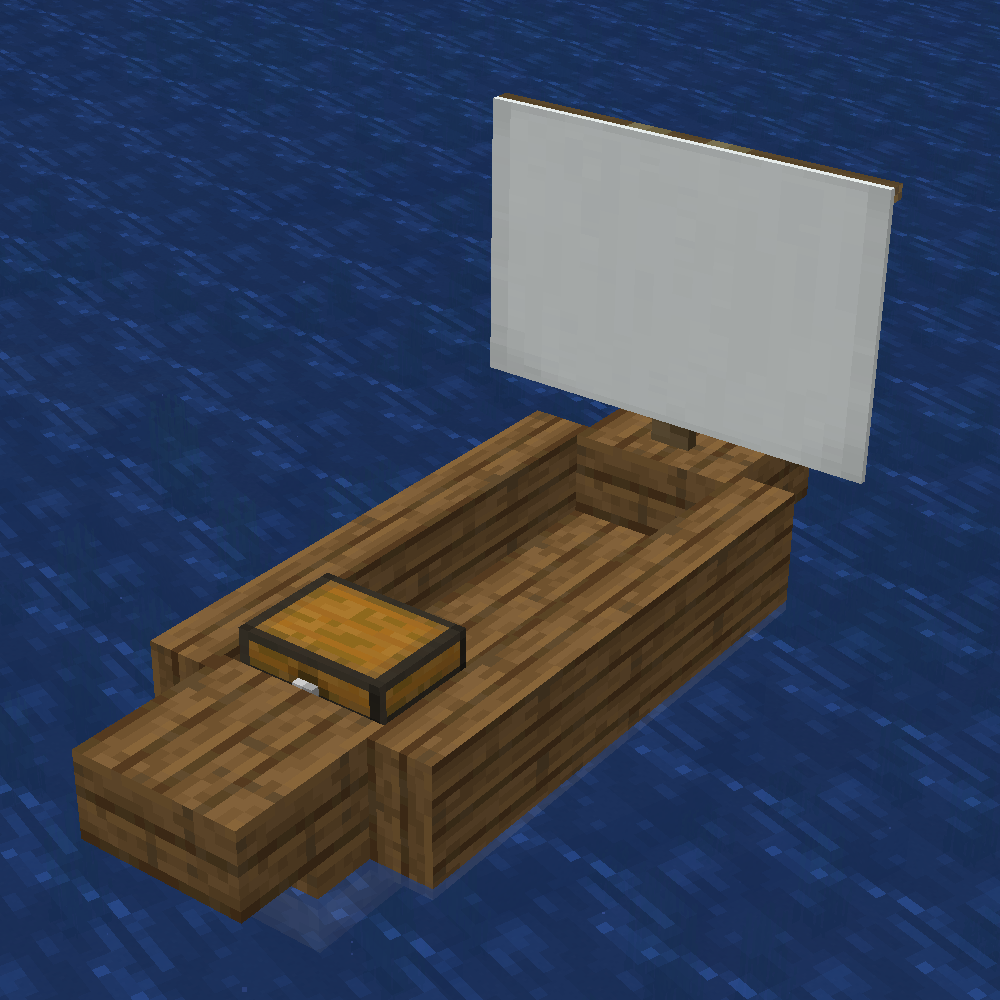
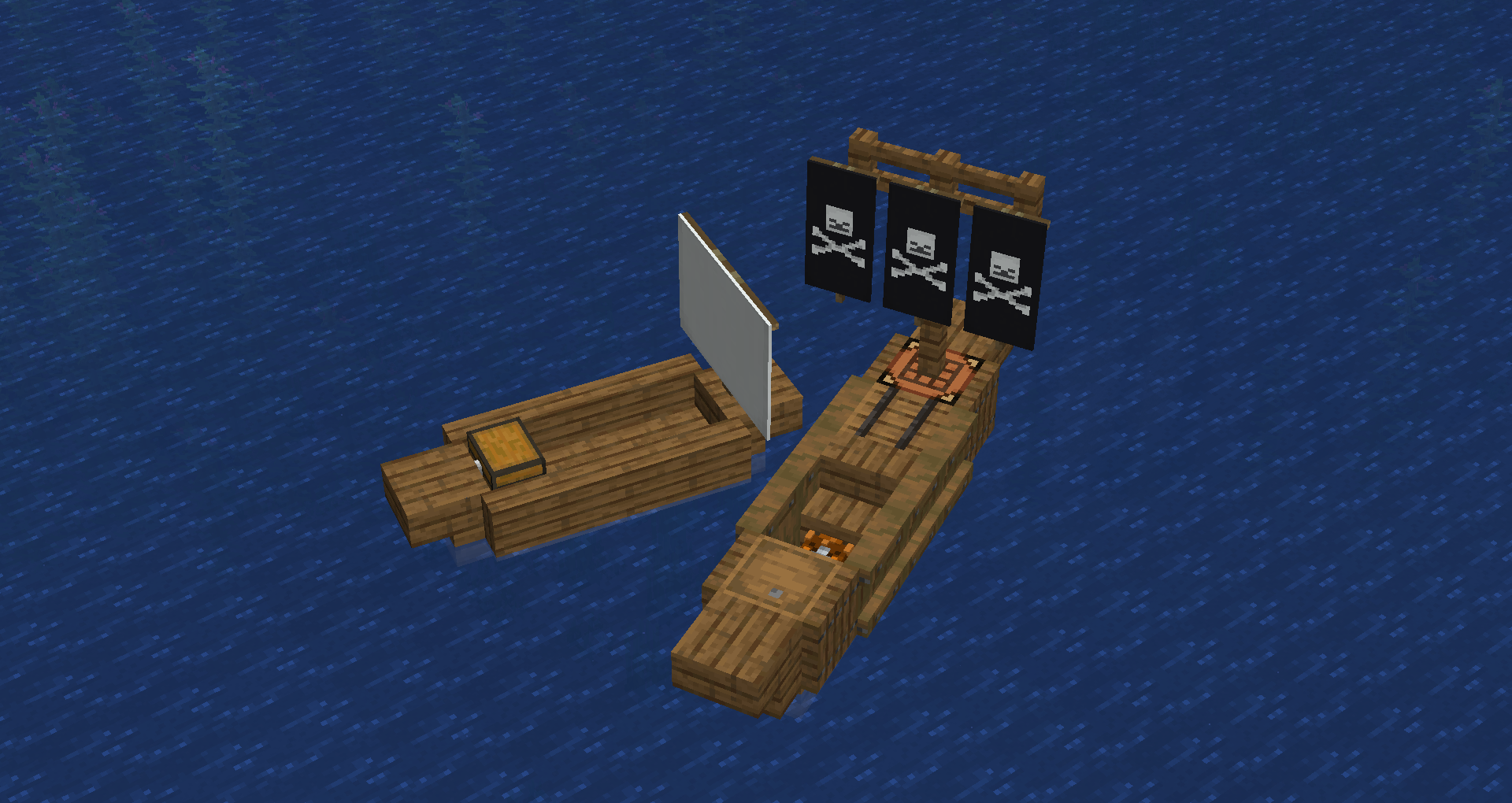
| the prefab small spruce ship | A small custom ship next to the prefab small spruce ship |
|---|---|
 |
 |
WARNING: THIS PROJECT IS IN ALPHA. EXPECT BUGS, MISSING FEATURES, AND BREAKING CHANGES. USE AT YOUR OWN RISK, AND BACKUP YOUR WORLD OFTEN. THE DEVELOPER IS NOT RESPONSIBLE FOR ANY DAMAGE CAUSED BY THIS PLUGIN.
Features
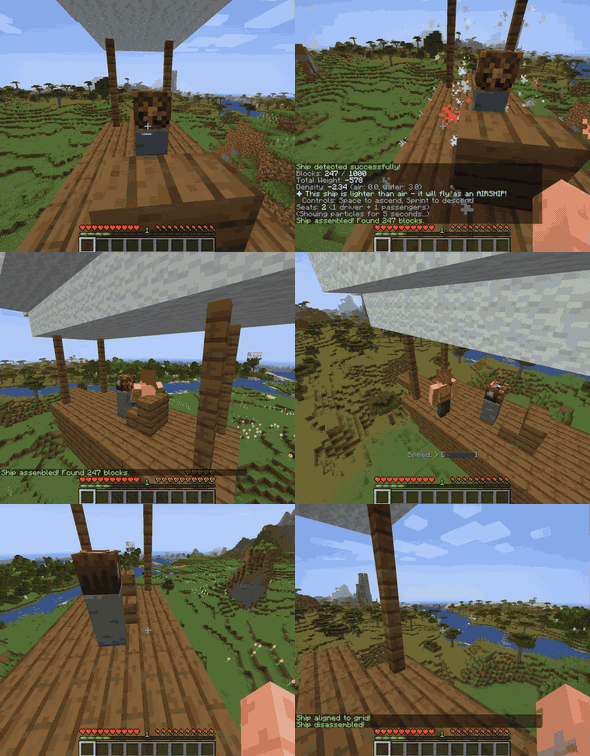
Build a ship out of allowed blocks, place a Ship's wheel on it and right click, and click "assemble" in the menu. Your blocks are now a mobile ship! Depending on the density (fully configurable) of the blocks in your ship, your ship might float lower or higher in the water. Use enough "lighter than air" blocks like glowstone, and your ship will be a flying airship.
Ships can include:
- Functional blocks - Crafting tables, anvils, enchanting tables work as normal. (furnaces/brewing stands don't fully yet work)
- Storage - Chests, barrels, dispensers, etc remain accessible
- Seats - any stair becomes a passenger seat you can sit on.
- Lead points - Anything leashed to a fence will stay tied to the ship. You can lead things to the ship while its moving. Prefab ships have a single lead point.
- Cannons - a dispenser with a block of obsidian behind it will shoot its contents. fire all through the ship menu, or right click on the obsidian to fire.
- Health & damage - Ships have health, take damage from collisions/attacks, and regenerate over time. When they run out of health, ships will attempt to place themselves back in the world.
- Sounds & effects - Movement and damage come with visual effects and audio.
- Drowned Captain - Rare drowned mobs spawn carrying ship wheels
- Dynamic lighting - Light-emitting blocks (glowstone, lanterns, torches, etc.) on ships emit dynamic light when DynLight is installed (optional)
Custom Ships
- Build a structure from allowed blocks (see or edit this in
blocks.yml)
- generally, wood/metal/functional blocks are allowed, while stone/dirt/other natural blocks are not
- light-giving blocks, like glowstone, end rods, and beacons, serve as floatation aids. enough of these, and you get an airship!
- Craft a "Ship Wheel"
- Place the wheel on your structure
- Right-click the wheel to assemble
- Right-click again to board and steer
- Right-click the wheel, or sneak right-click, to open menu and disassemble
Prefab Ships
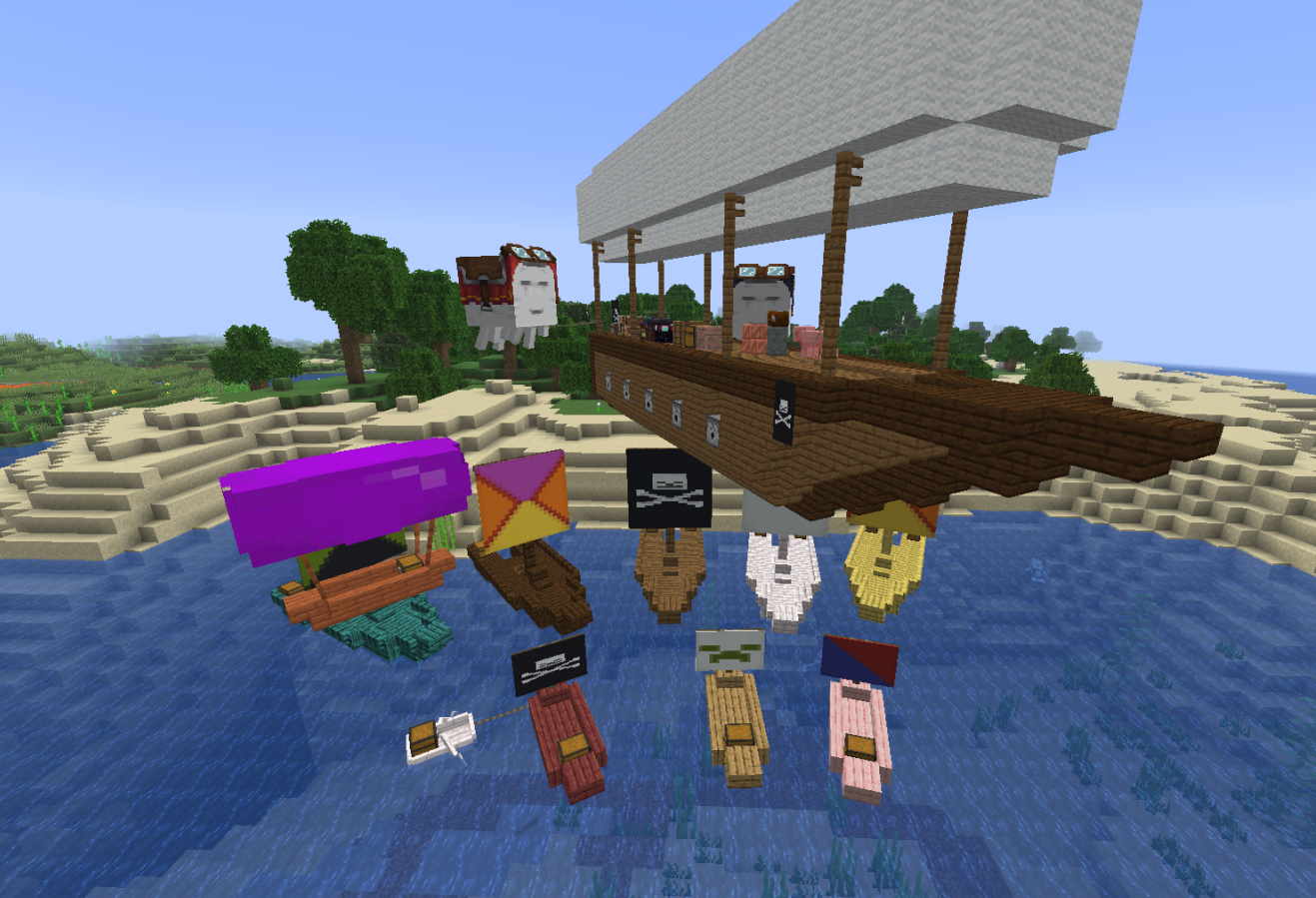
Spawn ready-to-use ships, with customizable banners/colors/wood types:
- Small Ship - Fast, lightweight water vessel. Two seats and a double chest.
- Large Ship - Larger water vessel with more health. Two double chests, many seats.
- Small Airship - Floats in the air with vertical controls. Also two seats and a double chest.
Command: /blockships give <item> (items: ship_wheel, small_ship, large_ship, small_airship)
Physics System
- Walk on your ships - Players can walk around on deck while sailing/flying. this is still buggy!
- Buoyancy - Ships float based on block weight and density. this is buggy sometimes!
- Movement - Acceleration, drag, and collision response
- Collision detection - Ships interact with terrain and entities (interacting with other ships is buggy)
Controls
| Key | Action |
|---|---|
| W | Move forward |
| S | Move backward / brake |
| A | Rotate left |
| D | Rotate right |
| Space | Ascend (airships only) |
| Sprint | Descend (airships only) |
Crafting Recipes
| Item | Recipe |
|---|---|
| Ship Wheel | 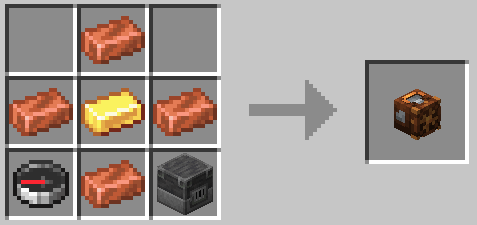 |
| Small Ship Wood type, banner customizable |
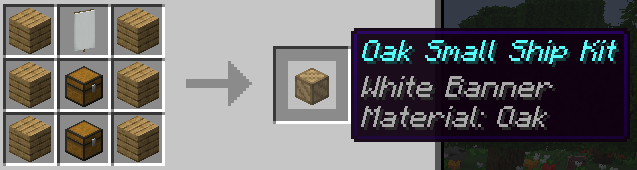 |
| Large Ship Wood type, banner customizable |
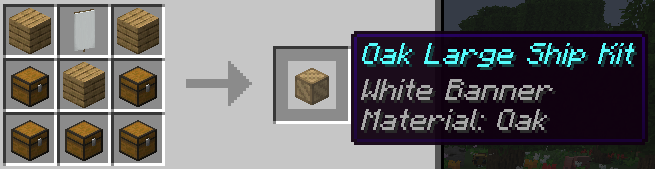 |
| Ship Balloon Wool color customizable |
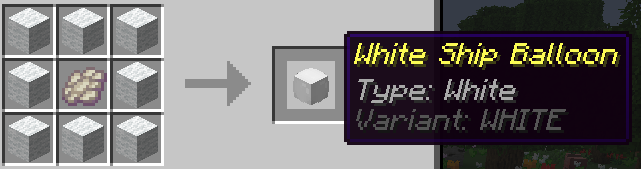 |
| Small Airship Wood type, balloon type customizable |
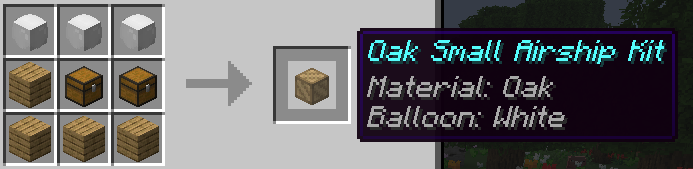 |
Cannons
| Cannons Firing | Cannon Menu |
|---|---|
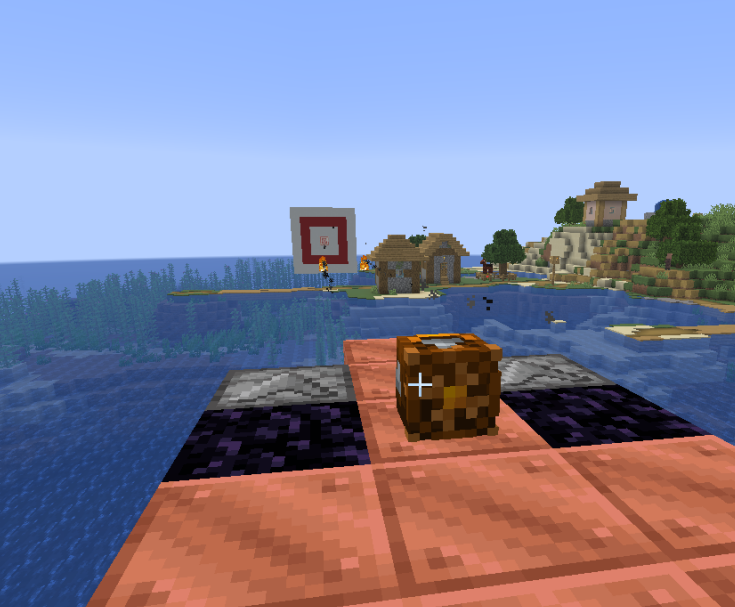 |
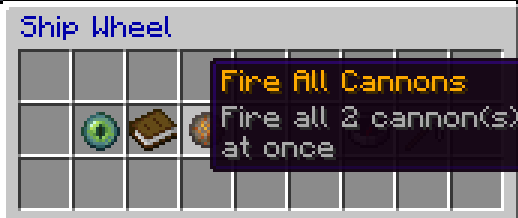 (or, right click obsidian to fire individually) (or, right click obsidian to fire individually) |
Commands
| Command | Description | Permission |
|---|---|---|
/blockships help |
Show help and list all commands | - |
/blockships info |
Show ship and wheel statistics | - |
/blockships dismount |
Force-dismount from a ship | blockships.dismount |
/blockships reload |
Reload configuration | blockships.reload |
/blockships give <item> |
Give yourself a ship wheel or ship kit | blockships.give |
/blockships recipes [player] |
Unlock crafting recipes | blockships.recipes |
/blockships forcedisassembleall |
(DANGEROUS) Disassemble all custom ships | blockships.admin |
/blockships killentities |
(DANGEROUS) Remove all ship entities | blockships.admin |
Installation
- Download the BlockShips jar file from modrinth: modrinth.com/plugin/blockships
- IMPORTANT: Download ProtocolLib if using 1.21.2 or below! ProtocolLib is no longer required as of BlockShips 0.0.16
- Place both jars in your server's
pluginsfolder - Restart the server
Configuration
config.yml
Main plugin settings including:
- Ship physics (speed, acceleration, drag)
- Buoyancy values (density, strength)
- Collision settings (mass, response)
- Crafting recipes
blocks.yml
Configure which blocks can be used in custom ships:
- Weight scale - Affects buoyancy
- Collider - Custom collision shapes
- Seat/storage - Special block behaviors
Inspiration
This plugin is inspired by mods which also implement rideable ships, as well as plugins which have attempted similar functionality. I made this plugin because I realized that with the addition of display entities, it might be possible to create a better ship plugin than previously possible, but without requiring any client-side mods. No code from any of other project has been used. In particular, this plugin was inspired by:
Although this plugin predates them, you should also check out the extremely cool Create Aeronautics Mod, as well as the similar SimpleShips plugin!
License
You are free to use this plugin only for non-commercial projects and servers. For commercial use, please contact the author for a license. For more details, see the LICENSE.txt file.
Developing
You will need java and gradle installed. Running make build will compile the plugin and create a jar file in bin/.