

Links
Tags
Creators
Details
1.4.0
Compatibility
Changes
CircuitSim 1.4.0
The 1.4.0 release lets you turn any circuit you build into a reusable subcircuit — convert a schematic into a portable chip and drop it into a new 5×5 Subcircuit block, exactly like the built-in Amplifier but defined entirely by you. It also adds behavioral (arbitrary) sources and a voltage-controlled switch, and reworks how IC/PDK parameters are configured.
User-Defined Subcircuits
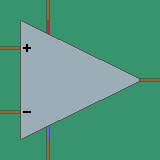
Subcircuit block — a 5×5 block (like the Amplifier) that instantiates your own saved schematic as a single black-box component. It exposes 12 pins around its perimeter — two on each corner cell and one in the middle of each edge — numbered clockwise from the top-left. Wires connect only to the live pins; the top texture reflects the pin count and a floating name tag shows the loaded subcircuit.
Subcircuit Converter + Subcircuit Chip — place the Converter block on a finished circuit, give it a name, and convert: the schematic is replaced by a portable Chip item. Right-click the ground with a chip to rebuild the entire circuit block-for-block, or insert it into a Subcircuit block to use it.
Probe "Subcircuit pin" toggle — the voltage probe edit screen gains a checkbox (plus a pin-order number) that marks a net as an external terminal of the subcircuit. The probe's label becomes the pin name.
Under the hood — conversion generates a self-contained .subckt … .ends definition and instantiates it with an X line, so subcircuits work across OP, AC, DC, TRAN, and NOISE analyses as well as parameter sweeps. The Subcircuit block's GUI has a chip slot and a scrollable, read-only netlist view.
New Components
Behavioral (arbitrary) sources — B-source blocks driven by a free-form expression (V = … for a voltage source, I = … for a current source).
VC Switch — a voltage-controlled switch (ngspice S device / SW model) with configurable threshold, hysteresis, on/off resistances, and an optional initial state. Switches with identical parameters share one .model line.
PDK / IC Components
- The PDK choice (model prefix and MOSFET geometry) now lives on each IC component instead of the Simulate block.
none/placeholderemit a bareW/L/minstance, whilesky130Akeeps the full geometry via a per-PDK formula table. - W/L are read as microns under
sky130Aand as SI meters otherwise; editor labels, field parsing, and in-world callouts were updated to match. NF is editable only undersky130A. - The device multiplier is emitted as ngspice's built-in
m=for all IC devices. - The
hsacompatibility mode now accepts multiple.libpaths in a single multi-line box, likepsa.
Example World
- Updated with additional pre-built circuits.
- Note: some examples reference
.libfiles by absolute path; update those to match your own PDK install before simulating them.
- Note: some examples reference
Other Changes
- README updated with a User-Defined Subcircuits guide and captions above the preview GIFs.
- Removed leftover texture-fix helper scripts; minor texture fixes.