
Compatibility
Minecraft: Java Edition
Platforms


Tags
Creators
Details
CoreChatX Feature List
CoreChatX is a complete communication suite for Minecraft servers. It brings chat, private messages, persistent nicknames, channels, mentions, pings, chat item previews, chat bubbles, moderation, player settings, locales, and external bridges into one polished system.
The idea is simple: server chat should feel like one product, not a stack of separate plugins that each need their own configuration, commands, and maintenance.
This page is a commercial-style feature overview. Exact config keys, defaults, limits, and operational details are documented at https://wiki-corechatx.icewolf23x.dev/
Current release: 2026.3.0
Before updating an existing installation, stop the affected servers and back up every file and subfolder inside their CoreChatX plugin folders. Keep the old JARs separately and also back up MySQL if it is already in use. Update the Velocity proxy and all participating Paper backends together.
Why CoreChatX
Many servers end up installing one plugin for chat, another for private messages, another for nicknames, another for mentions, another for channels, another for Discord, another for Telegram, another for chat bubbles, another for item previews, and then one more just to keep the whole setup consistent.
That works, technically. It also turns chat into a maintenance hobby.
CoreChatX is built for server owners who want the whole communication experience to feel consistent:
- one visual language
- one permission model
- one player settings flow
- one network-aware chat layer
- one place to manage public chat, PMs, nicknames, channels, pings, bridges, moderation, and rich interactions
It is not trying to be "yet another chat plugin". It is trying to replace scattered chat-related plugin stacks with one clean, friendly, server-ready system.
Stats
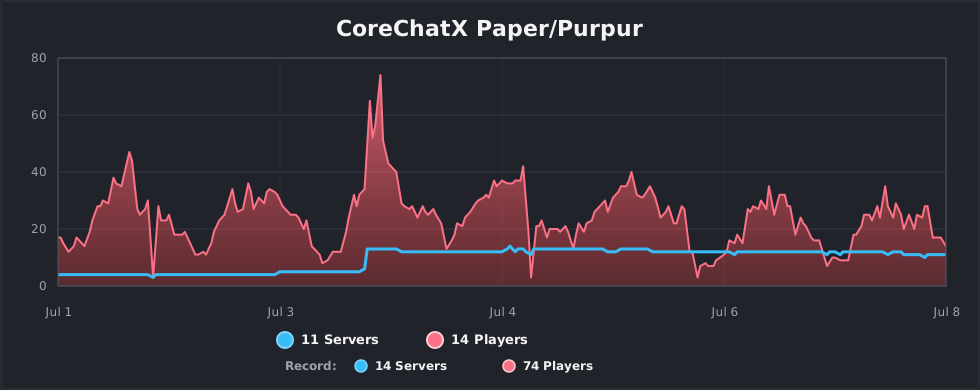
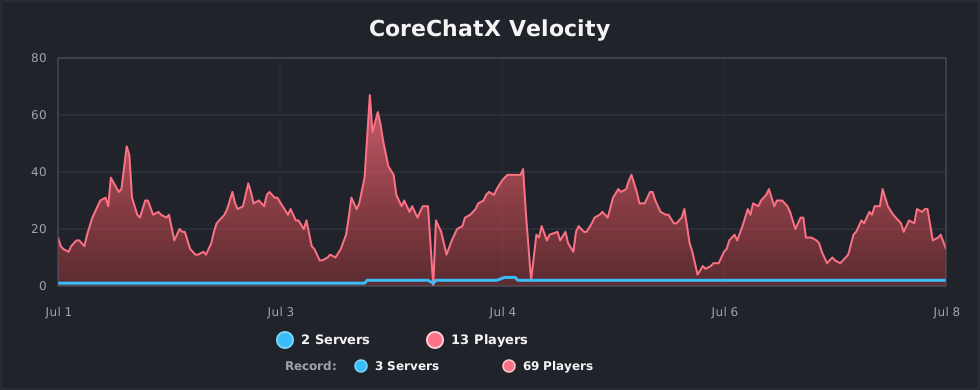
CoreChatX uses bStats for usage statistics, enabled by default. Reports include plugin/platform and Java versions, operating-system details, processor count, player count, online-mode status, a generated server identifier, and the configured backend count on Velocity. These metrics do not include chat messages or player names. bStats receives the reports; aggregate charts are publicly available.
You can opt out by setting enabled: false in Paper's plugins/bStats/config.yml, or enabled=false in Velocity's plugins/bStats/config.txt, then restarting the affected server/proxy. These settings are shared with other bStats integrations. See the bStats server-owner guide and privacy policy.
Current State
CoreChatX currently:
- supports Paper
1.21.11 - 26.2 - targets Java
21; use Java21for Paper1.21.11and Java25for Paper26.1/26.2, while Velocity must satisfy its own runtime requirement and CoreChatX's Java21minimum - ships separate
corechatx-paperandcorechatx-velocityruntime jars - uses
CoreChatXas the Paper plugin name - uses
corechatxas the Velocity plugin id - works on standalone Paper servers
- works on Velocity networks with one or more isolated CoreChatX proxy groups
- keeps YAML as the default and offers optional MySQL storage for standalone Paper or Velocity-owned network groups
- includes verified backups, YAML-to-MySQL migration, and current-data MySQL-to-YAML rollback through
/ccxstorage - lets each player choose persistent or non-persistent channel selection
- supports permanent or timed personal channel hiding
- checks Modrinth for stable releases and experimental alpha/beta builds, with console and Paper OP notifications
- supports group-local network chat, PMs, player settings, nicknames, runtime data, Discord links, and ChatItem snapshots
- supports Discord inbound and outbound messages
- supports Telegram inbound and outbound messages
- supports Telegram forum topic routing
- supports per-channel Discord and Telegram bridge format overrides
- supports source-specific mention gates for Minecraft, Discord, and Telegram text
- supports optional Discord-Minecraft account linking
- supports Discord required-link-to-play and required-role-to-play gates
- supports Discord nickname sync from Minecraft nicknames, with fallback to the real Minecraft player name
- supports Discord connection, death, advancement, and server-status embeds
- supports Discord console channels, player-list output, and channel description updates
- supports Discord ChatItem PNG previews and item inspection menus
- supports Discord custom emoji expansion from Minecraft messages
- supports Discord inbound attachments as clickable Minecraft file links
- supports legacy color and hex formatting conversion from trusted server-side values before rendering
- includes optional chat bubbles above players
- includes persistent CoreChatX nicknames with granular color, style, hex, and gradient permissions
- supports local Paper or proxy-routed join, quit, and first-join announcements
- has been tested on standalone Paper and Velocity network setups
- documents proprietary CoreChatX code and external third-party libraries through
LICENSEandTHIRD-PARTY-NOTICES.md
One Suite, Not Ten Plugins
CoreChatX covers the core communication stack:
- public chat
- private messages
- persistent nicknames
- real-name lookup for nicknames
- replies
- channels
- channel shortcuts
- mentions
- custom pings
- interactive keywords
- chat item previews
- chat bubbles
- moderation tools
- player settings
- locale support
- Discord bridge
- Telegram bridge
- standalone and Velocity network setups
The value is not just the feature count. The value is that these features know about each other.
Channels can affect formatting, permissions, mention delivery, ChatItems, chat bubbles, and bridge export. Mentions can respect player settings and channel read permissions. Private messages can work with social spy and ignore rules. Network chat can carry rich Adventure components and ChatItem preview references. Bridges can follow channel routing instead of acting like a separate side project.
That is the difference between a chat system and separate plugins with overlapping commands and disconnected configuration.
Polished Public Chat
CoreChatX gives public chat the kind of foundation players actually notice:
- clean chat formats
- rank-aware layouts
- channel-aware layouts
- LuckPerms prefix support
- PlaceholderAPI support in server-controlled templates
- persistent nickname support
- join, quit, and first-join messages
- message cleanup and sanitization
- safe conversion of legacy color codes and legacy hex color values in trusted server-side text
- anti-repeat checks
- anti-caps checks
- word filtering
Player-written messages stay safe. Server-owned templates can use dynamic placeholders, while normal player input is kept under control before it becomes a rich chat component.
Kyori Adventure And MiniMessage
CoreChatX is built around Kyori Adventure and MiniMessage formatting. That means server owners can create modern chat components without being trapped in old color-code-only formatting.
MiniMessage support makes it easy to use:
- colors
- gradients
- hover text
- click actions
- suggested commands
- copy-to-clipboard actions
- reusable formatting patterns
- clean rich text across chat, messages, previews, bridge output, embeds, and command feedback
CoreChatX also handles legacy formatting returned by plugins such as PlaceholderAPI, LuckPerms, and Essentials-style nickname providers before building the final Adventure component. That helps server owners keep modern MiniMessage templates without breaking when another plugin still returns old color-code or hex-color output.
This gives CoreChatX a modern Paper-native feel instead of a legacy chat setup with richer formatting bolted on afterward.
PlaceholderAPI-Powered Interactions
CoreChatX can combine MiniMessage with PlaceholderAPI inside server-controlled templates.
That opens the door to fast, flexible interactions based on:
- player data
- ranks and groups
- economy values
- server stats
- world data
- progression systems
- installed PlaceholderAPI expansions
- custom server logic exposed through placeholders
CoreChatX also exposes useful PlaceholderAPI values to other plugins, including:
%corechatx_player_nickname%%corechatx_first_join_date%%corechatx_messages_count%
In practice, this means server owners can build dynamic chat interactions without extra glue just to make a hover line, bridge message, Discord channel description, or click action show something useful.
If PlaceholderAPI can expose it, CoreChatX can help turn it into part of the chat experience.
On Velocity, optional PAPIProxyBridge support can resolve PlaceholderAPI values for proxy-owned surfaces such as player list rows, Discord channel descriptions, join/quit messages, and fallback Discord formats. If a proxy placeholder lookup cannot complete in time, CoreChatX falls back instead of letting the message path wait indefinitely.
Persistent Nicknames
CoreChatX includes a full nickname layer instead of treating display names as a formatting afterthought.
Nickname features include:
/nick <nickname>/nick off,/nick clear, and/nick reset- staff nickname edits for other online players
/realname <nickname>lookup{player_name}for the real Minecraft username{player_nickname}for the visible CoreChatX nickname, with fallback to the real username- optional
nicknames.prefixshown only when a custom nickname exists - optional color-only mode through
nicknames.change-only-colors - named colors, safe MiniMessage styles, hex colors, gradients, and legacy color-code input
- per-color and per-style nickname permissions
- duplicate nickname protection
- proxy-group nickname synchronization
Nicknames are used across chat, PMs, social spy, broadcasts, join/quit/first-join messages, mentions, ChatItem preview titles, PlaceholderAPI output, and Discord account-linked identity where enabled.
The real player identity stays stable internally. Routing, ignore rules, replies, account links, and runtime state still use UUIDs and real Minecraft names, while the visible presentation can use the configured nickname.
Interactive Keywords
Interactive keywords let players type simple tokens such as:
[discord][rules][store][vote][map]
CoreChatX can turn those tokens into polished clickable chat elements.
They can include:
- hover text
- click commands
- suggested commands
- URLs
- copied text
- optional permissions
- channel restrictions
- optional PlaceholderAPI rendering
This is the kind of small feature that often becomes "add another plugin". Here, it is just part of the chat suite.
Mentions And Pings
Mentions and pings are built directly into the message flow.
They support:
- player mentions
@Playerand exact-name mention behavior- nickname-aware mention suggestions
- custom ping triggers
- sound notifications
- actionbar notifications
- per-player ping toggles
- staff-friendly ping rules
- cross-server mention awareness
- mention formatting based on the mentioned player
- channel read-permission checks before a target is pinged
- source-specific mention gates for Minecraft, Discord, and Telegram
- Discord role allow-lists for custom pings triggered from Discord
If a player cannot read the channel where they were mentioned, CoreChatX does not ping them and does not render their name as an @ mention.
Because mentions are part of CoreChatX itself, they can work with formatting, notifications, privacy choices, custom nicknames, channel permissions, and Velocity network presence instead of pretending every server is isolated.
Channels
CoreChatX supports multiple channel styles:
- global chat
- local chat
- staff chat
- network-wide chat
- role-based chat spaces
- custom server-defined channels
Channel delivery scopes are explicit: NETWORK reaches participating backends in the same Velocity group, SERVER stays on one backend, and LOCAL_RADIUS reaches players within a configured radius in the same world. On standalone Paper, network-scoped chat stays on that server.
Channels can decide:
- who can send
- who can receive
- which features are enabled
- how messages look
- whether chat bubbles are allowed
- whether ChatItems are allowed
- whether messages can be exported to Discord or Telegram
- which Discord or Telegram target should receive bridge output
- which per-channel bridge format override should be used
- which sources are allowed to create mentions
- which shortcut command should control the channel
- whether public-chat ignores affect only notifications or hide ignored senders' messages
Channel shortcuts can be configured per channel.
For example, /ac can switch a player to adminchat, while /ac <message> can send a one-shot message to that channel without changing the player's currently selected active channel.
Players with the appropriate permissions can use /hidechannel <channel> [minutes] to hide a channel temporarily or until they restore it with /unhidechannel <channel>. While hidden, the player cannot send to or receive from that channel. The preference persists and follows the player across backend switches in proxy mode.
This keeps channel behavior centralized instead of scattered across several plugins with separate ideas of how chat should behave.
Private Messages
Private messaging is part of the same communication system as public chat.
Included tools:
- direct messages
- reply command
- social spy
- ignore controls
- PM toggle
- delivery feedback
- cross-server private messages
- group-local private messages on Velocity networks
Public-chat ignore behavior can stay PM-only, suppress public mention/ping notifications, or hide public messages from ignored players. Channels can inherit or override this behavior, and configured staff bypass permissions still apply.
The result is a PM system that understands the rest of the plugin: privacy, moderation, network routing, formatting, nicknames, and player settings all live in the same ecosystem.
Moderation Tools
CoreChatX includes the everyday moderation controls a real server needs:
- player mute
- unmute
- global chat mute
- clear chat
- anti-repeat checks
- anti-caps checks
- word filtering
- staff bypass permissions
- mute-aware Discord account linking behavior
- bridge-origin permission checks for linked Discord users
Moderation is handled inside the chat layer itself. That means it works naturally with channels, private messages, network behavior, Discord-linked users, and player settings.
This avoids making separate moderation and chat tools duplicate or guess each other's state.
Chat Item Previews
Players can share clickable previews for:
- held items
- shulker contents
- armor
- hotbar
- inventory
- ender chest
Supported chat tokens include:
[item][i][armor][hotbar][inventory][inv][enderchest][ender][ec]
ChatItem token formats can use:
{token}{name}{material}{amount}
{name} uses the custom item name when present, then the item name, then the material fallback.
Multiple ChatItem tokens in the same message can reuse the same captured player state while still opening the correct view.
On a Velocity network, players on another backend can still click and open the preview through lightweight snapshot references and on-demand retrieval. That keeps network chat cleaner and avoids stuffing heavy item data into the main chat packet.
When Discord image rendering is enabled, Minecraft-to-Discord ChatItem messages can attach rendered PNG previews. Inventory-like renders can include dropdown menus, and Discord users can inspect individual items through ephemeral Minecraft-style tooltip panels with names, lore, enchantments, stored enchanted-book enchantments, potion effects, attributes, armor trims, and durability.
Expired Discord item inspection actions now return a clear expired or unavailable message instead of loading forever.
Admins can also warm the item render cache with:
/corechatx itemcache warmup/corechatx itemcache status/corechatx itemcache cancel
This helps make Discord item previews appear faster after the cache has been prepared.
When vanilla asset downloading is enabled, the renderer can download and extract Minecraft client assets into the local plugin cache. Configured resource packs can also provide rendering assets; vanilla Minecraft assets are not bundled in the plugin JAR.
Chat Bubbles
CoreChatX can show recent chat messages above player heads.
Bubble features include:
- player toggle
- channel rules
- world rules
- sneaking checks
- invisibility checks
- configurable duration
- message wrapping
- stacked recent messages
- distance-based visibility
- cleanup on quit, reload, and shutdown
Chat bubbles use the already processed message, so filtering, channels, mentions, nicknames, and keywords have already done their job.
On a network, bubbles stay local to the server where the sender is physically playing. That keeps the feature useful without pretending an overhead bubble can float across servers.
Player Controls
Players get direct control over important communication preferences:
- settings menu
- ping toggles
- PM toggle
- nickname management
- channel switching
- channel shortcuts
- permanent or timed personal channel hiding
- persistent or non-persistent channel selection
- chat bubble toggle
- locale selection
- ignore list controls
- Discord account link and unlink commands when enabled
The Channel compass in /ccxsettings (also /chatsettings) lets each player choose:
- Persistent: keep the last active channel after disconnecting, including across server restarts.
- Non persistent: return to the configured default on the next connection.
Changing this preference does not immediately switch the active channel. Moving between backends during the same proxy connection also preserves the current selection.
This makes CoreChatX feel like a player-facing feature, not just an admin-side config file with a chat command attached.
Locale Support
CoreChatX includes a practical locale foundation:
- per-player locale selection
- locale override files
- fallback to the main message file
- cleaner control over player-facing wording
This is useful for multilingual communities and for servers that want every message to sound like it belongs to their brand.
Discord And Telegram Bridges
CoreChatX includes built-in bridge support.
Important disclosure: Discord and Telegram bridges are optional and only run when the server owner enables and configures them. When enabled, CoreChatX can send selected chat content, player display names, channel labels, rich message data, and related message formatting to the Discord or Telegram services configured by the server owner. Inbound bridge messages can also bring Discord or Telegram messages back into configured Minecraft channels. Account linking associates Minecraft identities with Discord accounts. When enabled, event mirrors, ChatItem exports, and console mirroring can also send event data, item/inventory previews, or console output to Discord.
Bridge features include:
- Discord outbound messages
- Discord inbound messages
- Telegram outbound messages
- Telegram inbound messages
- Telegram forum topic routing
- per-channel bridge targets
- per-channel Discord and Telegram bridge format overrides
- fully configurable Discord inbound format
- Discord inbound attachment forwarding as clickable Minecraft file links
- Discord ChatItem image attachments and item inspection menus for Minecraft-origin messages
- Discord text channel description updates with internal placeholders and optional PlaceholderAPI values
- Discord player-list text and slash commands
- Discord console command channels for standalone Paper, backend console bots, and Velocity proxy commands
- PlaceholderAPI and rank prefix support in Discord outbound format templates
- Discord role names and role colors available to Minecraft chat formats
- Discord custom emoji expansion for Minecraft-to-Discord messages
- optional Discord account linking for Minecraft-backed inbound identity
- optional Discord nickname sync from the Minecraft nickname or real player name
- optional link-to-play enforcement with a Discord link code in the Minecraft denial or kick reason
- optional Discord role gates for players joining the server
- group-specific required-role gates on Velocity networks
- route-level and channel-level account-link overrides
- channel prefix support in Discord inbound format templates
- source-specific mention gates for Minecraft, Discord, and Telegram inbound text
- Discord role allow-lists for bridge-origin custom pings
- connection, first-join, quit, death, and advancement embeds
- server online and offline status embeds
- rank prefix support in Telegram outbound format templates
- channel-level bridge export control
- config-load warnings for bad bridge placeholders or inbound MiniMessage syntax
- global bridge master switch
- cleaner reload and shutdown behavior
- safe message length handling
Discord role-based admission requires Server Members Intent. When enabled, role and guild-membership changes can revoke an online linked player's access, and the admission gate prevents reconnection until the required access is restored. Discord nickname synchronization remains subject to Discord's role hierarchy and guild-owner restrictions. Console channels and their authorized roles should be restricted to trusted administrators.
Custom Discord slash-command names are supported. Linking messages can use /{link_command} so the instructions show the command actually configured for the standalone or proxy bot.
Bridge formatting is sanitized where it matters. CoreChatX can strip MiniMessage, legacy, and hex formatting from identity/template fragments before sending to external services, while preserving the real player message content.
The bridge layer is treated as part of the chat system, not as a separate external pipe with unrelated routing rules.
That matters because channel rules, formatting, network behavior, and bridge routing should agree with each other. If they do not, players notice. Admins notice faster.
Velocity Network Support
CoreChatX supports both standalone Paper servers and Velocity networks.
In network mode, it can keep these features working across servers:
- group-local network chat channels
- group-local cross-server private messages
- player communication settings
- persistent nicknames
- Velocity-owned runtime storage for proxy mode
- player real-name and nickname suggestions
- TAB entries where available
- mentions and pings
- group-local Discord account-link sync
- interactive keyword behavior
- ChatItem preview access
- proxy-routed join, quit, and first-join announcements
- Velocity-owned
velocity-messages.ymlformats for proxy join, quit, and first-join messages - proxy-routed group broadcasts
- Discord player-list output for the matching group
- Discord bridge export without duplicate network messages
- Discord event embeds for accepted backend death and advancement events
- Discord server-status embeds for proxy startup, proxy shutdown, and backend online/offline changes
In multi-channel mode, each Velocity network-channel value is an isolated CoreChatX group.
Chat, PMs, player directory data, state sync, nicknames, mutes, Discord links, pending link codes, Discord image transfer, and ChatItem snapshot routing stay inside the matching group.
Velocity can also monitor backend servers listed in backend-groups.* and announce online/offline changes to Discord when discord.server-status is enabled.
When login gates are enabled, backend-groups.<server> lets Velocity resolve the target CoreChatX group before the player fully enters a backend.
That allows required Discord link and role checks to happen at the proxy boundary instead of depending on a backend with an online carrier player.
This is where the "one suite" approach matters most. A network setup should not require a separate plugin stack on every backend just to make messages, toggles, mentions, nicknames, join/leave behavior, bridges, and PMs understand that players moved servers.
YAML And MySQL Storage
CoreChatX keeps YAML as the default storage backend. You can update a YAML installation to 2026.3.0 without switching to MySQL.
Optional MySQL storage persists:
- player preferences and nicknames
- statistics and active/hidden channels
- ignore lists and mutes
- global runtime state
- Discord links, unlink records, and pending link codes
Standalone Paper owns its storage directly. In proxy mode, Velocity owns the shared runtime data and keeps each CoreChatX network group isolated; Paper backends use the proxy instead of opening their own MySQL connections.
/ccxstorage provides status and health checks, file/database validation, verified backups, migration plans, progress, data comparisons, history, and interruption recovery. Migration and rollback changes are console-only. Configured MySQL storage does not silently fall back to YAML when unavailable.
Changing the backend setting alone does not migrate existing YAML data. After making the complete backup described at the top of this page, follow the guide for your setup:
Each guide explains preparation, import, verification, activation, and reopening in order. It also covers recovery and returning to YAML using the latest MySQL data. Rehearse with an isolated copy of your own installation before migrating a live server; restoring an old YAML backup after MySQL has accepted new changes would lose those newer changes.
Commands
CoreChatX includes commands for:
- plugin management
/corechatxroot command/ccxroot command alias/corechatx itemcache/ccxstorage/ccxsettingsand/chatsettings/hidechanneland/unhidechannel/nick/realname/discord link/discord unlink/discord linked- private messages
- replies
- social spy
- broadcast
- nicknames
- real-name lookup for custom nicknames
- Discord account linking
- ping controls
- channel controls
- channel shortcuts
- ignore controls
- PM toggle
- settings menu
- locale selection
- mute and unmute
- global chat mute
- clear chat
The commands are designed around the same communication layer, so they feel connected instead of random.
Admin Experience
CoreChatX includes practical behavior for server owners:
- clear startup information
- version and author shown on startup
- Paper or Velocity architecture shown on startup
CORECHATXstartup bannercorechatx.*permission namespacecorechatx:maindefault network channel- safer config validation
- default config key synchronization
- cleaner failure handling
- safer network message handling
- bridge lifecycle handling on reload and shutdown
- config regeneration support
- Discord ChatItem render cache warmup
- documented proprietary code and third-party dependency notices
- narrowly packaged runtime jars containing the common module, MySQL storage module, HikariCP, and Connector/J; no separate storage or JDBC plugin JARs are needed
- Paper external runtime libraries declared through
plugin.yml - Velocity external libraries downloaded into
plugins/CoreChatX/libswith startup logs showing whether libraries were downloaded or already present - automatic missing-default restoration for Paper YAML files and Velocity YAML/properties files
- runtime data ownership rules for standalone Paper and Velocity proxy deployments
- explicit mixed-version warnings for Paper and Velocity jar pairs
- asynchronous Modrinth update checks after startup and every 24 hours by default
- stable-update recommendations and separate experimental alpha/beta announcements
- storage health checks, verified backups, migration, and rollback tools
The update checker notifies console and OP players on Paper, and console only on Velocity. It reads version metadata from Modrinth's API and identifies the installed plugin version in its User-Agent; it does not download or install plugin updates. Configure update-check.interval-hours or disable checks with update-check.enabled in Paper's config.yml or Velocity's velocity-config.properties.
Runtime libraries declared by Paper or loaded by Velocity may require internet access during initial startup.
These are not flashy player-facing features, but they make day-to-day operation much easier to trust and maintain.
Verified
The current project state has been tested through:
- build and test passes
- release packaging checks
- standalone Paper startup
- Velocity startup
- Paper startup in network mode
- command checks
- config regeneration checks
- Discord bridge checks
- ChatItem rendering and cache checks
- live Paper test environment checks
- live Velocity network test environment checks
Future Direction
CoreChatX is designed to grow into a broader communication hub for common server social systems, such as:
- clans and guilds
- towns and settlements
- lands and territories
- parties and lightweight groups
The goal is to make chat aware of the communities players actually build, while keeping communication centralized, consistent, and pleasant to use. These are future directions, not additional integrations included in the current release.
Summary
CoreChatX gives a server:
- polished public chat
- Kyori Adventure MiniMessage formatting
- PlaceholderAPI-powered dynamic templates
- persistent nicknames
- legacy formatting compatibility
- interactive keywords
- mentions and pings
- channels and channel shortcuts
- private messages
- moderation tools
- ChatItem previews
- chat bubbles
- player settings
- locale support
- Discord and Telegram bridges
- Discord account linking and optional login gates
- Discord connection, event, and server-status embeds
- Discord ChatItem image rendering, player-list commands, console channels, channel descriptions, custom emoji, and attachment forwarding
- standalone Paper support
- Velocity network support
- optional MySQL storage with backup, migration, and rollback tools
- personal channel persistence and visibility controls
- Modrinth stable and experimental update notifications
In short, CoreChatX is for servers that want communication to feel intentional.
If your chat setup needs several plugins, multiple bridge configs, and extra placeholder glue just to produce one consistent message, CoreChatX is built to make that experience simpler.
Also try
 CoreToolsX |
 CoreArmorX |
 CoreStructuresX |
 CoreCaseX |
 CoreExtractionX |