


Tags
Creators
Details
1.0.0-forge-1.20.1
Compatibility
Changes
Ender Logistics Network
Ender Logistics Network adds a shared storage channel system that allows items to be transferred between pouches, hoppers, barrels, and other connected blocks without keeping chunks loaded.
The core mechanic of the mod is the Channel System. Multiple devices connected to the same channel share a single inventory, making it possible to access, send, and receive items from anywhere in the world.
This can be used for:
- Sending mined resources back to your base.
- Accessing food, tools, and supplies remotely.
- Sharing inventories between players.
- Building long-distance logistics systems.
- Storing and transferring items without chunk loaders.
One of the main features of the mod is its flexibility. Almost every feature can be individually enabled or disabled through the configuration file.
Features
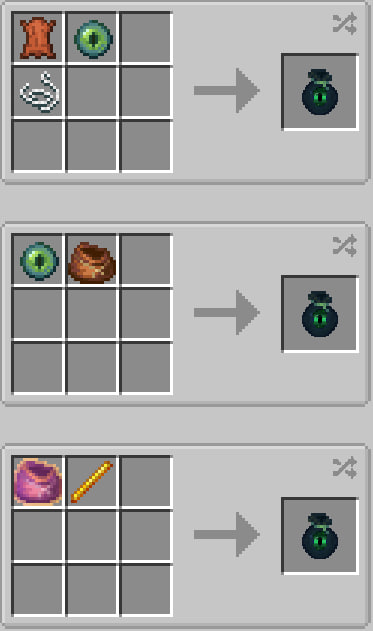
- Ender Pouch with Ender Chest access.
- Shared Storage Pouches.
- Ender Hopper for long-distance item transfer.
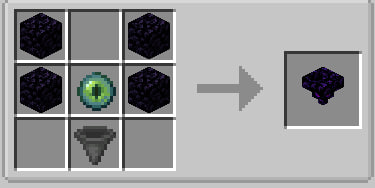
- Linking Station for channel management.
- Linked Barrel connected to channel storage.
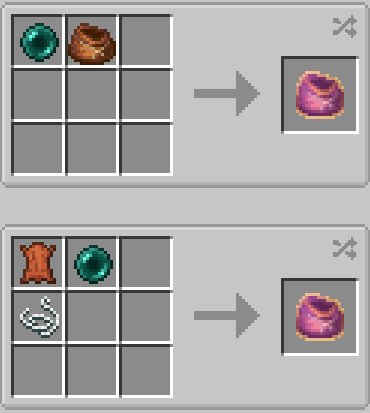
- Advanced Bundle with support for unstackable items.
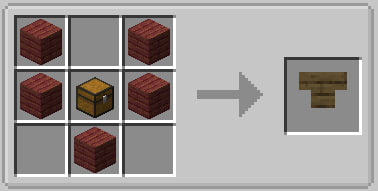
- Wooden Hopper as a cheaper early-game alternative.
- Crafting recipe for the vanilla Bundle.
Recipes
Ender Pouch
Wooden Hopper
Advanced Bundle
Ender Hopper
Linking Station
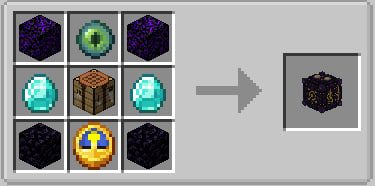
Blocks and Items
Ender Pouch
Provides direct access to the player's Ender Chest from the inventory.
Config:
enderPouchChestEnabled=true
Can also be configured to stay with the player after death:
curiosPouchKeepOnDeath=true
Transfer Pouch
Multiple pouches can be linked to the same channel and share a single inventory.
Config:
binderStationPouchCreationEnabled=true
Ender Hopper
Connects to a channel and provides access to shared storage. Allows item transfer across any distance without chunk loading.
Config:
enderHopperEnabled=true
enderHopperFunctionEnabled=true
Disabling the block completely:
enderHopperEnabled=false
Disabling only the remote storage functionality:
enderHopperFunctionEnabled=false
Linking Station
Used to create, edit, copy, and delete channels, as well as link pouches and other devices to them.
Config:
binderStationPouchCreationEnabled=true
Linked Barrel
A barrel that connects directly to a storage channel and shares its inventory.
Config:
linkedBarrelEnabled=true
Advanced Bundle
An upgraded bundle that supports unstackable items.
Config:
advancedBundleEnabled=true
advancedBundleCapacity=64
advancedBundleMode="DEFAULT"
Modes:
- DEFAULT — all items except storage containers (backpacks, pouches, etc.).
- VANILLA_UNSTACKABLES — only vanilla unstackable items.
Wooden Hopper
A cheaper but significantly slower version of the vanilla hopper.
Config:
woodenHopperEnabled=true
Additional Information
The mod also adds a crafting recipe for the vanilla Bundle, allowing it to be obtained in regular survival gameplay.