
Compatibility
Minecraft: Java Edition
Platforms


Links
Tags
Creators
Details
FloodPass
Floodgate Auto Login for AuthMe — Xbox-verified, so Bedrock players never type a password
Official AuthMe only. FloodPass is built for the original AuthMeReloaded (5.x / 6.x). Do not install it on forks that already ship native Floodgate auto-login (such as AuthMeReReloaded) — the feature would run twice.
What It Does
Cross-play servers usually protect survival accounts with AuthMe. That works well for Java players, but Bedrock players arriving through Geyser + Floodgate have already proven who they are: they signed in with their Microsoft/Xbox account before the connection was even established. Making them type a password anyway is simply unnecessary.
FloodPass solves exactly that:
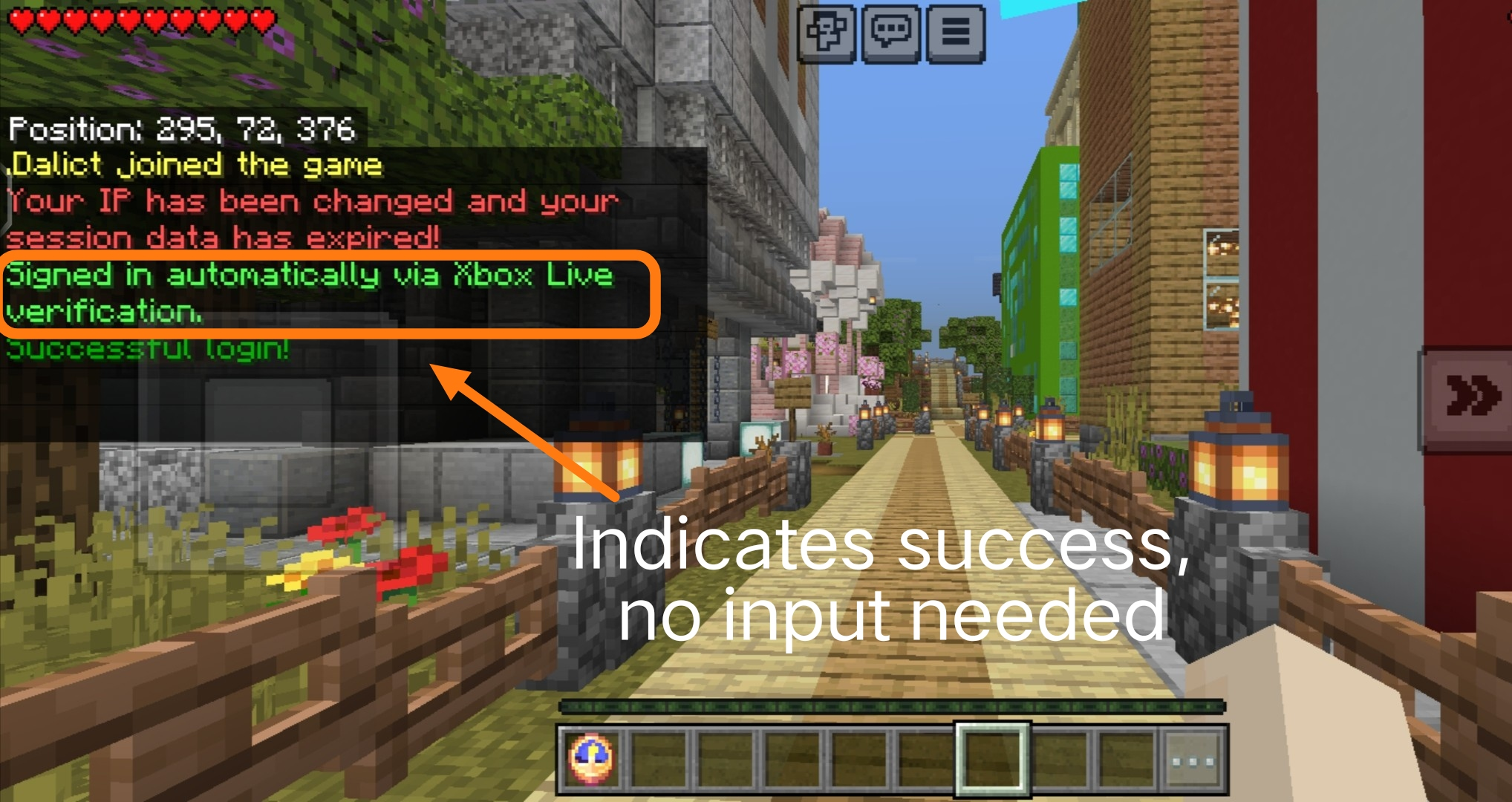
- For Bedrock players: nothing to type, ever. Registered accounts are signed in automatically about a second after joining; brand-new players are registered silently with a random password and signed in the same way
- For Java players: zero change, they go through AuthMe exactly as before
- Prefix-friendly: Bedrock names carrying the Floodgate prefix (for example
.Steve) pass AuthMe's defaultallowedNicknameCharactersregex with no AuthMe config change — only genuine Floodgate UUIDs are exempt - Premium coexistence: a Bedrock player whose gamertag equals a premium-enrolled Java account (AuthMe 6.x
/premium+ PacketEvents) joins normally while the Java account keeps its passwordless premium login - For server owners: one jar, no AuthMe configuration changes, one command to manage everything; the trust decision stays where it belongs (Floodgate's Xbox Live verification)
Screenshot of a Bedrock Player Joining
How It Works
- A player joins; FloodPass listens at
MONITORpriority, by which time Floodgate identity data for the connection is available FloodgateApi#isFloodgatePlayer(uuid)decides whether this is a genuine Bedrock connection; Java players are never touched- After a configurable delay (20 ticks by default), AuthMe has finished its own join processing, and FloodPass takes over:
- Registered player:
AuthMeApi#forceLoginsigns the account in without a password - Unregistered player (if auto-register is on):
AuthMeApi#forceRegisterregisters the account with a random password and signs it in immediately
- Registered player:
Security basis: a Floodgate identity only exists after the Bedrock client completed Floodgate's encrypted handshake with a valid Xbox Live token. A Java Edition client cannot forge that identity, so the passwordless path is only ever offered to players Microsoft has already verified.
Compatibility
| Component | Requirement | Notes |
|---|---|---|
| Server | Spigot / Paper / Purpur / Folia 1.13+ | Java 8 bytecode; older legacy servers (1.8+) generally load it too, untested |
| Folia | Supported | Per-entity scheduler via reflection, global scheduler fallback elsewhere |
| Java | 8+ | The JVM floor is usually raised by AuthMe/Floodgate builds, not by FloodPass |
| AuthMe | 5.2+ (v3 API) | Official AuthMeReloaded only; tested against 5.6.x and 6.0.x. Not for forks with built-in Bedrock auto-login |
| Floodgate | 2.x | Required at load time |
Dependencies
| Plugin | Required | Version | Purpose |
|---|---|---|---|
| Floodgate | Required | 2.x | Verifies Bedrock players through Xbox Live; the trust basis of every FloodPass feature |
| AuthMe (official AuthMeReloaded) | Required | 5.2+ | The login plugin FloodPass signs Bedrock players into; forks with built-in Bedrock auto-login are not supported |
| PacketEvents | Optional | 2.x | Only needed when AuthMe 6.x premium verification (enablePremium) is used |
Geyser itself is not a plugin dependency of FloodPass — Bedrock connectivity can come from any Geyser setup (standalone or proxy), but the Floodgate plugin must run on this server.
Installation
- Install and configure Geyser and Floodgate (2.x) so Bedrock players can join
- Install AuthMe (5.2+); configure it as usual for your Java players
- Drop
FloodPass-x.x.x.jarintoplugins/and restart the server - Done. No AuthMe settings need to change; all 17 bundled language files are extracted on first start
Verify with a Bedrock account: first join should say "Registered and signed in automatically", the next join "Signed in automatically".
Running Behind a Proxy (Velocity / BungeeCord)
This gets asked a lot, so here is the short version.
FloodPass is not a proxy plugin. Do not put it into the plugins folder of Velocity or BungeeCord, it will not load there. It goes wherever AuthMe goes: on the backend server that runs AuthMe.
Who sits where:
| Component | Proxy | Backend (the server running AuthMe) |
|---|---|---|
| Geyser | install | not needed |
| Floodgate | install | install too (same key.pem as the proxy) |
| AuthMe | no | install |
| FloodPass | no | install |
Why does the backend need its own Floodgate? The one on the proxy only encrypts and forwards the Bedrock identity. The one on the backend is what actually decrypts it, so backend plugins can tell who is a Bedrock player. With Floodgate only on the proxy, backend plugins cannot recognize Bedrock players. The same goes for any backend plugin that adapts to Bedrock.
About the key.pem: copy the one from the proxy's Floodgate into the Floodgate folder of every backend. Both sides must have the exact same file.
Two more small things:
- On Velocity, enable modern forwarding and make sure the forwarding-secret matches the backend's Paper config; on BungeeCord, set bungeecord: true in the backend's spigot.yml (ip-forward), or the identity never arrives
- If you use AuthMe's /premium, the proxy also needs the official companion (authme-velocity on Velocity, authme-bungee on BungeeCord), and the backend AuthMe needs
Hooks.bungeecord: trueplus the sameproxySharedSecret
When you are done, connect with a Bedrock client to Geyser's port (UDP 19132 by default). You should see the auto sign-in message about a second after joining.
Commands and Permissions
| Command | Permission | Description |
|---|---|---|
/floodpass |
floodpass.admin (default OP) |
Show status (enabled, delay, auto-register) |
/floodpass reload |
floodpass.admin |
Reload the config and language files; missing files are restored automatically |
Alias: /fpass
Known Limitations
- Bedrock accounts are stored under their Floodgate-prefixed name (for example
.Stevewith the default prefix). Changing the Floodgate username prefix later breaks the name mapping for existing accounts and requires an AuthMe database migration — or you can simply leave it as is: the player is automatically re-registered with a fresh random password bypass-nickname-checkrecognizes AuthMe's deny by the pattern embedded in its kick message; if you customize AuthMe'sinvalid_name_charactersmessage, keep the%regtag so detection continues to work- With an empty Floodgate
username-prefixthe premium conflict guard cannot tell the two identities apart — and AuthMe itself would store both accounts under the same name, which is unsupported - AuthMe's nickname length limits (
maxNickLength, default 20) are not bypassed; prefixed Bedrock names (prefix + 16-char gamertag = 17 max) fit the default forceLoginbypasses AuthMe's two-factor authentication for Bedrock accounts. For an Xbox-verified identity this is the intended behavior, but be aware it applies to Bedrock accounts with 2FA enabled as well- On AuthMe 6.x with the experimental dialog login UI (Minecraft 1.21.6+), a Bedrock player may see the login dialog flash briefly before the delayed auto sign-in completes
- AuthMe's
/premiumcommand targets Java accounts and is safely rejected for regular Bedrock players (their Floodgate-prefixed name matches no Mojang account); Bedrock players do not need it — FloodPass already signs them in, andpremium-conflict-guardkeeps gamertags colliding with premium accounts joinable
Support
I hope this plugin helps you all! I built it because I run a cross-play server and want to keep using the official AuthMe. If you run into anything, please do leave feedback — thank you! ouo
- Issues: https://github.com/Dalict/FloodPass/issues
- Source: https://github.com/Dalict/FloodPass
- License: MIT