


Tags
Creators
Details
0.8.0+26.1
Compatibility
Changes
Itematic 0.8.0 for 26.1
22nd of September 2026
The first release part of the new versioning system for Minecraft! With Minecraft 26.3 out, I am getting closer and closer to being up-to-date with the game... This version keeps unknown items from being deleted, adds cancellable item events and moves a few hardcoded items to tags!
For a few more details regarding the new future you can look at the roadmap to 26.x!
Changes
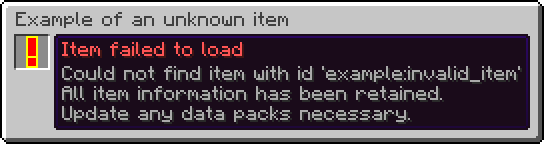
- Unknown items are now retained instead of being deleted.
- An item stack with an unknown item:
- Renders as a red exclamation mark with a yellow outline.
- Has a name and tooltip mentioning that it could not load the item.
- Displays its stack size, just like normal item stacks.
- Can stack up to their current stack size.
- For example, a stack of 30 will use 30 as its max stack size until the count is modified, such as by splitting the stack in half, in which case it will be 15 for both item stacks.
- This means that the item stack can still be moved around without snapping to a single item, while at the same time it prevents a player from accidentally overflowing item stack sizes.
- Cannot be interacted with.
- Cannot interact with other items, such as inserting it into a Bundle.
- Cannot be used to interact with blocks.
- Cannot be used to destroy blocks. (This includes Creative mode!)
- Cannot be used to interact with entities.
- Cannot be used to hit entities.
- Does not have any animations.
- Can be moved around between inventories as to not forcefully take up a slot.
- Can be dropped on the ground as to not forcefully take up a slot.
- Is not treated as an empty item stack.
- Is never considered to be equal to another item stack, even if the item id, count and data components match.
- Is treated as a disabled item stack.
- Cannot be picked up from saved hotbars.
- Cannot be modified via item modifiers.
- Removed trades.
- This has been replaced by a new system in vanilla.
Items
- The items in
#minecraft:beacon_payment_itemsare now rendered in the Beacon screen instead of using a set of hardcoded items.- They are displayed in an automatically moving carousel going forwards and backwards.
- Each movement has a delay of 1.5 seconds.
- It only displays five items at once, just like vanilla.
- This in turn fixes MC-235757.

Blocks
- Added the
#minecraft:has_marker_particletag.- Represents blocks that render a block marker particle at their position when holding an item that places said block.

Item Behaviour Components
-
Expanded
minecraft:attack_blocking.- The
bypassed_byfield now also accepts a damage type or list of damage types in addition to a damage type tag.
- The
-
Expanded
minecraft:banner_pattern.- The
patternsfield now also accepts a banner pattern or list of banner patterns in addition to a banner pattern tag. - This also means that existing entries must be changed to have a
#in front of them.
- The
So if you had this:
{
  "minecraft:banner_pattern": {
    "patterns": "minecraft:pattern_item/flower"
  }
}
You now have to use this instead:
{
  "minecraft:banner_pattern": {
    "patterns": "#minecraft:pattern_item/flower"
  }
}
-
Removed
minecraft:dyeable.- Adding dye has been replaced by the new
minecraft:crafting_dyerecipe type. - Removing dye via a Cauldron is now controlled by the
#minecraft:cauldron_can_remove_dyetag.
- Adding dye has been replaced by the new
-
Removed
minecraft:firework_shape_modifier.- This has been replaced by the
shapesfield in theminecraft:crafting_special_firework_starrecipe for direct usage.
- This has been replaced by the
-
Expanded
minecraft:immune_to_damage.- The
damagefield now also accepts a damage type or list of damage types in addition to a damage type tag. - This also means that existing entries must be changed to have a
#in front of them.
- The
So if you had this:
{
  "minecraft:immune_to_damage": {
    "damage": "minecraft:is_explosion"
  }
}
You now have to use this instead:
{
  "minecraft:immune_to_damage": {
    "damage": "#minecraft:is_explosion"
  }
}
- Expanded
minecraft:item_holder.- Added the
insert_fail_item_soundfield, which is a sound event that plays whenever a Player fails to add an item to the item holder.
- Added the
Item Events
- Adds two cancellable item events:
minecraft:before_use_on_block, which is called before running the item behaviour when used on a block.minecraft:before_use_on_entity, which is called before running the item behaviour when used on an entity.
Actions
- Action event entries gain a new format, one that allows you to cancel the original call when successful.
- Fields:
entry: An action or inlined action. The actual action to run.cancel_original_call_on_success: A boolean. Indicates whether to cancel the original event call. Does not work for all events.
- The original format is equivalent to setting
cancel_original_call_on_successtofalse. - Note that not every event is cancellable as it is based on outside conditions.
Example:
{
  "minecraft:before_use_on_block": {
    "cancel_original_call_on_success": true,
    "entry": {
      "action": {
        "type": "minecraft:sequence",
        "handler": "minecraft:passing",
        "entries": [
          {
            "action": {
              "type": "minecraft:set_block_state",
              "position": "interacted",
              "state": {
                "Name": "minecraft:potted_dandelion"
              }
            }
          },
          {
            "action": {
              "type": "minecraft:invoke_game_event",
              "event": "minecraft:block_change",
              "entity": "this",
              "position": "interacted"
            }
          },
          {
            "action": {
              "type": "minecraft:increment_stat",
              "entity": "this",
              "stat": {
                "type": "minecraft:custom",
                "entry": "minecraft:pot_flower"
              }
            }
          },
          {
            "action": {
              "type": "minecraft:decrement_item",
              "amount": 1
            }
          },
          {
            "action": {
              "type": "minecraft:swing_hand",
              "entity": "this"
            }
          }
        ]
      },
      "requirements": {
        "condition": "minecraft:location_check",
        "position": "interacted",
        "predicate": {
          "block": {
            "blocks": "minecraft:flower_pot"
          }
        }
      }
    }
  }
}
Item Group Entry Providers
- Replaced the keys of item group entry types with identifiers.
- Replaced
minecraft:stackandminecraft:tagwith a singleminecraft:itemitem group entry.- This simplifies creating simple item stacks as they are now part of the same type.
- This means that lists of items and item tags can now be inlined as well alongside single items.
- This also means that the same data components can be applied to multiple items at once.
So if you had this:
{
  "id": "minecraft:firework_rocket",
  "type": "minecraft:stack",
  "components": {
    "minecraft:fireworks": {
      "flight_duration": 1
    }
  }
}
You now have to use this instead:
{
  "type": "minecraft:item",
  "components": {
    "minecraft:fireworks": {
      "flight_duration": 1
    }
  },
  "items": "minecraft:firework_rocket"
}
Additionally, if you had this:
{
  "type": "minecraft:tag",
  "tag": "minecraft:item_group/wooden_building_blocks"
}
You now have to use this instead:
"#minecraft:item_group/wooden_building_blocks"
Or this in case you also want to add data components to all items in the tag:
{
  "type": "minecraft:item",
  "items": "#minecraft:item_group/wooden_building_blocks"
}
minecraft:item
- Adds items in the specified order with an optional set of data components.
- Format:
items: An item, list of items or hash-prefixed item tag. The items to add.components: An optional set of data components. The data components to add to each item.
Example:
{
  "type": "minecraft:item",
  "components": {
    "minecraft:fireworks": {
      "flight_duration": 1
    }
  },
  "items": "minecraft:firework_rocket"
}
minecraft:instrument
- Now allows you to define an instrument or list of instruments to use, rather than just a tag.
- This means that tags require an additional
#prefix to use them. - Renamed the
tagfield toinstruments. - New format:
item: An item. The item to use.instruments: An instrument, list of instruments or hash-prefixed instrument tag. The instruments to add.
So if you had this:
{
  "type": "minecraft:instrument",
  "item": "minecraft:goat_horn",
  "tag": "minecraft:goat_horns"
}
You now have to use this instead:
{
  "type": "minecraft:instrument",
  "instruments": "#minecraft:goat_horns",
  "item": "minecraft:goat_horn"
}
minecraft:painting_variant
- Renamed the
tagfield topainting_variants. - New format:
item: An item. The item to use.painting_variants: A painting variant tag predicate. The painting variants to match and use.
So if you had this:
{
  "type": "minecraft:painting_variant",
  "item": "minecraft:painting",
  "tag": {
    "id": "minecraft:placeable",
    "expected": true
  }
}
You now have to use this instead:
{
  "type": "minecraft:painting_variant",
  "item": "minecraft:painting",
  "painting_variants": {
    "id": "minecraft:placeable",
    "expected": true
  }
}
Item Modifiers
- Removed the
minecraft:dyeitem modifier.- This has been replaced by the new
minecraft:set_random_dyesin vanilla. - Note that this implementation is different and thus requires a different approach to achieve the same result.
- This has been replaced by the new
So if you had this:
{
  "chances": [
    1.0,
    0.3,
    0.2
  ],
  "function": "minecraft:dye"
}
You now have to use this instead:
{
  "function": "minecraft:set_random_dyes",
  "number_of_dyes": {
    "type": "minecraft:sum",
    "summands": [
      1.0,
      {
        "type": "minecraft:binomial",
        "n": 2.0,
        "p": 0.75
      }
    ]
  }
}
Predicates
Entity Predicates
- Removed the
minecraft:villagerentity sub-predicate.- The new data component check should be used instead.
So if you had this:
{
  "type_specific": {
    "type": "minecraft:villager",
    "variant": "minecraft:swamp"
  }
}
You now have to use this instead:
{
  "predicates": {
    "minecraft:villager/variant": "minecraft:swamp"
  }
}
Recipes
- Allowed remainders for the ingredients in the following recipe types:
minecraft:crafting_decorated_potminecraft:crafting_dyeminecraft:crafting_imbueminecraft:crafting_special_bannerduplicateminecraft:crafting_special_bookcloningminecraft:crafting_special_firework_rocketminecraft:crafting_special_firework_starminecraft:crafting_special_firework_star_fademinecraft:crafting_special_mapextendingminecraft:crafting_special_shielddecoration
Fixes
- Items that are supposed to be pottable can now be potted again.
- Picking container blocks with unloadable items now creates an item stack correctly.
- Unloadable item stacks now no longer incorrectly match with empty stacks in certain places.
- Unloadable item stacks now no longer snap to a single item when moved around in an inventory.
- Placing blocks that are attached to sides now always target the appropriate side it's used on.
- Blocks with collision shapes that depend on the held item now use the correct shape.
- Item holders now render the correct occupancy in their tooltip bar when a different capacity is used.
- Item holders now no longer delete an item stack from their contents when one is already present in a Player's inventory who is in Creative mode.