


Tags
Creators
Details
0.8.0-preview.1+26.1
Compatibility
Changes
Itematic 0.8.0 Preview 1 for 26.1
8th of September 2026
The first preview that is part of the new versioning system for Minecraft! 🎉 I am getting closer and closer to being up-to-date with the game... In any way, this preview keeps unknown items from being deleted and adds cancellable item events!
For a few more details regarding the new future you can look at the roadmap to 26.x!
Changes
- Unknown items are now retained instead of being deleted.
- There are still bugs in this system and parts of it may change.
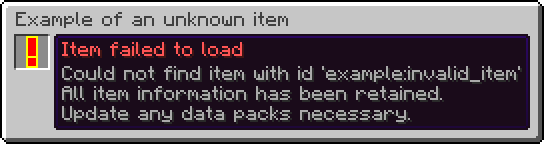
- An item stack with an unknown item:
- Renders as a red exclamation mark with a yellow outline.
- Has a name and tooltip mentioning that it could not load the item.
- Cannot be interacted with.
- Cannot interact with other items (such as inserting it into a Bundle).
- Cannot be used to interact with blocks.
- Cannot be used to destroy blocks (this includes Creative mode!).
- Cannot be used to interact with entities.
- Cannot be used to hit entities.
- Does not have any animations.
- Can be moved around between inventories as to not forcefully take up a slot.
- Can be dropped on the ground as to not forcefully take up a slot.
- Is not treated as an empty item stack.
- Is never considered to be equal to another item stack, even if the item id, count and data components match.
- Is treated as a disabled item stack.
- Cannot be picked up from saved hotbars.
- Cannot be modified via item modifiers.
- Removed trades.
- This has been replaced by a new system in vanilla.
Item Behaviour Components
-
Expanded
minecraft:attack_blocking.- The
bypassed_byfield now also accepts a damage type or list of damage types in addition to a damage type tag.
- The
-
Expanded
minecraft:banner_pattern.- The
patternsfield now also accepts a banner pattern or list of banner patterns in addition to a banner pattern tag. - This also means that existing entries must be changed to have a
#in front of them.
- The
So if you had this:
{
  "minecraft:banner_pattern": {
    "patterns": "minecraft:pattern_item/flower"
  }
}
You now have to use this instead:
{
  "minecraft:banner_pattern": {
    "patterns": "#minecraft:pattern_item/flower"
  }
}
-
Removed
minecraft:dyeable.- Adding dye has been replaced by the new
minecraft:crafting_dyerecipe type. - Removing dye via a Cauldron is now controlled by the
#minecraft:cauldron_can_remove_dyetag.
- Adding dye has been replaced by the new
-
Removed
minecraft:firework_shape_modifier.- This has been replaced by the
shapesfield in theminecraft:crafting_special_firework_starrecipe for direct usage.
- This has been replaced by the
-
Expanded
minecraft:immune_to_damage.- The
damagefield now also accepts a damage type or list of damage types in addition to a damage type tag. - This also means that existing entries must be changed to have a
#in front of them.
- The
So if you had this:
{
  "minecraft:immune_to_damage": {
    "damage": "minecraft:is_explosion"
  }
}
You now have to use this instead:
{
  "minecraft:immune_to_damage": {
    "damage": "#minecraft:is_explosion"
  }
}
- Expanded
minecraft:item_holder.- Added the
insert_fail_item_soundfield, which is a sound event that plays whenever a Player fails to add an item to the item holder.
- Added the
Item Events
- Adds two cancellable item events:
minecraft:before_use_on_block, which is called before running the item behaviour when used on a block.minecraft:before_use_on_entity, which is called before running the item behaviour when used on an entity.
Actions
- Action event entries gain a new format, one that allows you to cancel the original call when successful.
- Fields:
entry: An action or inlined action. The actual action to run.cancel_original_call_on_success: A boolean. Indicates whether to cancel the original event call. Does not work for all events.
- The original format is equivalent to setting
cancel_original_call_on_successtofalse. - Note that not every event is cancellable as it is based on outside conditions.
Example:
{
  "minecraft:before_use_on_block": {
    "cancel_original_call_on_success": true,
    "entry": {
      "action": {
        "type": "minecraft:sequence",
        "handler": "minecraft:passing",
        "entries": [
          {
            "action": {
              "type": "minecraft:set_block_state",
              "position": "interacted",
              "state": {
                "Name": "minecraft:potted_dandelion"
              }
            }
          },
          {
            "action": {
              "type": "minecraft:invoke_game_event",
              "event": "minecraft:block_change",
              "entity": "this",
              "position": "interacted"
            }
          },
          {
            "action": {
              "type": "minecraft:increment_stat",
              "entity": "this",
              "stat": {
                "type": "minecraft:custom",
                "entry": "minecraft:pot_flower"
              }
            }
          },
          {
            "action": {
              "type": "minecraft:decrement_item",
              "amount": 1
            }
          },
          {
            "action": {
              "type": "minecraft:swing_hand",
              "entity": "this"
            }
          }
        ]
      },
      "requirements": {
        "condition": "minecraft:location_check",
        "position": "interacted",
        "predicate": {
          "block": {
            "blocks": "minecraft:flower_pot"
          }
        }
      }
    }
  }
}
Item Group Entry Providers
- Replaced the keys of item group entry types with identifiers.
- Replaced
minecraft:stackandminecraft:tagwith a singleminecraft:itemitem group entry.- This simplifies creating simple item stacks as they are now part of the same type.
- This means that lists of items and item tags can now be inlined as well alongside single items.
- This also means that the same data components can be applied to multiple items at once.
So if you had this:
{
  "id": "minecraft:firework_rocket",
  "type": "minecraft:stack",
  "components": {
    "minecraft:fireworks": {
      "flight_duration": 1
    }
  }
}
You now have to use this instead:
{
  "type": "minecraft:item",
  "components": {
    "minecraft:fireworks": {
      "flight_duration": 1
    }
  },
  "items": "minecraft:firework_rocket"
}
Additionally, if you had this:
{
  "type": "minecraft:tag",
  "tag": "minecraft:item_group/wooden_building_blocks"
}
You now have to use this instead:
"#minecraft:item_group/wooden_building_blocks"
Or this in case you also want to add data components to all items in the tag:
{
  "type": "minecraft:item",
  "items": "#minecraft:item_group/wooden_building_blocks"
}
minecraft:item
- Adds items in the specified order with an optional set of data components.
- Format:
items: An item, list of items or hash-prefixed item tag. The items to add.components: An optional set of data components. The data components to add to each item.
Example:
{
  "type": "minecraft:item",
  "components": {
    "minecraft:fireworks": {
      "flight_duration": 1
    }
  },
  "items": "minecraft:firework_rocket"
}
minecraft:instrument
- Now allows you to define an instrument or list of instruments to use, rather than just a tag.
- This means that tags require an additional
#prefix to use them. - Renamed the
tagfield toinstruments. - New format:
item: An item. The item to use.instruments: An instrument, list of instruments or hash-prefixed instrument tag. The instruments to add.
So if you had this:
{
  "type": "minecraft:instrument",
  "item": "minecraft:goat_horn",
  "tag": "minecraft:goat_horns"
}
You now have to use this instead:
{
  "type": "minecraft:instrument",
  "instruments": "#minecraft:goat_horns",
  "item": "minecraft:goat_horn"
}
minecraft:painting_variant
- Renamed the
tagfield topainting_variants. - New format:
item: An item. The item to use.painting_variants: A painting variant tag predicate. The painting variants to match and use.
So if you had this:
{
  "type": "minecraft:painting_variant",
  "item": "minecraft:painting",
  "tag": {
    "id": "minecraft:placeable",
    "expected": true
  }
}
You now have to use this instead:
{
  "type": "minecraft:painting_variant",
  "item": "minecraft:painting",
  "painting_variants": {
    "id": "minecraft:placeable",
    "expected": true
  }
}
Item Modifiers
- Removed the
minecraft:dyeitem modifier.- This has been replaced by the new
minecraft:set_random_dyesin vanilla. - Note that this implementation is different and thus requires a different approach to achieve the same result.
- This has been replaced by the new
So if you had this:
{
  "chances": [
    1.0,
    0.3,
    0.2
  ],
  "function": "minecraft:dye"
}
You now have to use this instead:
{
  "function": "minecraft:set_random_dyes",
  "number_of_dyes": {
    "type": "minecraft:sum",
    "summands": [
      1.0,
      {
        "type": "minecraft:binomial",
        "n": 2.0,
        "p": 0.75
      }
    ]
  }
}
Predicates
Item Predicates
- Removed the
behaviorfield.- Appropriate data components should be used instead.
- Note that not everything can be replicated yet.
So if you had this:
{
  "behavior": [
    "minecraft:item_holder"
  ]
}
You now have to use this instead:
{
  "predicates": {
    "minecraft:bundle_contents": {}
  }
}
Entity Predicates
- Removed the
minecraft:villagerentity sub-predicate.- The new data component check should be used instead.
So if you had this:
{
  "type_specific": {
    "type": "minecraft:villager",
    "variant": "minecraft:swamp"
  }
}
You now have to use this instead:
{
  "predicates": {
    "minecraft:villager/variant": "minecraft:swamp"
  }
}
Recipes
- Allowed remainders for the ingredients in the following recipe types:
minecraft:crafting_decorated_potminecraft:crafting_dyeminecraft:crafting_imbueminecraft:crafting_special_bannerduplicateminecraft:crafting_special_bookcloningminecraft:crafting_special_firework_rocketminecraft:crafting_special_firework_starminecraft:crafting_special_firework_star_fademinecraft:crafting_special_mapextendingminecraft:crafting_special_shielddecoration
Fixes
- Items that are supposed to be pottable can now be potted again.