
Compatibility
Minecraft: Java Edition
Platforms
Supported environments


Tags
Creators
Details
AutoDrop
Keep your inventory clean: automatically drop the items you don't want, right after you pick them up.
🎬 Showcase
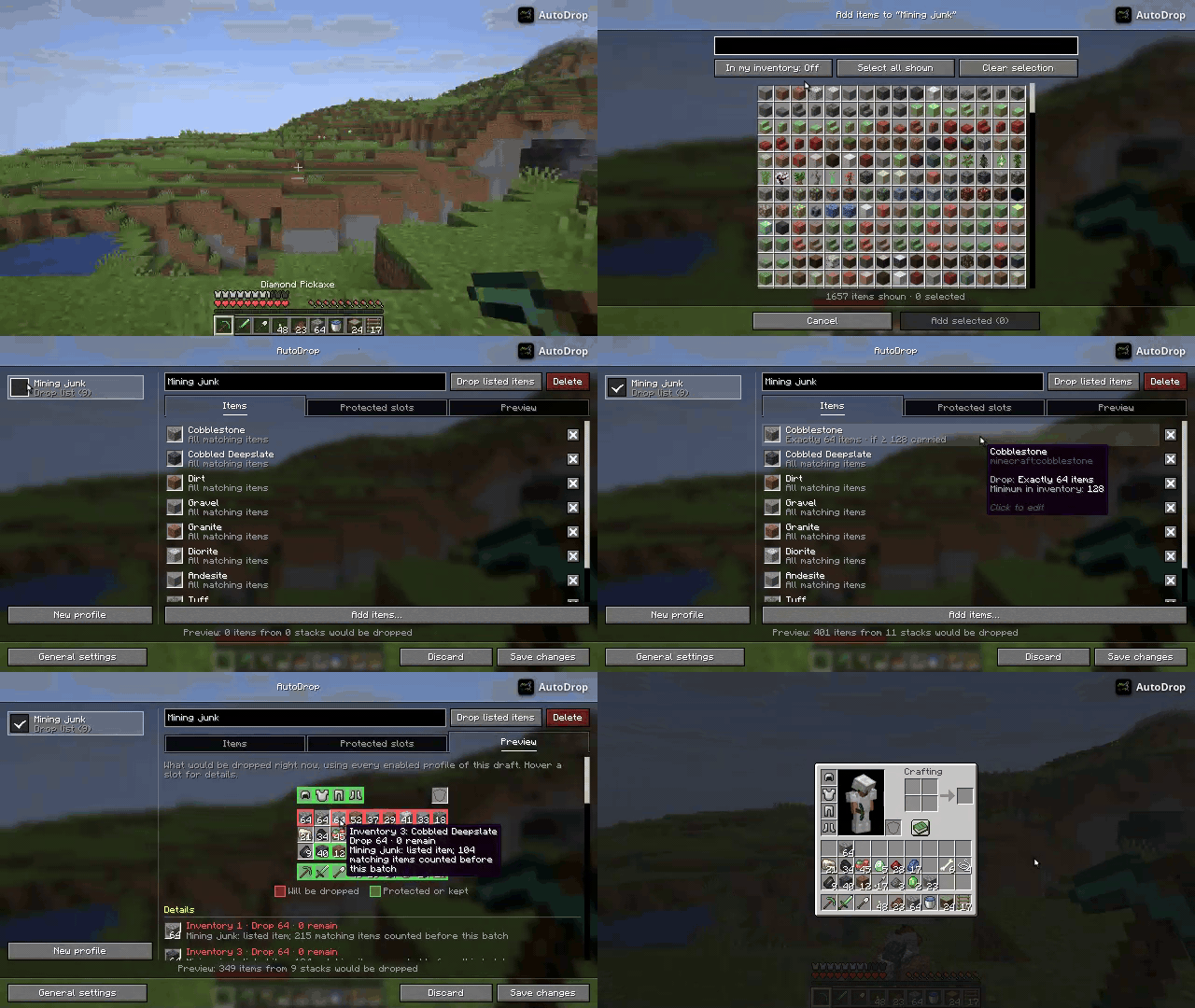
✨ Features
- Profiles: Group items into profiles and turn each one on or off. Every enabled profile applies at the same time.
- Drop lists & keep lists: Drop only the listed items, or keep the listed items and drop everything else.
- Per-item rules: Drop all matching items, half of each stack or exactly X items, and only once you carry a minimum amount.
- Protected slots: Items in protected slots are never dropped. Armor slots are protected by default.
- Live preview: See what would be dropped right now and why each slot is dropped or kept.
- Flexible triggers: Drop on item pickup, when you start crouching or with a keybinding.
- Item data filters: Match items by their components/NBT, e.g. only enchanted books without Mending.
- Client-side: Works in singleplayer and on servers without installing anything on the server.
📖 Usage
Opening the config screen
- Press the config keybinding (default: O).
- Or use the config button of the mod in Mod Menu (Fabric) or the mods list (NeoForge).
Changes are only applied when you press Save changes. Dropping is paused while the screen is open. You can edit profiles outside a world as well, but the inventory view and the preview need one.
Profiles
Items are organized in profiles. Each profile can be turned on or off in the profile list, and every enabled profile applies at the same time. New profiles start turned off.
A profile works in one of two modes:
- Drop listed items: The listed items are dropped.
- Keep listed items: The listed items are kept and every other item is dropped. You have to review what would be dropped before a keep list can be turned on. If several keep lists are on, an item on any of them is kept.
Each profile has three tabs:
- Items: Add items with the item picker (several at once) and click an item to edit its rule.
- Protected slots: Items in protected slots are never dropped by any enabled profile. New profiles protect the armor slots.
- Preview: Shows what would be dropped right now and why each slot is dropped or kept.
Item rules
Every item in a drop list can be configured:
- Amount: Drop all matching items, half of each stack, or exactly X items per trigger (taken from several stacks if needed).
- Minimum in inventory: Only drop once you carry at least this many matching items in total.
Triggers & keybindings
Dropping can be triggered by:
- picking up items (on by default)
- starting to crouch (off by default)
- the trigger keybinding
| Keybinding | Default | Action |
|---|---|---|
| Open config | O | Opens the config screen |
| Trigger | K | Drops the configured items now |
| Toggle | J | Turns AutoDrop on or off |
The delay between a trigger and dropping can be changed in the general settings.
Item data filters (Components/NBT)
The item data filter can be found in the advanced options of an item rule.
⚠️ Be careful: Using "Any item" (
*) and leaving the filter empty will cause the mod to drop every item that is not protected or kept.
The format of the filter is always the item predicate syntax of the version of Minecraft you're playing on.
Unless you know the syntax by heart, you can use
a give command generator
and copy the component part (enclosed by []).
The syntax is also described on
this wiki post.
For sub-types of items, such as Bottle of Water (subtype of Potion), use a specialized generator like the Minecraft Maps Generators.
❓ FAQ
How do I drop everything except a specific item?
Create a profile in Keep listed items mode and add the items you want to keep.
For finer control, use "Any item" with a filter like [!minecraft:stored_enchantments={mending:1}]. It will drop
every item that does not have Mending enchanted. If you want to only drop enchanted books that do not have Mending
enchanted, use minecraft:enchanted_book instead of "Any item".
Do I need to install AutoDrop on the server?
No. AutoDrop is a client-side mod and only needs to be installed on your client.
📦 Installation
Download the file for your loader from Modrinth
or CurseForge, put it in your mods folder and add
the required dependencies:
| Loader | Required dependencies | Optional |
|---|---|---|
| Fabric / Quilt | Fabric API, Fabric Language Kotlin | Mod Menu |
| NeoForge | KotlinLangForge | – |
💬 Support
If you need help with any of my mods, join my Discord server.