Tags
Creators
Details
1.0.0
Compatibility
Changes
MaShop모드 사용 법
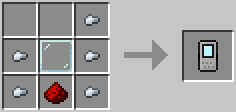
등록기 제작법은 본문 참조 해 주세요.
등록기를 들고 우클릭하여 인벤 내 아이템을 판매 등록 할 수 있습니다.
먼저, 판매할 아이템을 왼쪽 슬롯에 넣습니다.
오른쪽 가격 슬롯 중 하나를 클릭하여 나오는 아이템 목록에서 대금으로 받을 아이템을 선택, 수량을 설정합니다.
최대 4종까지 설정 할 수 있습니다.
/shop 명령어를 이용 해 등록 된 판매 아이템 목록을 볼 수 있습니다.
또한, 같은 화면 중앙 하단의 "내 상점"메뉴를 통해 판매중인 상품의 회수 및 대금 수령이 가능합니다.
판매 목록에서 원하는 아이템이 있을 경우 클릭하여 가격 확인이 가능합니다.
인벤토리 내 가격에 맞는 아이템이 있을 경우 활성화 된 구매 버튼을 통해 아이템 구매가 가능합니다.
OP전용 명령어입니다.
/mashop clear : 등록 된 모든 판매 글을 취소시키고 등록 된 아이템을 판매자에게 반환합니다.
/mashop remove <고유번호 7자리> : 해당 고유번호에 해당하는 판매글을 삭제하고 물품을 판매자에게 반환합니다.
고유번호는 1000000 ~ 9999999까지 할당되므로, 그럴 일은 없겠지만 판매글이 900만개가 넘어가면 등록 실패 또는 오류가 발생할 수 있습니다.
Client and Server입니다. (서버와 접속자 둘 다 설치해야 합니다.)
지원 언어 : 영어 및 한국어
Please refer to the main text for how to make the Registrar.
Hold the Shop Registrar and right-click to list items from your inventory for sale.
First, place the item you want to sell into the slot on the left.
Then, click one of the price slots on the right. From the item list that appears, select the item you want to receive as payment and set the quantity.
You can set up to 4 types of payment items.
Use the /shop command to view the list of registered items for sale.
You can also use the “My Shop” menu at the bottom center of the same screen to retrieve your listed items and collect payments.
If you find an item you want in the sale list, click it to check its price.
If you have the required payment items in your inventory, you can purchase the item using the activated purchase button.
OP-Only Commands
/mashop clear Cancels all registered sale listings and returns the listed items to their sellers.
/mashop remove <7-digit unique ID> Deletes the sale listing matching the specified unique ID and returns the item to the seller.
Unique IDs are assigned from 1000000 to 9999999, so it is unlikely to happen, but if there are more than 9 million sale listings, registration may fail or an error may occur.
This is a Client and Server mod. It must be installed on both the server and all connecting clients.
Supported languages: English and Korean.