


Tags
Creators
Details
1.0.2
Compatibility
Changes
🎭 Nicks 🎭
Nicks 1.0.2 UPDATE:
CUSTOM NAME TAGS, TAB LIST & CAPES
For any suggestions or Bug Reports, Please DM @SupRani on Discord.
Take full control over how you see other players - disguise any username, change their skin, all from one in-game menu or Command. Completely client-side, no server-side support needed, for Multiple people at the same Time.
🆕 What's New
Custom name tags now work. Servers that build their own name tags - an invisible armour stand or a named marker floating above each player instead of the real tag - now show the nickname too. The disguise no longer stops at the player's own head.
Nicknames in the tab list on every server. They used to only appear on servers that send their own tab list names, which meant the real username stayed on show on most setups.
Capes and elytras come with the skin. Skin swapping now brings the full look across - cape, elytra texture, and the correct arm model (slim or classic) for the account you picked.
Rank prefixes survive. [Owner] Bob: hi becomes [Owner] Alice: hi, with the rank and its colour exactly as the server sent it. Team colours and prefixes on name tags stay intact too, and clicking a name in chat still opens a message to the right person.
The death screen matches. "You were slain by..." now shows the same name as the chat line behind it.
Everything else is left alone. Signs, books, item names and tooltips are no longer touched - previously they could get caught up in the swap and lose their formatting.
Brand New Logo! A Cleaner Logo.
🛠️ Fixes
- A corrupt or hand-edited config no longer stops the game from starting - it now recovers on its own
- Two players wearing each other's names no longer crash the chat
- Names are matched whole - nicking
Bobno longer rewritesBobcatorBobby - Nicknames no longer chain into each other, so
A → BandB → Cstays put instead of turning A into C - Team colours, sidebar rows and below-name scores are no longer lost on nicked players
- Failed skin lookups now retry instead of giving up until the next restart
- Death messages, joins and whispers keep their colours and styling
- Skins are cached on disk instead of being re-downloaded every launch
- Name swapping no longer runs across every piece of text the game draws, which is a large performance win in chat-heavy servers
✏️ Custom /nick (Client-Side)
Disguise anyone on your screen instantly. Change any player's visible name to whatever you want, allowing you to easily organize friends, mock opponents, or stream without revealing real usernames.
👥 Skin Swapping
It doesn’t just stop at text. When you change a player's nickname, the mod automatically fetches and applies the official skin, cape and elytra of that new name. Look around the world and see your customized roster exactly how you set them to be. Pick a name that doesn't exist and it falls back to the default skin that name would have, so nobody is ever left wearing their real one.
💾 Unlimited Slots
Add as many nicknames as you want. There are zero limits or slot restrictions on how many unique player overrides you can save and maintain at the same time.
⌨️ Commands
/nick- opens the GUI/nick <player> <nick>- disguise a player (with tab-completion for everyone online)/nick <player> clear- remove one/nick list- see everything you've set/nick toggle- turn every nickname off and back on without losing them/nick reload- re-read the config from disk/nick clearall- wipe the list
There's also a keybind for the GUI, unbound by default, in Options → Controls.
🖥️ The GUI
This is not your average Minecraft settings screen. Nicks features a fully custom-built, modern dark UI with scrollable split panels, direct text fields, and instant status updates — manage your entire list inside the game with zero config file hunting. Every row shows a live status dot for its skin, and a single switch turns the whole mod off without forgetting a thing.
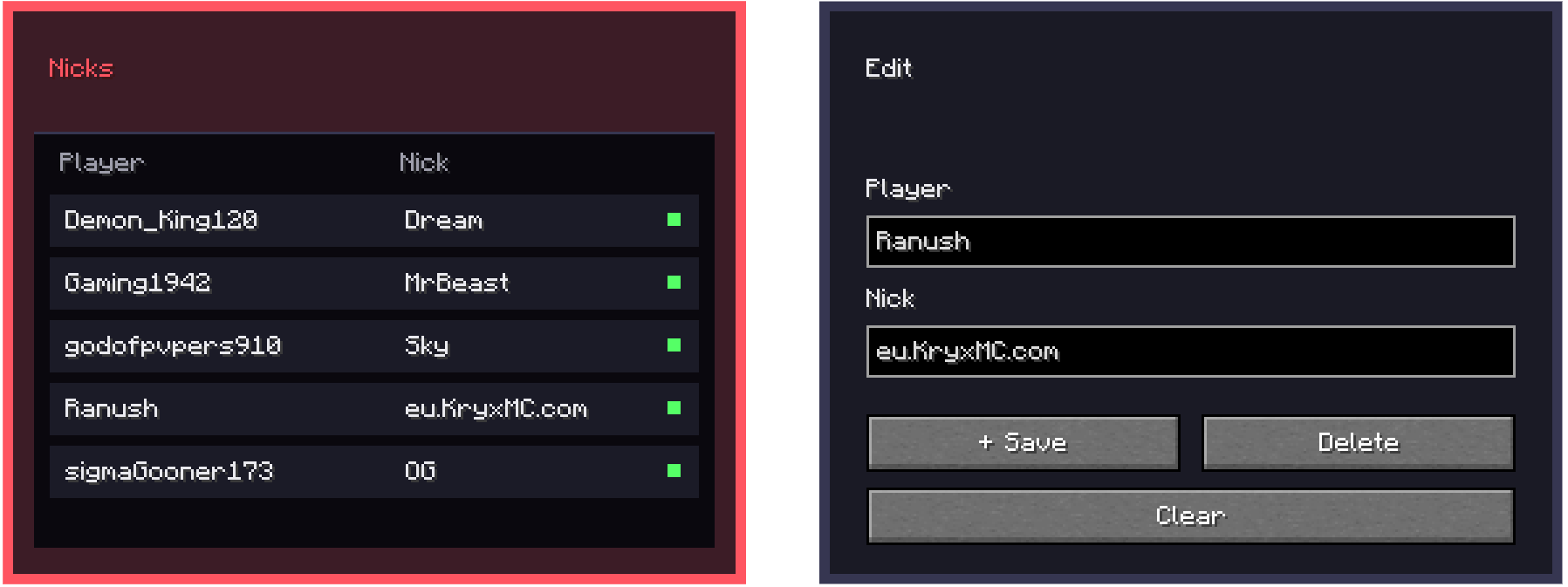
to open the GUI, all you need to do is do /nick
⚙️ Optional: Outgoing Names
Off by default. Turn it on in the GUI and the chat and commands you send get the real username put back in, so typing /msg <nickname> actually reaches the person you meant. Leave it off and nothing you send is ever changed.