
Compatibility
Minecraft: Java Edition
Platforms


Links
Tags
Creators
Details
PhantomControl




PhantomControl is a lightweight phantom management plugin for Minecraft Paper and Folia servers. It lets players choose whether phantoms can spawn for them while giving administrators central controls for individual players, batches, and world rules.
Language: Chinese README
Features
- Personal phantom control – Players can enable, disable, or check their own phantom spawning.
- Administrator management – Manage another player's status, run batch operations, and view server statistics.
- Paper and Folia support – Built against the Paper API, with Folia-aware scheduling and environment detection.
- FlatFile and MySQL storage – Choose local file storage or a remote MySQL database.
- World whitelist and blacklist – Restrict phantom control to selected worlds or exclude selected worlds.
- Automatic saving and cache cleanup – Periodically save player data and clean expired cache entries.
- Hot configuration reload – Reload messages, GUI settings, world rules, and database settings without restarting. Command names and aliases require a restart.
- GUI controls – Give players a simple inventory interface for changing their status.
- Chinese and English – Automatically follow the player's client language or force a language in configuration.
- PlaceholderAPI support – Expose phantom status to scoreboards, tab lists, and other integrations.
- Developer API and events – Read or change status from other plugins and listen for changes or blocked spawns.
- bStats and debug tools – Optional anonymous usage statistics, detailed debug logging, and configuration validation.
Requirements
- Minecraft 1.20.1 or newer
- Paper or Folia server
Spigot and Bukkit servers are not supported.
Installation
- Download
PhantomControl-2.1.1.jarfrom the latest release. - Place the JAR in your server's
pluginsfolder. - Restart the server. PhantomControl will create its default configuration files.
- Edit the configuration as needed and run
/phantomcontrolreload(or/pcr) to apply reloadable settings.
Paper and Folia load HikariCP and the MySQL driver through the server's library system; no separate dependency installation is required.
Configuration
The main configuration is plugins/PhantomControl/config.yml. Messages are stored separately in plugins/PhantomControl/messages.yml and messages_en.yml.
Database
database:
  type: "flatfile" # flatfile or mysql
  auto-save-interval: 300 # seconds; 0 disables automatic saving
  cache-timeout-minutes: 60
  mysql:
    address: "localhost:3306"
    username: "username"
    password: "password"
    database: "phantom_control"
    prefix: "phc_"
World rules
whitelist:
  world-whitelist-enabled: false
  world-whitelist: []
  world-blacklist-enabled: true
  world-blacklist: []
When the whitelist is enabled, only listed worlds are controlled. When the blacklist is enabled, listed worlds are ignored.
Messages, language, GUI, and debug
settings:
  message:
    default-type: "CHAT" # CHAT, ACTION_BAR, or TITLE
    show-title-on-change: false
    show-actionbar-on-change: false
    language:
      mode: "auto" # auto, chinese, or english
      default: "messages_en"
  bstats:
    enabled: true
  debug:
    enabled: false
GUI materials and command names can also be customized under settings.gui and settings.commands. Command names and aliases are registered at startup, so changing them requires a server restart.
Example GUI material settings:
settings:
  gui:
    status-enabled-material: "GREEN_WOOL"
    status-disabled-material: "RED_WOOL"
    enable-button-material: "LIME_DYE"
    disable-button-material: "RED_DYE"
    info-button-material: "BOOK"
    border-material: "GRAY_STAINED_GLASS_PANE"
Commands
Main command aliases: /phantomcontrol, /pc, /phantom.
Player commands
| Command | Description | Permission |
|---|---|---|
/pc enable or /pc on |
Enable phantom spawning for yourself | phantomcontrol.use |
/pc disable or /pc off |
Disable phantom spawning for yourself | phantomcontrol.use |
/pc toggle or /pc switch |
Toggle your phantom spawning status | phantomcontrol.use |
/pc status or /pc check |
Check your current status | phantomcontrol.use |
/pc gui or /pc menu |
Open the graphical control menu | phantomcontrol.use |
/pc help |
Show command help | phantomcontrol.use |
Administrator commands
| Command | Description | Permission |
|---|---|---|
/pc admin enable <player> |
Enable phantoms for a player | phantomcontrol.admin |
/pc admin disable <player> |
Disable phantoms for a player | phantomcontrol.admin |
/pc admin status <player> |
Check a player's status | phantomcontrol.admin |
/pc admin batch enable <player1> <player2> ... |
Enable phantoms for multiple players | phantomcontrol.admin |
/pc admin batch disable <player1> <player2> ... |
Disable phantoms for multiple players | phantomcontrol.admin |
/pc admin server |
View online player status statistics | phantomcontrol.admin |
/phantomcontrolreload, /pcr, /phreload |
Reload plugin configuration | phantomcontrol.reload |
Permissions
| Permission | Description | Default |
|---|---|---|
phantomcontrol.use |
Use player control commands | Everyone |
phantomcontrol.admin |
Use administrator commands | Operator |
phantomcontrol.reload |
Reload plugin configuration | Operator |
Players without phantomcontrol.use are automatically kept enabled by the plugin's permission enforcement.
PlaceholderAPI
PlaceholderAPI is optional. Version 2.11.7 or newer is recommended for Folia environments.
| Placeholder | Description | Example |
|---|---|---|
%phantomcontrol_enabled% |
Whether the player's phantoms are enabled | true / false |
%phantomcontrol_status% |
Localized status text | Enabled / Disabled |
Developer API
PhantomControl registers PhantomControlAPI through Bukkit's ServicesManager.
import org.bukkit.Bukkit;
import yyz.chl.phantomcontrol.api.PhantomControlAPI;

PhantomControlAPI api = Bukkit.getServicesManager().load(PhantomControlAPI.class);
if (api == null) return;

boolean enabled = api.arePhantomsEnabled(player);
api.setPhantomsEnabled(player, false);
For offline UUID operations, use the asynchronous overloads:
api.arePhantomsEnabled(playerId).thenAccept(enabled -> {
    Bukkit.getLogger().info("Phantoms enabled: " + enabled);
});

api.setPhantomsEnabled(playerId, false).thenAccept(success -> {
    Bukkit.getLogger().info("Saved: " + success);
});
Available events:
PhantomStatusPreChangeEvent– Fired before a change and can be cancelled.PhantomStatusChangeEvent– Fired after a successful change; includes the old state, new state, andPhantomStatusChangeSource.PhantomSpawnBlockedEvent– Fired when PhantomControl blocks a phantom spawn.
Example event listener:
import org.bukkit.event.EventHandler;
import org.bukkit.event.Listener;
import yyz.chl.phantomcontrol.event.PhantomStatusPreChangeEvent;

public class PhantomListener implements Listener {
    @EventHandler
    public void onPreChange(PhantomStatusPreChangeEvent event) {
        if (!event.willBeEnabled()
                && event.getPlayer().hasPermission("server.need.phantom")) {
            event.setCancelled(true);
        }
    }
}
FAQ
Why are phantoms still spawning?
Check the world's whitelist/blacklist rules, confirm that PhantomControl loaded without errors, and check for another plugin that changes phantom spawning.
Does PhantomControl change the player's sleep statistics?
No. The plugin blocks phantom spawning through Paper events and does not modify the player's TIME_SINCE_REST statistic.
How do I disable bStats?
Set settings.bstats.enabled to false and reload the configuration.
How do I enable debug logging?
Set settings.debug.enabled to true, then reload the configuration. Detailed diagnostics will be written to the console.
bStats
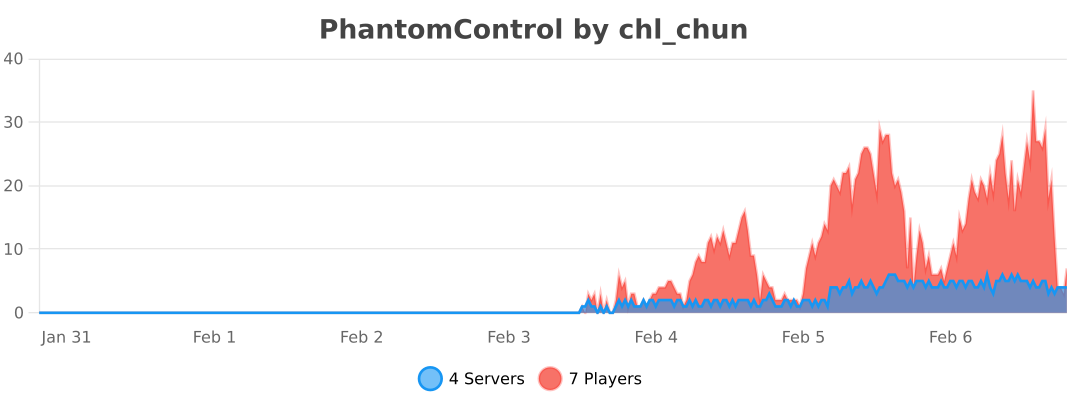
PhantomControl uses bStats for anonymous server and plugin usage statistics. Data collection can be disabled with settings.bstats.enabled: false.
Links and contact
- Source code
- Issue tracker
- License: GNU AGPL v3.0
- QQ group:
1093090518 - Author QQ:
2919089965
If PhantomControl helps your server, consider leaving a star on GitHub or reporting suggestions and issues through the issue tracker.