

Tags
Creators
Details
Licensed MIT
Published 5 months ago
Updated 5 months ago
All versions
1.0.0
playtime-goal 1.0.0-1.20.15 months ago 67
Compatibility
Minecraft: Java Edition
Platform
Supported environments
Changes
Playtime Goals
Set a daily playtime goal and track your progress directly in-game with a clean HUD.
Features
- Daily goal — set how long you want to play today (in minutes)
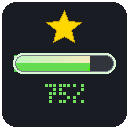
- Progress bar HUD — shows time played vs goal with a color bar
- Goal reached alert — pulsing ★ overlay when you hit your goal
- Saves progress — tracks playtime across sessions, resets daily
- Simple menu — press G to open the goals screen
How it works
The mod tracks how long you've been playing today. When you hit your goal, a celebration overlay appears. Progress saves automatically when you quit.
Keybinds
| Key | Action |
|---|---|
| G | Open goals menu |
Installation
- Install Fabric Loader
- Install Fabric API
- Drop the jar into your
modsfolder