
Compatibility
Minecraft: Java Edition
Platforms
Supported environments


Tags
Creators
Details

Why Bkups?
- Comes with a GUI that will help you throughout the mod
- Four different types of backups
- Differential backups
- Restore only what you need
- Daily backups at fixed times, or every X minutes
- Exclude the files and folders you don't need
- Whopper System (switch between worlds in-game)
- Many ways to protect your world or server
- Lots of options to make it your own
- Settings Menu
- No cheats on needed
- Install and Play!
Two Interfaces
Bkups comes with two interfaces and you can switch between them at any time, without losing your backups or settings.


| Classic Interface | New Interface | |
|---|---|---|
| Navigation | Separate screens | Home, Backups, Worlds and Settings in one top bar |
| Backups list | Tree structure | Home screen, timeline and filters |
| Versions | Every version | 26.x |
Switch: Settings → Advanced → Interface (new) or "New interface" button in the Settings Menu (classic)
Backup Manager (GUI)

Bkups Lite

Classic Interface


Types of Backups

- Manual: this backup is made by the player manually
- Auto: this backup is made automatically according to your settings (every X minutes or every day at fixed times)
- Exit: this backup is made whenever you leave the world or the server stops
- Legacy: these are the backups created with the vanilla Minecraft "Make Backup" button
Differential Backups
All backups are differential by default: they only save the files that changed since the last full backup, so they are much smaller and faster

- A full backup is made every 10 backups (or when the changes are too big)
- Manual, Auto and Exit backups each have their own mode and their own full backups
- Use
/bk full [name]to force a full manual backup - Differential backups show a differential tag in the Backup Manager
- A differential needs its full backup to be restored, so Bkups always keeps them together (delete, trash, favorites and storage limits)
- Use
/bkup advanced mode all fullif you prefer only full backups
Classic Interface

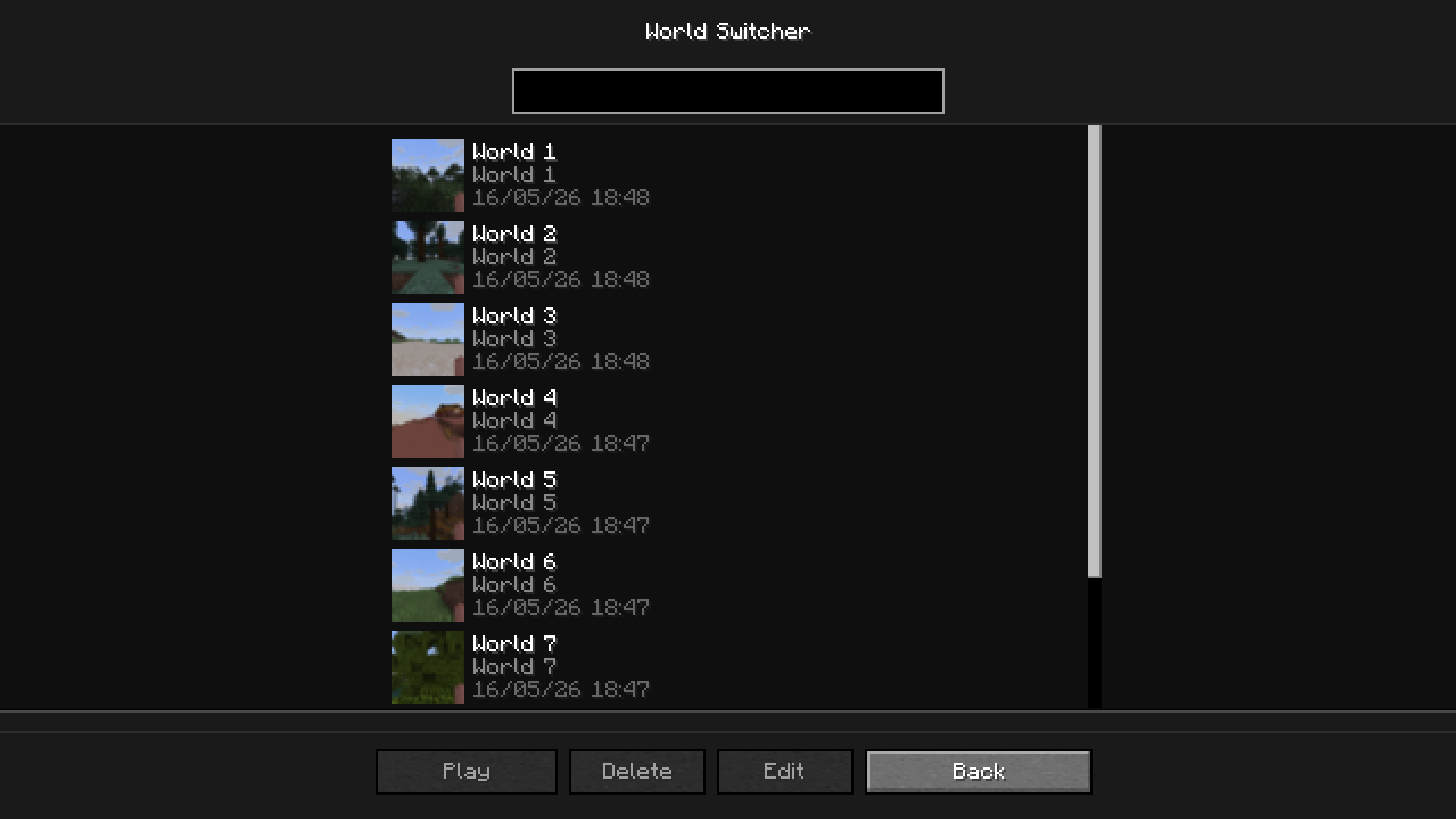
Whopper System
This system lets you switch worlds without having to go back to the main menu

Classic Interface
The Trash
To access the trash, click on the trash button in Backup Manager. All your deleted backups will appear here if you have the trash enabled (/bkup advanced trash on)
 With the trash, you can permanently delete the backup or recover it
Classic Interface

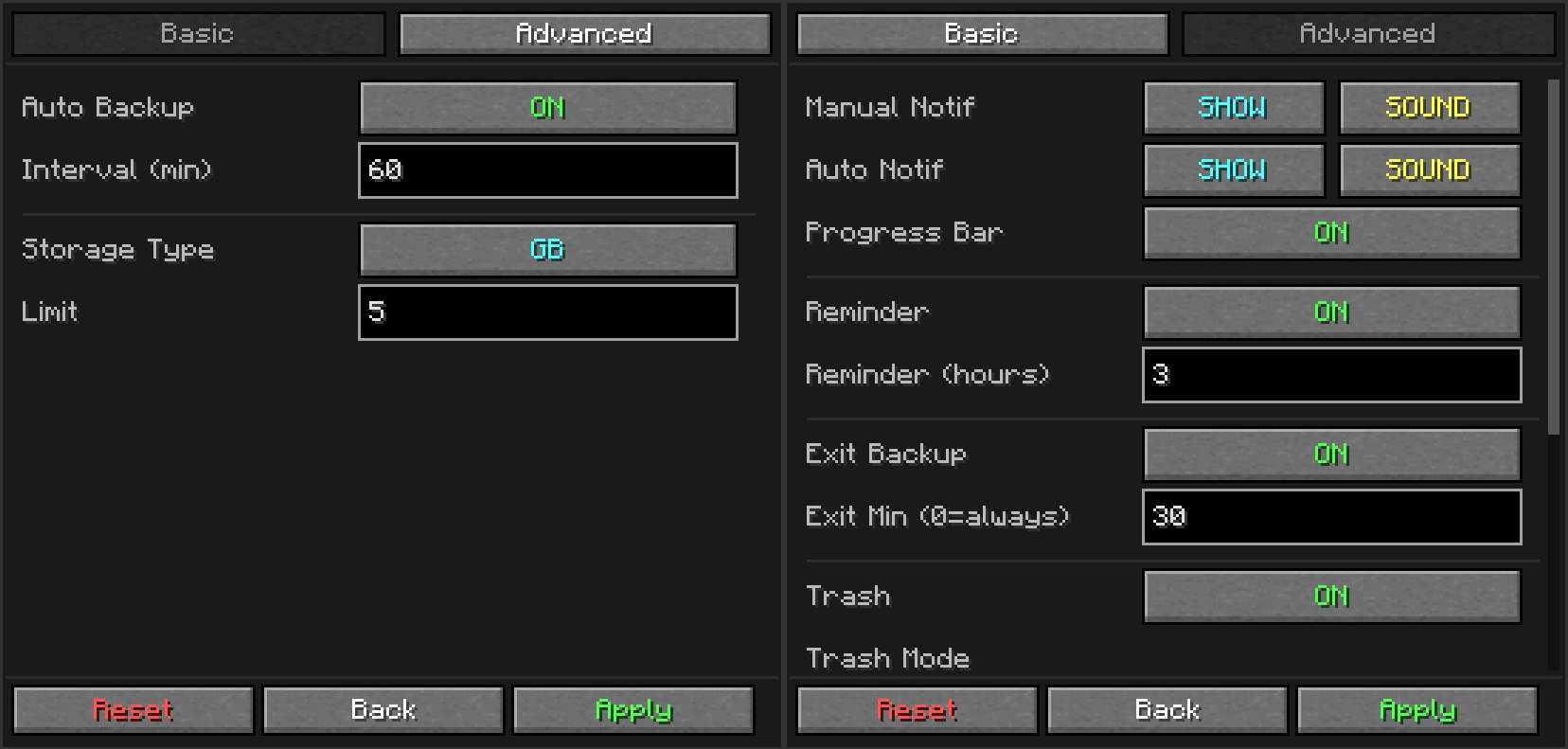
Settings Menu
 A settings menu so you don't have to use commands
Classic Interface
Detailed Backup
To access this screen, double-click on a backup in the backup manager

- See the world info: last played, play time, difficulty, version and seed
- Write a note on the backup (a ✎ appears in the list)
- View log: open the
latest.logsaved in that backup to see what happened right before it - Files: restore or extract only a part of the backup
Classic Interface

Restore only a part of a backup
From the Files button in the backup details (or with commands) you can:
- Restore a player (inventory, advancements and stats)
- Restore a dimension or any folder or file
- Extract something from a backup without touching your world
Nothing is lost: everything that is replaced is moved to bkups\replaced
Favorites
You can add your backups to your favorites. The advantages are:
- Your backup will not be deleted by auto-cleanup
- Better visibility of your backups
Commands
/bk [custom_name]If you want to make a manual backup ([custom_name]is used to name the backup)/bkup <subcommand>For all the other options and customization, more about it below
Subcommands
| Command | Description |
|---|---|
/bkup auto <on/off> |
Toggles automatic backups |
/bkup auto at <HH:mm> |
Daily backups at fixed times (at remove, at list, warn) |
/bkup storage <lim> <type> |
Sets retention limit by gb or backups |
/bkup storage age <days/off> |
Deletes backups older than <days> |
/bkup delete <file> |
Deletes a backup (or moves to trash if enabled) |
/bkup note <file> [text] |
Adds or removes a note on a backup |
/bkup restore <file> |
Restores a backup (whole world, a player or a file) |
/bkup status |
Shows current settings and disk usage |
/bkup help [command] |
Displays the command list in-game |
/bkup advanced exit <on/off> |
Toggles backup when stopping the server or leaving the world |
/bkup advanced trash <options> |
Manages trash system (on, off, clear, recover) |
/bkup advanced compression <mode> |
Sets compression to fast (larger) or heavy (smaller) |
/bkup advanced mode <type> <mode> |
Sets manual, auto, exit or all backups to full or differential |
/bkup advanced exclude <options> |
Excludes files or folders from backups (add, remove, list) |
/bkup advanced extract <file> <path> |
Copies a part of a backup without touching the world |
/bkup advanced diskcheck <on/off> |
Checks free disk space before each backup |
/bkup advanced path [path] |
Shows or changes the backup folder location |
/bkup advanced config <options> |
Toggles chat notifications, sounds, progress bar and log |
/bkup advanced admin <player> |
Grants backup permissions to non-OP players |
/bkup advanced unadmin <player> |
Removes backup permissions from non-OP players |
Detailed
| Command | Description |
|---|---|
| Manual Backups | |
/bk |
Creates an instant backup with the world folder name. |
/bk [custom_name] |
Creates a backup with a specific name (e.g., /bk BossFight). |
/bk full [custom_name] |
Creates a full backup, even if manual backups are differential. |
| Help | |
/bkup help |
Shows the main help menu. |
/bkup help <command> |
Shows detailed help for a topic: bk, auto, storage, status, delete, restore, note, extract, advanced, exclude, mode, log, diskcheck. |
| Storage Limits | |
/bkup storage <num> gb |
Sets limit by size (e.g., 5 gb). Deletes oldest files when full. |
/bkup storage <num> backups |
Sets limit by quantity (e.g., 20 backups). |
/bkup storage age <days> |
Deletes backups older than <days> days. Favorites and the newest backup are never deleted. |
/bkup storage age off |
Disables deleting by age. |
| Delete | |
/bkup delete <file> |
Deletes a backup. Moves it to Trash if enabled. |
| Notes | |
/bkup note "<file>" <text> |
Adds a note to a backup (up to 100 characters). |
/bkup note "<file>" |
Removes the note. |
| Info | |
/bkup status |
Prints current config, disk usage, and stats to chat. |
| Automation | |
/bkup auto on |
Enables auto-backups every 60 minutes. |
/bkup auto on <min> |
Enables auto-backups with a custom interval (e.g., 30). |
/bkup auto off |
Disables automatic backups completely. |
/bkup auto at <HH:mm> |
Makes a backup every day at that time (real clock). |
/bkup auto at remove <HH:mm> |
Removes a daily time. |
/bkup auto at list |
Lists the daily times. |
/bkup auto warn <min> |
Warns players <min> minutes before a daily backup. |
/bkup auto warn off |
Disables the warning. |
/bkup advanced exit on |
Enables backup when stopping the server (always). |
/bkup advanced exit on <min> |
Enables exit backup only if session > <min> minutes. |
/bkup advanced exit off |
Disables backups on server stop. |
| Restore | |
/bkup restore "<file>" |
Restores the whole world when the server stops (dedicated server). |
/bkup restore cancel |
Cancels a pending restore. |
/bkup restore "<file>" player <name> |
Restores a player's data now (the player must be offline). |
/bkup restore "<file>" file <path> |
Restores a folder or file when the server stops (or when you leave the world). |
/bkup advanced extract "<file>" <path> |
Copies a folder or file from a backup to bkups/extracted. |
/bkup advanced extract clear |
Empties bkups/extracted. |
/bkup advanced replaced clear |
Empties bkups/replaced (asks for confirm). |
| Trash System | |
/bkup advanced trash on |
Enables Trash. Deleted files stay for 24 hours. |
/bkup advanced trash on <num> hours |
Custom Trash: Files expire after <num> hours. |
/bkup advanced trash on <num> backups |
Custom Trash: Keeps a batch of <num> deleted files. |
/bkup advanced trash on <num> backups accumulated |
Custom Trash: Rolling buffer of <num> deleted files. |
/bkup advanced trash off |
Disables Trash. Files are deleted permanently. |
/bkup advanced trash clear |
Instantly empties the trash folder. |
/bkup advanced trash recover <file> |
Restores a deleted file from Trash to its original folder. |
| Technical Settings | |
/bkup advanced compression fast |
Level 1: Fastest backup speed, larger file size. |
/bkup advanced compression heavy |
Level 9: Best compression, smaller file size (slower). |
/bkup advanced mode <manual|auto|exit|all> differential [num] |
Those backups only save what changed. A full backup is made every <num> (default 10). |
/bkup advanced mode <manual|auto|exit|all> full |
Those backups are always full. |
/bkup advanced exclude add <path> |
Excludes a folder, file or pattern (e.g., DIM-1, **/*.mca). |
/bkup advanced exclude remove <path> |
Removes an exclusion. |
/bkup advanced exclude list |
Lists the exclusions. |
/bkup advanced diskcheck <on/off> |
Cancels the backup if there isn't enough free space (on by default). |
/bkup advanced path |
Shows the current backup folder (click to copy). |
/bkup advanced path <path> |
Changes backup folder location (e.g., D:/Backups). |
/bkup advanced path reset |
Resets storage folder to default (/bkups). |
| Notifications & UI | |
/bkup advanced config noti on |
Reminds you to backup if you haven't in 3 hours. |
/bkup advanced config noti on <hours> |
Sets custom reminder interval. |
/bkup advanced config noti off |
Disables "long session" warnings. |
/bkup advanced config progress show |
Shows the boss-bar progress on top of screen. |
/bkup advanced config progress hide |
Hides the progress bar. |
/bkup advanced config log <on/off> |
Saves latest.log inside each backup (on by default). |
/bkup advanced config <all|manual|auto> <hide|show> <sound|mute> |
Sets chat visibility and sound for a backup category. all applies to both manual and auto. |
| Admin | |
/bkup advanced admin <player> |
Allows a player to use backup commands without OP. |
/bkup advanced unadmin <player> |
Revokes backup privileges. |
How does Bkups work?
How are folders created
Bkups creates a folder in .minecraft\bkups when the first backup is made (except Legacy backups, which are stored in .minecraft\backups, the vanilla Minecraft folder)
Inside it, each type has its own folder (Manual, Auto, Exit), and a folder is only created when a backup of that type is made
Bkups is a local backup system: all your backups stay on your PC (or on your server)
How does it work online?
When two or more people are connected to your server with Bkups installed:
If a player is not an admin:
- When a backup is done, the message will appear in the chat, but the path will not
- They will also not be able to use the commands or buttons that appear in the pause menu
If a player is an admin (/bkup advanced admin <player>):
- They will be able to see the path
- Use all the commands and the quick backup button
- If they make a backup, it will be stored in the local folder of the server owner
On a dedicated server, backups are saved in the bkups folder inside the server folder. The Backup Manager only shows the backups on your own PC, so on a server it is disabled: use /bkup status, /bkup delete and /bkup restore instead
Backups to World
When a backup is created, Bkups compresses the world into a .zip, which is extracted again when you restore it
Full backups are complete compressed copies of your world, so no data is lost. Differential backups only contain what changed, and are restored together with their full backup
Before every backup Bkups checks that there is enough free space, and the game keeps saving while the backup is compressed
The command /bkup advanced compression <mode> changes how the .zip files are compressed
Each backup also saves the latest.log of that moment. On servers this log contains the chat and player IPs, so turn it off with /bkup advanced config log off if you share your backups
Bkups Lite
Want only the essentials?
Bkups Lite is designed for people who just want to keep their data safe without having to do any extra configuration.

Why Bkups Lite?
As we create new versions of Bkups, we have realized that most of the changes we make are extra features that not everyone needs. That’s why we made Bkups Lite: only the essentials (manual, auto and exit backups, differential backups, a storage limit and a simple restore list), with the same safety as Bkups. Both use the same backup folder, so you can switch between them anytime without losing anything.
Road Map
- Continue updating the mod with unique and useful ideas
- Bkups Server: coming soon, manage your server’s backups from the game.
- Fix known bugs
Credits
- Blanq_Ky: Mod and versions development, project lead
- TrasTick: Responsible for descriptions on CurseForge and Modrinth pages