

Tags
Creators
Details
1.3+1.21.1BETA2
Compatibility
Changes
ReAnimated 1.3 BETA — Animation Studio & the sync fixes
Still beta, still Fabric 1.21.1 only. This drop builds on the Profile Editor beta: there's now a second, friendlier editor (the Animation Studio), presets and the editor finally work together instead of cancelling each other, and — the big one — the bug where button text lagged behind its frame is gone. Break it and tell me what's wrong. Other versions and NeoForge come once this settles.
🇬🇧 English
🎬 Animation Studio — build your animation with sliders
There's a new Animation Studio... button in the ReAnimated settings, next to the Profile Editor. It edits the same animation, but it's made for tinkering:
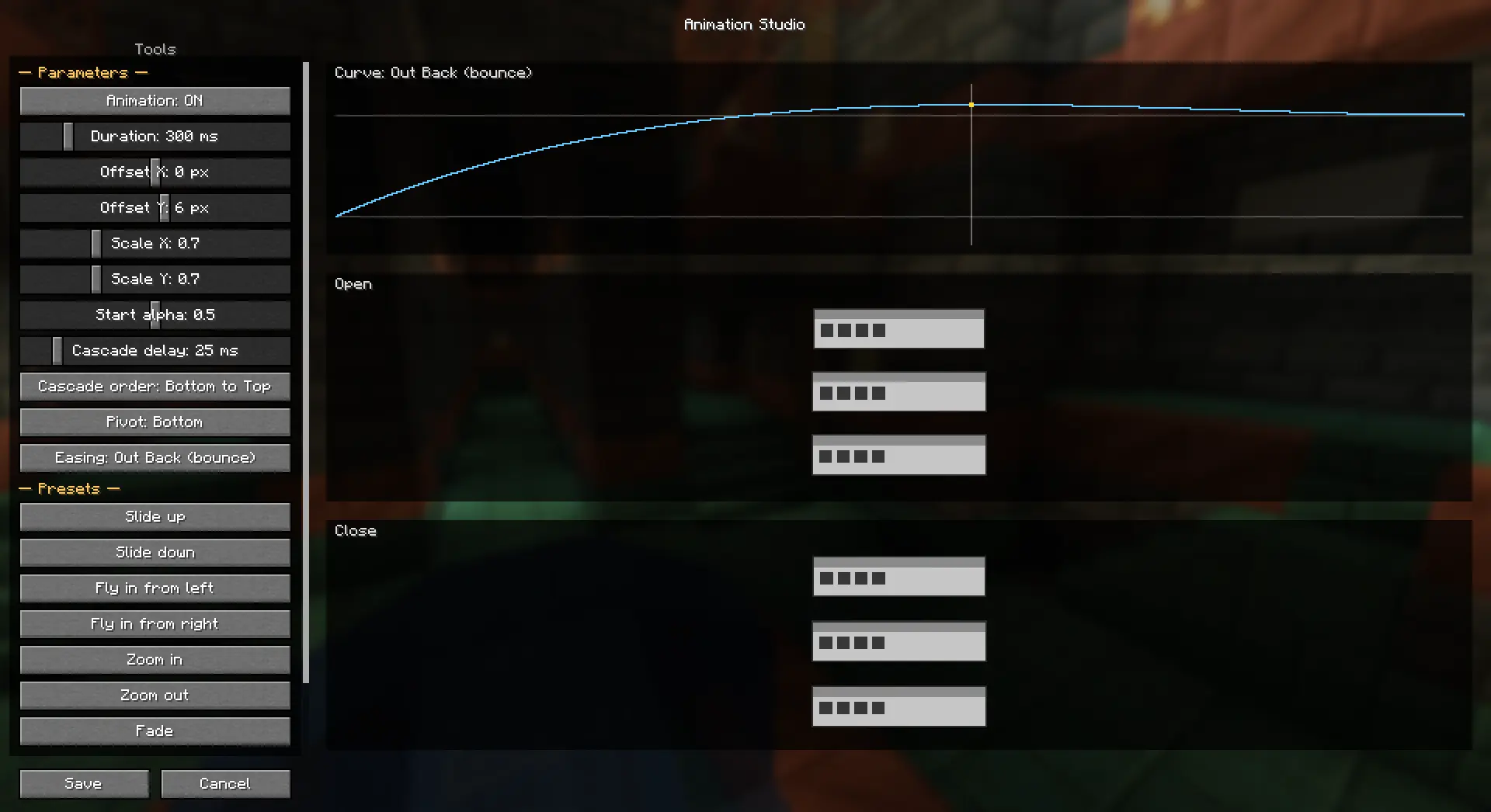
- Live sliders instead of typing numbers — grab a slider and the preview reacts instantly.
- Ready-made presets — one click each: Slide up / Slide down, Fly in from left / right, Zoom in / Zoom out, Fade, Pop. Great starting points you then tweak.
- A visual easing curve — a little graph of the selected curve, with a marker running along it so you can see the timing, not just its name.
- Two previews at once — one shows how the UI opens, the other how it closes, side by side, both looping. The preview elements are little UI panels now (not buttons), so they read like actual windows.
🧩 Presets and the editor finally play together
Before, turning the editor ON took over completely and the preset picker in the main settings stopped doing anything. That's fixed. The two are now separate layers that stack:
- Presets animate the whole screen — the panel slides/scales in as one piece. This is your "UI animation".
- The Studio / profile animates the buttons on top — the per-button fade and cascade. This is your "button animation".
So you can slide the whole menu in and have the buttons cascade over it, at the same time. Switch a preset while the editor is on — it works now.
✅ Button text stays glued to the button
The headline fix. When buttons animated — cascaded in, faded, scaled on hover — the text used to lag behind or stay solid while the frame moved and faded without it. Turns out Minecraft draws button text in a way that quietly ignored the fade in 1.21.1. ReAnimated now fades the text the same way it fades the frame, so text and frame animate as one. This also covers the player model in the inventory and long button labels (see below).
📏 Long labels and the inventory character stay in place
A related sync fix. Anything Minecraft clips while drawing — a long button label that scrolls, or the player model in your inventory — used to get cut off by a clip box that stayed put while the content animated, so it looked like it was lagging. The clip now follows the animation, so scrolling labels and the inventory character move with the panel instead of being sliced.
The Profile Editor is still here
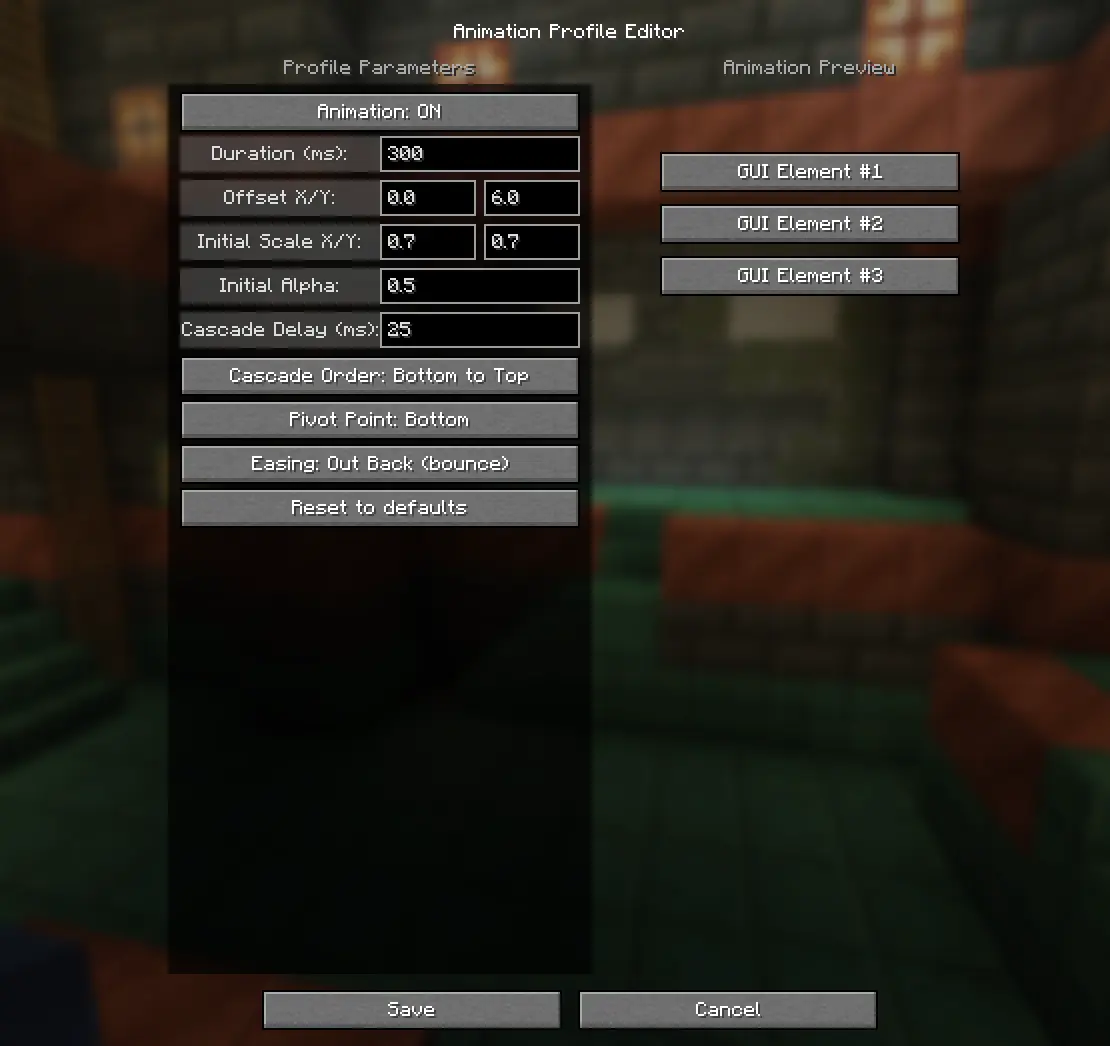
The original Profile Editor... (parameters on the left, live 3-element preview on the right) is untouched and edits the same profile. Use whichever you like.
Known limits of this beta
- Screen titles and text fields still don't fade — the mod can't fade a whole screen without taking the blurred background with it.
- The text fix covers real buttons (
PressableWidget). Sliders draw their label through a different path — if you spot a slider whose text doesn't fade in step, tell me and I'll cover it too. - Presets animate the screen; the profile animates buttons — so containers (chests, etc.), which have no button widgets, animate via the preset, not the Studio.
🇷🇺 Русский
🎬 Студия анимаций — соберите анимацию ползунками
В настройках ReAnimated, рядом с Редактором профиля, появилась кнопка «Студия анимаций...». Она правит ту же анимацию, но заточена под возню:
- Живые ползунки вместо ввода чисел — тянешь ползунок, превью откликается сразу.
- Готовые пресеты в один клик: Выезд снизу / сверху, Влёт слева / справа, Приближение / Отдаление, Проявление, Хлопок. Хорошая отправная точка, дальше подкручиваешь.
- Визуальная кривая easing — маленький график выбранной кривой с бегущим маркером: видно сам тайминг, а не только название.
- Два превью сразу — одно показывает, как UI открывается, второе — как закрывается, рядом, оба зациклены. Элементы превью теперь мини UI-панели (а не кнопки), читаются как настоящие окна.
🧩 Пресеты и эдитор наконец работают вместе
Раньше включение эдитора забирало всё себе, и селектор пресета в настройках переставал что-либо делать. Исправлено. Теперь это два отдельных слоя, которые складываются:
- Пресеты анимируют весь экран — панель выезжает/масштабируется единым куском. Это «анимация UI».
- Студия / профиль анимирует кнопки поверх — покнопочный фейд и каскад. Это «анимация кнопок».
Так можно выезжать всем меню и каскадить кнопки поверх — одновременно. Переключаешь пресет при включённом эдиторе — теперь работает.
✅ Текст кнопки держится за кнопку
Главный фикс. При анимации кнопок — каскад, фейд, увеличение под курсором — текст отставал или оставался сплошным, пока рамка ехала и гасла без него. Оказалось, Minecraft в 1.21.1 рисует текст кнопки так, что прозрачность тихо игнорировалась. Теперь ReAnimated гасит текст тем же путём, что и рамку, — текст и рамка анимируются как одно целое. Это же чинит модель игрока в инвентаре и длинные лейблы (ниже).
📏 Длинные лейблы и персонаж в инвентаре не разъезжаются
Смежный фикс синхрона. Всё, что Minecraft обрезает при отрисовке — длинный прокручиваемый лейбл кнопки или модель игрока в инвентаре — раньше резалось неподвижной областью обрезки, пока контент ехал, и выглядело как отставание. Теперь обрезка едет вместе с анимацией: и прокручиваемый текст, и персонаж двигаются с панелью, а не срезаются.
Редактор профиля на месте
Изначальный «Редактор профиля...» (параметры слева, живое превью из трёх элементов справа) не тронут и правит тот же профиль. Пользуйтесь любым.
Что эта бета пока не умеет
- Заголовки экранов и текстовые поля по-прежнему не растворяются — мод не может фейдить экран целиком, не утащив размытый фон.
- Фикс текста покрывает настоящие кнопки (
PressableWidget). Ползунки рисуют лейбл иначе — если заметишь ползунок, чей текст не гаснет в такт, скажи, добавлю и туда. - Пресеты анимируют экран, профиль — кнопки, поэтому контейнеры (сундуки и т.п.), где нет виджетов-кнопок, анимируются пресетом, а не Студией.
Загрузчики и версии / Loaders & versions
- Только Fabric / Quilt 1.21.1 (нужен Fabric API). Бета — остальные версии и NeoForge позже. / Fabric / Quilt 1.21.1 only (requires Fabric API). Beta — other versions and NeoForge later.
- Настройки в
config/reanimated.json, профиль — в полеprofile. Конфиг от 1.2 и от прошлой беты подхватывается как есть. / Settings live inconfig/reanimated.json, the profile in theprofilefield. Your 1.2 and earlier-beta config carry over as-is.
mod by @pycodder — https://modrinth.com/user/pycodder