


Links
Tags
Creators
Details
mc1.21.1-v0.2.2-r2
Compatibility
Changes
Rift Gun 0.2.2-r2 for Minecraft 1.21.1
Rift Gun 0.2.2-r2 adds per-gun appearance customization, independent Coordinate and Pairing portal groups, and more flexible surface sizing and portal exits. It also adds the Magic Circle visual, new sounds and shot animations, and fixes portal rendering, remote facing, and reusable relocation targets.
Highlights
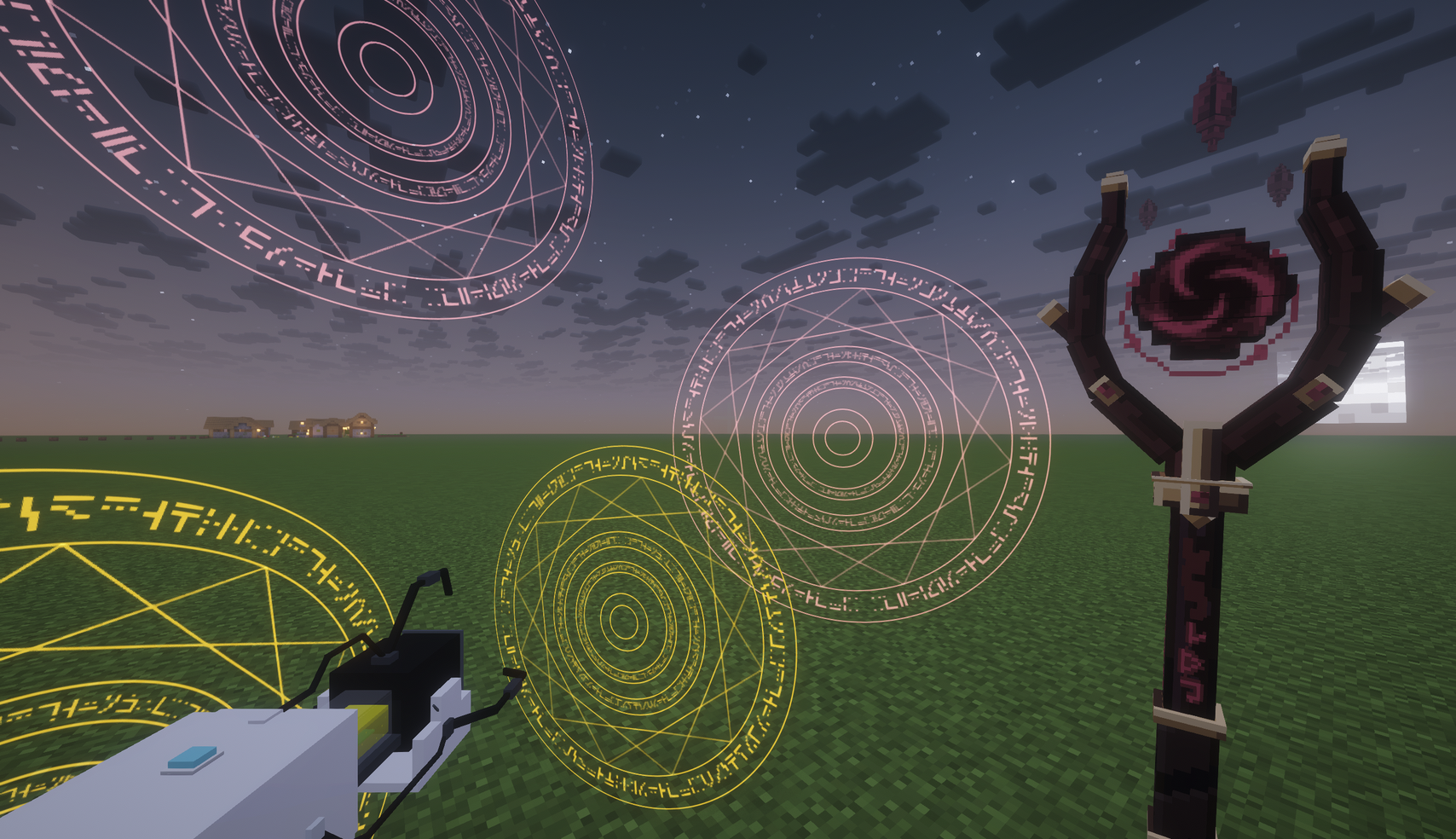
- Added Aperture-ish and Arcane Staff skins, with a Skin Module to unlock changes.
- Save portal visuals, sounds, and shot animation choices on each gun.
- Added a Color Module with HEX input and a color picker for display-only RGB.
- Added Magic Circle, Arcane sounds, Stars shot sound, and selectable shot animations.
- Keep Coordinate Travel and Portal Pairing portals open independently per player.
- Added a close-key radial for closing the portals of one mode.
- Added Full Support, Adaptive, and Prefer Large surface-size policies.
- Relaxed vertical exit collision checks and allowed floating portals below the world.
- Allow Xaero's Minimap 26.5.x on both supported Minecraft versions.
Gun Appearance and Sound
- Added Aperture-ish and Arcane Staff, with dynamic fuel/mode colors and support for resource-pack skins. The new Skin Module unlocks changing the gun skin. Removing it keeps the selected skin.
- Skin, portal visual, shot animation, and sound choices are saved on each gun. Open portals keep the presentation captured when opened.
- Apply the current skin's recommended sounds, portal visual,
and shot animation with one button. Three separate switches control automatic
recommendations when applying a skin. Presets are editable in client config;
CUSTOMkeeps the gun's current choice. - The Color Module customizes the gun and newly opened portals with a display-only
RGB color. Choose with a hue wheel and saturation/value square, enter
#RRGGBB, or restore the fuel color. Removing the module disables the override while preserving its setting. Fuel identity, consumption, cross-dimensional access, and instability are unaffected. - Magic Circle is a new portal visual with glowing runes, triangles, and two inner rings, with separate inner/outer rotation controls.
- Added Arcane shot, portal, and transit sounds, plus a separate Stars shot sound. Increased Arcane shot loudness. Fresh Arcane Staff presets use Arcane sounds, Magic Circle, and Swing; existing saved presets are preserved.
- Choose Off, Light recoil, Swing, or Dip. Recoil strength and timing remain configurable on the client.
Independent Coordinate and Pairing Portals
Each player can keep a Coordinate Travel portal pair and a Portal Pairing pair at the same time. Opening or replacing one mode's portals leaves the other mode's portals intact. Ownership is per player, not per gun.
- A short press of the close-portals key closes all of your portals.
- With Pairing available, hold that key to open a radial selector and close only Coordinate Travel or only Portal Pairing portals.
- The GUI close action continues to close all of your portals.
Surface Portal Sizes
The Portal Aperture Module now offers three surface-size policies:
Policy Behavior Full Support Uses 2x2 only when the supporting surface is complete. Adaptive (default) Uses 1x2 on exposed vertical two-block support and 1x1 on the top/bottom of an isolated block; otherwise prefers 2x2 with overhang. Prefer Large Prefers 2x2 even when the supporting surface is incomplete.
All three policies retain obstruction fallback. Adaptive and Prefer Large also use the existing player-relative priority when choosing the portal's position.
Portal Exits and Void Placement
- Ordinary vertical exits allow a closer exit position: approximately 0.41 blocks for a player, down from 0.85. If the position overlaps blocks, the traveler and passengers move up one block once. No alternate-position search is performed; horizontal exits and projectile placement keep their behavior.
- Floating portals can open below the world's minimum build height. Surface placement still needs a block face, and player void damage is unchanged.
Gun Data and Networking
- Skin, portal visual, shot animation, sound choices, and configured display color are stored on each gun. Open portals retain their captured presentation.
- Existing guns without presentation data migrate their previous effective visual/animation choices and saved sounds on first use.
- New guns initialize from the owner's preferences. Saved choices do not change automatically when presets are edited or the gun changes owners.
- Player destination data remains at schema 11.
The network protocol advances to 3. Protocol 2 and older peers are rejected.
Install the exact same Rift Gun build on the server and every client.
Rendering and Interface Fixes
- Fixed Magic Circle depth handling when clouds or water are behind the portal, including shader rendering paths.
- Added BSL 10.1.x support for the End Frame central surface. Unregistered shader packs keep the existing fallback.
- Fixed remote entrance facing and player view rotation during transit.
- Fixed Pairing-mode Entity Relocation targets so they can be reused.
- Refined gun/staff held positions, mode indicators, GUI icons, and translations.
- Kept the module-settings panel at its previous size, with Color beside Pairing in the first row. The close radial uses distinct mode colors and no bottom hint.
Stability and Performance
- Added a registry for dynamic particle effects with per-tick spawn and live-particle limits, distance culling, and cleanup when the client changes worlds.
- Preserve original portal splash size, opacity, lifetime, physics, and sprites. Remaining splashes finish naturally after a portal closes.
- Share GUI sprite definitions and alignment helpers across related screens.
No live-server performance profiling was completed for this candidate. Automated checks do not establish frame-time or tick-time behavior in every modpack.
License Changes
Original project code and assets in this release use Apache-2.0. Published
0.2.1-r1 and earlier releases retain their original licenses. Third-party
assets retain their own license terms and attribution. The main JAR includes
META-INF/LICENSE, notices, and third-party license texts.
Known Limitations
- Infinite Dimensions creates dimensions synchronously through its upstream API. A single new dimension can still produce a long server tick.
- Text targets cannot be previewed or resolved without Infinite Dimensions installed.
- The vertical-exit correction moves the traveler up one block once; it does not search for or guarantee a collision-free position.
- Automatic targets remain read-only apart from pinning and deletion.
- Unregistered shader packs retain the existing conservative fallback.
- Xaero's Minimap integration targets a verified implementation range rather than a stable independent waypoint API.
- Public Addon API stability is not guaranteed before Rift Gun 1.0.0.