Tags
Creators
Details
1.0.0-1.21.11
Compatibility
Changes
🎚️ Setting
For any suggestions or Bug Reports, Please DM @SupRani on Discord.
Save every game setting as a preset and switch between them in seconds — all from a clean in-game menu. No configs to edit, no restarts, no external tools.
📸 Full Snapshot
One preset captures your entire client at once — video, controls, accessibility, sound, skin, chat, and even your enabled resource packs and their exact load order. Select a preset and it writes everything straight back into the game, live.
🎛️ Category Toggles
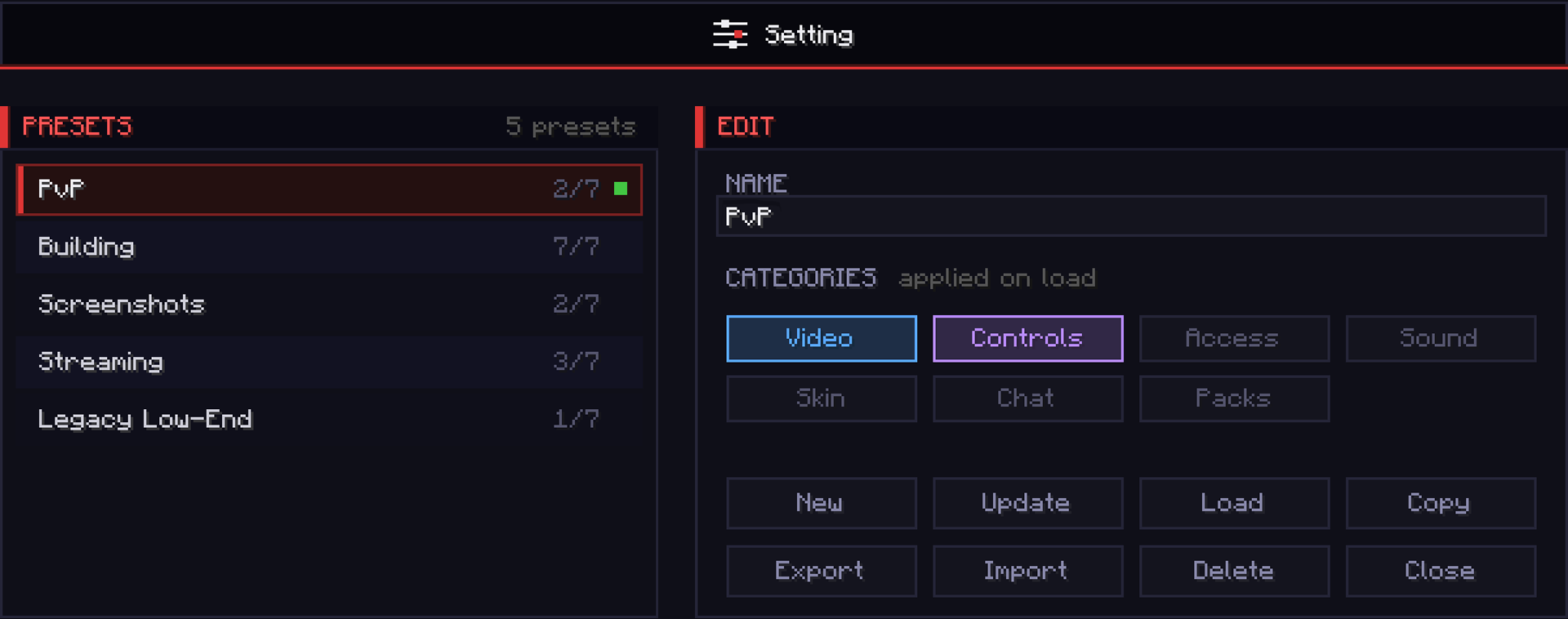
Every preset has 7 toggles, and only the ones you turn on are applied when you load it — so each preset controls exactly what you want and leaves everything else untouched.
- Video — render distance, FOV, GUI scale, max FPS, graphics
- Controls — mouse sensitivity and every keybind
- Accessibility — text background, narrator, screen effects
- Sound — every volume slider
- Skin — cape, body layers, and main hand
- Chat — opacity, width, colors, and delay
- Packs — enabled resource packs and load order
⚡ Instant Switching
Swap your whole setup mid-game with a single click. Jump between PvP, building, screenshots, and recording in a second — no digging through the vanilla options menus.
💾 Preset Manager
Save, rename, update, duplicate, and delete unlimited presets. A green dot marks the preset you're currently running, and an amber dot warns you the moment your live settings drift from it — so you always know when to re-save.
🔗 Share Codes
Export any preset to a single-line code and drop it into Discord. Import a friend's code to load their exact setup instantly — copy a pro's entire config in seconds.
🖥️ The GUI
This is not your average Minecraft settings screen. Setting features a fully custom-built dark UI — a scrollable preset list, colour-coded category chips, a clean button grid, and live active/drift indicators — built as a centered card that looks pixel-identical at every GUI scale. All inside the game, no external tools, no config file hunting.
Fabric 1.21.11