


Links
Tags
Creators
Details
0.1.2
Compatibility
Required content
Changes
StereoCraft: Stereoscopic 3D (Angelica edition)
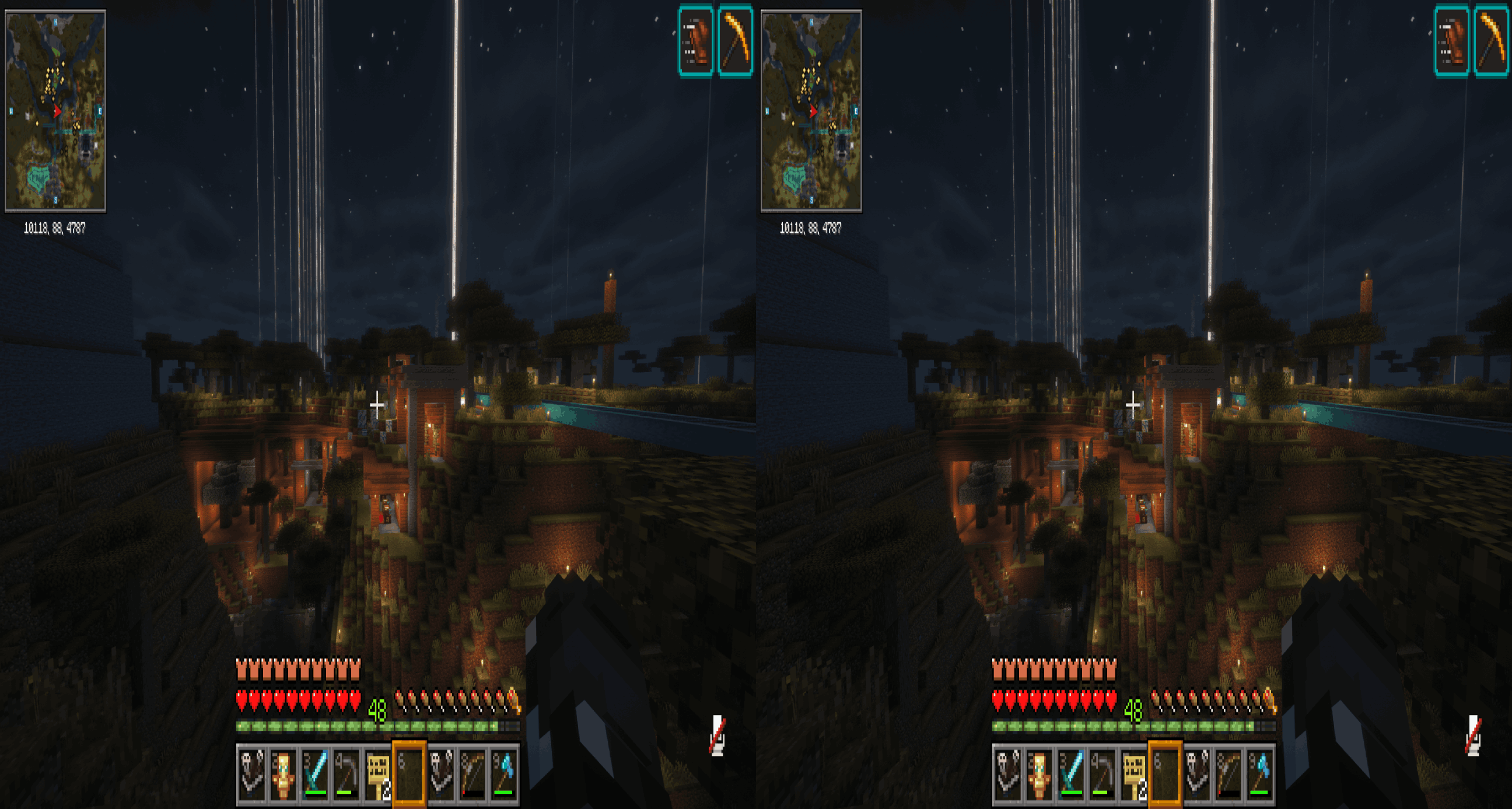
Side-by-side (SBS) stereoscopic 3D rendering for Minecraft 1.7.10 on the Angelica renderer (GTNH's Iris/Sodium/Embeddium fork). Splits the Minecraft window into left and right eye views with a configurable interpupillary distance (IPD), producing a stereoscopic image for 3D TVs, 3D monitors, SBS-capable HMDs, and VR passthrough virtual monitors.
This is the 1.7.10 sibling of the Fabric 1.21.11 StereoCraft mod — same features, ported to Forge.
Requirements
- Minecraft 1.7.10
- Forge 10.13.4.1614 or later
- Java 17 (via Angelica's
lwjgl3ify+jvmDowngraderchain — same JVM GTNH uses) - Angelica
[2.1,2.2)(hard dependency — bundles Sodium, Embeddium, and Iris) - GTNHLib 0.9.52 or later
Optional
- A shaderpack loaded through Angelica's bundled Iris — tested against BSL and Complementary Reimagined / Unbound. DH (Distant Horizons) terrain alignment is supported under shaders.
- Reverse-SBS displays / VR passthrough virtual monitors — toggle Swap eyes in Sodium options.
Installation
- Install Forge 10.13.4.1614+ for Minecraft 1.7.10 (use a launcher that supports Java 17 — e.g. PrismLauncher with the GTNH meta).
- Install Angelica
[2.1,2.2)and GTNHLib0.9.52+into yourmods/folder. - Grab
stereoscopic-vX.Y.Z.jarfrom the GitHub releases page and drop it intomods/. - Launch the game.
Configuration
Open the in-game options menu and go to Video Settings → Sodium → Stereoscopic (added by our Sodium options-page integration). From there:
- Mode —
OFF,SBS_FULL,SBS_HALF,OUDA_FULL,OUDA_HALF. Toggling triggers an Iris pipeline rebuild on the next frame, so the screen may flash briefly. - IPD (mm) — interpupillary distance, 55–75 mm anthropomorphic range. Default 64 mm.
- Convergence (blocks) — off-axis convergence distance. Objects at this depth sit at the screen plane (zero parallax); closer pops out, farther recedes. 0 = parallel-axis (no shear, everything pops out). Default 4.
- Swap eyes — flip which eye-render goes to which physical eye. Toggle if depth looks inverted on your display.
- HUD mode —
DUPLICATE(per-eye HUD),STRETCH(full-width across both eyes), orHIDE. - Debug: force eye — render only LEFT or RIGHT eye full-screen, for debugging per-eye divergence.
Persistent settings live at config/stereoscopic.cfg (standard Forge config format). Manual edits round-trip cleanly through the in-game options page.
Compatibility
- Iris shaderpacks: BSL, Complementary Reimagined, Complementary Unbound (all tested). Per-eye colortex banking keeps each eye's temporal slots (PBR reflection cache, TAA history, screen-space colored blocklight) separate so eyes don't cross-contaminate. DH-projection shear restoration keeps Distant Horizons terrain aligned with regular chunks under shaders.
- Distant Horizons: works under shaders (Iris's DH path is shear-corrected per eye) and without shaders.
- Xaero's minimap: minimap renders once per frame (gated by frame counter), not twice — won't double-draw under our two-pass renderWorld.
- ChromaticTooltips: tooltip overlay positions per eye.
- HUDCaching (Angelica feature): HUD caches at full resolution once per frame, then blit-duplicates per eye.
Known limitations
- Async cursor presents Windows-only: the cursor-mirroring feature that keeps the OS cursor smooth at low FPS uses Win32 cursor APIs. On Linux/macOS the cursor will only appear in one eye while a screen (inventory, chat, options) is open.
- NEI overlay: works, but extra-large item tooltips may slightly clip at the eye-half boundary because NEI's overlay uses display-pixel coords.
- Iris pipeline first-frame rebuild: on world load, Iris loads its pipeline once before our stereo state is published. We auto-trigger a rebuild on the first stereo-active frame — you may see a one-frame flash.
- Sodium chunk visibility cull: BFS skipped on the second eye (chunks visible to one eye are visible to the other at typical IPD). At extreme IPD / convergence settings near a chunk boundary you might see a missing-chunk artifact for one frame.
Screenshot
License
LGPL-3.0-only. See LICENSE.