


Tags
Creators
Details
Licensed ARR
Published last year
Updated 5 days ago
All versions
2.3.1
wynnmod 2.3.14 months ago 2,311
Compatibility
Minecraft: Java Edition
Platform
Supported environments
Changes
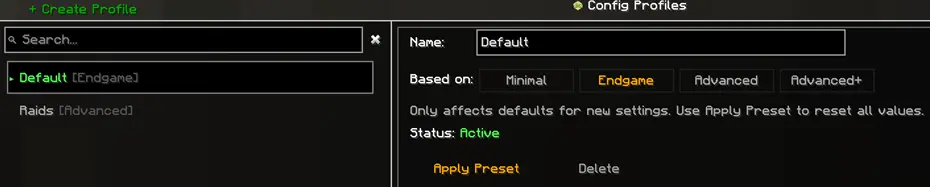
Config Profiles & Presets
Wynnmod config now supports multiple profiles and presets for quickly setting up which features are enabled.
Access via Config → Profiles (bottom left of the config menu)
Profiles
- Create, rename, switch, and delete config profiles
- Each profile stores its own config settings
- Some settings (e.g. favorites, telemetry, API token) remain global across all profiles
Presets
Each profile has a base preset that controls which features or settings are enabled by default:
- Minimal: Only the core passive & lightweight features
- Endgame: Balanced preset for endgame players (Default)
- Advanced: Enables more aggressive features, such as combat and session overlays
- Advanced+: Enables more features similar to Wynntils, both mods' effects may appear at once
You can apply a preset to a profile at any time from the profile screen.
Presets are just a starting point, you can fine-tune settings in any profile afterwards.
Migration
- Existing config will be automatically migrated to the new profile system on first launch
- Your migrated settings will be kept in a "Default" profile
The Nameless Anomaly
Default enabled for Endgame and above profiles
Flooding Canyon (Room 1)
- Void rift waypoints
- Shaman berry lineup waypoints (Make sure you have scanned your ability tree)

Weeping Soulroot (Room 2)
- Countdown and status overlay for void holes (default enabled for Advanced and above profiles)
- Renders an optimal path to the detected grotto color
- Available path styles: Line, Tube(default), Dots
- Path color can be configured

Blueshift Wilds (Room 3)
- Display warning overlay when a Bulb Keeper spawn audio cue is detected
- Display direction arrow to the Bulb Keeper spawn audio cue

The Canyon Colossus
Default enabled for Endgame and above profiles
The Canyon Colossus (Boss Room)
- Overlay showing active core count (default disabled)
- Warning overlay shown when spawned cores reach a configurable threshold (default disabled)
Changes & Fixes
- Added sacrificed pulls to lootrun information overlay
- Updated lootrun logic (fixed wrong beacon counts)
- Fixed an issue gathering telemetry
- Improved blood sorrow detection