


Creators
Details
1.0.2
Compatibility
Required content
Changes
✦ Usage
Install the mod on both the dedicated server and every client that should see or manage regions. Players without the client mod will not see the map overlay.
Open Xaero's World Map and use the region controls: R opens the region drawing workflow on Xaero's map screen when the player is an operator in creative mode. P places polygon points while drawing. Middle mouse click places polygon points while drawing. T opens the region manager while in normal camera/game view. Only operators in creative mode can create, edit, delete, or upload icons. All players with the mod installed can view synced regions, limited by their own Xaero explored-map data.
✦ What It Does
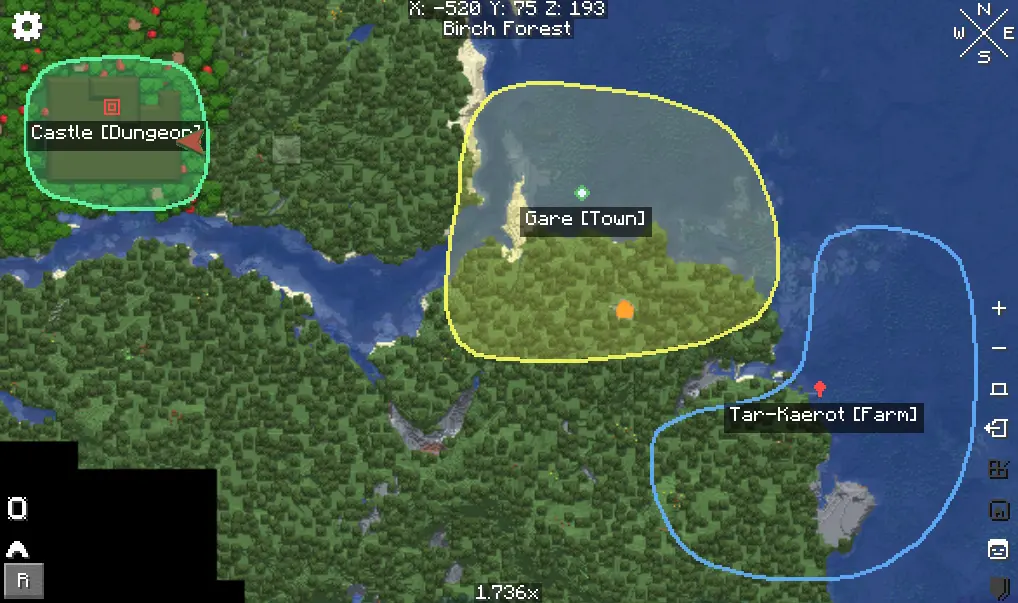
Lets operators in creative mode draw freeform polygon regions on Xaero's World Map.
Supports named regions, ARGB colors, alpha/opacity, optional categories, predefined icons, and custom PNG icons.
Stores all region data on the server and syncs it to every connected client.
Restricts create, edit, delete, and icon upload packets on the server to players who are both operators and in creative mode.
Respects Xaero's explored-map data so regions only render where the player has already explored the map.
Fades newly revealed region portions in over about 1.5 seconds.
Shows region entry titles when a player crosses into a region, with optional Traveler's Titles reflection support and an internal fallback overlay.
Persists regions and custom icon metadata through world SavedData.
✦ Dependencies
Use these dependencies when publishing and when building a server pack.
Kotlin for Forge | Tested ver: 5.6.0 required because this mod is written in Kotlin. Xaero's World Map | Tested ver: 1.40.16 XaeroLib | Tested ver: 1.1.15 Traveler's Titles | Optional -> Tested by reflection only | If absent, Xaero Regions uses its built-in title overlay.
Important: do not redistribute xaeroworldmap-neoforge-1.21.1-1.40.16.jar
inside this mod jar or inside this repository release artifact. Xaero's World
Map is an external dependency with its own license.