Joining your server just got easier
Share your server with friends directly in the app. When they accept, we'll create an instance for them that's managed by your server.
Posted on November 2, 2026 Modrinth Team
Hey everyone!
Running a modded server with friends has always involved a lot of manual work, from making sure everyone has the right mods installed to keeping everything up to date.
With this Modrinth Hosting update, we're making that process a whole lot easier. You can now manage server and player content all in one place and invite friends to play directly through the Modrinth App.
TL;DR
- Invite friends to play on your server by Modrinth username or link.
- Manage the instance your friends use to play from your server.
- Share client-side mods, resource packs, and shaders from your server.
- Export your server's player content as an
.mrpackfor other launchers. - Existing servers require a one-time migration before sharing.
Managing server and player content
From your server's Content tab, you can now manage both the content installed on your server and the content you want to share with your players, whether it's required to join or just something you'd like them to have. We've added a new "Enabled for" column that lets you choose where each piece of content goes:
- Server: Content installed only on your server.
- Player: Content shared only with your players.
- Both: Content installed on your server and shared with your players.
Managing content for your players
This means you can add content that previously wouldn't have made sense to install on a server, such as client-side performance mods, resource packs, and shaders.
When installing content from Modrinth, we'll automatically determine where it should go based on the version's environment information. For example, installing a client-side mod will enable it for Players under the "Enabled for" column rather than installing it on the server.
In some cases, content may need to be enabled somewhere unexpected, such as when a server-side mod depends on a client-side-only mod. We'll flag these cases with a warning so you can review them.
We've also added new filters to Discover and the Content tab to make it easier to find and organize content based on where it's installed.
Inviting friends to your server
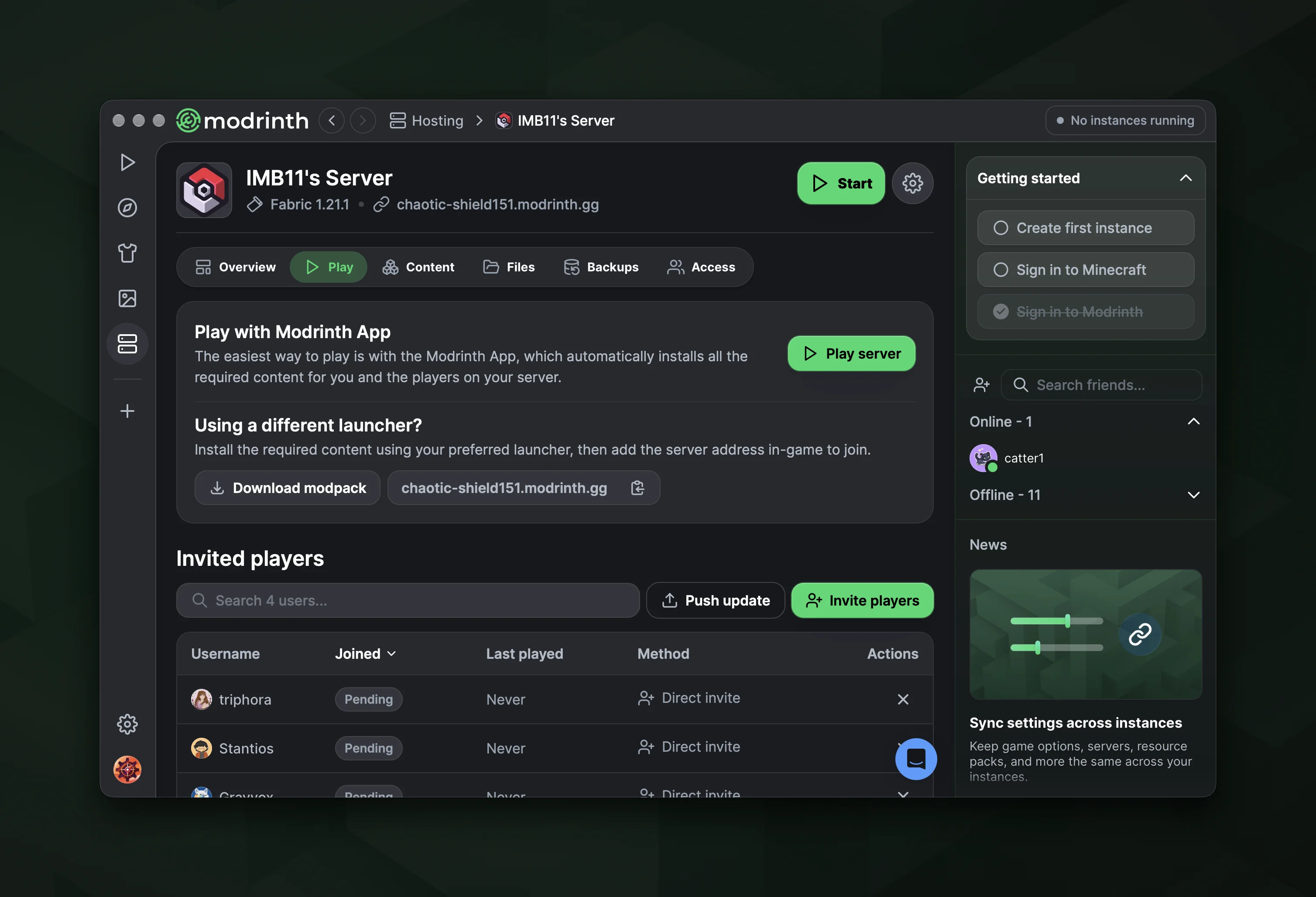
Now that your server and player content are managed in one place, we've introduced a new Play tab to make sharing your server easier.
You can invite friends using their Modrinth username or create a shareable link to send to anyone.
When someone accepts an invite, a shared instance is created in their Modrinth App that's tied directly to your server. You can push updates to this instance whenever you change the content enabled for players.
The Play button also launches Minecraft directly into your server without needing to enter an address.
Sharing with other launchers
You can export the content enabled for players as an .mrpack modpack, which can be imported into other compatible launchers and clients.
This gives you the flexibility to share your server's content however you want, while keeping everything managed from the same Content tab.
For current servers
If you're already hosting a server on Modrinth, there's one additional step before you can share it with friends.
Before this update, we automatically excluded client-side content that could misbehave on your server. For example, if you installed a modpack, some content your players need would be missing.
To fix this, we've added a migration process that reinstalls your content and determines whether it should be enabled for your server, players, or both. We'll create a backup before migrating so you can restore your server if anything goes wrong.
You can complete this migration the first time you try to share your server through the new Play tab.