


Tags
Creators
Details
All versions
2.4.0
denizen-reflect 2.4.04 months ago 61
Compatibility
Minecraft: Java Edition
Platforms
Changes
denizen-reflect 2.4.0
Add:
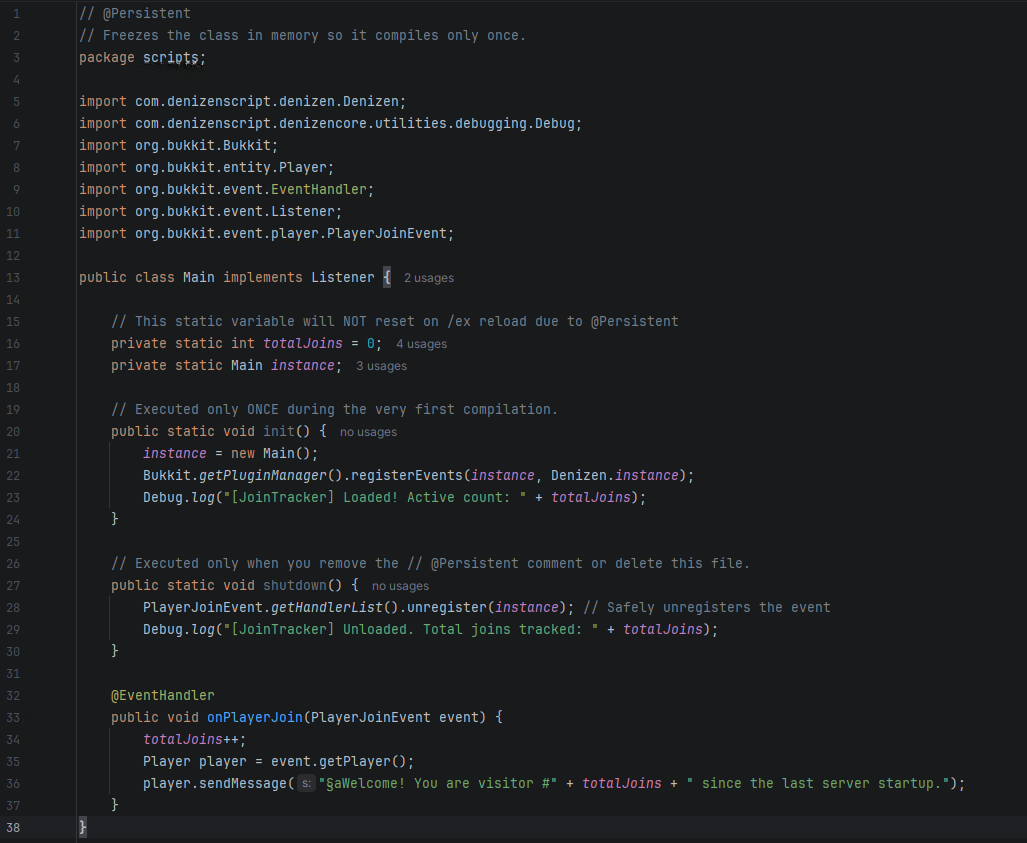
Java Scripts (.java Script Support):
Write and execute native Java classes directly in your plugins/Denizen/scripts/ folder. They compile on-the-fly during "/ex reload" and run with 100% native Java performance.
The // @persistent State Control
Control the compilation lifecycle by adding a // @persistent comment at the very top of your .java file:
- Volatile (Default - No comment): Recompiles from scratch on every "/ex reload". Best for active development and quick testing.
- Persistent (Add // @persistent): Compiles only once and "freezes" in memory, protecting static variables from resetting. Use this when you have completely finished developing the class.
Architecture:
To prevent memory leaks during reloads, the system uses a strict classloader hierarchy. You must follow these visibility rules:
- ✅ Volatile scripts CAN see and use Persistent classes.
- ✅ Persistent classes CAN see and use other Persistent classes.
- ❌ Persistent classes CANNOT reference Volatile scripts. Doing so will trap the old volatile script in memory and eventually crash the server with an OutOfMemoryError.
Lifecycle Methods:
You can optionally implement two static methods that the system invokes automatically:
- public static void init(): Executed immediately after successful compilation.
- public static void shutdown(): Executed right before the script is reloaded or deleted (used for cleanup).
For more information, visit the documentation website.
Fix:
TagCommand:
Fixed custom base tags not supporting sub-tags.
CustomCommand:
Fixed custom commands ignoring execution determinations.