


Tags
Creators
Details
5.2.0
Compatibility
Required content
Changes
ResourceWorldResetter 5.2.0
Typed world and network evacuation, configuration isolation, complete localization, and safer asynchronous resets.
Highlights
- Evacuate players to the default overworld, loaded local worlds, named Velocity/BungeeCord backend servers, or destinations registered by add-ons through API 5.2.0.
- Discover proxy destinations through the BungeeCord-compatible
GetServerschannel and verify that players actually leave before regeneration begins. - Configure destination types, targets, and bounded transfer timeouts through
/rwr gui. - Move GUI-managed worlds and teleport overrides to
managed-worlds.yml, with automatic import from combined version 5 configurations. - Localize commands, notifications, GUIs, history, status values, and teleport outcomes in English, Simplified Chinese, Japanese, and Korean.
- Deliver MiniMessage components through a bundled, relocated Adventure platform bridge on Spigot/CraftBukkit and native Adventure on Paper/Purpur/Folia.
- Harden Folia scheduling, teleport admission, locale fallback, update reloads, and post-regeneration state restoration.
Proxy setup
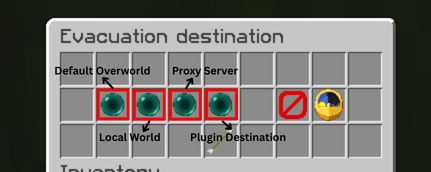
Velocity requires bungee-plugin-message-channel = true. The configured destination target must exactly match a backend key in the proxy configuration. RWR sends a transfer request and then waits for actual departure; a plugin message alone is not treated as success. No separate proxy-side RWR plugin is required.
Upgrade notes
Back up the complete RWR data folder and managed worlds before replacing the JAR. Existing combined version 5 world definitions are imported into managed-worlds.yml. If upgrading customized messages from messages.yml, copy them into the selected locales/<locale>.yml.
Install exactly one artifact:
RWR-Spigot-5.2.0.jarfor Spigot/CraftBukkit with Multiverse-Core 5.8.0+.RWR-Paper-Folia-5.2.0.jarfor Paper/Purpur/Folia with Worlds 4.4.0+.
See the full release notes, changelog, and evacuation setup guide.