Compatibility
Minecraft: Java Edition
Platforms


Links
Tags
Creators
Details

If you use a pickaxe with the silk touch enchantment while breaking a spawner, you will receive the spawner you broke. When placing the spawner again, the spawner will spawn the mob it spawned when breaking it.
Compatible with Paper, Spigot, Purpur, Bukkit and Folia servers.
QuickStart
Want to use SilkSpawners without configuring permissions or anything else? Install the plugin and run this command as an admin or from the console, then confirm as prompted:
/silkspawners setup
Commands
/silkspawners help [command]/silkspawners give <player> <entity> [amount]/silkspawners set <entity>/silkspawners explosion <enable/disable/setting> <player>/silkspawners locale <setting/reload/restore>/silkspawners config <reload/get/set> [setting] [value]/silkspawners config explosion <list/add/remove> [all/normal/silktouch] [values]/silkspawners setup [confirm/revert]/silkspawners entities/silkspawners version/silkspawners dump
Permissions
Commands
- silkspawners.command.give - Use this command to give spawners to players.
In addition, set silkspawners.command.give.* to allow all entities or replace the star with an entity name.
- silkspawners.command.set - Use this command to change already placed spawners.
In addition, set silkspawners.command.set.* to allow all entities or replace the star with an entity name.
- silkspawners.command.explosion - Use this command to temporarily enable or disable spawner explosions for a specific player.
- silkspawners.command.locale - Use this command to reload and restore locale files.
- silkspawners.command.config - Use this command to view and reload the configuration, including the explosion tiers.
In addition, set silkspawners.command.config.set to allow changing settings and explosion tiers.
- silkspawners.command.setup - Use this command to disable or restore the permissions needed to use spawners.
- silkspawners.command.entities - Use this command to see the entities you can use in permissions and commands.
- silkspawners.command.version - Use this command to see if updates are available.
- silkspawners.command.dump - Use this command to create a diagnostic report for support requests.
Spawners
- silkspawners.break.* - Permission to set if players will receive destroyed spawners.
- silkspawners.place.* - Permission to set if players can place silk spawners.
- silkspawners.change.* - Permission to set if players can change spawners with eggs.
- silkspawners.explosion - If set, spawner explosion is enabled.
If you want to allow only specific types of spawners you can replace the * with an entity name. Use the entities command to see spawnable entities.
Configuration
Default configuration:
messages:
  prefix: $8[$bSilkSpawners$8] # The plugin prefix used in all messages
  locale: en # The locale file to be used
spawner:
  dropChance: 100 # Probability that the spawner will drop when mined (0-100)
  destroyable: true  # If set to false, it won't be possible to destroy spawners without SilkTouch or without the permission
  pickaxeRequired: true # If set to false, spawners will always drop regardless of what the player is holding in his hand
  silktouchRequired: true # If set to false, spawners will drop even if the used pickaxe does not have SilkTouch
  silktouchLevel: 1 # The minimum SilkTouch level the pickaxe needs to mine spawners, at least 1 (useful for custom pickaxes with higher enchantment levels)
  item:
    name: $d{entity} Spawner # The name of the spawner item dropped, {entity} is replaced with the mob name
    color: $e # The color of the mob name in chat messages
    prefixOld: [] # Lore prefixes used by spawner items from older plugin versions, kept so those items stay recognized
    lore: ['$7Spawns $e{entity}'] # The lore of the spawner item, {entity} is replaced with the mob name
  explosion:
    all: [] # Explosion tiers rolled whenever spawners are mined, with or without SilkTouch (see below)
    normal: [] # Explosion tiers rolled when spawners are mined without SilkTouch (see below)
    silktouch: [] # Explosion tiers rolled when spawners are mined with SilkTouch (see below)
  message:
    denyDestroy: true # If set to true, a message will be sent to the player if the spawner cannot be destroyed
    denyPlace: true # If set to true, a message will be sent to the player if the spawner cannot be placed
    denyChange: true # If set to true, a message will be sent to the player if the spawner cannot be changed
  permission:
    disableDestroy: false # If set to true, no permission is required to receive destroyed spawners
    disablePlace: false # If set to true, no permission is required to place spawners
    disableChange: false # If set to true, no permission is required to change spawners with eggs
update:
  configVersion: 4 # Do not change this value manually! It is automatically managed by the plugin
  check:
    enabled: true # If set to true, the plugin will check for updates
    interval: 24 # The interval in hours at which to check for updates, at least 1
hooks:
  shopguiplus: true # If set to true, SilkSpawners will hook into ShopGUI+ if it is installed
If you want to use a dollar sign in a value, you can escape it by putting a backslash in front of it.
All messages (in the configuration and in locale files) can be formatted with either legacy color codes or MiniMessage tags. Mixing both formats within the same message is not supported.
Changing settings in game:
/silkspawners config get <setting>shows the current value and what the setting does/silkspawners config set <setting> <value>changes it in theconfig.ymlfile
Settings and values are tab completed. Changing settings requires the silkspawners.command.config.set permission. Changes take effect immediately, except for hooks.shopguiplus, which needs a server restart. Lists can only be changed in the file, and explosion tiers are managed with /silkspawners config explosion (see below).
Explosion tiers:
Mined spawners can explode for players with the silkspawners.explosion permission: explosion.normal tiers apply when mining without SilkTouch, explosion.silktouch with it, and explosion.all to both. Each tier needs a chance in percent and an explosion power (TNT is 4.0). The example below gives a 50% chance of a small explosion, 30% of a large one and 10% of a massive one that also ignites fires:
spawner:
  explosion:
    normal:
    - chance: 50
      power: 2.0
    - chance: 30
      power: 4.0
    - chance: 10
      power: 8.0
      setFire: true # Optional: the explosion ignites fires (default false)
      breakBlocks: true # Optional: the explosion damages surrounding blocks (default true)
Changing tiers in game:
/silkspawners config explosion list [all/normal/silktouch]shows the configured tiers/silkspawners config explosion add <all/normal/silktouch> <power> [chance] [setFire] [breakBlocks]adds a tier/silkspawners config explosion remove <all/normal/silktouch> <tier>removes a tier by its number in the list
Adding and removing tiers requires the silkspawners.command.config.set permission. Changes made with the command take effect immediately. Changes made in the file take effect after /silkspawners config reload or a server restart.
Custom messages

New and reworded messages are applied to your locale files automatically on startup. Messages you edited yourself are never touched, so a customized message keeps its wording across updates.
Use /silkspawners locale restore confirm only to discard your own edits and return every message to the bundled default.
If you want to create your own locale file, you should create a new file to prevent your changes from being overwritten when you restore the locale files.
Locale files must be named accordingly to the messages_myfile.properties naming schema and can be used by setting myfile as locale.
If you have created your own translation, it would be awesome if you could submit it at our translation program, so other people can use it too.
Default messages file
SPAWNER_DESTROY_DENIED = $7You can't break this spawner.
SPAWNER_PLACE_DENIED = $7You can't place this spawner.
SPAWNER_CHANGE_DENIED = $7You are not allowed to change this spawner.

COMMAND_NOT_FOUND = $eCommand not found.$7\nAvailable commands\: \n{0}
COMMAND_INSUFFICIENT_PERMISSIONS = $cYou do not have the permission to execute this command.

COMMAND_SILKSPAWNERS_HELP_USAGE = $ePlease use /silkspawners help [command]
COMMAND_SILKSPAWNERS_HELP_MESSAGE = $7You can execute the following commands\: \n{0}\nUse /silkspawners help <command> for detailed info
COMMAND_SILKSPAWNERS_HELP_MESSAGE_HELP = $7Use this command to show information about the commands you can use. \nUsage\: /silkspawners help [command]
COMMAND_SILKSPAWNERS_HELP_COMMAND_NOT_FOUND = $7The command $c/silkspawners {0}$7 does not exist.
COMMAND_SILKSPAWNERS_HELP_MESSAGE_EXPLOSION = $7Use this command to temporarily enable or disable spawner explosions for a specific player. \nUsage\: /silkspawners explosion <enable/disable/setting> <player>
COMMAND_SILKSPAWNERS_HELP_MESSAGE_GIVE = $7Use this command to give spawners to players. \nUsage\: /silkspawners give <player> <entity> [amount]
COMMAND_SILKSPAWNERS_HELP_MESSAGE_SET = $7Use this command to change already placed spawners. \nUsage\: /silkspawners set <entity>
COMMAND_SILKSPAWNERS_HELP_MESSAGE_ENTITIES = $7Use this command to see entities that can be used in commands and permissions. \nUsage\: /silkspawners entities
COMMAND_SILKSPAWNERS_HELP_MESSAGE_VERSION = $7Use this command to see, if updates are available. \nUsage\: /silkspawners version
COMMAND_SILKSPAWNERS_HELP_MESSAGE_LOCALE = $7Use this command to see the currently used locale, to reload the locale files and to restore them from the .jar file. New and reworded messages are applied automatically on startup, so restoring is only needed to discard your own changes. \n$eWarning\! All custom changes will be lost if not previously saved\!$7\nUsage\: /silkspawners locale <setting/reload/restore>
COMMAND_SILKSPAWNERS_HELP_MESSAGE_CONFIG = $7Use this command to view and change settings, to manage the explosion tiers rolled when spawners are mined and to reload the configuration from the config.yml file. \nUsage\:\n/silkspawners config reload\n/silkspawners config get <setting>\n/silkspawners config set <setting> <value>\n/silkspawners config explosion <list/add/remove>
COMMAND_SILKSPAWNERS_HELP_MESSAGE_DUMP = $7Use this command to upload a diagnostic report you can attach to support requests. \nUsage\: /silkspawners dump
COMMAND_SILKSPAWNERS_HELP_MESSAGE_SETUP = $7Disables or restores the permissions needed to use spawners, so anyone can break, place and change them without a permissions plugin. \nUsage\: /silkspawners setup [confirm/revert]

COMMAND_SILKSPAWNERS_GIVE_USAGE = $ePlease use /silkspawners give <player> <entity> [amount]
COMMAND_SILKSPAWNERS_GIVE_PLAYER_NOT_FOUND = $7The player $c{0}$7 is not online.
COMMAND_SILKSPAWNERS_GIVE_ENTITY_NOT_FOUND = $7The entity $c{0}$7 is no valid spawner mob.
COMMAND_SILKSPAWNERS_GIVE_INSUFFICIENT_ENTITY_PERMISSION = $7You do not have the permission to give $c{0}$7 spawners to players.
COMMAND_SILKSPAWNERS_GIVE_INVALID_AMOUNT = $7The amount $c{0}$7 is no number.
COMMAND_SILKSPAWNERS_GIVE_TOO_SMALL_AMOUNT = $7The amount must be at least 1.
COMMAND_SILKSPAWNERS_GIVE_SUCCESS = $7Gave {0} {1}$7 spawner{2} to {3}.
COMMAND_SILKSPAWNERS_GIVE_SUCCESS_TARGET = $7You received {0} {1}$7 spawner{2} by {3}.
COMMAND_SILKSPAWNERS_GIVE_SUCCESS_SELF = $7Gave {0} {1}$7 spawner{2} to yourself.

COMMAND_SILKSPAWNERS_SET_USAGE = $ePlease use /silkspawners set <entity>
COMMAND_SILKSPAWNERS_SET_PLAYERS_ONLY = $7This command can only be used by players.
COMMAND_SILKSPAWNERS_SET_ENTITY_NOT_FOUND = $7The entity $c{0}$7 is no valid spawner mob.
COMMAND_SILKSPAWNERS_SET_INSUFFICIENT_ENTITY_PERMISSION = $7You do not have the permission to set spawners to $c{0}$7.
COMMAND_SILKSPAWNERS_SET_INVALID_TARGET = $7You must look at a spawner to change.
COMMAND_SILKSPAWNERS_SET_SUCCESS = $7Successfully set spawner to {0}$7.
COMMAND_SILKSPAWNERS_SET_UNCHANGED = $7The spawner is already set to {0}$7.

COMMAND_SILKSPAWNERS_EXPLOSION_USAGE = $ePlease use /silkspawners explosion <enable/disable/setting> <player>
COMMAND_SILKSPAWNERS_EXPLOSION_PLAYER_NOT_FOUND = $7The player $c{0}$7 is not online.
COMMAND_SILKSPAWNERS_EXPLOSION_ENABLED = $cEnabled $7spawner explosion for {0}.
COMMAND_SILKSPAWNERS_EXPLOSION_DISABLED = $aDisabled $7spawner explosion for {0}.
COMMAND_SILKSPAWNERS_EXPLOSION_SETTING_ENABLED = $7Explosions for {0} are currently $cenabled$7.
COMMAND_SILKSPAWNERS_EXPLOSION_SETTING_DISABLED = $7Explosions for {0} are currently $adisabled$7.

COMMAND_SILKSPAWNERS_ENTITIES_USAGE = $ePlease use /silkspawners entities
COMMAND_SILKSPAWNERS_ENTITIES_MESSAGE = $7You can use the following entities in commands and permissions\: {0}

COMMAND_SILKSPAWNERS_VERSION_USAGE = $ePlease use /silkspawners version
COMMAND_SILKSPAWNERS_VERSION_INFO = $aYou are up to date.$7\nThe currently installed version is v{0}
COMMAND_SILKSPAWNERS_VERSION_UPDATE_AVAILABLE = %link%$7\nThe currently installed version is v{0}\nThe latest version is v{1}
COMMAND_SILKSPAWNERS_VERSION_UPDATE_AVAILABLE_LINK = $b$nAn update is available\!
COMMAND_SILKSPAWNERS_VERSION_ERROR = $cUpdate checking is disabled. $7\nThe currently installed version is v{0}

COMMAND_SILKSPAWNERS_LOCALE_USAGE = $ePlease use /silkspawners locale <setting/reload/restore>
COMMAND_SILKSPAWNERS_LOCALE_SETTING = $7The currently used locale is {0}. Available locales are\: {1}
COMMAND_SILKSPAWNERS_LOCALE_RELOAD_SUCCESSFUL = $7The locale was reloaded successfully.
COMMAND_SILKSPAWNERS_LOCALE_RELOAD_ERROR = $cAn error occurred reloading the locale.
COMMAND_SILKSPAWNERS_LOCALE_INCOMPLETE = $eThe locale {0} is incomplete ({1}% translated).$7 Untranslated messages are shown in English.\nYou can help completing the translation at {2}
COMMAND_SILKSPAWNERS_LOCALE_RESTORE_WARNING = $eWarning\!$7 Restoring the locale files will $coverwrite all changes$7.\n If you want to proceed, run %link%.
COMMAND_SILKSPAWNERS_LOCALE_RESTORE_WARNING_LINK = $b$n/silkspawners locale restore confirm
COMMAND_SILKSPAWNERS_LOCALE_RESTORE_SUCCESSFUL = $7The locale files were restored and reloaded successfully.
COMMAND_SILKSPAWNERS_LOCALE_RESTORE_ERROR = $cAn error occurred.$7 Please contact the developer if this problem persists.

COMMAND_SILKSPAWNERS_CONFIG_USAGE = $ePlease use /silkspawners config <reload/get/set/explosion>
COMMAND_SILKSPAWNERS_CONFIG_RELOAD_SUCCESSFUL = $7The config was reloaded $asuccessfully$7.
COMMAND_SILKSPAWNERS_CONFIG_RELOAD_ERROR = $7An $cerror$7 occurred reloading the configuration. Please check the server logs.
COMMAND_SILKSPAWNERS_CONFIG_COMMAND_NOT_FOUND = $7The command $c/silkspawners config {0}$7 does not exist. Use tab completion to see the available commands.
COMMAND_SILKSPAWNERS_CONFIG_GET_USAGE = $ePlease use /silkspawners config get <setting>
COMMAND_SILKSPAWNERS_CONFIG_SET_USAGE = $ePlease use /silkspawners config set <setting> <value>
COMMAND_SILKSPAWNERS_CONFIG_KEY_NOT_FOUND = $7The setting $c{0}$7 does not exist. Use tab completion to see the available settings.
COMMAND_SILKSPAWNERS_CONFIG_GET_VALUE = $7{0} is set to $e{1}$7\n{2}
COMMAND_SILKSPAWNERS_CONFIG_SET_SUCCESSFUL = $7{0} was set to $e{1}$7.
COMMAND_SILKSPAWNERS_CONFIG_SET_ERROR = $7The value $c{1}$7 cannot be used for {0}\: $c{2}
COMMAND_SILKSPAWNERS_CONFIG_SET_UNKNOWN_VALUE = $7The value $c{1}$7 cannot be used for {0}. Available values\: $e{2}
COMMAND_SILKSPAWNERS_CONFIG_NOT_SETTABLE = $7{0} can only be viewed and changed in the config.yml file.
COMMAND_SILKSPAWNERS_CONFIG_SET_RESTART_REQUIRED = $eThe new value for {0} takes effect after a server restart.
COMMAND_SILKSPAWNERS_CONFIG_SET_RELOAD_ERROR = $7{0} was saved as $e{1}$7, but reloading the configuration $cfailed$7, so the change is not active yet. Please check the server logs, then run $e/silkspawners config reload$7 or restart the server.
COMMAND_SILKSPAWNERS_CONFIG_EXPLOSION_USAGE = $ePlease use /silkspawners config explosion <list/add/remove>
COMMAND_SILKSPAWNERS_CONFIG_EXPLOSION_LIST_USAGE = $ePlease use /silkspawners config explosion list [all/normal/silktouch]
COMMAND_SILKSPAWNERS_CONFIG_EXPLOSION_LIST_NOT_FOUND = $7The tier list $c{0}$7 does not exist. Available lists\: $e{1}
COMMAND_SILKSPAWNERS_CONFIG_EXPLOSION_LIST_EMPTY = $7The tier list $e{0}$7 is empty.
COMMAND_SILKSPAWNERS_CONFIG_EXPLOSION_LIST_HEADER = $7Explosion tiers in $e{0}$7\:
COMMAND_SILKSPAWNERS_CONFIG_EXPLOSION_LIST_TIER = $7{0}\: chance $e{1}%$7, power $e{2}$7, setFire $e{3}$7, breakBlocks $e{4}
COMMAND_SILKSPAWNERS_CONFIG_EXPLOSION_ADD_USAGE = $ePlease use /silkspawners config explosion add <all/normal/silktouch> <power> [chance] [setFire] [breakBlocks]
COMMAND_SILKSPAWNERS_CONFIG_EXPLOSION_ADD_SUCCESSFUL = $aAdded$7 an explosion tier to $e{0}$7\: chance $e{1}%$7, power $e{2}$7, setFire $e{3}$7, breakBlocks $e{4}
COMMAND_SILKSPAWNERS_CONFIG_EXPLOSION_INVALID_POWER = $7The power $c{0}$7 is invalid. Use a number of 0 or greater (0 means no explosion).
COMMAND_SILKSPAWNERS_CONFIG_EXPLOSION_INVALID_CHANCE = $7The chance $c{0}$7 is invalid. Use a number between 0 and 100.
COMMAND_SILKSPAWNERS_CONFIG_EXPLOSION_INVALID_FLAG = $7The value $c{0}$7 is invalid. Use true or false.
COMMAND_SILKSPAWNERS_CONFIG_EXPLOSION_REMOVE_USAGE = $ePlease use /silkspawners config explosion remove <all/normal/silktouch> <tier>
COMMAND_SILKSPAWNERS_CONFIG_EXPLOSION_REMOVE_SUCCESSFUL = $aRemoved$7 explosion tier $e{1}$7 from $e{0}$7.
COMMAND_SILKSPAWNERS_CONFIG_EXPLOSION_TIER_NOT_FOUND = $7The tier $c{1}$7 does not exist in $e{0}$7. Use $e/silkspawners config explosion list {0}$7 to see the available tiers.
COMMAND_SILKSPAWNERS_CONFIG_EXPLOSION_SAVE_ERROR = $7An $cerror$7 occurred saving the configuration\: $c{0}

COMMAND_SILKSPAWNERS_DUMP_USAGE = $ePlease use /silkspawners dump
COMMAND_SILKSPAWNERS_DUMP_CREATING = $7Creating a diagnostic dump...
COMMAND_SILKSPAWNERS_DUMP_SUCCESS = $7The dump was uploaded to %link%
COMMAND_SILKSPAWNERS_DUMP_SUCCESS_LINK = $b$n{0}
COMMAND_SILKSPAWNERS_DUMP_ERROR = $cThe dump could not be uploaded.$7 It was saved to {0}

COMMAND_SILKSPAWNERS_SETUP_USAGE = $ePlease use /silkspawners setup [confirm/revert]
COMMAND_SILKSPAWNERS_SETUP_WARNING = $eWarning\!$7 This disables the permissions for breaking, placing and changing spawners, so $canyone$7 can use spawners.\n If you want to proceed, run %link%.
COMMAND_SILKSPAWNERS_SETUP_WARNING_LINK = $b$n/silkspawners setup confirm
COMMAND_SILKSPAWNERS_SETUP_SUCCESSFUL = $7Permissions for breaking, placing and changing spawners are now $adisabled$7. Anyone can use spawners.\n Run $e/silkspawners setup revert$7 to require permissions again.
COMMAND_SILKSPAWNERS_SETUP_REVERT_SUCCESSFUL = $7Permissions for breaking, placing and changing spawners are now $crequired$7 again.
COMMAND_SILKSPAWNERS_SETUP_ERROR = $7An $cerror$7 occurred saving the configuration\: $c{0}

CONFIG_MESSAGES_PREFIX = The plugin prefix used in all messages
CONFIG_MESSAGES_LOCALE = The locale file to be used
CONFIG_SPAWNER_DROPCHANCE = Probability in percent (0-100) that the spawner will drop when mined
CONFIG_SPAWNER_DESTROYABLE = If set to false, spawners cannot be destroyed without SilkTouch or without the permission
CONFIG_SPAWNER_PICKAXEREQUIRED = If set to false, spawners will always drop regardless of the item used to mine them
CONFIG_SPAWNER_SILKTOUCHREQUIRED = If set to false, spawners will drop even if the used pickaxe does not have SilkTouch
CONFIG_SPAWNER_SILKTOUCHLEVEL = The minimum SilkTouch level the pickaxe needs to mine spawners, at least 1
CONFIG_SPAWNER_ITEM_NAME = The name of the spawner item dropped, {entity} is replaced with the mob name
CONFIG_SPAWNER_ITEM_COLOR = The color of the mob name in chat messages
CONFIG_SPAWNER_MESSAGE_DENYDESTROY = If set to true, a message is sent to the player if the spawner cannot be destroyed
CONFIG_SPAWNER_MESSAGE_DENYPLACE = If set to true, a message is sent to the player if the spawner cannot be placed
CONFIG_SPAWNER_MESSAGE_DENYCHANGE = If set to true, a message is sent to the player if the spawner cannot be changed
CONFIG_SPAWNER_PERMISSION_DISABLEDESTROY = If set to true, no permission is required to receive destroyed spawners
CONFIG_SPAWNER_PERMISSION_DISABLEPLACE = If set to true, no permission is required to place spawners
CONFIG_SPAWNER_PERMISSION_DISABLECHANGE = If set to true, no permission is required to change spawners with eggs
CONFIG_UPDATE_CHECK_ENABLED = If set to true, the plugin checks for updates
CONFIG_UPDATE_CHECK_INTERVAL = The interval in hours at which to check for updates, at least 1
CONFIG_HOOKS_SHOPGUIPLUS = If set to true, SilkSpawners hooks into ShopGUI+ if it is installed
FAQ
Common questions and problems are answered in the FAQ.
Support
If the FAQ does not cover your problem, open an issue. Running /silkspawners dump creates a diagnostic report - plugin, server and Java versions, the installed plugins and your configuration - on pastes.dev and replies with a link to attach to the issue. If it cannot be shared, the report is written to the plugin folder instead.
Integrations
EconomyShopGUI
EconomyShopGUI supports SilkSpawners out of the box, so spawners bought and sold in its shops are SilkSpawners items. Its spawner-provider option detects SilkSpawners automatically when set to AUTO (the default), or can be pinned with spawner-provider: SILKSPAWNERSV2.
ShopGUI+
If ShopGUI+ is installed, SilkSpawners automatically registers itself as its spawner provider, so spawners bought and sold in shops are SilkSpawners items. The hook can be disabled by setting hooks.shopguiplus to false in the configuration.
For developers
SilkSpawners provides a developer API with a SilkSpawnersAPI service and custom Bukkit events. See the Developer documentation for details.
Tutorial
Thanks to KasaiSora for creating this great tutorial!
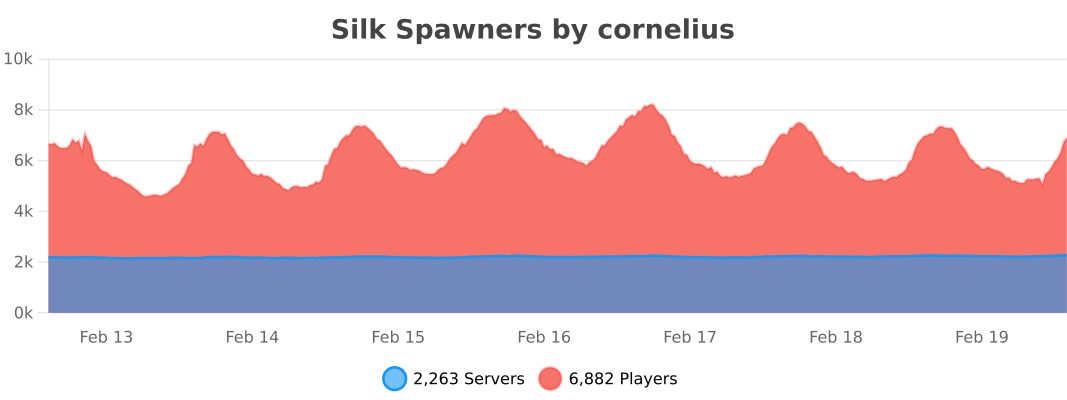
Statistics