
Compatibility
Minecraft: Java Edition


Tags
Creators
Details
Licensed ARR
Published last month
Updated last month
Clearer Waters
Tired of murky oceans, muddy rivers, and blinding underwater fog? Clearer Waters transforms the default water textures across all biomes into crisp, transparent liquid, making underwater exploration and coastal building effortless while preserving Minecraft's classic vanilla aesthetic.
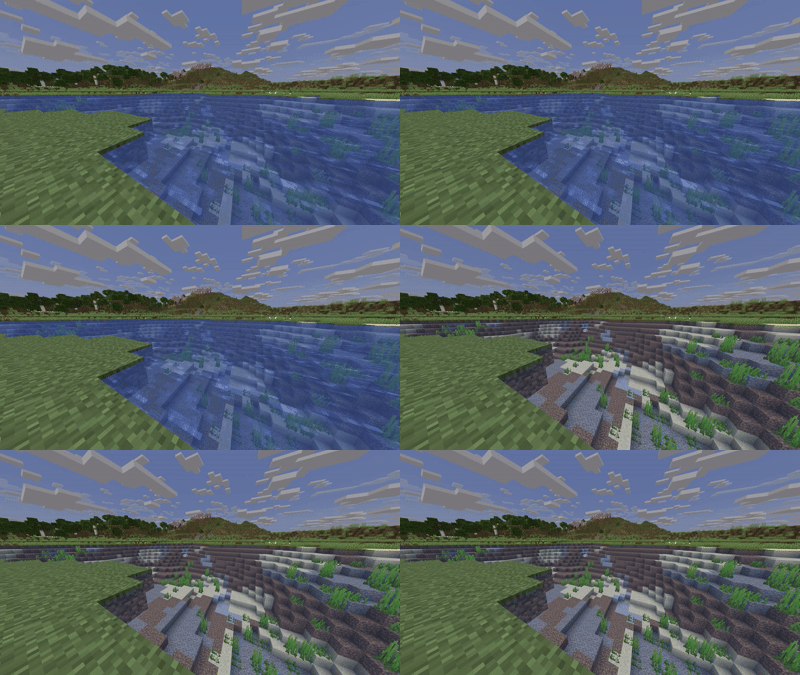
Key Features
- High Visibility: Strips away heavy surface murkiness and dense underwater fog, letting you spot shipwrecks, ocean monuments, and sea life from a distance.
- Vanilla-Friendly: Keeps default biome tints (from warm coral reefs to dark swamp waters) intact without altering the game's core art style.
- Zero Lag: Purely texture-based with no performance impact
- Broad Compatibility: Works smoothly alongside your favorite UI tweaks, font packs, and vanilla-plus textures.
Installation Guide
Java Edition
- Download: Get the
Clearer Waters.zipfile. - Open Folder:
- Launch Minecraft and navigate to Options → Resource Packs.
- Click the Open Pack Folder button in the bottom-left corner.
- Move Pack: Place the downloaded
.zipfile into the openresourcepacksdirectory (do not unzip it). - Activate:
- Head back into Minecraft.
- Hover over Clearer Waters under the Available list and click the arrow to shift it to Selected.
- Click Done to apply the pack.
Bedrock Edition (Windows / Mobile)
- Download: Grab the
.mcpackfile. - Import: Double-click or tap the file to automatically boot up Minecraft and start the import process.
- Activate:
- Navigate to Settings → Global Resources (or edit a specific world's settings).
- Open My Packs, click on Clearer Waters, and select Activate.