
Compatibility
Minecraft: Java Edition


Tags
Creators
Details
Two 3D_rails
About:
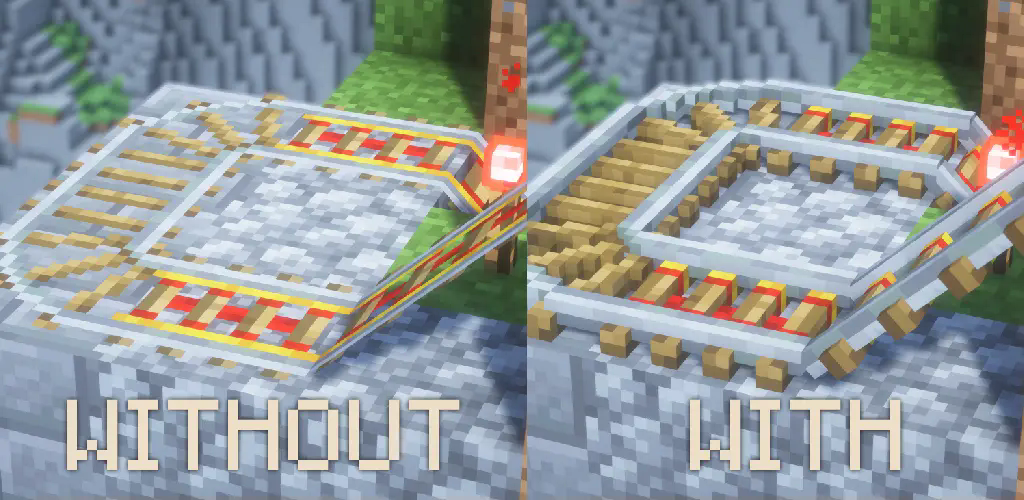
This resource pack transforms your default 2D sprite rails into detailed 3D models while preserving the classic Vanilla texture. As shown in the images, rails now have a more realistic look with added depth and structure, enhancing your Minecraft experience without changing the original style.
Page description:
- About
- Screenshots
- Installation guide
- End
Screenshots:

Installation:
-
Launch your version of minecraft / (or while playing press "Esc" button)
-
Click on "Option" menu.
-
Click on "Resource pack"
This is list of all your pack, left column that is not in use - right column that is currently used
-
Click on "Open Pack Folder"
-
Drag the resource pack into the explorer window that just appeared.
-
Go back to Minecraft. (In left column will appear new resource pack)
-
Move resource pack to the right column and click "Done"
-
Enjoy
End:
Thank you for downloading my resource pack, I will be happy to hear your feedback or/and any suggestion or issue that might be found. Thanks, there are a lot of 2D sprites in Minecraft that I would like to change!