
Compatibility
Minecraft: Java Edition
Platforms
Supported environments


Tags
Creators
Details
🎨 MWHud — Customizable HUD for Minecraft
A feature-rich, highly customizable HUD mod for Fabric that brings your server's essential stats right onto your screen — in real-time, beautifully styled, and fully draggable.
📖 About
MWHud is a Fabric client-side mod that pairs with the MWHudPlugin (Paper/Spigot) to push real-time server statistics directly to your HUD — no commands, no menus, no scoreboard clutter.
Your server stats appear right on your screen — money, fly time, PvP status, and more. Drag them where you want, style them your way, and save layouts to switch between anytime.
📸 Preview
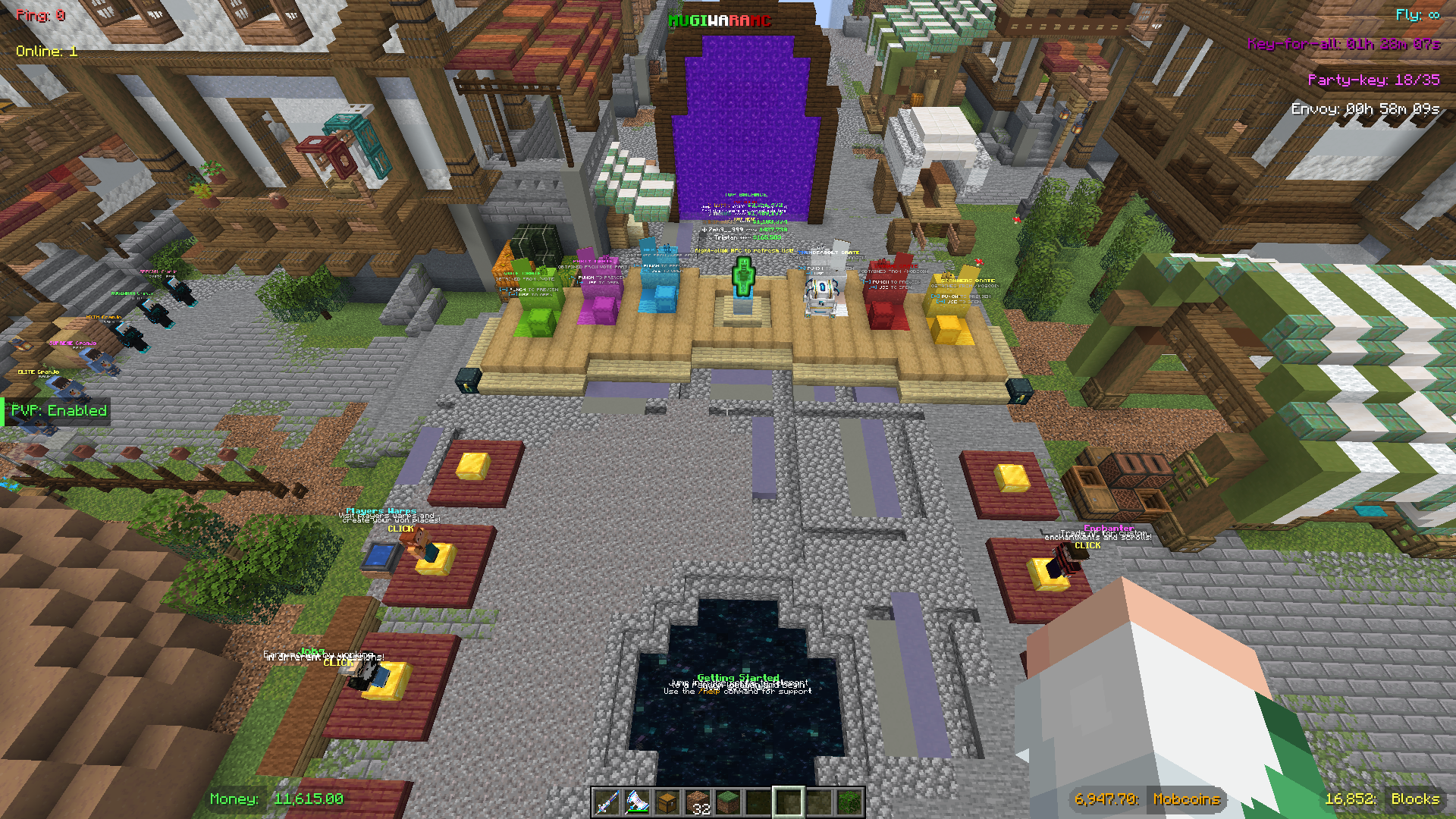
The default Mugiwara preset — fully customizable layout with all HUD elements displayed.
✨ Features
🖥️ HUD Display Elements
| Element | Description | Requires Plugin |
|---|---|---|
| 💰 Money | Your current balance | ✅ |
| 🪙 Mobcoins | Your mobcoin balance | ✅ |
| 🕊️ Fly Time | Remaining flight duration countdown | ✅ |
| 🧱 Claim Blocks | Remaining GriefPrevention claim blocks | ✅ |
| ⚔️ PvP Status | Whether PvP is enabled or disabled | ✅ |
| 📦 Envoy Timer | Countdown to the next Envoy event | ✅ |
| 🔑 Key-for-all Timer | Countdown to the next Key-for-all drop | ✅ |
| 🎉 Party Key | Current / required votes for a Vote Party | ✅ |
| 📶 Ping | Your live connection latency | ❌ |
| 👥 Online Players | Current server player count | ✅ |
| 🏷️ Server Title | A custom server name shown on-screen | ✅ |
Ping is read directly from the Minecraft client — no plugin needed.
⚙️ Customization
| Option | Details |
|---|---|
| 16 Box Shapes | Plain Box, Pill, Accent Bar, Text Only, Bottom Line, Corner Brackets, Tag/Flag, Outline Text — plus 8 split variants with ghost/pill modes |
| 15 Colors | White, Light Grey, Grey, Black, Green, Dark Green, Gold, Yellow, Cyan, Blue, Light Blue, Purple, Red, Orange, Pink |
| Server Color Sync | Auto-matches box colors to whatever the server sends; one-click reset |
| Per-box Control | Cycle value color, box shape, and label color independently per element |
| Drag & Drop | Freely reposition any box; smart snapping to edges, alignments, and midpoints |
| Group Drag | Hold Shift and drag to move a cluster of nearby boxes together |
| Hide Boxes | Toggle individual boxes off without losing their position |
| Preset System | 3 built-in presets + save unlimited custom layouts (positions, colors, shapes, visibility) |
| HUD Scale | Cycle through 5 scale presets — Tiny, Small, Normal, Large, Huge — independent of Minecraft's UI Scale |
| Smart Anchoring | Boxes auto-detect edge positions and anchor accordingly — left, center, or right — keeping layouts consistent across all scales |
Edit Mode Controls
| Control | Action |
|---|---|
| Left-click (Drag Mode) | Drag a single box |
| Shift + Left-click (Drag Mode) | Group-drag nearby boxes |
| Left-click (Edit Mode) | Cycle value color |
| Right-click (Edit Mode) | Cycle box shape |
| Shift + Right-click (Edit Mode) | Cycle label color (split shapes only) |
| Left-click (Hide Mode) | Toggle box visibility |
⌨️ Hotkeys
| Key | Action |
|---|---|
| F6 | Toggle the entire HUD on / off |
| F7 | Toggle the scoreboard on / off |
| F8 | Open HUD Configuration |
| F9 | Open Password Manager |
| Esc | Exit the current edit mode |
🔐 Password Manager (bonus feature)
MWHud includes a built-in per-server password manager, independent of the HUD itself.
| Feature | Details |
|---|---|
| Auto-login | Automatically runs /login <password> when you join a saved server |
| Per-account storage | Passwords are stored per server + player name pair |
| Encrypted storage | Passwords are AES-encrypted before being written to disk |
| In-game UI | Add, view (masked), and delete saved entries from the F9 screen |
This is entirely optional and unrelated to the HUD data system.
📦 Installation
- Install Fabric Loader for Minecraft 1.21.x
- Download the latest
mwhud-*.jarfrom the releases page - Drop it into
.minecraft/mods/ - Launch Minecraft with the Fabric profile
The mod works standalone — ping shows immediately with a default layout. Full HUD data (money, fly time, etc.) requires the MWHudPlugin installed on the server side.
🔌 Server admins: see the MWHudPlugin page for setup instructions.
🎮 Explorer's Mugiwara SMP
Join Mugiwara SMP — our thriving Minecraft Survival Multiplayer server! 🌊
Embark on an epic adventure in a friendly community-driven world featuring:
- 🏪 Shop — Buy and sell items in the player-driven economy
- 🐉 Custom Dragon — Face unique dragon battles with special rewards
- ⚾ Pokéballs — Catch mobs and build your collection
- 🛡️ Custom Items/Armors — Equip exclusive gear with special abilities
- 🏠 Grief Protection — Claim your land and build with peace of mind
- ⚔️ PvP Arena / PvP Training Arena — Test your skills in balanced combat zones
Set sail for adventure — the Grand Line awaits! 🏴☠️

