
Compatibility
Minecraft: Java Edition
Platforms
Supported environments


Links
Tags
Creators
Details
Licensed MIT
Published 7 months ago
Updated 3 weeks ago


Client-side mod that automates inventory management and equipment swapping during gameplay. Detects durability loss, empty item stacks, and block-breaking actions to equip the correct items from your inventory automatically.
Client-side only (no server installation required). Fully compatible with singleplayer. Dependencies: Fabric & NeoForge require Architectury API. Forge requires no additional dependencies.
Free to use in any modpack — public or private, no permission needed.
What it does
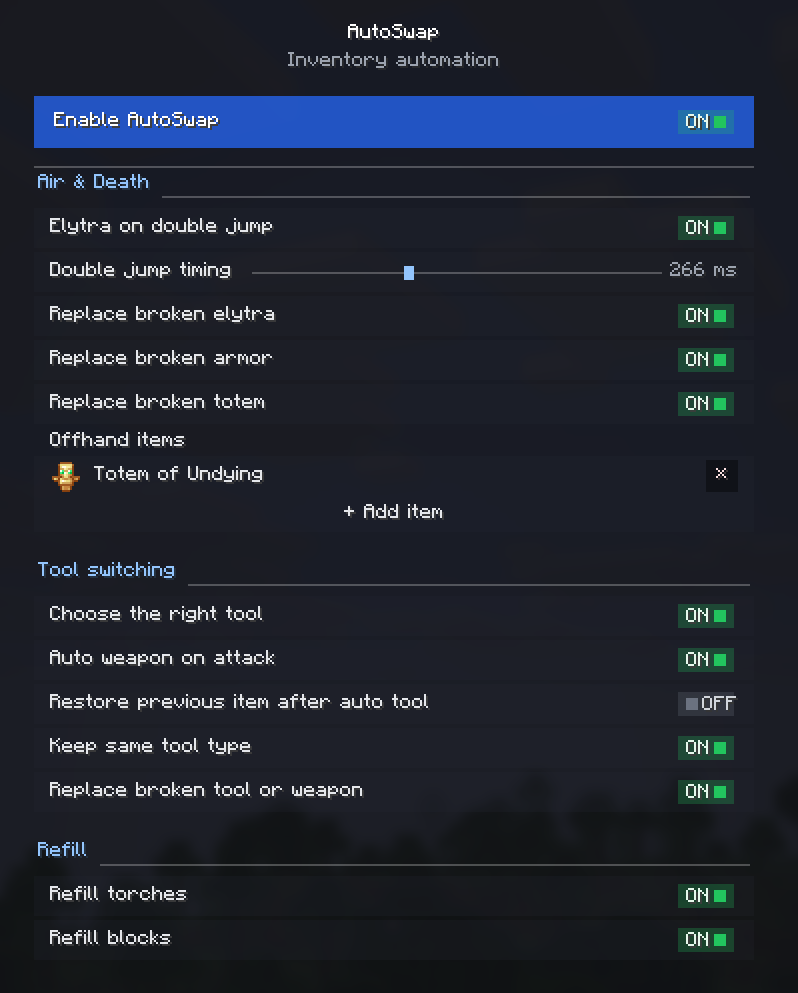
- Smart Tool Selection — continuously picks the best tool while you mine, even when moving between different block types without releasing the button.
- Tool-Switch Blacklist — choose items that automatic tool selection should never swap away from.
- Auto Weapon on Attack — optionally draws your best sword the instant you start hitting a mob. Disable it and AutoSwap will never swap off your weapon while a mob is in your crosshair.
- Gear Replacement — automatically equips a matching tool, weapon, or armor piece when the currently equipped one breaks.
- Offhand Replenishment — refills your off-hand when the held item runs out. Add a Totem of Undying, shield, or any item via the built-in item picker or by item ID.
- Stack Refills — refills the active hotbar slot with identical blocks or torches when the current stack is depleted.
- Double-Jump Elytra — equips an elytra from your inventory on double jump, and swaps your chestplate back on landing.
- Restore After Auto-Tool — restores the item you were originally holding after automatic tool selection is finished.
- Keep Tool While Sneaking — a toggle for controlling tool-switching behavior while sneaking.
Configuration
All features are fully modular and can be toggled individually through the in-game settings screen, the config file, or via keybinds under Controls → AutoSwap.
Details
- Client-side only.
- All settings are stored locally in your game config folder.
- Translated into 10 languages — English and Russian are complete; other locales are in progress.
Feedback
Please report any bugs, errors, or feature suggestions on Discord: https://discord.gg/HTkn94BXmA