
Compatibility
Minecraft: Java Edition
Platforms
Supported environments


Links
Tags
Creators
Details
Tired of swapping mods every time you switch Minecraft versions or loaders? Version Mod Sorter lets you sort mods into subfolders inside your mods folder. Name a folder after a loader or a Minecraft version, and the mods inside it are loaded only when the game runs with that loader or version. Keep one instance and let VMS sort out which mods to load.
How It Works
Create subfolders inside the mods folder and put your mods in them. Whether a mod in a subfolder is loaded depends on the folder names.
| Folder name | Loaded when |
|---|---|
fabric / forge / neoforge |
The game runs with that loader |
A name containing . (e.g. 1.21.1, Disabled.Mod) |
Only when the name matches the current Minecraft version |
Anything else (e.g. utility) |
Always |
Folders can be nested in any order and depth. A mod is loaded only when every folder on its path meets its condition. For example, a mod in mods/fabric/1.21.1/ is loaded only on Fabric with Minecraft 1.21.1. mods/1.21.1/fabric/ works the same way.
Mods placed directly in the mods folder are always loaded, as usual. Folders for the current version and loader are created automatically at launch.

Quick Reference
| Location | Fabric 1.21.1 | Fabric 1.20.1 | Forge 1.21.1 |
|---|---|---|---|
| mods/ (root) | ✅ | ✅ | ✅ |
| mods/utility/ | ✅ | ✅ | ✅ |
| mods/fabric/ | ✅ | ✅ | ❌ |
| mods/1.21.1/ | ✅ | ❌ | ✅ |
| mods/fabric/1.21.1/ | ✅ | ❌ | ❌ |
| mods/Disabled.Mod/ | ❌ | ❌ | ❌ |
Features
- Works with Fabric, Forge, and NeoForge — a single jar supports all three
- Sort mods by loader, by Minecraft version, or both
- Organize mods into category folders freely
- Set mods aside in
Disabled.Modwithout deleting them - No need for separate game directories, profiles, or instances
- No Minecraft class modifications or bytecode patching
FAQ
Can Fabric load mods from subfolders?
Not by default. Fabric Loader only loads mods placed directly in the mods/ folder, and subfolder support has been declined by the loader developers. Version Mod Sorter adds this missing feature.
Can I use one instance for multiple Minecraft versions?
Yes. That is exactly what this mod is for. Put version-specific mods in version folders and shared mods in the loader folder or mods/ root, then switch versions freely from your launcher without touching the mods folder.
Do I need to rename or move mods when updating Minecraft?
No. Mods in non-matching version folders are simply ignored, so old versions' mods can stay where they are.
Why isn't my folder named Create 0.5 loaded?
A folder name containing . is treated as a Minecraft version. Remove the . from folder names meant for organizing.
Crash Analysis (Fabric)
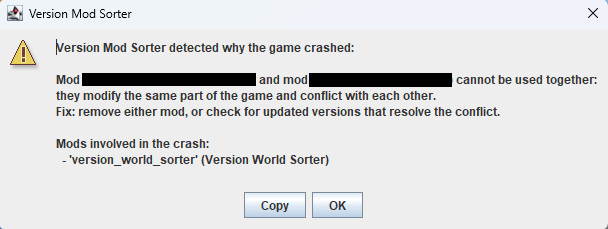
When the game crashes on Fabric, VMS analyzes the cause and shows a dialog. It checks crash reports (crash-reports/) first, then falls back to the tail of logs/latest.log. This feature works only when at least one mod is loaded from a subfolder.
It detects two kinds of crashes and shows the involved mods and suggested fixes:
- Mod conflicts — when multiple mods modify the same code and collide, both mod names are shown with the suggestion to remove one or check for updates
- Version mismatch — when a mod references code that does not exist in the current Minecraft version, the mod name is shown with the suggestion to move it to the matching version folder, or to update or remove it
For crashes that match neither category, VMS still lists mods inferred from the stack trace. If the loader itself reports a mod resolution failure (Mod resolution failed, etc.), VMS does not show a second notification because the loader already shows its own error screen.
Requirements
- Fabric Loader 0.13.0+ / Forge 41.1.0 (MC 1.19)+ / NeoForge 20.6.62-beta (MC 1.20.6)+
Notes
- A version folder name must exactly match the current Minecraft version.
1.21and1.21.0are treated as different versions. - On Fabric, if at least one mod is loaded from a subfolder, VMS restarts the game once, so startup takes slightly longer.
- If you put the same mod in more than one folder that loads at the same time, it gets loaded twice and may cause an error.
- This mod relies on internal loader implementations. A major loader update may cause it to stop working, but it will never affect the game or other mods.
- For the folder rules in 0.1.x and earlier, see this page.