
Compatibility
Minecraft: Java Edition
Platforms


Tags
Creators
Details
ChainDecor
ChainDecor is a Purpur/Paper plugin that adds decorative hanging chains between blocks. You can attach lanterns, banners, end rods, and hanging flower pots to chain segments while preserving visual styling and banner patterns.
It supports sagging chains, detailed configuration, per-segment decoration placement, individual decoration removal, multiple anchor types, real lantern light, chain ziplines, and redstone-powered chain lifts.
ChainDecor is designed for builders and survival servers that want more detailed decorative and functional chain mechanics without requiring any client-side mods.
Key Features
- Create decorative hanging chains between supported anchor blocks
- Natural-looking chain sag with configurable physics
- Attach lanterns, banners, end rods, and hanging flower pots to individual chain segments
- Plant flowers, saplings, and other supported plants inside hanging pots
- Banner patterns are preserved from the item in the player’s hand
- Shears can remove a specific decoration from a specific segment
- Lanterns can provide real light to the surrounding area
- Chains can be used as ziplines
- Redstone-powered chains can work as chain lifts
- Supports fences, walls, iron bars, copper bars, lightning rods, and optional all-block anchors
- Fully server-side, not required on the client
New in 2.0.0
- Added hanging flower pots for chain segments
- Added support for planting flowers and saplings inside hanging pots
- Added chain ziplines
- Added chain movement sounds for ziplines
- Added redstone-powered chain lifts
- Added direction selection when both anchors are powered
- Added separate redstone detection radius settings for X, Y, and Z
- Added optional hoe durability loss while riding ziplines
- Added options to block or drop decorations when a chain becomes powered
- Added full language file support
Decorations
Each chain segment can hold one decoration at a time:
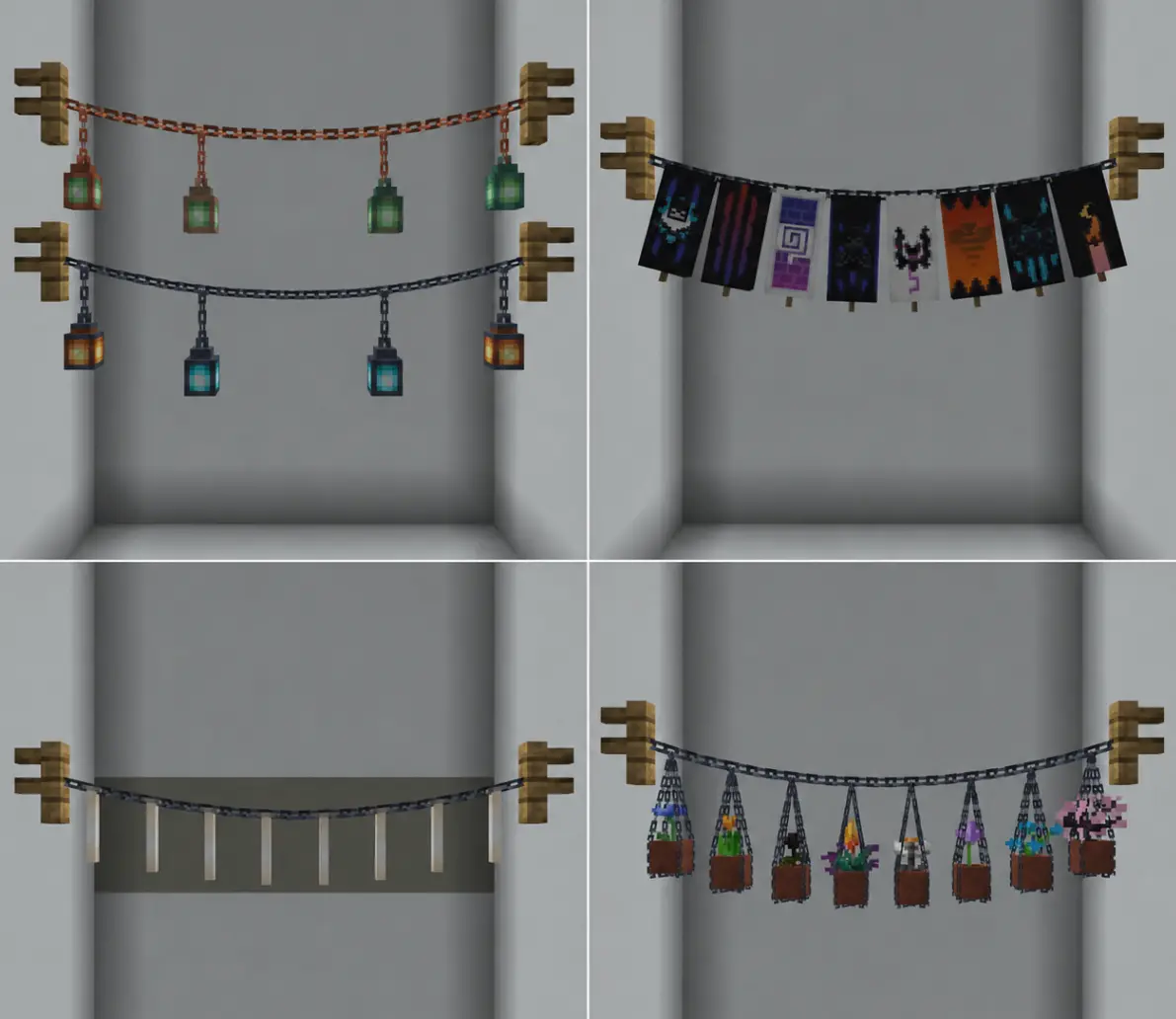
- Lanterns
- Banners
- End Rods
- Hanging Flower Pots
This allows patterns such as:
- banner, lantern, banner, lantern
- lantern, banner, end rod
- hanging pot, lantern, hanging pot
- alternating decorative layouts without overlapping on the same segment
Hanging Flower Pots
Flower pots can be attached directly to chain segments.
- Hold a flower pot
- Right-click a chain segment
- Right-click the hanging pot with a plant, flower, or sapling to plant it inside
Using shears on a hanging pot removes it.
If the pot contains a plant, the plant can also drop separately.
Ziplines and Redstone Chain Lifts


Chains can also work as ziplines.
If the chain is not powered by redstone, it works as a normal downhill zipline.
unpowered chain = downhill only
If only the upper anchor is powered, the chain works as a lift and pulls the player upward.
upper anchor powered = upward lift
If both anchors are powered, the player can choose the movement direction by looking along the chain.
both anchors powered = choose direction by looking along the chain
Powered chains can also block new decorations or drop existing decorations, depending on the configuration.
Removal
Using shears on a decorated segment removes the decoration attached to that segment first.
If there is no decoration on that segment, the chain itself can be removed.
Configuration
Config File
- Location:
plugins/ChainDecor/config.yml - Reload command:
/chains reload
Main Options
- Chain sag strength and limits
- Anchor support rules
- Lantern offsets and connector size
- Banner size, offset, and slope behavior
- End rod position and slope behavior
- Hanging flower pot position and chain wrapping
- Zipline speed, sounds, collision checks, and item durability
- Redstone lift behavior
- Redstone detection radius by X, Y, and Z
- Decoration spacing rules
- Optional support for all blocks as anchors
- Language selection
Example Redstone Lift Settings
zipline-powered-lift-redstone-radius-x: 5
zipline-powered-lift-redstone-radius-y: 5
zipline-powered-lift-redstone-radius-z: 5
zipline-powered-lift-speed-blocks-per-tick: 0.5
Anchor Support
By default, chains can be attached to:
- Fences
- Walls
- Iron bars
- Copper bars
- Lightning rods
You can also enable this option:
support-all-blocks: true
When enabled, chains may be attached to any block.
Commands
| Command | Description |
|---|---|
/chains reload |
Reload the plugin configuration and language files |
Examples
Create a hanging chain
- Hold a supported chain item
- Right-click the first anchor
- Right-click the second anchor
Hang a lantern
- Hold a lantern
- Right-click a chain segment
Hang a banner
- Hold any banner
- Right-click a chain segment
Hang an end rod
- Hold an end rod
- Right-click a chain segment
Hang a flower pot
- Hold a flower pot
- Right-click a chain segment
- Right-click the hanging pot with a plant to plant it inside
Ride a zipline
- Right-click a chain with the configured zipline item
- If the chain is unpowered, you ride downhill
- If the upper anchor is powered, you ride upward
- If both anchors are powered, look along the chain to choose the direction
Remove a decoration
- Hold shears
- Right-click the decorated segment
Languages
Language files are stored in:
plugins/ChainDecor/lang/
Available languages:
- Russian
- English
- German
- Spanish
- Tatar
- Kazakh
The active language can be selected in config.yml.
language: en
Installation
This is a server-side plugin for Purpur/Paper and is not required on the client.
- Place the plugin jar into your
pluginsfolder - Start the server
- Edit
config.ymlif needed - Use
/chains reloadafter config changes
Compatibility
- Minecraft Java Edition:
1.21.9–26.2 - Server software: Paper / Purpur
Notes
- Banner patterns are preserved from the item used when placing the banner
- Decorations are stored per chain segment
- Lanterns can provide light
- End rods use chain-based slope behavior similar to banners, but are rendered as a single decoration
- Hanging pots can contain plants
- Decoration overlap on the same segment is prevented
- Powered chains can work as functional redstone lifts
- The plugin is fully server-side
ChainDecor Configuration
Language
Plugin language file. Available by default: ru, en, de, es, tt, kk Files are stored in plugins/ChainDecor/lang/ Example: language: ru
language: ru
Chain Settings
Maximum allowed distance between two anchor points.
max-distance: 24.0
How many visual chain segments are created per block of distance (Higher values = smoother chain, but more entities.)
segments-per-block: 1.25
Minimum amount of chain segments.
min-segments: 2
Maximum amount of chain segments.
max-segments: 64
Main sag multiplier (Higher values = stronger hanging curve.)
sag-factor: 0.06
Minimum sag, even for short chains.
min-sag: 0.015
Maximum sag limit for long chains.
max-sag: 1.0
Vertical anchor point inside the block.
anchor-height: 0.55
If true, the chain connects to the block center.
anchor-to-center: true
Horizontal inset used when not anchoring exactly to the center.
anchor-horizontal-inset: 0.12
Extra shortening near the chain ends.
endpoint-gap: 0.0
Thickness of the main chain display.
segment-thickness: 0.82
Height of the invisible interaction hitbox for each chain segment.
segment-hitbox-height: 0.45
Lantern Settings
How far below the chain the lantern hangs.
lantern-hang-offset: 0.78
Height of the small connector chain above the lantern.
lantern-connector-top-offset: 0.1
Thickness of the lantern connector chain.
lantern-connector-thickness: 0.62
Minimum distance between lanterns.
lantern-min-spacing: 1.5
Light level for normal lanterns.
lantern-light-level: 15
Light level for soul lanterns.
soul-lantern-light-level: 10
Drop the lantern item when removed with shears.
drop-lantern-on-remove: true
Banner Settings
How far below the chain the banner hangs.
flag-hang-offset: 0.95
Overall banner scale.
flag-scale: 1.7
Banner width multiplier.
flag-width-scale: 0.86
Banner height multiplier.
flag-height-scale: 0.92
Small side offset between the two rendered banner sides.
flag-side-offset: 0.0015
Extra vertical offset applied to banner rendering.
flag-vertical-nudge: -0.1
How strongly the banner follows the chain angle.
flag-slope-factor: 1
Maximum allowed slope angle in degrees.
flag-max-slope-degrees: 100.0
Extra forward lean applied to the banner.
flag-forward-lean-degrees: 0.0
Additional lean based on slope angle.
flag-extra-lean-per-slope-degree: 0.00
Moves the banner along the chain direction.
flag-along-tangent-offset: 0.0
Drop the banner item when removed with shears.
drop-flag-on-remove: true
End Rod Settings
How far below the chain the end rod hangs.
end-rod-hang-offset: 0.33
Overall end rod scale.
end-rod-scale: 1.6
Extra vertical offset for the end rod.
end-rod-vertical-nudge: -0.06
How strongly the end rod follows the chain angle.
end-rod-slope-factor: 1.0
Maximum allowed slope angle in degrees.
end-rod-max-slope-degrees: 100.0
Extra forward lean for the end rod.
end-rod-forward-lean-degrees: 0.0
Additional lean based on slope angle.
end-rod-extra-lean-per-slope-degree: 0.0
Moves the end rod along the chain direction.
end-rod-along-tangent-offset: 0.0
Drop the end rod item when removed with shears.
drop-end-rod-on-remove: true
Decoration Rules
How many neighbouring segments are blocked when placing a decoration.
 0 = only the same segment
 1 = same segment + adjacent segments
decoration-exclusion-radius-segments: 0
Anchor Support
Allow chains to connect to walls.
support-walls: true
Allow chains to connect to fences.
support-fences: true
Allow chains to connect to iron bars and copper bars.
support-bars: true
Allow chains to connect to all lightning rod variants.
support-lightning-rods: true
If enabled, chains can connect to any block (This overrides the specific support settings above.)
support-all-blocks: false
Removal Rules
Require sneaking when removing chain connections from anchors.
require-sneak-to-remove: true
Drop chain item when chain is removed.
drop-chain-on-remove: true