
Compatibility
Minecraft: Java Edition
Platforms
Supported environments


Links
Tags
Creators
Details
Litematica Zone Focus is a client-side Litematica addon for Fabric that lets you build a schematic piece by piece.

A placed schematic is split into zones. You pick the zone you're working on right now, and the schematic is rendered, counted and verified only inside that zone — the rest stays out of the way until you get to it.
Requirements: Fabric Loader, Fabric API, MaLiLib and Litematica. Client-side only — nothing to install on the server, and it works on vanilla servers.
What it does

- Splits a schematic into zones — as a grid (set either the number of zones per axis or the size of one zone in blocks, with a live preview of how many zones you'll get and how big they'll be), by dragging out a zone with your mouse, or from a Litematica selection.
- Works inside the active zone only — rendering, misplaced-block detection, layer-by-layer building and every other calculation are limited to the zone you selected.
- Tracks progress for every zone — percentage, blocks remaining and distance to the zone. The list can be sorted by any of them, or by zone number.
- Reduces the rendering load on large schematics — geometry outside the active zone isn't built at all, so there's less to draw and fewer chunk rebuilds. How much you gain depends on the schematic and your zone size.
- Lets you mark zones with the mouse — a new hotbar slot: hold Attack (left mouse button by default) and drag to mark out a zone, release to save it.
- Verifies the schematic within the zone — the same breakdown as Litematica's Schematic Verifier: missing (red), wrong block (orange), wrong state (yellow), extra (light blue), drawn through walls. Toggled with a keybind.
- Updates in real time — place a block and its marker disappears, the progress bar moves instantly.
- Remembers your zones — zone layout and progress survive leaving a server or switching dimensions.
How to use it
- Place a schematic with Litematica as usual.
- Open the zones screen and split the placement into a grid — or mark a single zone by dragging with the mouse.
- Select a zone. Only that part of the schematic is rendered and counted.
- Build it, watch the progress bar, then move on to the next zone — manually or automatically.
Settings
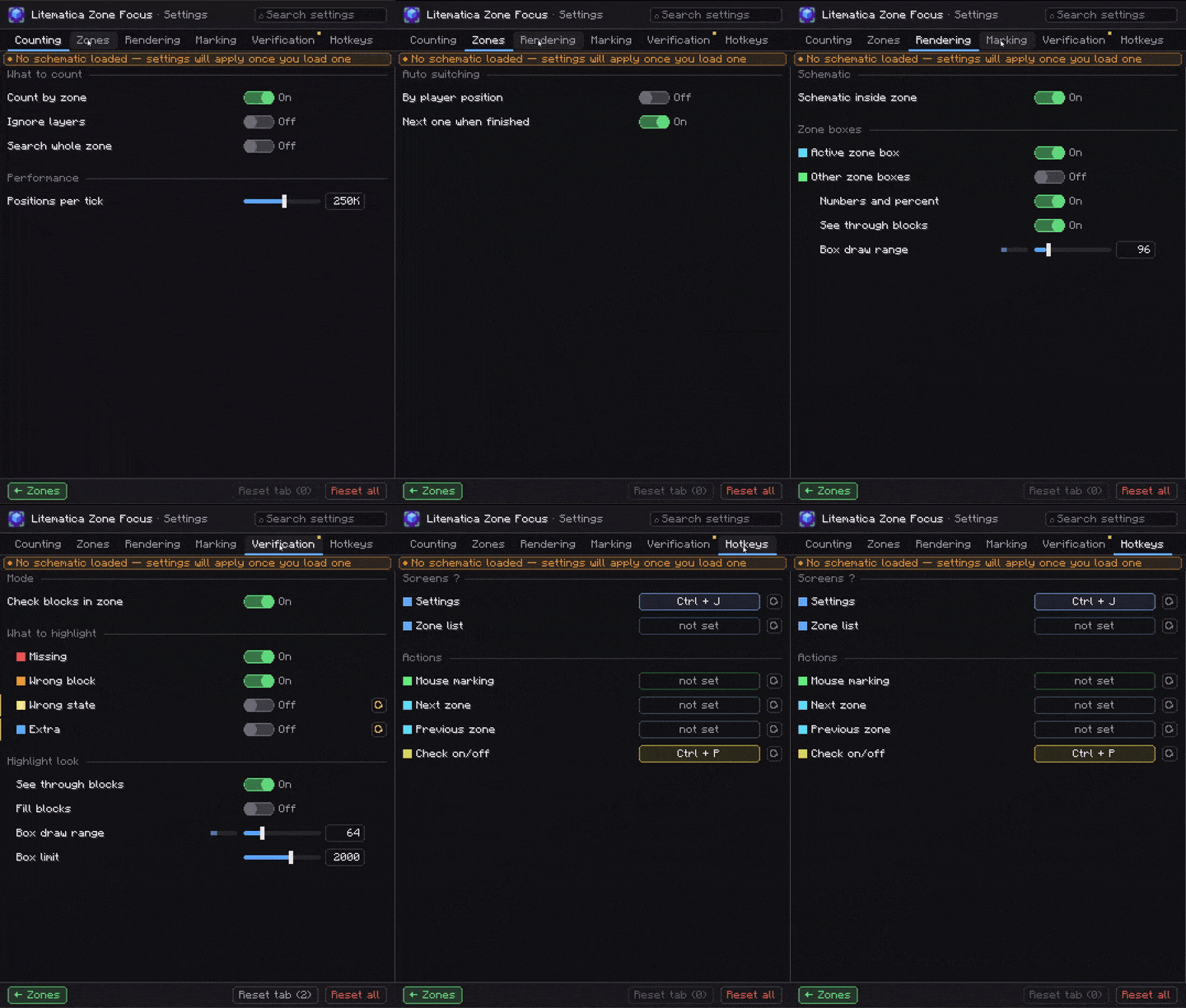
Open with Ctrl + J, or from the zones screen. Everything above can be turned off individually; on top of that:
| Section | What you can tweak |
|---|---|
| Zone automation | Make the zone you're standing in the active one; move on to the next zone once there's nothing left to place in the current one. |
| Whole zone | Ignore Litematica's layer range and count the entire zone. |
| Rendering | Outlines for the active zone and for the rest of the grid (completed zones turn green), zone numbers with percentages in the world, visibility through blocks, outline draw distance 16–512. |
| Marking | Clamp a marked zone to the schematic's bounds, ray distance 8–512. |
| Verification | Semi-transparent block fill, highlight distance 8–256, marker limit per category 50–20000 — so a huge zone doesn't cost you frames. |
| Scan budget | How many positions are checked per tick while calculating progress, 10k–4M. |
Keybinds
Only one is bound by default — the rest are up to you.
| Action | Default |
|---|---|
| Open settings | Ctrl + J |
| Zones screen | unbound |
| Next / previous zone | unbound |
| Mouse marking | unbound |
| Verify zone | unbound |
Pairs well with
Litematica Material HUD & Chest Finder — a material list HUD for the layer you're building, plus colored markers on the chests holding those blocks. Zone Focus tells you where to build; Material HUD tells you what to bring.

💬 Questions, bugs or ideas? Join the Discord