
Compatibility
Minecraft: Java Edition
Platforms


Tags
Creators
Details
Cinematix Shader
A cinematic Minecraft shader pack that transforms your world into a breathtaking visual experience.
NEW in v1.5 — Horror Mode
Cinematix now includes a dedicated Horror Mode, designed to create a darker and more unsettling Minecraft experience.
Horror Mode makes the world significantly darker without making it foggier, keeping visibility relatively clear while creating a much more frightening atmosphere. It also introduces flickering lights, making light sources feel unstable and unpredictable.
Horror Mode Features
- Darker Lighting — Significantly darker lighting for a more unsettling atmosphere
- Flickering Lights — Light sources can flicker to create an unstable and eerie feeling
- No Extra Fog — Horror Mode does not rely on heavy fog to create its atmosphere
- Dark Atmosphere — Designed for caves, nighttime exploration, and other dark environments
- Compatible with Existing Features — Horror Mode works alongside Cinematix's existing lighting and atmospheric features
Horror Mode Showcase
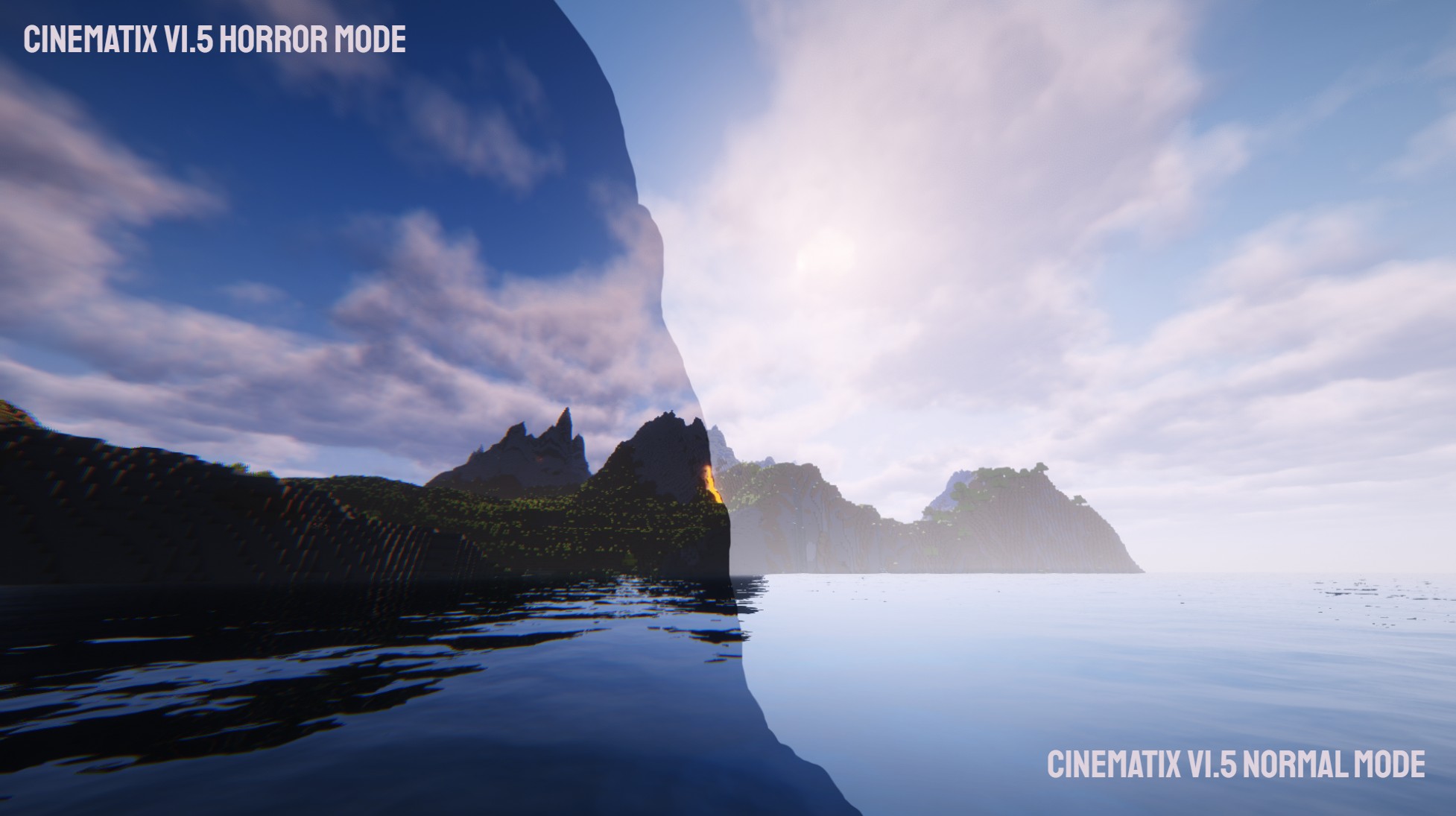
Note: There will not be a separate Horror Mode showcase video. Creating another video would take a significant amount of time, while Horror Mode currently focuses primarily on lighting and atmosphere rather than introducing completely new visual effects. A screenshot is therefore used to demonstrate the visual changes instead.
Cinematix is a modified shader pack based on Complementary Reimagined by Complementary Development. It has an stunning cinematic look. Whether you're exploring lush overworld biomes , delving into atmospheric caves lit by glowing ores, or watching the aurora across a star-filled night sky, Cinematix makes every frame look like a movie.
Showcase Video
Credits & Acknowledgements
Cinematix is a Modified Pack based on Complementary Reimagined by EminGT / Complementary Development.
- Original Shader: Complementary Shaders - Reimagined by EminGT
- Based on: BSL Shaders by Capt Tatsu — his generosity made Complementary possible
- Special Thanks: IMS212, sp614x, Chocapic13, Robobo1221, SixthSurge, null511, fayer3, catlikecoding, Builderb0y, Jessie, SpacEagle17, isuewo, flytrap, gri573, FoZy-STYLE, plazmal
Support the original developer on Patreon
Join the community on Discord
Key Features
Atmosphere & Sky
- Volumetric Light Shafts God rays shine through trees and caves, with customizable intensity for day, night, and rain
- Dynamic Clouds clouds with customizable altitude, speed, shadows, and colors
- Aurora Borealis Beautiful auroras light up the night sky with adjustable style and conditions
- Night Nebula & Stars Rich star-filled skies with configurable star amounts and night nebulae
- Rainbows Weather-dependent rainbows with multiple style options
- Atmospheric Fog Border fog, cave fog, and altitude-based atmospheric fog with full color customization per time of day
- Sun & Moon Customizable sun/moon styles, angles, and horizon behavior
Water & Translucents
- Cinematic Water Multiple water styles with realistic caustics, refraction, foam, and customizable wave normals
- Water Reflections Screen-space ray-traced reflections on water and translucent surfaces
- Underwater Effects Customizable underwater fog, color, and distortion
- Glass connected glass effects, mirror tinted glass, and more reflective distant glass
Lighting & Shadows
- High-Quality Shadows Adjustable shadow quality (0-4) and distance up to 320 blocks
- Advanced Color Tracing (ACT) Colored lighting with up to 384 light sources, colored light fog, and colored candle light
- SSAO Screen-space ambient occlusion with adjustable quality and intensity
- Blocklight Directional blocklight, blocklight flickering, and customizable blocklight colors
- Held Lighting Dynamic lighting from held light sources
- Moon Phase Influence Moon phases affect night lighting, atmosphere, and reflections
- Pixelated Lighting Retro-style pixelated shadows, blocklight, and ambient occlusion
Materials & PBR
-
IntegratedPBR+ Built-in PBR materials for blocks and entities without needing a resource pack:
- Reflective gold, diamond, emerald, iron, and lapis blocks
- Glowing ores (iron, gold, copper, redstone, lapis, emerald, diamond, nether quartz, nether gold, ancient debris, and more)
- Glowing amethyst, glowing lichen, emissive redstone and lapis blocks
- PBR materials for anvils, copper blocks and bulbs, crying obsidian, froglights, quartz, and many more
-
Custom PBR Support Full labPBR/seuspbr support with normal maps, emission maps, and parallax occlusion mapping (POM)
-
Generated Normals Auto-generated normal maps for enhanced surface detail
-
Coated Textures Enhanced texture detail with coated texture effects
-
Specific Block Materials Custom rendering for leaves, snow, lava, coral, candles, pumpkins, and more
Camera & Post-Processing
- Bloom Cinematic bloom with adjustable strength
- World Blur / Depth of Field DOF with FOV-scaled, chromatic, and anamorphic modes, customizable per biome/time
- Tone Mapping Exposure, contrast, saturation, vibrance, dark desaturation, and white point controls
- Color Grading Full RGB color grading matrix for custom color pipelines
- Chromatic Aberration Subtle lens distortion for cinematic feel
- Motion Blur Optional motion blur with adjustable strength
- Lens Flare Multiple lens flare modes with adjustable intensity
- Image Sharpening Post-process sharpening for crisp visuals
- Vignette Cinematic vignette effect
- Distant Light Bokeh Beautiful bokeh for distant light sources
- Anti-Aliasing TAA (temporal anti-aliasing) and FXAA with configurable interaction
World & Environment
- Waving Textures Foliage, leaves, water, lava, and lily pads all wave in the wind with adjustable speed and intensity
- Rain Puddles Puddles form on the ground during rain
- Snowy World Toggle a snowy world effect
- Hand Swaying Subtle hand sway animation for immersion
- World Outline Optional outline effects with adjustable thickness, intensity, and dark outline mode
- Selection Outline Customizable block selection outline with auto-hide option
- Special Biome Weather Biome-specific weather effects
- Pale Garden Light Shafts Special light shafts for the Pale Garden biome
Performance Profiles
Cinematix includes four carefully tuned profiles to fit any hardware:
| Profile | Best For | Key Highlights |
|---|---|---|
| Lite | Low-end devices / max FPS | No shadows, 80-block shadow distance, no reflections, FXAA, basic clouds |
| Balanced (Default) | Most players | Shadow quality 2, 192-block shadow distance, reflections, 128 colored lights, balanced clouds |
| Cinematic | High-end setups | Shadow quality 3, 256-block shadow distance, full reflections, 256 colored lights, anisotropic filtering, cinematic clouds |
| Ultra | Enthusiast hardware | Shadow quality 4, 320-block shadow distance, world-space reflections, 384 colored lights, max anisotropic filtering |
It's recommended to use one of these profiles unless you know what you're doing. All affected settings can be found in the "Performance Settings" menu.
Installation
- Install Iris (or OptiFine) for your Minecraft version — Iris is recommended: irisshaders.dev
- Download the latest Cinematix shader .zip file
- Place the .zip file in your shaderpacks folder — Options > Video Settings > Shader Packs > Open Shader Pack Folder
- Select Cinematix from the shader pack list
- Choose a profile that matches your hardware (Balanced is recommended)
- Enjoy!
License
Cinematix is distributed under the Complementary License Agreement 1.6. This is a Modified Pack as defined by the license terms. The original Complementary Reimagined shader pack is credited and linked above as required by the license terms.
FAQ
What's the difference between Cinematix and Complementary Reimagined?
Cinematix is a modified version of Complementary Reimagined, with a cinematic visual direction. It features adjusted profiles, atmosphere, and visual settings designed to give Minecraft a more movie-like appearance.
What's new in v1.5?
Version 1.5 introduces Horror Mode, which provides darker lighting and flickering lights without adding excessive fog. It is designed to create a more unsettling atmosphere while keeping the world relatively clear.
Which renderer do I need?
Cinematix works with Iris (recommended) or OptiFine. Make sure you're using a compatible version for your Minecraft version.
Will it work on my computer?
The Lite profile is designed for low-end hardware. If you're unsure, start with Lite and work your way up. Balanced is the sweet spot for most devices.
Can I use this in a modpack?
Yes, as long as Cinematix is credited in the modpack description and added through CurseForge/Modrinth's existing systems (no direct file redistribution).
Does it support resource packs?
Yes Cinematix supports IntegratedPBR+ (built-in), Basic mode (no PBR), and labPBR/seuspbr (requires PBR resource packs).