Compatibility
Minecraft: Java Edition
Platforms
Supported environments


Tags
Creators
Details
WaLL Teams
WaLL Teams is a team management mod for Minecraft Forge servers.
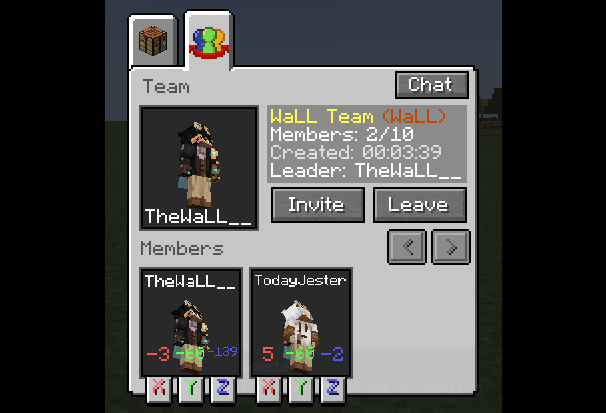
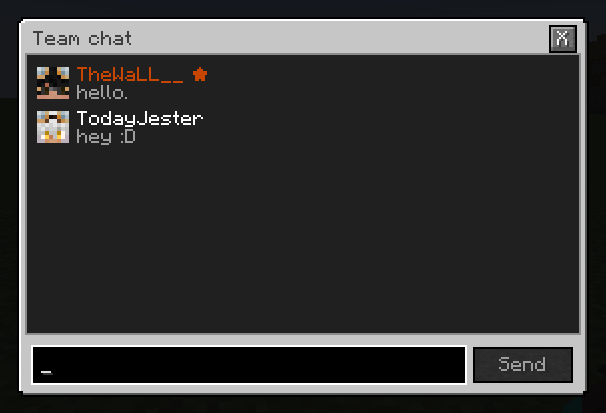
It allows players to create and manage teams, invite other players, use private team chat, and access a graphical team menu when the mod is also installed on the client.

All team logic, data, permissions, and rule enforcement are handled by the server. The client mod is only required for client-side features such as the graphical interface and localized UI.
Features
- Create and manage teams
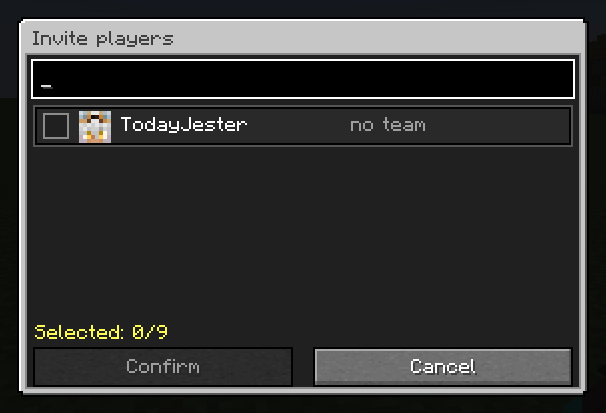
- Invite, accept, deny, and remove players
- Private team chat
- Team member management
- Configurable friendly fire
- Configurable nametag visibility
- Configurable player limits
- Per-team rule overrides
- Server-side permission support
- GUI support for players with the mod installed client-side
- Vanilla client support
Configuration
The common server configuration file is located at:
config/wallteams-common.toml
Default values:
| Setting | Default | Description |
|---|---|---|
localization.serverLanguage |
"en_us" |
Vanilla fallback language used for players without the mod installed. Accepted values: pt_br, en_us. |
teams.friendlyFireBetweenMembers |
false |
Allows members of the same team to damage each other. |
teams.nameTagsVisibleToTeamMembers |
true |
Team members can see each other's nametags. Players from other teams can never see them. |
teams.maximumPlayersPerTeam |
10 |
Default limit for players and reserved invitation slots. Accepted range: 1 to 4096. |
teams.enforceTeamMemberLimit |
true |
Enables the default team size limit. When disabled, teams without an override have unlimited slots. |
commands.requireCommandPermissions |
false |
Requires wallteams.command.* permission nodes for regular commands. |
Invitations count as reserved slots toward the team member limit.
The /wteams modify commands can set per-team overrides for PvP, nametag visibility, and player slots. These overrides take priority over the global configuration.
When the Forge configuration is reloaded, global rules are safely reapplied to existing teams without replacing their individual overrides.
Commands & Permissions
By default, commands.requireCommandPermissions is set to false, meaning regular players do not need explicit permission nodes to use common commands.
If it is enabled, the following permissions are required:
| Command | Permission |
|---|---|
/wteams create |
wallteams.command.create |
/wteams delete |
wallteams.command.delete |
/wteams invite |
wallteams.command.invite |
/wteams accept |
wallteams.command.accept |
/wteams deny |
wallteams.command.deny |
/wteams cancel |
wallteams.command.cancel |
/wteams promote |
wallteams.command.promote |
/wteams kick |
wallteams.command.kick |
/wteams leave |
wallteams.command.leave |
/wteams members |
wallteams.command.members |
/wteams chat |
wallteams.command.chat |
/wteams list |
wallteams.command.list |
Administrative Commands
Administrative permission nodes are always checked.
If no permission mod or plugin grants these nodes, WaLL Teams falls back to Minecraft OP level 2.
| Command / Action | Permission |
|---|---|
/wteams join <team_id> [player] |
wallteams.command.admin.join |
/wteams delete <team_id> |
wallteams.command.admin.delete |
/wteams members <team_id> |
wallteams.command.admin.members |
/wteams chat <team_id> |
wallteams.command.admin.chat |
Admin teleport through the team menu |
wallteams.command.admin.teleport |
/wteams modify <team_id> pvp <true|false> |
wallteams.command.admin.modify |
/wteams modify <team_id> nametag <true|false> |
wallteams.command.admin.modify |
/wteams modify <team_id> slots <n|inf> |
wallteams.command.admin.modify |
/wteams modify <team_id> reset |
wallteams.command.admin.modify |
Nametag Rules
When a team's nametag setting is set to true, player nametags are visible only to members of the same team.
When set to false, nametags are hidden from everyone, including teammates.
Players from other teams can never see the nametags of players belonging to a managed team.
Teams without a specific override use the global teams.nameTagsVisibleToTeamMembers setting.
Team IDs
Commands that require a team use its internal ID without spaces.
For example:
Tung Sahur → Tung_Sahur
Command autocomplete suggests the internal ID while displaying the team's visual name as its description.