
Compatibility
Minecraft: Java Edition
Platforms


Tags
Creators
Details

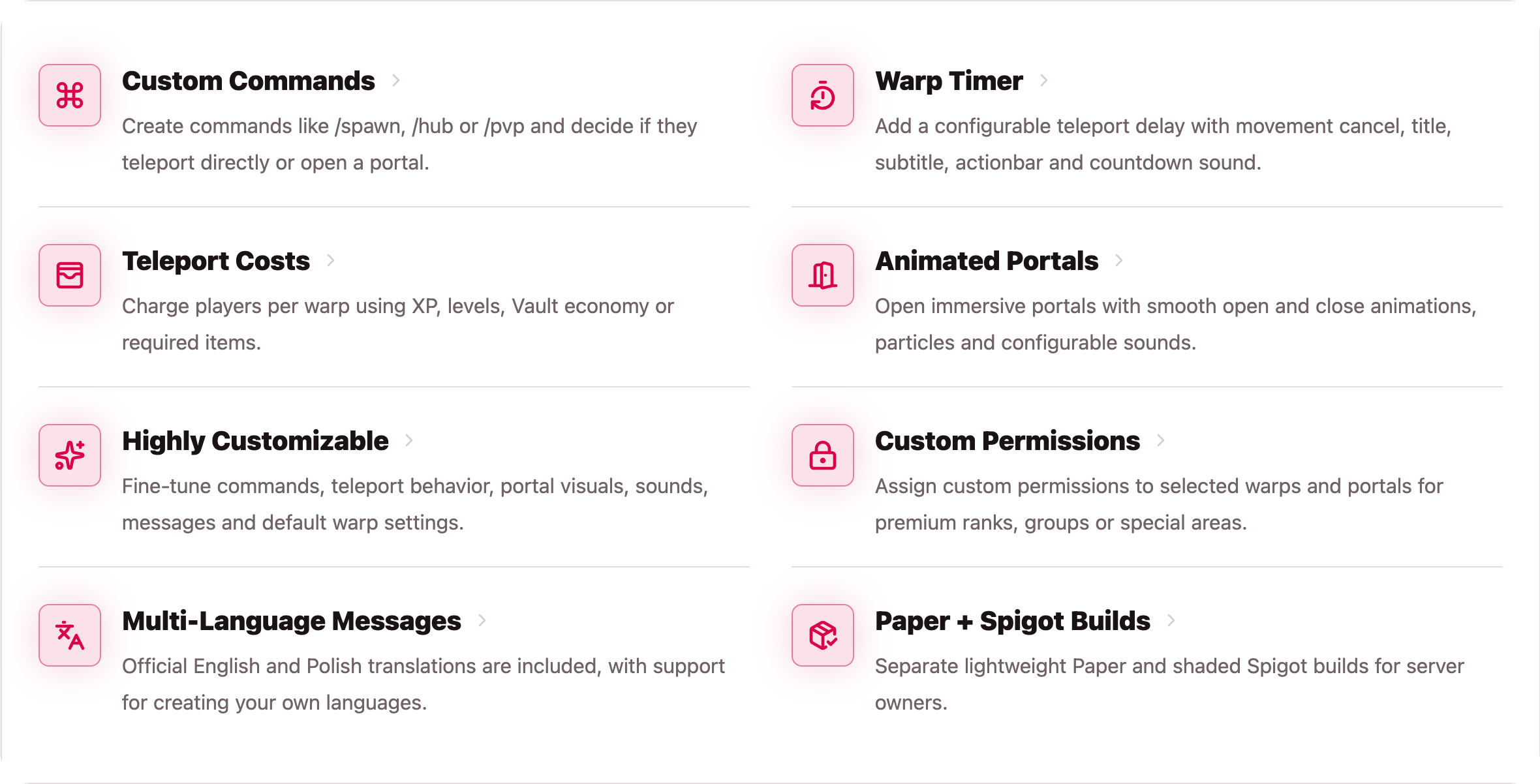
WarpPortals is designed for servers that want warp travel to feel intentional, configurable and polished instead of being just another instant teleport command.
You can keep classic /warp behavior, turn warps into animated portal travel, or mix both styles depending on the command, warp, rank or server area.
| Good for | Why it fits |
|---|---|
| Spawn and hub travel | Create clean shortcuts like /spawn and /hub. |
| VIP destinations | Protect individual warps with custom permissions. |
| Economy servers | Charge for direct teleporting, portal creation, or both. |
| Survival servers | Add a no-move timer before teleporting. |
| RPG and dungeon areas | Use portals when instant teleporting feels too flat. |
| Server networks | Configure different behavior per shortcut without writing extra plugins. |
Every saved warp stores the destination position and player rotation, so players arrive facing the direction you prepared. Portal visuals, sounds, timing, access rules, messages and costs can all be adjusted from configuration files.
Portal Feature Preview

Commands
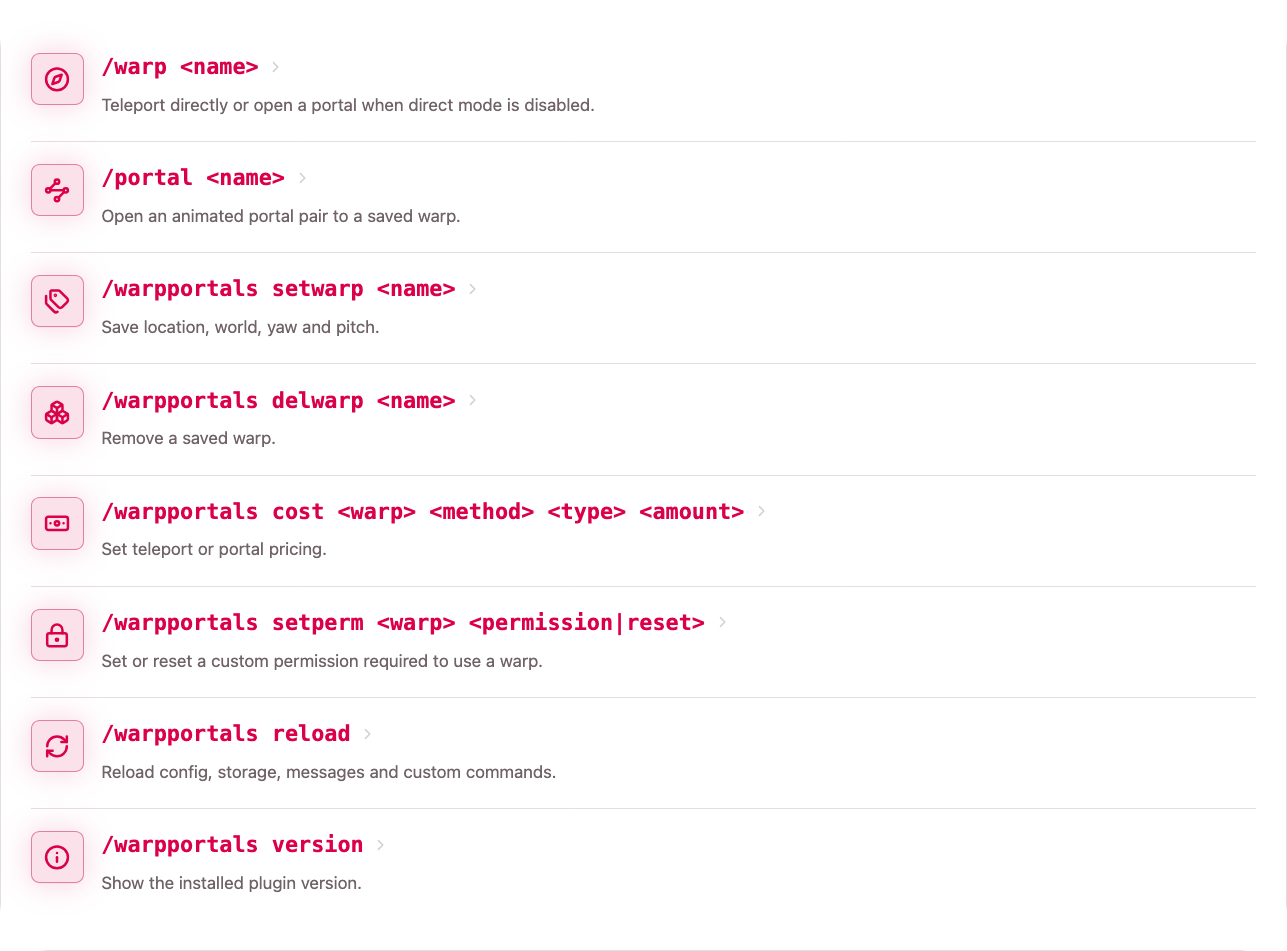
Most server owners will use three simple workflows:
| Workflow | What you do |
|---|---|
| Player travel | Players use /warp <name> for direct travel or /portal <name> for portal travel. |
| Warp management | Admins create and remove saved destinations. |
| Access and pricing | Admins set costs, custom permissions and reload the plugin. |
If direct warp teleport is disabled in config,
/warp <name>automatically opens a portal instead.
Command behavior notes
Player Travel
Players use /warp <name> for normal warp travel and /portal <name> when they should open an animated portal.
Warp Management
Admins create warps by standing at the destination and running /warpportals setwarp <name>. The plugin saves the world, coordinates, yaw and pitch. Warps can be removed later with /warpportals delwarp <name>.
Access And Pricing
Admins can set separate prices for direct teleporting and portal creation. They can also attach a custom permission to a warp, which makes it easy to create rank-only destinations without making multiple command aliases or separate config sections.
After editing config, storage, messages or custom commands, use /warpportals reload to refresh the plugin without restarting the server.
Permissions
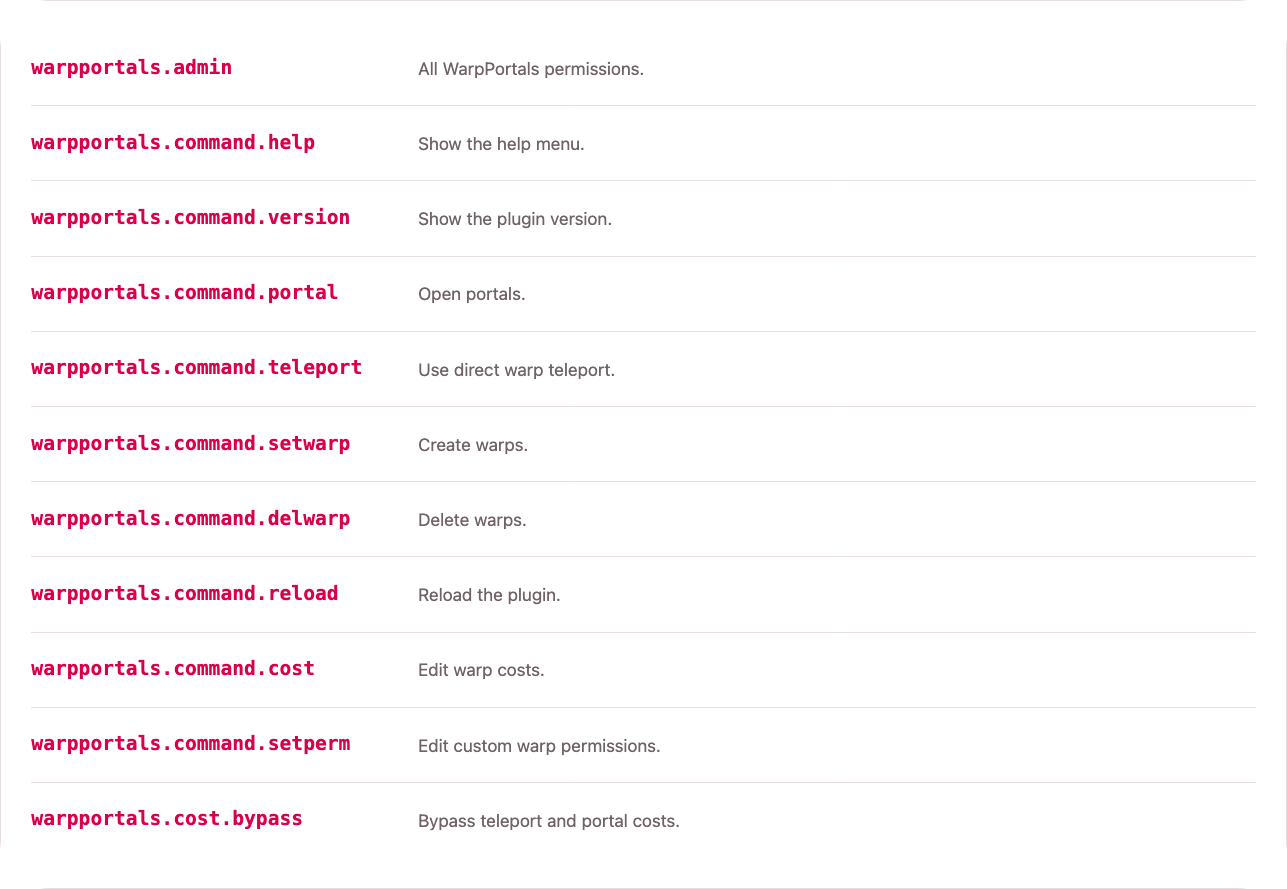
Permission Copy-Paste
| Permission name | Permission description |
|---|---|
| warpportals.admin | All WarpPortals permissions. |
| warpportals.command.help | Show the help menu. |
| warpportals.command.version | Show the plugin version. |
| warpportals.command.portal | Open portals. |
| warpportals.command.teleport | Use direct warp teleport. |
| warpportals.command.setwarp | Create warps. |
| warpportals.command.delwarp | Delete warps. |
| warpportals.command.reload | Reload the plugin. |
| warpportals.command.cost | Edit warp costs. |
| warpportals.command.setperm | Edit custom warp permissions. |
| warpportals.cost.bypass | Bypass teleport and portal costs. |
The default permission setup is intentionally simple:
| Group type | Suggested permissions |
|---|---|
| Normal players | warpportals.command.teleport, warpportals.command.portal |
| VIP players | Normal player permissions plus custom warp permissions like warpportals.warp.vip |
| Staff | Admin command permissions for creating, deleting, pricing and reloads |
| Trusted users | warpportals.cost.bypass if they should ignore costs |
Example rank setup
default:
  warpportals.command.teleport
  warpportals.command.portal

vip:
  warpportals.command.teleport
  warpportals.command.portal
  warpportals.warp.vip

admin:
  warpportals.admin
Custom warp permissions are not hardcoded. You can use any permission string you want, then assign it through your permissions plugin.
Configuration
WarpPortals uses three main configuration areas:
| File | Purpose |
|---|---|
config.yml |
Global behavior, portals, sounds, timers and custom commands. |
storage.yml |
Saved warps, warp permissions and per-warp costs. |
messages/*.yml |
Language files and MiniMessage-formatted messages. |
Essential configuration
Global Teleport Settings
teleport:
  delay-seconds: 3
  cancel-on-move: true
  title: true
  actionbar: false
Set delay-seconds to 0 to disable the timer. Any value above 0 enables the warmup before teleporting.
Direct Warp Or Portal Warp
commands:
  direct-warp-teleport: true
When this is true, /warp <name> teleports directly. When this is false, /warp <name> opens a portal instead.
Optimizations
optimizations:
  cache-warps: true
  shared-particle-scheduler: true
  portal-spatial-index: true
  cache-portal-calculations: true
  cache-settings: true
  cache-vault-provider: true
These advanced settings are enabled with defaults suitable for most servers. Change them only when profiling or a specific server setup shows that a different mode works better.
Portal Settings
portal:
  protection-mode: block
  material: TINTED_GLASS
  width: 1.25
  height: 2.5
  distance-from-player: 1.5
  min-distance: 10
  animation-enabled: true
  use-display-transitions: true
  animation-ticks: 10
  hold-ticks: 60
portal.min-distance prevents players from opening a portal when they are already too close to the destination. Set it to 0 to disable that check.
portal.use-display-transitions lets Minecraft clients animate each display entity from a start transform to an end transform. Disable it only when you need the legacy server-side animation updated every tick.
Saved warp example
warps:
  vip:
    world: world
    x: 120.5
    y: 70.0
    z: -40.5
    yaw: 180.0
    pitch: 0.0
    permission: warpportals.warp.vip
    costs:
      teleport:
        enabled: true
        type: xp
        amount: 100
        item: DIAMOND
      portal:
        enabled: true
        type: item
        amount: 5
        item: DIAMOND
The permission field is optional. Leave it empty if every player with warp access can use that destination.
Cost types
| Type | Meaning |
|---|---|
xp |
Removes raw experience points. |
level |
Removes experience levels. |
vault |
Removes money through Vault economy. |
item |
Removes items from the player's inventory. |
none |
Disables the cost. |
Teleport and portal costs are separate, so opening a portal can be priced differently from using direct teleport.
Custom command example
custom-commands:
  spawn:
    aliases:
      - hub
    warp: spawn
    mode: direct
    delay-seconds: 0
    cooldown-seconds: 0
    message: ""
    cost:
      enabled: false
      type: xp
      amount: 0
      item: DIAMOND
Use mode: direct for instant or timer-based teleporting. Use mode: portal when the command should open a portal.
Languages
English and Polish are included by default:
language: en_us
language: pl_pl
You can add your own language file in the messages folder. Missing keys are copied from English when the plugin reloads.
Q&A
Warp creation and basic travel
How do I create a new warp?
Stand where players should arrive and run:
/warpportals setwarp spawn
The plugin saves the location, world, yaw and pitch.
How do I make /warp open portals instead of teleporting directly?
commands:
  direct-warp-teleport: false
After reload, /warp <name> will open a portal.
How do I keep /warp as a normal teleport command?
commands:
  direct-warp-teleport: true
Teleport timer
How do I create a warp with a delay?
Set the global delay:
teleport:
  delay-seconds: 3
  cancel-on-move: true
Players will need to wait 3 seconds before direct teleporting. If cancel-on-move is enabled, moving cancels the teleport.
How do I disable the delay?
teleport:
  delay-seconds: 0
VIP and custom permissions
How do I make a warp only for VIP players?
Create the warp:
/warpportals setwarp vip
Assign a permission:
/warpportals setperm vip warpportals.warp.vip
Then give warpportals.warp.vip to your VIP group.
How do I remove the VIP requirement from a warp?
/warpportals setperm vip reset
How do I manually edit a warp permission?
Open storage.yml and edit:
warps:
  vip:
    permission: warpportals.warp.vip
Use an empty string to make it unrestricted:
permission: ""
Costs and economy
How do I charge XP for teleporting?
/warpportals cost spawn teleport xp 100
How do I charge XP for opening a portal?
/warpportals cost spawn portal xp 100
How do I charge levels?
/warpportals cost spawn teleport level 10
How do I charge Vault money?
/warpportals cost spawn teleport vault 20
Vault and an economy plugin must be installed.
How do I charge items?
/warpportals cost spawn portal item 5 DIAMOND
This charges 5 diamonds when opening a portal.
How do I remove a cost?
/warpportals cost spawn teleport none 0
For portal costs:
/warpportals cost spawn portal none 0
How do I let staff bypass all costs?
Give them:
warpportals.cost.bypass
Custom commands
How do I create /spawn?
custom-commands:
  spawn:
    warp: spawn
    mode: direct
    delay-seconds: 0
How do I make /hub also run the spawn warp?
custom-commands:
  spawn:
    aliases:
      - hub
    warp: spawn
    mode: direct
How do I make a specific shortcut open a portal?
custom-commands:
  dungeon:
    warp: dungeon
    mode: portal
Players can then use /dungeon to open a portal to that warp.
How do I add a cooldown to a custom command?
custom-commands:
  spawn:
    warp: spawn
    mode: direct
    cooldown-seconds: 30
How do I add a custom success message?
custom-commands:
  spawn:
    warp: spawn
    mode: direct
    message: "<gray>Teleported to <#e23a6f>spawn<gray>."
Portal-only setups
How do I make a warp available only through a portal?
Use portal mode for the command players should use:
custom-commands:
  dungeon:
    warp: dungeon
    mode: portal
Then do not give those players warpportals.command.teleport, or keep direct /warp usage for staff only.
How do I disable portals completely for a group?
Do not give that group:
warpportals.command.portal
If /warp is configured to open portals, also keep commands.direct-warp-teleport: true for groups that should only use direct teleport.
Portal distance and protection
How do I stop players from opening a portal too close to the target?
portal:
  min-distance: 10
If the entrance portal would be closer than 10 blocks to the destination portal, it will not open.
How do I disable that distance check?
portal:
  min-distance: 0
How do I prevent duplicate active portals?
portal:
  protection-mode: block
How do I replace the old portal when a new one opens?
portal:
  protection-mode: replace
Portal travel rules
How do I make portals one-way?
portal:
  teleport:
    one-way: true
How do I allow everyone to walk through a portal?
portal:
  teleport:
    only-owner: false
How do I make portals work only for the creator?
portal:
  teleport:
    only-owner: true
How do I close portals after the creator uses them?
portal:
  teleport:
    close-after-owner-use: true
Portal visuals and timing
How do I change portal size?
portal:
  width: 1.25
  height: 2.5
  depth: 0.1875
How do I change how far the entrance portal appears from the player?
portal:
  distance-from-player: 1.5
How do I change the portal animation speed?
portal:
  animation-enabled: true
  use-display-transitions: true
  animation-ticks: 10
Set animation-enabled to false to make portals appear and disappear immediately. Lower animation-ticks values are faster, while higher values are slower.
How do I change how long portals stay open?
portal:
  hold-ticks: 60
20 ticks equals 1 second.
Sounds
How do I disable a sound?
Use none:
portal:
  sounds:
    open:
      sound: none
How do I change teleport sounds?
teleport:
  sounds:
    complete:
      sound: ENTITY_EXPERIENCE_ORB_PICKUP
      volume: 1.0
      pitch: 2.0
    cancel:
      sound: BLOCK_NOTE_BLOCK_BASS
      volume: 1.0
      pitch: 0.6
How do I change portal sounds?
portal:
  sounds:
    open:
      sound: BLOCK_PORTAL_TRIGGER
      volume: 0.7
      pitch: 1.6
    close:
      sound: BLOCK_PORTAL_TRAVEL
      volume: 0.4
      pitch: 1.8
Reloading and language files
How do I reload the plugin?
/warpportals reload
Reload refreshes config, storage, messages and custom commands.
What happens if config or message files are missing?
The plugin recreates missing config and message files on startup or reload.
Can I add another language?
Yes. Create a file such as:
messages/de_de.yml
Then set:
language: de_de
Missing keys will be copied from English.
EXPECT BUGS
I tried to anticipate every possible scenario that could cause errors or bugs, but testing it alone might have missed something. If you find a bug, PLEASE report it immediately to the issue tracker on the project's GitHub pin or on my Discord. Thank you ❤️
If you find this plugin helpful, unique, or simply cool, please consider supporting me by following the project on Modrinth. If you’d like to offer even more support, you can also check out my Ko-fi. Every bit of support motivates me to keep working on this plugin.
