
Compatibility
Minecraft: Java Edition


Tags
Creators
Details
PREMISE: this work was born from the author’s desire to create his own version of a realistic texture pack for Minecraft. The author has not used any copyrighted material (see the licenses inside each file for details).
This project is splitted between FOUR different texture packs that complement each other:
- Above: It brings true realism to the above world of Minecraft - neither Nether nor End.
- Beneath: It brings true realism to the underground world of Minecraft - neither Nether nor End
- Worlds: It brings true realism to the dimensions of Minecraft - Nether, End, dimensions to come.
- So_Plenty: It brings true realism to the news of the Biomes O' Plenty Mod only.
English:
MostlyTrue is made for those who love to enjoy the game and the adventure, always striving to recreate a sense of realism, so… creation is in progress!
I've included some BetterNether and BetterEnd Mod's textures needed to blend coherently with the MostlyTrue style. For Biomes O' Plenty Mod I’ve prepared a ‘mask biome’ that turns Visceral Heap biome into a Steampunk Heap biome instead - you’ll be able to see it only if you also use the World package.
Español:
MostlyTrue está hecho para quienes disfrutan del juego y de la aventura, siempre buscando reproducir sensaciones de realismo, así que… la creazion està continuando!
He incluido algunas texturas de los mods BetterNether y BetterEnd que son necesarias para integrarse de manera coherente con el estilo de MostlyTrue. Para el mod Biomes O’ Plenty preparé un “bioma máscara” que convierte el bioma Visceral Heap en un bioma Steampunk Heap - solo podrás verlo si también usas el paquete World.
Italiano:
MostlyTrue è fatto per chi ama godersi il gioco e l'avventura, sempre in cerca di riprodurre sensazioni di realismo, quindi… la creazione continua!
Ho incluso alcune texture delle mod BetterNether e BetterEnd necessarie per fondersi in modo coerente con lo stile di MostlyTrue. Per la mod Biomes O’ Plenty ho preparato un “bioma maschera” che trasforma il bioma Visceral Heap in un bioma Steampunk Heap - potrai vederlo solo se usi anche il pacchetto World.

Below is a summary of the key information you need to get the best experience when using Minecraft with my texture packs:
_1 ESSENTIAL MODS FOR USE WITH FABRIC/IRIS SHADERS:
- BiomesOPlenty - adds biomes and materials; WARNING! This mod permanently alters your Minecraft world, so add it BEFORE creating a new world!
- continuity - adds large scale texture tiling and randomization tiling feature to make a realistic gameplay
- entity_model_feature_fabric (EMF) - adds customizable entity model feature
- entity_texture_feature_fabric (ETF) - adds customizable entity texture feature
- fabric-api - adds customization and shader supports
- fabric-language-kotlin - required to interpret certain codes
- GlitchCore - required by BiomesOPlenty Mod
- indium - ESSENTIAL by fabric up to version 1.20.6, not for later ones!
- iris-fabric - required by fabric
- lithium - required by fabric
- sodium-fabric - required by fabric
- TerraBlender - required by BiomesOPlenty Mod
_2 For those USING THE OFFICIAL MICROSOFT LAUNCHER, the correct installation procedure is:
- Do not start the launcher.
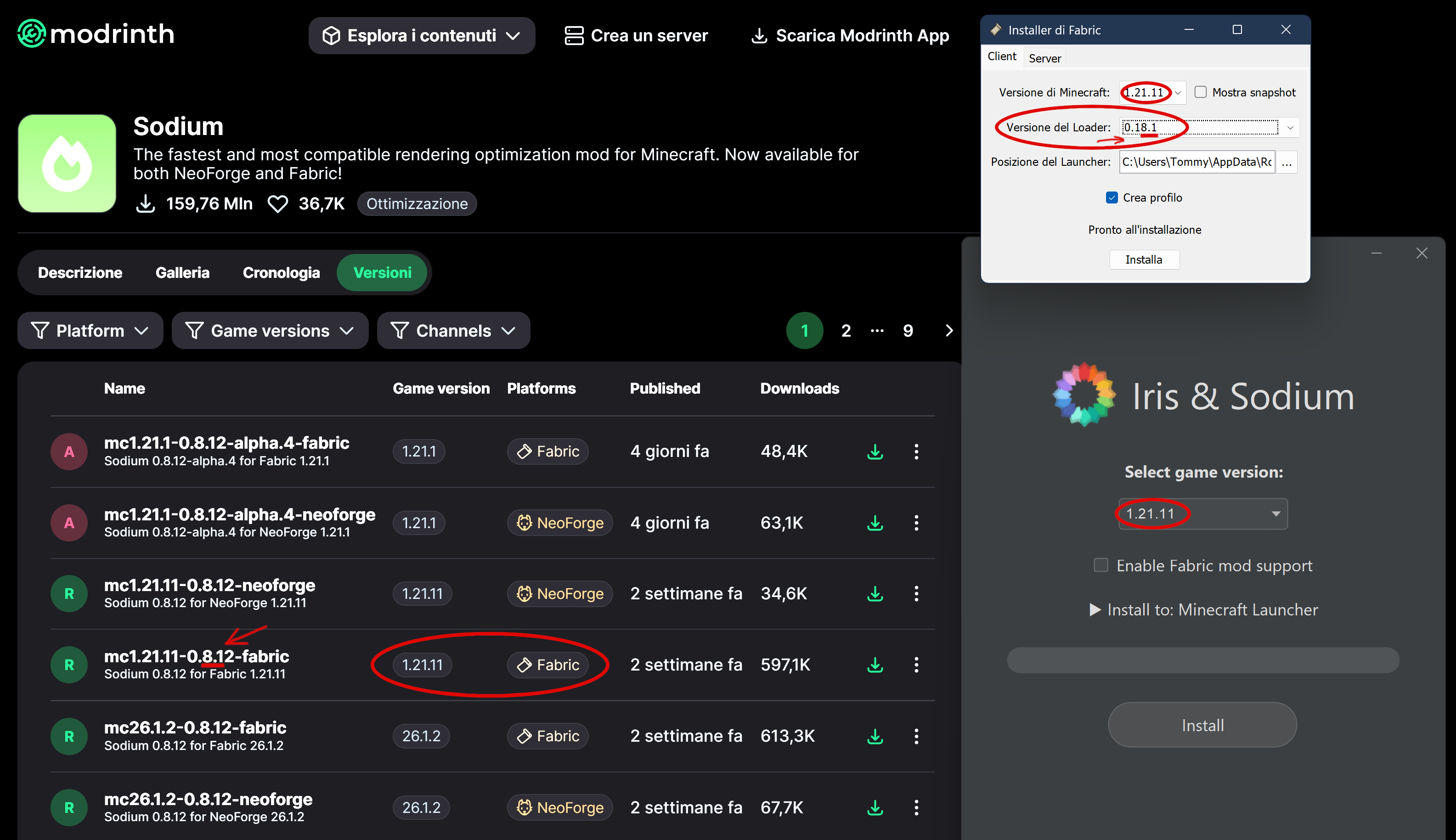
- First download and run fabric-installer, then iris-installer; choose 1.21.11 VERSION, for example.
See below how to choose loader version, matching Sodium version. In this example, the most significant digit is the first one, namely the 8, which must match. NOTE: Recently (in 2026) the latest Fabric Loaders have fixed several bugs and now work even with older Sodium versions, but this is not guaranteed.
-
-
After that, check the path (usually C:\Users\ [username] \AppData\Roaming\ .minecraft) and make sure the folder "iris-reserved" and version subfolder "1.21.11" has been created; if they’re missing, create them manually.
-
Paste all the mods listed above into the VERSION subfolder.
-
Now start the launcher and make sure a new installation has been created with a name like "iris-fabric-loader-0.18.6-1.21.11". If it’s not there, something went wrong and you need to repeat the procedure.
-
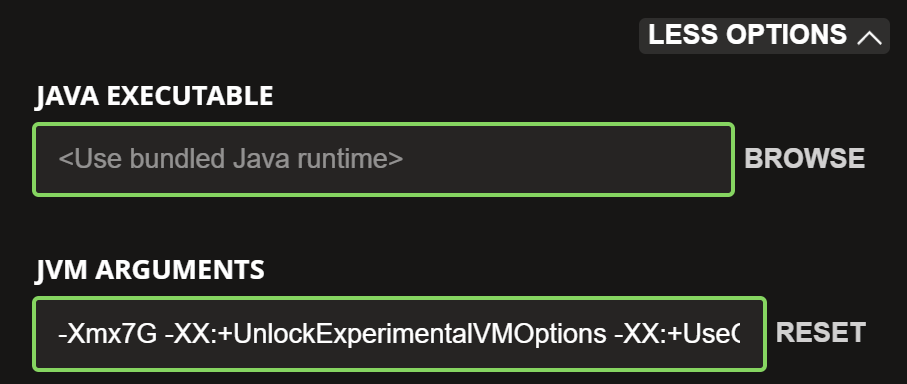
Before launching the game, I recommend checking how much memory is allocated. Go to the Installations menu and edit the profile you just created. At the bottom, in the JVM Arguments field, change the first string "-Xmx2G" to "-Xmx4G" if you have up to 16 GB of RAM, or to "-Xmx7G" if you have up to 32 GB.
-
-
Now launch the game… if the mods are compatible with each other, everything will work fine; otherwise, you’ll need to check which mod has the wrong VERSION.
-
REMEMBER: only the group of mods listed above is guaranteed not to conflict. If you add other mods, you may experience crashes.
-
NOTE: Unfortunately, for quite some time now the fabric‑installer has no longer been able to perform installations using the requested loader, and this results in corrupted installations. For example, if you try to install Fabric for version 26.3 with loader 0.19.5, you will instead get the old loader 0.14.24, which will not work. I managed to fix it by explicitly selecting loader 0.14.24, and magically I ended up with loader 0.19.5.