
Compatibility
Minecraft: Java Edition


Tags
Creators
Details
Created as a first-time Blockbench texture pack project. Feel free to use this pack in your videos or edits—just credit the page link!
I'm a small content creator so please check out my Instagram too -> Not The MYTH
🕷️ Spider-Man & Gwen Stacy Cinematic Models (TASM Scene)Bring iconic superhero storytelling to life in Minecraft! Created entirely in Blockbench, this custom 3D resource pack recreates the heartbreaking clock tower sequence featuring Spider-Man and Gwen Stacy.Whether you're making cinematic shorts, YouTube Reels, or taking epic screenshots, these detailed player-scale models offer realistic dual-layer textures and dynamic pose.
📸 Key Features
Custom 3D Gwen Stacy Model: Complete with her iconic coat, hair layer, and suspended web-wrap geometry around her torso.
Custom 3D Spider-Man Model: Positioned in a clinging pose with custom web lines.
Optimized for Lighting: Designed without aggressive shading glitches to look flawless under shaders and warm directional light.
Zero Mods Required: Works entirely through vanilla resource pack model overrides!
🛠️ Replaced Blocks & How to Use
To prevent these models from interfering with normal gameplay, I replaced uncommon/utility blocks (to replace the models as per your liking. Unzip the resource pack and go to this directory -> "C:\Users\abc\OneDrive\Desktop\Gwen Stacy Fall From TASM 2\assets\minecraft\models\block" There you will find 5 .json files just change the name of the files with the blocks you want to replace. For e.g., cobweb.json -> diamond_block.json):
Blocks Replaced:
- Cobweb - Web Wrap for ceiling surface
- Pink Stained Glass - Web Wrap for Gwen (place directly above her block)
- Mangrove Stairs - Gwen Stacy (Suspended Model)
- Jungle Leaves - Spider-Man (Clinging Model)
- Magenta Stained Glass - Web Lines
Here is the structure with Resource Pack ON and OFF:
Resource pack OFF:
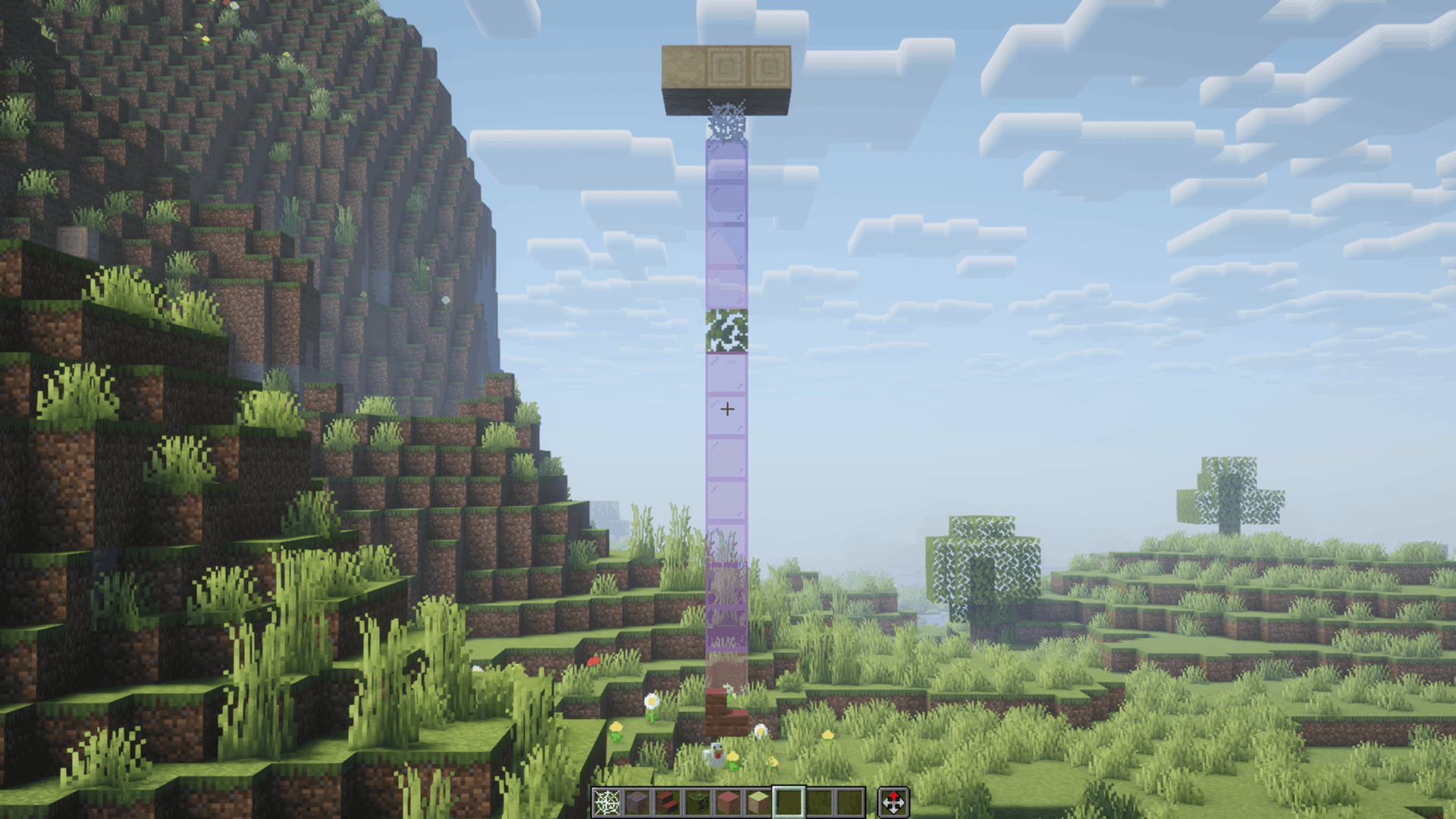
A vertical pillar of blocks extends downward from a floating wood platform to the ground. From bottom to top, place Mangrove Stairs one block above the ground, followed by Pink Stained Glass, a stack of Magenta Stained Glass interrupted by a Jungle Leaves block in the middle, a Cobweb attached directly beneath the top platform, and a stone support block at the peak.
Assembly Tutorial (Reverse Placement Order: Bottom to Top) To ensure the custom 3D models and web strands line up correctly in-game, place the blocks starting from the bottom near the ground and building upwards: 1. Mangrove Stairs (Gwen Model): Place 1 block above the ground to form the base of Gwen’s model. 2. Pink Stained Glass (Gwen's Web Wrap): Place directly on top of the Mangrove Stairs. 3. Magenta Stained Glass (Lower Web Line): Place a stack extending upward to build the lower web section. 4. Jungle Leaves (Spider-Man Model): Place on top of the lower Magenta Stained Glass column where Spider-Man will cling. 5. Magenta Stained Glass (Upper Web Line): Place a stack extending upward from Spider-Man toward the top anchor. 6. Cobweb (Ceiling Web Wrap): Place directly above the highest glass block, attaching to your ceiling or anchor platform.
Resource Pack ON:
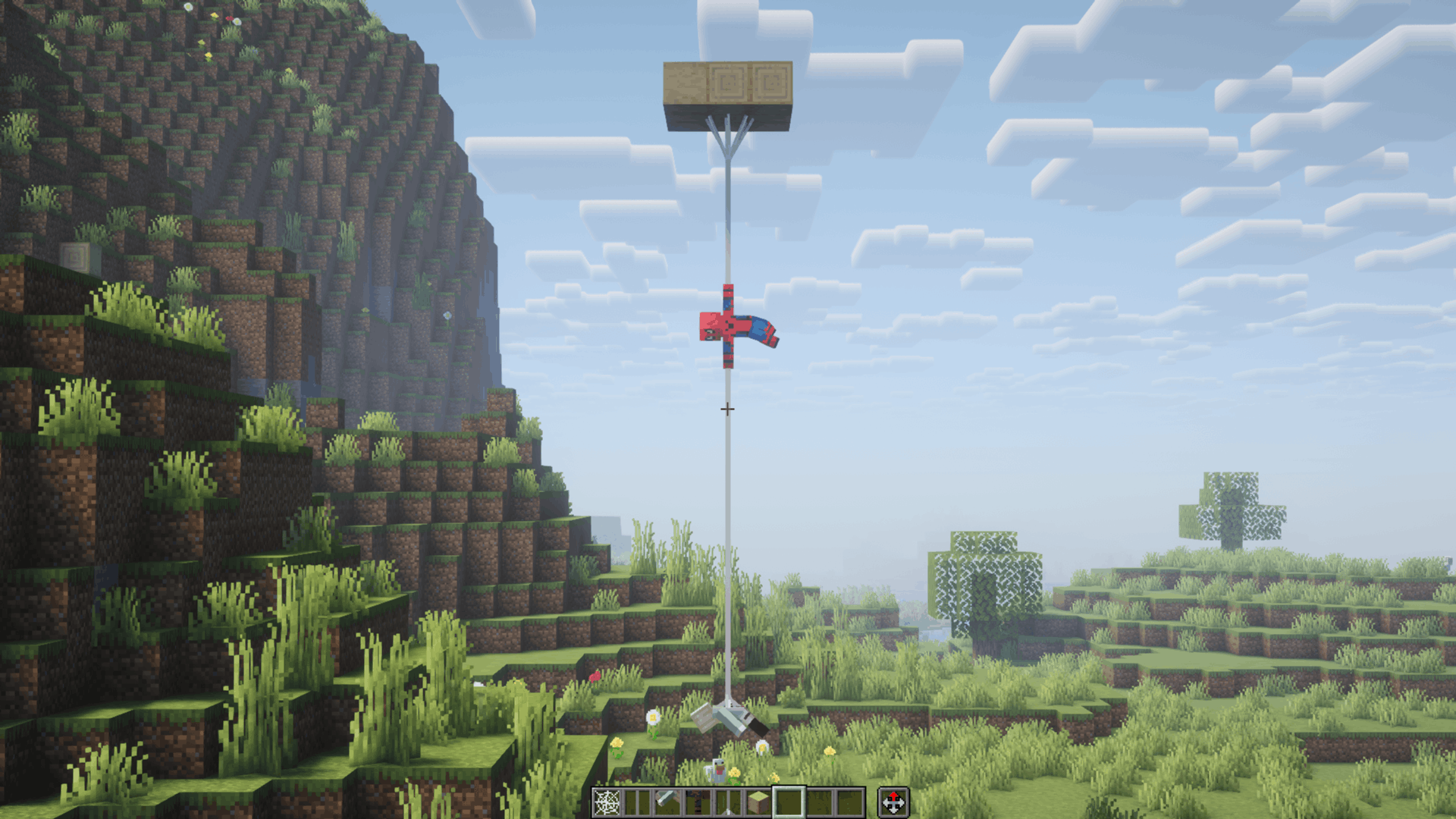
- Cobweb has been replaced by ceiling Web Wrap. 2) Magenta Stained Glass by Web Lines. 3) Jungle Leaves (one block) by Spider-Man. 4) Magenta Glasses again. 5) Pink Stained Glass by Gwen's Web Wrap. 6) Mangrove Stairs (one block) by Gwen
Recommended Shaders - BSL, Complementary, or Solas Shaders.