
Compatibility
Minecraft: Java Edition
Platforms
Supported environments


Links
Tags
Creators
Details



📊 If you find BUG please REPORT in our discord server
Armor Stats & HUD is a lightweight, all-in-one client-side mod designed to give you real-time visibility over your worn armor and item durability. Never get caught off-guard with broken equipment in the middle of battle or exploration again—without bloat.
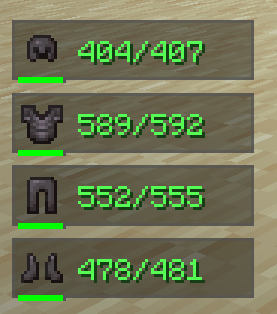
⚡ 100% Client-Side: Works on any vanilla or modded server. No server-side installation required! ⚙️ Fully Customizable: Every single feature can be tweaked, toggled, or customized directly in the Minecraft Settings menu!
⚙️ Fully Integrated Settings Menu
Don't want a specific position? Want to change background colors, scales, or the smooth RGB mode? Armor Stats & HUD seamlessly integrates into the native Minecraft options interface (via Mod Menu / Cloth Config). You can adjust or toggle anything on the fly with a single click!
🌟 Features Breakdown
🛡️ HUD & Armor Displays
- Real-Time Armor Overlay — Displays your currently equipped armor (Helmet, Chestplate, Leggings, Boots) with smooth entry and exit animations when equipment changes.
- Exact Durability & Percentages — Toggle between exact numeric durability values (
150/450) or simple percentage indicators (33%). - Smart Durability Color Coding — Numeric text dynamically changes color from Green to Yellow and Red as your gear loses durability, giving you instant visual feedback.
- Durability Progress Bar — Includes a mini visual progress bar under each armor piece for quick scanning during intense fights.
🎨 Advanced Background & Visual Styling
- Multiple Background Presets — Choose from a list of clean background options, including Dark (Default), Red, Green, Blue, Purple, or Transparent.
- Smooth RGB Rainbow Mode — Enable the dynamic RGB mode to make your HUD panels seamlessly cycle through a vibrant, fully animated rainbow palette.
- Custom Scale & Offset — Scale the HUD anywhere from
0.5xto3.0xand fine-tune its position with pixel-exact X/Y offsets. - Flexible HUD Positioning — Lock the overlay to any screen corner (Top-Left, Top-Right, Bottom-Left, Bottom-Right, Top-Center, Bottom-Center).
⚡ Performance & Smooth Animations
- Zero Lag Overhead: Written natively using fast GUI rendering pipelines without unnecessary tick bloat.
- Animated Show/Hide: Items smoothly slide in and out of your screen when equipped, unequipped, or broken.
-
🌟 By Denuver