Compatibility
Minecraft: Java Edition
Platforms
Supported environments


Links
Tags
Creators
Details



Compact Items is a storage focused datapack/mod that lets you compress 64 items into a single compact item. Save inventory space, reduce storage clutter, and safely convert compact items back whenever needed. Supports easy item compression and decompression while keeping your items organized.

- Compress 64 items into a single compact form to maximize storage space and keep your inventory organized.
- Store up to (64 Stack) 4,096 items in a single compact item, greatly reducing chest clutter.
- Easily convert compact items back into their original items whenever needed.
- Compact items are custom player heads, allowing them to be used as unique decorative blocks for creative builds.
- Perfect for servers and SMPs with chest shops or player shops, making item trading and storage more efficient.

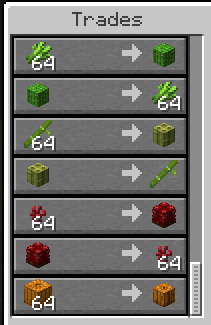
/trigger ci.farmer: Summons the Farmer Compactor wandering trader.


What happens if I rename Compact Items?
Renaming Compact Items can cause a mismatch because Minecraft checks the item's data when converting it back. Changing the name may cause the custom head data to no longer match, preventing the item from being converted back.How many items can one compact item store?
A single compact item can store up to 4,096 items, making it easier to manage large amounts of items in a smaller space.Can I convert compact items back?
Yes, compact items can be safely converted back into their original items whenever needed without losing any items.Are compact items only for storage?
No, compact items use custom player head textures, allowing them to also be used as decorative blocks for builds.Can I use this on servers or SMPs?
Yes, Compact Items works well on servers and SMPs, especially with chest shops or player shops, making storage and trading more efficient.Why doesn't it support versions below 1.21.X?
Compact Items uses the newer Minecraft head data system. In older versions, placed player heads can lose their custom data, causing item conversion issues and breaking the compact/decompact system.How can I blacklist someone from using Compact Items?
To blacklist a player, use:/tag player_name add ci_blacklisted
Blacklisted players will not be able to use Compact Items features.
How do I open the Compact Exchange shop?
Use the trigger command for the category you want. Example:/trigger ci.farmer
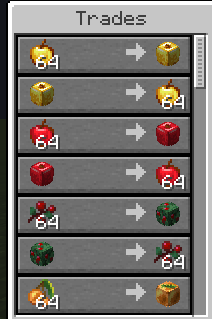
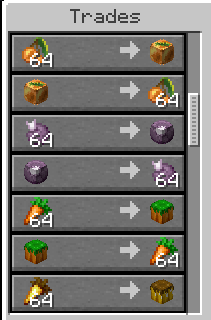
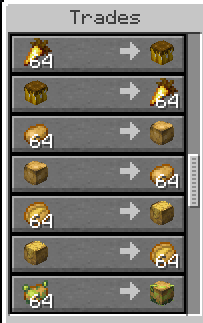
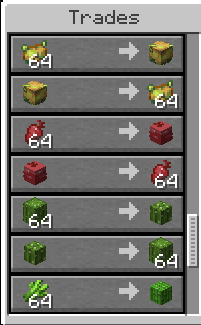
This opens the farming item exchange shop. You can also scroll to the bottom of the page to view all available trades.

Compact Items uses category-based wandering traders to handle item compression and exchange. Each trader has a unique category name displayed above the entity and holds a related item in their main hand to identify their purpose.
Scroll down to view all available trader categories/compactors and their available trades.