
Compatibility
Minecraft: Java Edition
Platforms
Supported environments


Links
Tags
Creators
Details
Reconnect


A mod that supersedes HiWord9's Reconnect Button mod, supporting Minecraft 1.20.1–1.21.11 and 26.1–26.3.
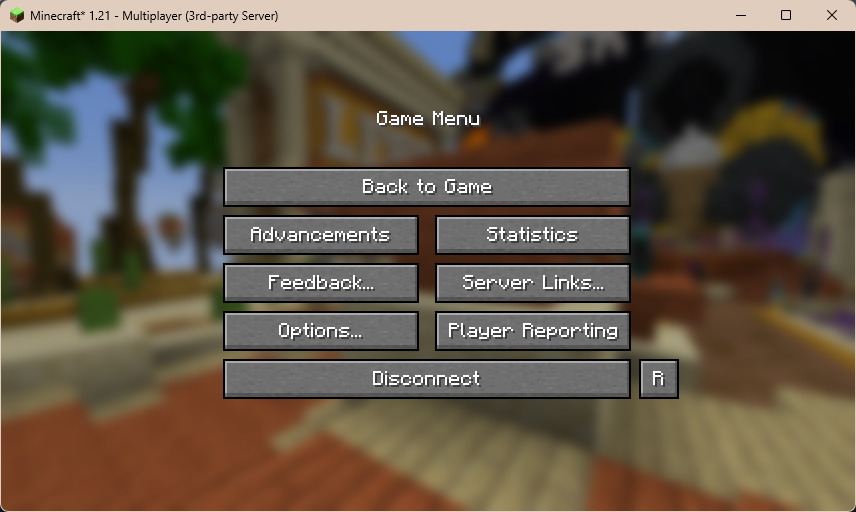
- This mod adds a reconnect button on your in-game menu screen while in a Multiplayer world.
- NEW: The disconnected screen includes a Reconnect Now button which automatically retries after 3, 10, 30 and 60 seconds, stopping after four failed attempts. The ∞ button toggles unlimited retries every 3 seconds. Returning to the server list or cancelling a connection stops retries.
- You can also reconnect to a server by typing
/reconnectin chat. - You can finally reconnect to a Realms server starting with version
1.4.
Supported versions
| Minecraft | Fabric | NeoForge | Forge | Java |
|---|---|---|---|---|
| 1.20.1–1.20.4 | Yes | Yes | Yes | 17 |
| 1.20.5 | Yes | Yes | No release | 21 |
| 1.20.6, 1.21, 1.21.1 | Yes | Yes | Yes | 21 |
| 1.21.2 | Yes | Yes | No release | 21 |
| 1.21.3–1.21.11 | Yes | Yes | Yes | 21 |
| 26.1, 26.1.1, 26.1.2, 26.2, 26.3 | Yes | Yes | Yes | 25 |
Please use the JAR file matching your Minecraft version and loader.
Will this mod come to CurseForge?
- There are currently no plans of bringing this mod to Curseforge. For now this mod is available for download on releases page or on Modrinth
Dependencies and Incompatibilities
- There are currently no incompatibilities seen with this mod at the moment.
Known issues
- N/A
Building the project
Please run Gradle with Java 25. Gradle resolves the Java 17 and Java 21 toolchains required by older targets automatically.
To get the files from this repository:
git clone https://github.com/59xa/reconnect-mod-reloaded/
cd reconnect-mod-reloaded

./gradlew build
The build uses Stonecutter to build all supported versions from the shared common, fabric, neoforge and forge source trees. Finished jars are written to build/libs/<minecraft-version>/.
To build one version or a selection of versions:
./gradlew -Pbuild_versions=26.3 build
./gradlew -Pbuild_versions=26.1,26.2,26.3 build
./gradlew -Pbuild_versions=1.20.1 -Pbuild_loaders=fabric build
On Windows, use ./gradlew.bat and quote the property argument, for example ./gradlew.bat "-Pbuild_versions=26.3" build.
Run a development client with ./gradlew -Pbuild_versions=1.20.1 :fabric:1.20.1:runClient, ./gradlew -Pbuild_versions=1.20.1 :neoforge:1.20.1:runClient or ./gradlew -Pbuild_versions=1.20.1 :forge:1.20.1:runClient.
Version dependencies live in versions/<minecraft-version>/gradle.properties. API differences live in version-selected compat source directories. Reconnect behaviour and command registration are shared across loaders. Fabric jars for obfuscated game versions are remapped to intermediary names, and Forge jars through 1.20.4 use SRG names. The Forge and NeoForge 1.20.1 builds include Mixin refmaps; NeoForge 1.20.1 uses the original Forge packages. CI builds every Minecraft target and checks the contents and metadata of the packaged jars.
Forge 1.20.3 uses a separate ForgeGradle build script because its original Loom development bootstrap is unpublished.
The 26.x Forge builds target Java 21 bytecode and Mixin compatibility because Forge ships Mixin 0.8.7. They compile and run with Java 25, as required by Minecraft.
The active IDE version defaults to 26.3. Change it with ./gradlew "Set active project to 26.1", then run ./gradlew "Reset active project" before committing. Targeted builds using build_versions leave the active IDE version unchanged.