
Compatibility
Minecraft: Java Edition
Platforms


Tags
Creators
Details
LsEnderChest
✨ A modern, lightweight and security-focused Ender Chest plugin for Paper 26.3.
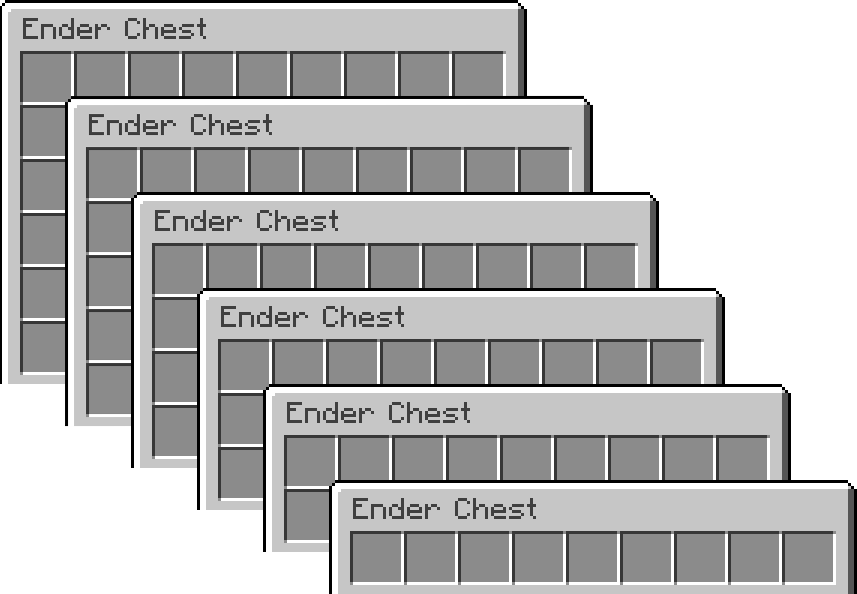
LsEnderChest replaces the vanilla Ender Chest with permission-based virtual storage that can give each player 1–6 rows, backed by SQLite or MySQL.
Version 2.0.0 is a major rewrite with live shared chest sessions, automatic overflow protection, GUI restore history, per-player audit journals and a built-in vanilla Ender Chest converter.
Features
- 🛡️ Advanced Anti-Dupe Protection
- 🕰️ GUI Ender Chest Restores
- 📦 1–6 Row Ender Chests
- 🧰 Automatic Overflow Protection
- 👮 Powerful Admin Tools
- 🔁 Built-In Vanilla Conversion
- 🧾 Detailed Per-Player Audit Logs
- 🔒 Advanced Item Blocking
- 💾 SQLite & MySQL
- ⚡ Asynchronous Storage
- 🌐 Online & Offline UUID Support
- 🔔 Admin Update Notifications
What's new in 2.0.0?
Live shared Ender Chest sessions
LsEnderChest now keeps one live inventory session per chest owner. If the owner already has their chest open and an administrator runs:
/ec <player>
both users see and edit the same live inventory. Admins are no longer blocked while the owner is using it, and separate stale writable copies are avoided.
Read-only staff can still view another player's chest without being able to modify it.
Automatic Overflow Chests
Losing a rank or row permission no longer makes items outside the new chest size disappear.
Example: a player goes from 4 rows to 1 row.
- Slots 1–8 stay where they are
- Slot 9 becomes an Overflow Chest
- Everything from slot 9 onward is safely moved into it
The same rule applies to every downgrade: the last slot of the new chest size becomes the Overflow Chest.
Overflow Chests are normal CHEST items with protected LsEnderChest metadata. They cannot be placed or used as reusable storage; their real contents stay server-side. Tokens are signed, tied to their owner and backed by a unique storage ID instead of trusting lore or visible metadata.
Right-clicking an Overflow Chest consumes it and drops every stored item at the player's location. It cannot be opened or filled, so it never becomes portable extra storage, and its lore clearly warns that claiming it is a one-time action.
If an unclaimed Overflow Chest is caught in a later downgrade, its contents are flattened into the new Overflow Chest instead of nesting them.
Permission changes are monitored automatically, and offline-player storage is checked the next time it is opened.
GUI restore system
Administrators can open a player's restore history with:
/ec restore <player>
The GUI shows timestamped restore points where staff can:
- Browse previous sessions
- Preview the exact historical chest contents
- Select a restore point
- Confirm it in a second GUI
A normal player session becomes one restore session:
open chest → make any number of changes → close the last viewer → one restore point
Individual item movements are still logged separately for auditing.
Before anything is restored, LsEnderChest creates a pre-restore backup, making accidental restores reversible from the same GUI.
Historical Overflow Chests are included too. When restoring an old snapshot, their overflow data is recreated under new protected IDs instead of reusing stale tokens.
Restore is intentionally administrator-only. Old inventory states can recreate items that were previously removed, so this permission should only be given to trusted staff.
Per-player audit journals
The old global simple.log and detailed.log system is replaced by one journal per Ender Chest owner:
plugins/LsEnderChest/logs/players/<uuid>.log
The journal records information such as:
- Chest opens and closes
- Exact item additions/removals
- The actor responsible for each change
- Admin opens and edits
- Blocked-item attempts
- Read-only edit attempts
- Overflow creation and one-time claims
- Row downgrades
- Vanilla conversion activity
- Restore actions
- Machine-readable restore snapshots
Old simple.log / detailed.log files are archived under logs/legacy/ instead of deleted, preserving existing audit history during the upgrade.
Built-in vanilla Ender Chest converter
The standalone LsEnderChestConverter is no longer required. Safe vanilla migration is now built directly into 2.0.0:
- Optional automatic one-time conversion on join
/ec convert <player>for one online player/ec convert allfor all online players- Vanilla contents are only cleared after custom storage saves successfully
- The vanilla chest is verified again before clearing
- Conversion rolls back if its contents change during migration
- Different existing LsEnderChest contents are never blindly overwritten
- Exact duplicate data from the old converter can be detected and cleaned safely
For safety, /ec convert all does not start immediately. It shows a warning and requires:
/ec confirm
within the configured confirmation timeout. Until then, nothing is converted.
If the old converter is still installed, LsEnderChest disables it and warns you to remove the old JAR.
Commands
| Command | Description |
|---|---|
/ec |
Open your Ender Chest |
/ec <player> |
Open another player's Ender Chest |
/ec restore <player> |
Open the admin restore-history GUI |
/ec convert <player> |
Safely migrate one online player's vanilla Ender Chest |
/ec convert all |
Arm bulk conversion for all online players |
/ec confirm |
Confirm the pending dangerous bulk action |
/ec reload |
Reload reloadable configuration |
/lsec and /enderchest support all of the exact same subcommands.
EssentialsX
/ec and /enderchest are registered as full Paper root commands rather than aliases. LsEnderChest loads after EssentialsX and intentionally takes ownership of the bare /ec and /enderchest labels. EssentialsX's namespaced commands remain available if needed.
Permissions
| Permission | Description | Default |
|---|---|---|
enderchest.use |
Open your own LsEnderChest | true |
enderchest.admin |
Edit other players' chests, use restore and reload | op |
enderchest.view.other |
View other players' chests read-only | false |
enderchest.convert |
Use the built-in vanilla converter | op |
enderchest.bypass |
Use the vanilla Ender Chest instead | false |
enderchest.blocked.bypass |
Bypass item restrictions | op |
enderchest.rows.1 |
Gives 1 row | false |
enderchest.rows.2 |
Gives 2 rows | false |
enderchest.rows.3 |
Gives 3 rows | false |
enderchest.rows.4 |
Gives 4 rows | false |
enderchest.rows.5 |
Gives 5 rows | false |
enderchest.rows.6 |
Gives 6 rows | false |
The highest row permission a player has is used. If none are present, settings.default-rows is used.
Storage & safety
LsEnderChest supports SQLite and MySQL.
2.0.0's storage/session rewrite includes:
- One shared live chest state per owner
- Ordered database work on a dedicated worker
- Save retries for transient failures
- SQLite WAL with stronger synchronous durability
- Restore backup-before-write behavior
- Signed one-time Overflow Chest tokens with server-side backing data
- Safe overflow flattening instead of nesting
- Save → verify → clear vanilla conversion flow
- Rollback when conversion verification fails
- Final blocked-item sweep before a chest is persisted
No inventory plugin can guarantee protection against every possible server crash, filesystem failure, database failure or malicious third-party plugin, but 2.0.0 is designed to avoid the common stale-copy, resize and migration duplication/data-loss paths.
Item Blocking
blocked-items.yml can restrict items by material and supported item metadata/components. Restrictions are checked during inventory interactions and again before the last viewer closes a chest.
Compatibility
- Paper 26.3
- Java 25
- Paper-compatible forks may work, but Paper is the primary supported platform
Installation / Upgrade
- Stop the server
- Back up your server and
plugins/LsEnderChestfolder before a major-version upgrade - Remove the old standalone
LsEnderChestConverter.jarif present - Place
LsEnderChest-2.0.0.jarin thepluginsfolder - Start the server
- Review the generated
config.ymlandblocked-items.yml
Existing LsEnderChest inventory data remains supported. Legacy audit logs are archived rather than deleted.
If you enjoy the plugin, donations are appreciated :D