
Compatibility
Minecraft: Java Edition


Tags
Creators
Details
Bedrock Ore-UI JE Resource Pack - Full Introduction
I. Core Overview
If you've grown tired of the native interface of Minecraft: Java Edition, which has remained largely unchanged with no core overhauls for over a decade, and are fed up with the fragmented gameplay experience brought by its outdated, cramped, and visually rigid GUI design, then Bedrock Ore-UI JE is the GUI optimization resource pack built specifically for you.
Developed exclusively for Minecraft: Java Edition players, this resource pack takes the modern interface design of Bedrock Edition as its core reference. While 100% preserving the native operation logic of Java Edition and without altering players' long-established gameplay habits, it has carried out meticulous remastering, optimization, and style unification for the full-scene UI interface in the game.
We uphold the core principles of minimalist style and vanilla compatibility, rejecting redundant and flashy invalid designs. We only focus on the visual comfort, information readability, and operational convenience of the interface, allowing Java Edition players to experience a fresh, modern, and non-fragmented new interface without switching game versions. At the same time, it does not damage the immersion of the vanilla game at all, and has zero impact on game performance.
II. Core Design Philosophy
1. Vanilla-First Design, Zero Learning Curve for Onboarding
We always adhere to the core principle of "optimization without overwriting". All interface optimizations only upgrade the visual style, and fully retain the functional layout, operation logic, and interactive habits of the native Java Edition interface.
Whether you are a veteran player who has been playing for years, or a new player who has just been exposed to Java Edition, you can get started directly with zero learning cost. There will be no operational errors or inability to find functions due to interface changes, and the visual renewal of the interface is completed without changing your gameplay habits.
2. Modern Bedrock Edition Style Porting, Say Goodbye to Outdated Interfaces
Aiming at the pain point of the long-term solidified style of the native Java Edition interface, we have deeply referred to the well-received flat and modern UI design system of Bedrock Edition. We fully port the rounded design, fresh color matching logic, and orderly typography layout of the Bedrock Edition interface to Java Edition, and at the same time carry out exclusive optimization combined with the interface characteristics of Java Edition.
This allows the interface experience of the two editions to achieve a seamless connection, bringing a brand-new visual experience to Java Edition players.
3. Minimalist Style, Focus on the Gameplay Itself
This resource pack focuses on the integration of minimalist style and vanilla style, rejecting over-design and gaudy decorative elements. All visual optimizations are carried out around "reducing visual fatigue and improving information acquisition efficiency".
We have optimized the contrast, size ratio, and white space layout of interface elements, eliminated redundant visual interference in the native interface, so that players can focus more on the game content itself. Even if you play continuously for a long time, you will not experience eye fatigue due to the cluttered interface vision.
4. Lightweight with No Burden, Full Scenario Compatibility
As a pure GUI interface resource pack, Bedrock Ore-UI JE only modifies the interface-related material content in the game, and does not change any non-UI game content such as blocks, entities, shaders, sound effects, etc. The file size is extremely small, with zero impact on game frame rate and loading speed, and it can run perfectly and smoothly even on low-configuration computers.
At the same time, the extremely lightweight design also gives it extremely strong compatibility. It can be freely matched with the vast majority of resource packs, shaders, and mods without content conflicts.
III. Full-Scene UI Optimization Coverage, A Seamless All-Round Refreshed Experience
Bedrock Ore-UI JE has carried out comprehensive and full-coverage remastering and optimization of the UI interface of Minecraft: Java Edition, covering every interactive scene in the player's gameplay process, truly achieving "optimization and refreshment everywhere".
1. Full Overhaul of the Main Menu & Core Entry Interfaces
We have completed a complete style unification and optimization of the full-process main interface after the game is launched, including:
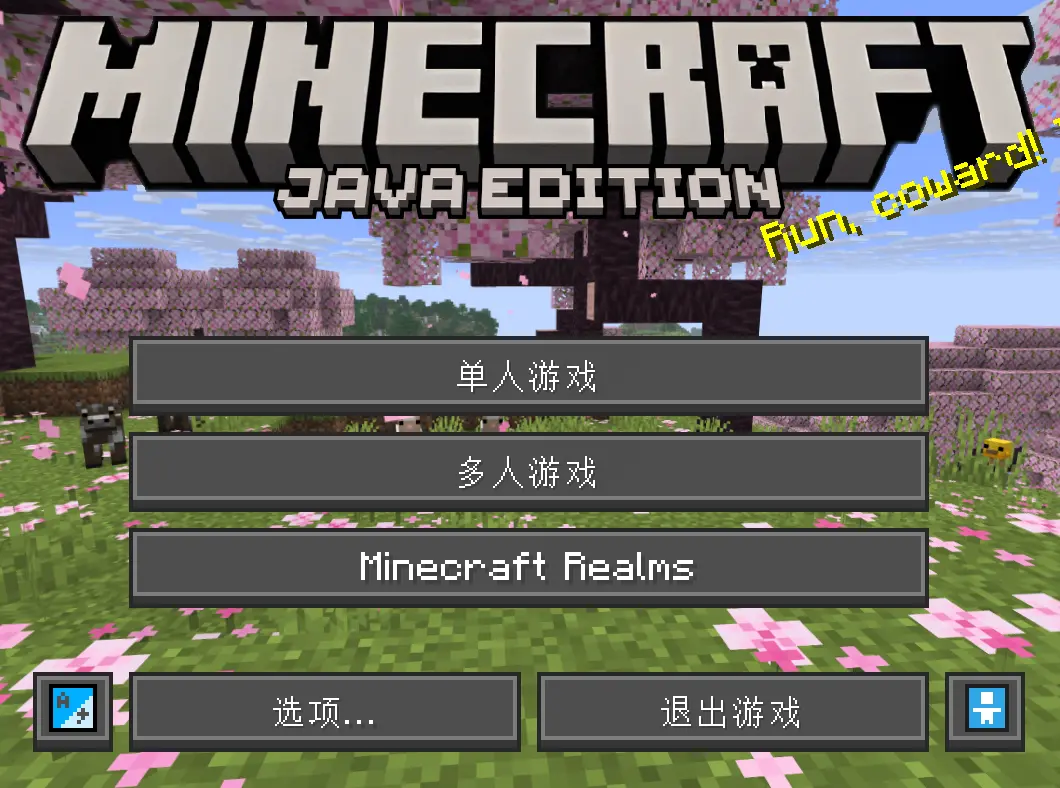
- The main menu interface after game launch, with optimized button styles, font typography and background adaptation, making the main interface cleaner and more orderly;
- Singleplayer & Multiplayer selection interfaces, world creation and management interfaces, with optimized list layout, button spacing and information display, making it easier and faster to browse and manage your game worlds;
- Settings interface series, including video settings, audio settings, control settings, language settings and other sub-interfaces, we have re-adjusted the option layout, slider style and toggle button design, making the parameter adjustment process more intuitive and efficient, and reducing the probability of misoperation;
- Resource pack & shader pack management interfaces, optimized preview window layout and list sorting, making it easier to sort and manage your installed resource packs.
2. In-Game HUD & Core Gameplay Interface Optimization
We have carried out targeted optimization for the core in-game interfaces that players are exposed to the most during gameplay, including:
 health bar, hunger bar, experience bar, armor bar, hotbar, and crosshair, with optimized size ratio, color contrast and display logic, ensuring that the core information is clear at a glance while reducing visual occlusion of the game screen;
- Inventory interface, including player survival inventory, creative inventory, recipe book interface, with optimized item grid layout, tooltip style, and category tab design, restoring the clean and tidy item management experience of Bedrock Edition;
- All interactive container interfaces, including chests, double chests, ender chests, shulker boxes, furnaces, blast furnaces, smokers, brewing stands, enchanting tables, anvils, crafting tables, looms, cartography tables, and all other functional block interfaces, with unified rounded style, optimized slot layout and background contrast, making the item interaction process more comfortable;
- Player combat & interaction related interfaces, including the trading interface with villagers, the horse riding interface, the boat control interface, the spectator mode menu, and the advancement/achievement interface, all of which have been fully remastered to maintain a unified modern style.
3. Prompt & Status Interface Unification
We have also optimized all the prompt and status pop-up interfaces in the game to eliminate the visual fragmentation of the native interface, including:
- Game over/respawn interface, with optimized text layout and button design, reducing the sense of abruptness of the native interface;
- Loading screen & chunk generation progress interface, with optimized progress bar style and text display;
- Chat & command input interface, including chat box style, message display format, and command prompt window, optimized for better readability in both singleplayer and multiplayer scenarios;
- System prompt pop-ups, disconnect prompts, pack loading failure prompts, and other system notification interfaces, all unified into the modern rounded style, maintaining visual consistency throughout the game.
IV. Compatibility & Usage Instructions
1. Supported Game Versions
This resource pack officially supports the following Minecraft: Java Edition versions:
- Full support for 1.21.x full series official releases
- Compatibility support for 26.1 snapshot versions
We will continue to update and adapt to the latest official releases and snapshot versions of Minecraft: Java Edition to ensure long-term availability.
2. Installation & Usage Guide
- Download the latest version of the Bedrock Ore-UI JE resource pack file from this page;
- Open Minecraft: Java Edition, enter the main menu, and click
Options>Resource Packs; - Click
Open Pack Folder, and drag the downloaded resource pack .zip file into the opened folder (do not unzip the file); - After the resource pack appears in the "Available" list, click the arrow to add it to the "Selected" list;
- Move this resource pack to the top of the "Selected" list to ensure that its GUI style takes effect first;
- Click
Done, wait for the game to load, and you can enjoy the brand-new interface experience.
3. Compatibility Notes
- This resource pack only modifies GUI interface related content, and has almost no conflict with most resource packs, shaders, and mods. If you use other resource packs that also modify the GUI interface, please place this resource pack at the top of the loading list to ensure the style takes effect;
- This resource pack is purely client-side, it does not need to be installed on the server, and can be used normally on all vanilla servers and most modded servers;
- It does not contain any content that affects game balance, and fully complies with the server rules of most public servers.
V. About the Project & License
- Project Author: yanyan54188
- License: CC BY-NC-SA 4.0
- You are free to share and adapt the material of this project, provided that you give appropriate credit, indicate if changes were made, and do not use the material for commercial purposes. If you remix, transform, or build upon the material, you must distribute your contributions under the same license as the original.
- This project is publicly released on Modrinth, and all official versions are only released through this platform.
- I am grateful to the GUI Overhaul for the inspiration it has provided me