
Compatibility
Minecraft: Java Edition
Platforms
Supported environments


Tags
Creators
Details
Legacy Bugs
Legacy Bugs is a research-based Fabric mod that restores selected historical Minecraft bugs as accurately as possible.
Rather than simply imitating old glitches, each bug is researched from its original snapshot behavior, documented, tested, and carefully reimplemented for modern Minecraft.
The main development target is Minecraft Java Edition 26.2, using Java 25. A separate branch is maintained for Minecraft Java Edition 1.21.11, using Java 21. Compatibility with other Minecraft versions is not guaranteed because updates can change internal classes, methods, mappings, Fabric APIs, networking behavior, or Mixin targets.
Historical Bug Demonstrations
LB-001 — Grindstone Enchantment Merge Bug
Original snapshot: 24w11a
Status: Implemented / Tested
This bug was introduced during the Item Data Components refactoring in snapshot 24w11a. It restores the historical grindstone behavior where enchantments from the second input item can be copied into the first input item under specific conditions. This can produce an illegally merged enchanted item, including combinations of normally incompatible enchantments.
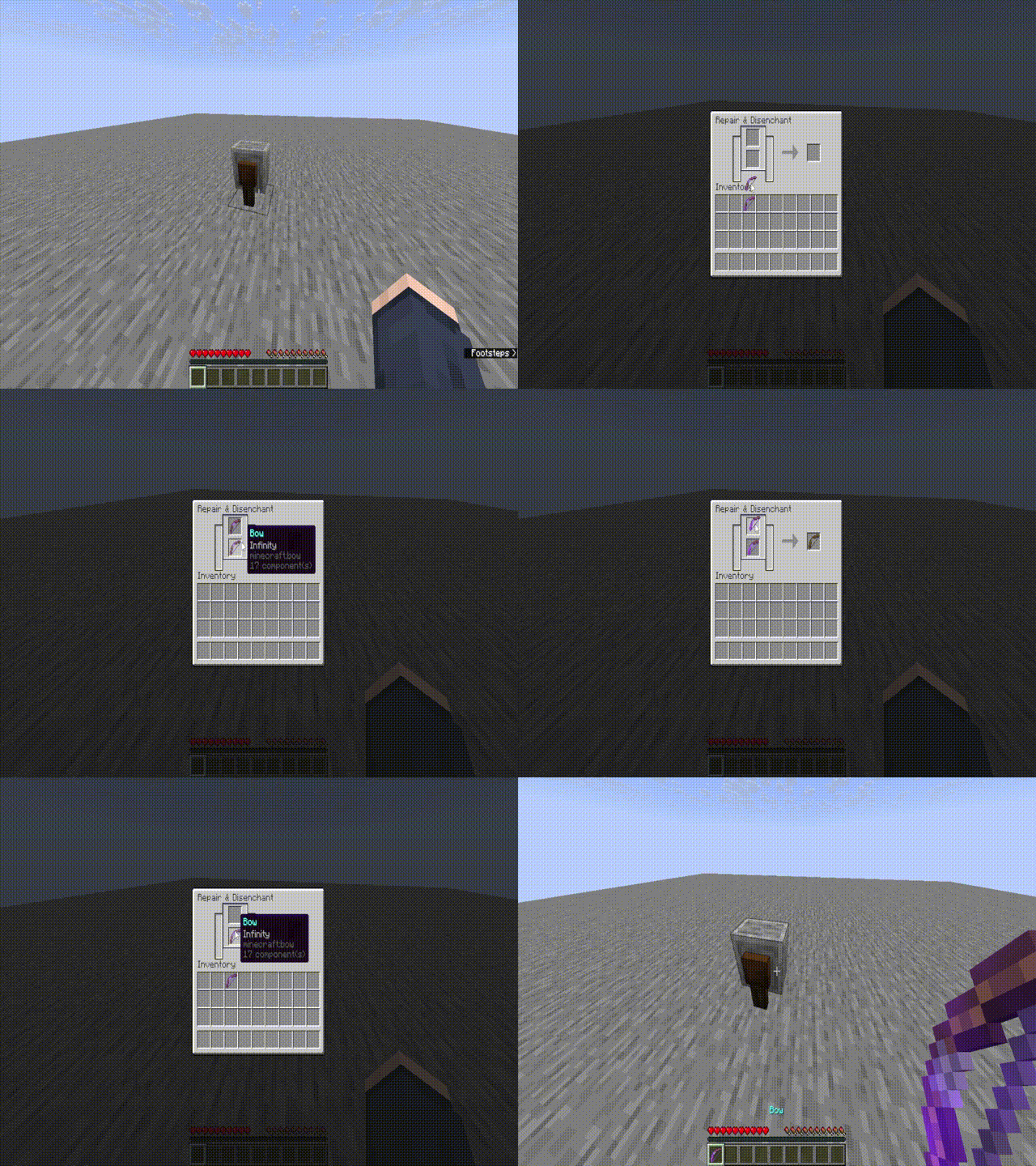
Confirmed behavior:
- The top input item receives enchantments from the bottom input item.
- The bottom input item remains unchanged.
- The output slot shows a normal grindstone output without the merged enchantments.
- Mutually exclusive enchantments can be merged into the top input item.
- Normal grindstone durability repair behavior still applies to the output item.
Confirmed test examples:
- Diamond Sword with Fire Aspect II + Diamond Sword with Looting III.
- Diamond Sword with Sharpness V + Diamond Sword with Fire Aspect II and Looting III.
- Diamond Chestplate with multiple mutually exclusive protection enchantments.
- Bow with Mending + Bow with Infinity.
- Damaged Diamond Swords with normal grindstone repair output.
LB-002 — MC-271398 Crafting Result Bug
Original snapshot: 24w18a
Status: Implemented / Tested
This bug restores the crafting-remainder behavior found in snapshot 24w18a. When a recipe is positioned away from the top-left corner of the crafting grid, remaining items can be returned to the wrong crafting-grid position.
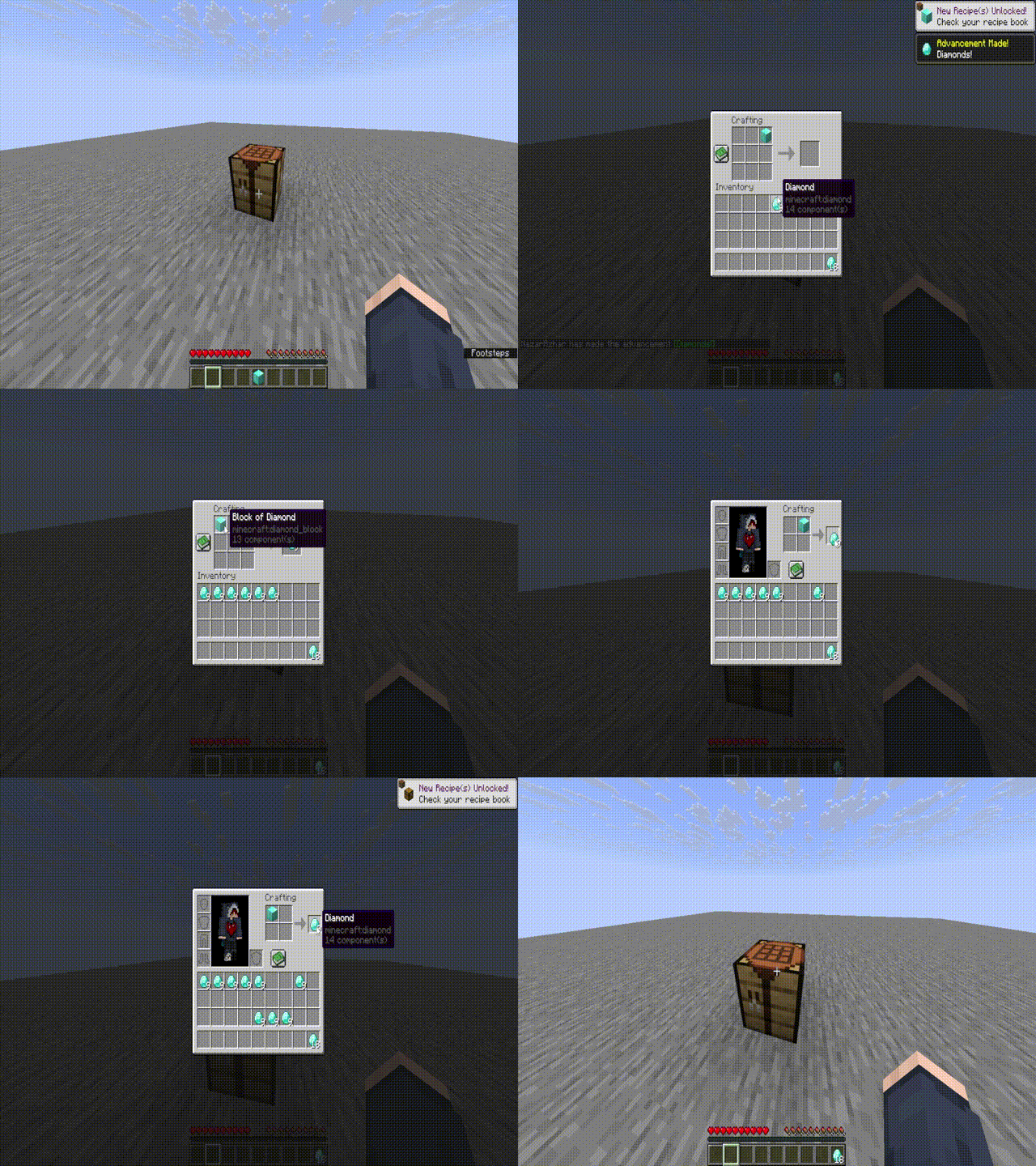
Confirmed behavior:
- Crafting remainders are applied starting from the top-left crafting-grid slot.
- The original recipe position inside the crafting grid is ignored.
- Container items can appear in the wrong slot.
- The original input item can remain in its original slot when the recipe is placed away from the top-left corner.
Confirmed test examples:
- Honey Bottle placed in the top-left crafting slot.
- Honey Bottle placed in the center crafting slot.
- Honey Bottle placed in the bottom-right crafting slot.
- A Sugar crafting result leaves a Glass Bottle in the top-left slot when the recipe is offset.
Relevant implementation areas:
ResultSlot.onTakeCraftingInput.PositionedgetRemainingItems
In-Game Configuration
Legacy Bugs includes an in-game configuration screen for controlling the mod without manually editing the configuration file.
The configuration screen includes:
- Global Legacy Bugs toggle.
- LB-001 — Grindstone Enchantment Merge toggle.
- LB-002 — Crafting Result Bug toggle.
- Refresh button.
- Current permission and edit status.
- Toggle states displayed as
TRUEorFALSE.
Default keybind: -. The keybind can be assigned or changed in Minecraft's Controls / Key Binds menu.
In singleplayer worlds, the world owner can change Legacy Bugs settings directly through the configuration screen.
On dedicated Fabric servers:
- Operators can view and modify Legacy Bugs settings.
- Non-operators can view the current settings but cannot modify them.
- Non-operators see a view-only status indicating that operator permission is required to edit settings.
- The server is authoritative: configuration changes are validated and saved by the server rather than trusted from the client.
Bug Toggle System and Configuration File
Legacy Bugs allows restored bug behavior to be enabled or disabled globally or individually. The configuration file is created automatically after the game or server is launched once with the mod installed.
Singleplayer / client configuration path:
.minecraft/config/legacy-bugs.json
Dedicated server configuration path:
config/legacy-bugs.json
Default configuration:
{
  "enabled": true,
  "lb001GrindstoneMerge": true,
  "lb002CraftingResultBug": true
}
enabledcontrols the entire mod globally.lb001GrindstoneMergecontrols LB-001.lb002CraftingResultBugcontrols LB-002.
If enabled is set to false, all restored bug behavior is disabled even if the individual bug options remain set to true.
Commands
Legacy Bugs also provides in-game commands for controlling the restored bugs.
/legacybugs status
/legacybugs enable
/legacybugs disable
/legacybugs lb001 enable
/legacybugs lb001 disable
/legacybugs lb002 enable
/legacybugs lb002 disable
/legacybugs statusshows the current Legacy Bugs settings./legacybugs enableenables Legacy Bugs globally./legacybugs disabledisables Legacy Bugs globally./legacybugs lb001 enableenables the grindstone bug./legacybugs lb001 disabledisables the grindstone bug./legacybugs lb002 enableenables the crafting result bug./legacybugs lb002 disabledisables the crafting result bug.
On dedicated servers, Legacy Bugs commands are restricted to operators / moderators. Changes made through commands are saved to the active Legacy Bugs configuration file.
Multiplayer and Server Behavior
Legacy Bugs has been tested on a Fabric dedicated server running Minecraft Java Edition 26.2.
Confirmed server behavior:
- Legacy Bugs loads successfully on the dedicated server.
legacy-bugs.jsonis created in the server configuration directory.- Operators can use Legacy Bugs commands and modify settings through the configuration screen.
- Non-operators can view server settings through the configuration screen but cannot modify them or use the restricted command interface.
- Configuration changes are validated and saved by the server.
Version Compatibility
The current main branch targets:
- Minecraft Java Edition: 26.2
- Java Runtime: Java 25
- Fabric Loader: 0.19.3
- Fabric API: 0.157.0+26.2
A separate branch, version/1.21.11, is maintained for:
- Minecraft Java Edition: 1.21.11
- Java Runtime: Java 21
Use the correct JAR for your Minecraft version. Compatibility with unlisted or untested versions is not guaranteed.
Research Notes
Detailed bug research, documentation, and testing progress are available in BUGS.md.
Disclaimer
Legacy Bugs is intended for singleplayer research, historical preservation, testing, and educational purposes.
Some restored behaviors may be considered unfair, unintended, or unwanted on multiplayer servers. Do not use this mod on a server without explicit permission from the server owner or administrators.
This project is not intended to be a cheat mod, hacked client, or general-purpose exploit tool. Its purpose is to document and reproduce selected historical Minecraft bugs for learning, preservation, and controlled experimentation.
Requirements — Main Branch (Minecraft 26.2)
- Minecraft Edition: Java Edition
- Minecraft Version: 26.2
- Java Runtime: Java 25
- Mod Loader: Fabric Loader 0.19.3
- Required Library: Fabric API 0.157.0+26.2
For Minecraft 1.21.11, use the JAR built for the separate version/1.21.11 branch and its corresponding requirements.