
Compatibility
Minecraft: Java Edition
Platforms


Links
Tags
Creators
Details
✦ PrismatikTabs
The all-in-one display manager for Paper servers. Tablist headers & footers, sidebar scoreboards, rank-based nametags, rotating BossBar & ActionBar announcements — all powered by clean YAML config and MiniMessage, with a built-in web editor for live changes. Zero dependencies required.
📋 Requirements
| Requirement | Details |
|---|---|
| Server | Paper 1.21+ (or any fork — Purpur, Pufferfish, etc.) |
| Java | 21 or newer |
| LuckPerms | Optional — enables rank-based nametags & {rank} placeholder |
| PlaceholderAPI | Optional — enables thousands of extra %placeholders% |
PrismatikTabs works completely standalone. LuckPerms and PlaceholderAPI are soft dependencies — install them only if you need their features.
⚡ Features
📋 Tablist — Header & Footer
- Fully customizable header & footer with multi-line support
- Conditional designs — show different tab overlays per world, rank, or permission
- Built-in placeholders:
{player}{online}{max}{ping}{world}{tps}{rank}{health}
📊 Scoreboard — Sidebar
- Beautiful sidebar scoreboard with up to 15 lines
- Multiple scoreboards with display conditions — auto-switches based on world, rank, or permissions
- Animated titles using the built-in animation engine
🏷️ Nametags — Rank Prefixes
- Rank-based prefix & suffix nametags that sync with LuckPerms groups
- Customizable name colors, collision rules, and visibility settings per rank
- Supports unlimited rank tiers (Owner → Admin → Mod → Helper → VIP+ → VIP → Member)
📢 Announcer — BossBar & ActionBar
- Rotating BossBar messages with customizable color & overlay style
- ActionBar announcements with live placeholder support
- Independent timing controls for each channel
🎬 Animations — Animated Text
- Define frame-by-frame text animations in a single file
- Use them anywhere with
%animation:name%— in scoreboards, tablist, nametags, or announcements - Tick-precise frame intervals (20 ticks = 1 second)
🎨 MiniMessage & Gradients
- Full MiniMessage support —
<gradient>,<bold>,<italic>,<hover>,<click>, and more - Create stunning gradient text:
<gradient:#FF9933:#FFFFFF:#57A818>Your Text</gradient>
🔌 Soft Integrations
- PlaceholderAPI — use any PAPI placeholder like
%player_health%,%vault_eco_balance%, etc. - LuckPerms — automatic rank detection for nametags, conditions, and the
{rank}placeholder
🖥️ Prismatik Studio — Web Editor
- Built-in HTTP API server — edit all configs from your browser
- Visual editors for every module (tablist, scoreboard, nametags, announcer, animations)
- Save & Reload writes to disk and hot-reloads instantly — no server restart needed
- Gradient creator and ASCII art tools built right in
- Secure token-based authentication
🚀 Getting Started — Quick Setup
Step 1: Install
- Download
PrismatikTabs.jarfrom this page - Drop it into your server's
plugins/folder - Start (or restart) your Paper server
- The plugin auto-generates all config files in
plugins/PrismatikTabs/
Step 2: Verify
Run /prismatik debug in-game or from the console. You should see:
[Prismatik] === Prismatik Debug ===
Version: 2.0.0
LuckPerms: true/false
PlaceholderAPI: true/false
Studio API: disabled
Online: 1/20
If you see this — you're good! The default tablist, scoreboard, nametags, and announcer are already running.
Step 3: Customize
Edit the YAML files in plugins/PrismatikTabs/, then run:
/prismatik reload
That's it — changes apply instantly to all online players. No restart needed.
🖥️ Prismatik Studio — Web Editor Tutorials
PrismatikTabs ships with Prismatik Studio — a stunning, browser-based visual editor that connects directly to your live server. No more hand-editing YAML files. Design everything visually, see live MiniMessage previews, and push changes to your server with one click.
🔌 Step 1: Enable Studio on Your Server
Before using the web editor, you need to open a port and enable the Studio API.
1. Allocate an extra port on your hosting panel (e.g., 25660). This must be a separate port from your Minecraft port (25565).
2. Edit plugins/PrismatikTabs/config.yml:
studio:
  enabled: true
  port: 25660                         # The port you allocated
  token: "your-super-secret-token"    # Set something strong!
  allowed-origin: "*"                 # Or lock to your studio URL
3. Run /prismatik reload in-game to start the Studio API server.
4. Confirm it's running with /prismatik studio:
[Prismatik] ✦ Prismatik Studio
Port: 25660
Token: your****
URL:  https://prismatiktabs.netlify.app

  § Click here to open Prismatik Studio
💡 Tip: The clickable link in chat opens the Studio directly in your browser!
🔗 Step 2: Connect to Your Server
Open https://prismatiktabs.netlify.app in your browser.
- Click the "Connect Server" button in the top-right corner
- Enter your connection details:
- Hostname / IP — your server's public IP (e.g.,
play.myserver.com) - Port — the Studio port you set (e.g.,
25660) - API Token — the token from your
config.yml
- Hostname / IP — your server's public IP (e.g.,
- Click Connect
Once connected, you'll see a green "Live" indicator with your server name, online player count, TPS, and detected plugins (LuckPerms ✓, PAPI ✓).
All your existing configs are automatically loaded from the server — you'll see your current setup ready to edit.
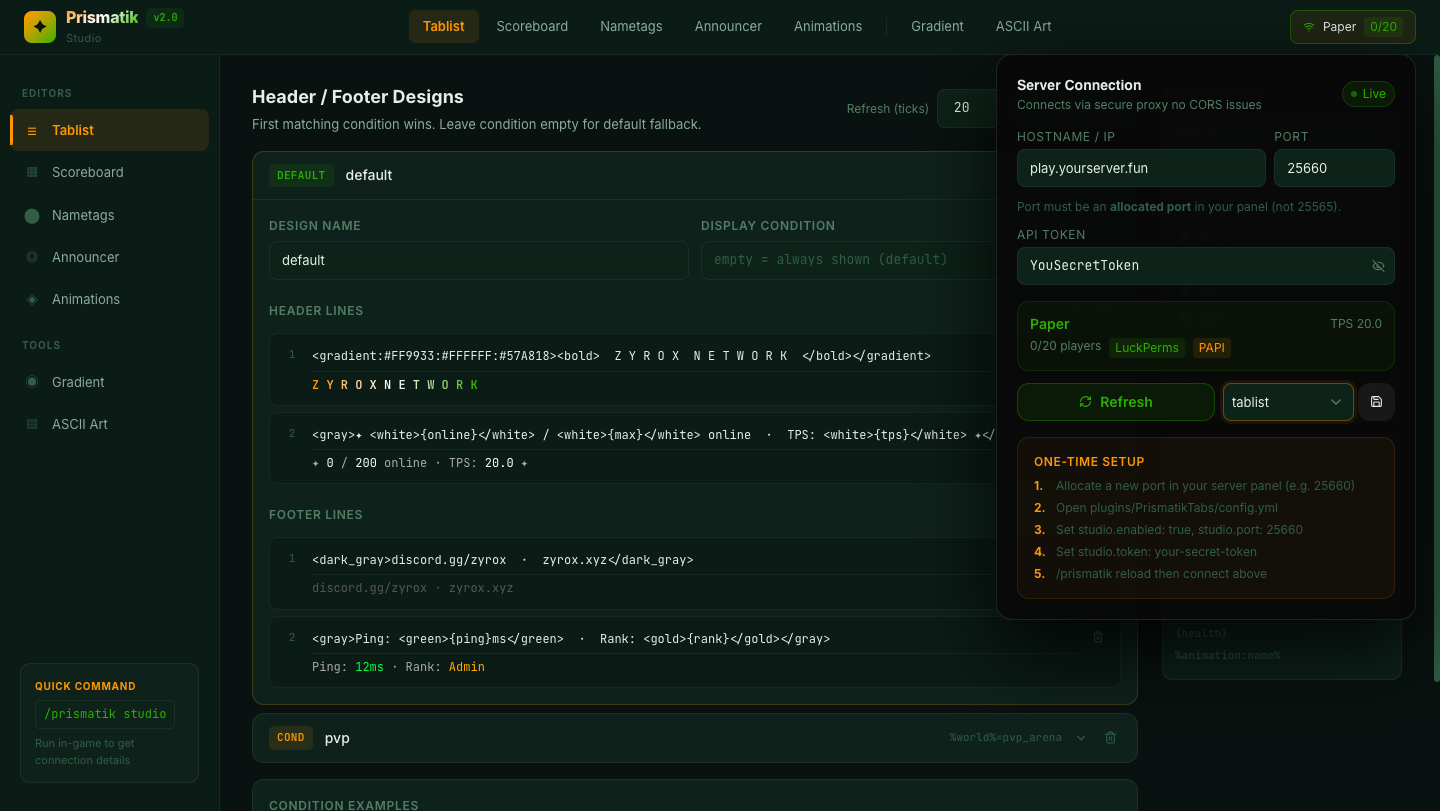
📋 Step 3: Editing the Tablist
Click "Tablist" in the sidebar under Editors.
What you'll see:
- A list of your tablist designs (e.g., "pvp", "default")
- Each design has a condition field and header/footer line editors
- A live Minecraft preview on the right that updates as you type
How to use it:
- Click on a design to expand its editor
- Edit the Design Name and Display Condition (leave empty for default fallback)
- Edit individual header and footer lines — each line shows a live MiniMessage preview below the input
- Click "+ Line" to add new lines, or the 🗑️ icon to remove them
- Click "+ Add Design" to create a new conditional design
- Set the Refresh (ticks) value in the top-right corner
- Use the Placeholders panel on the right — click any placeholder to copy it
Saving: Select "tablist" in the connection dropdown, then click the 💾 Save button. Your changes are written to disk and hot-reloaded instantly.
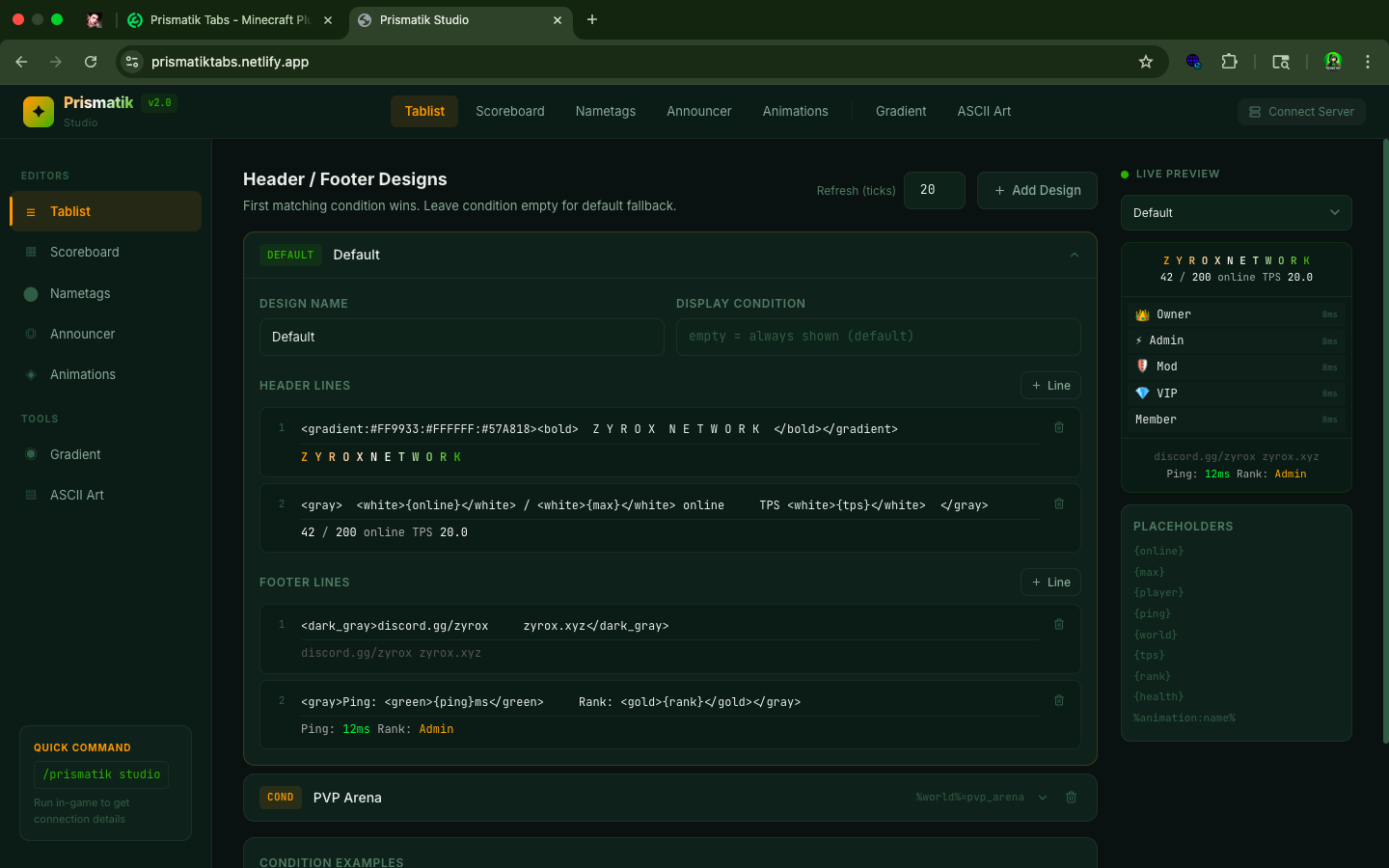
📊 Step 4: Editing the Scoreboard
Click "Scoreboard" in the sidebar.
What you'll see:
- A global enable/disable toggle for the entire scoreboard module
- Multiple scoreboard definitions (e.g., "pvp", "default") — each expandable
- A live sidebar preview on the right that mimics the in-game scoreboard
How to use it:
- Expand a scoreboard definition to edit its title, display condition, and lines
- Edit the title — supports MiniMessage and
%animation:name%for animated titles - Add, edit, or remove sidebar lines (max 15) — each with a live preview
- Use the condition field to target specific worlds, ranks, or permissions
- Toggle individual scoreboards on/off with their enabled switch
Pro tip: Use %animation:title% in the title field to make your scoreboard title cycle through animated frames!
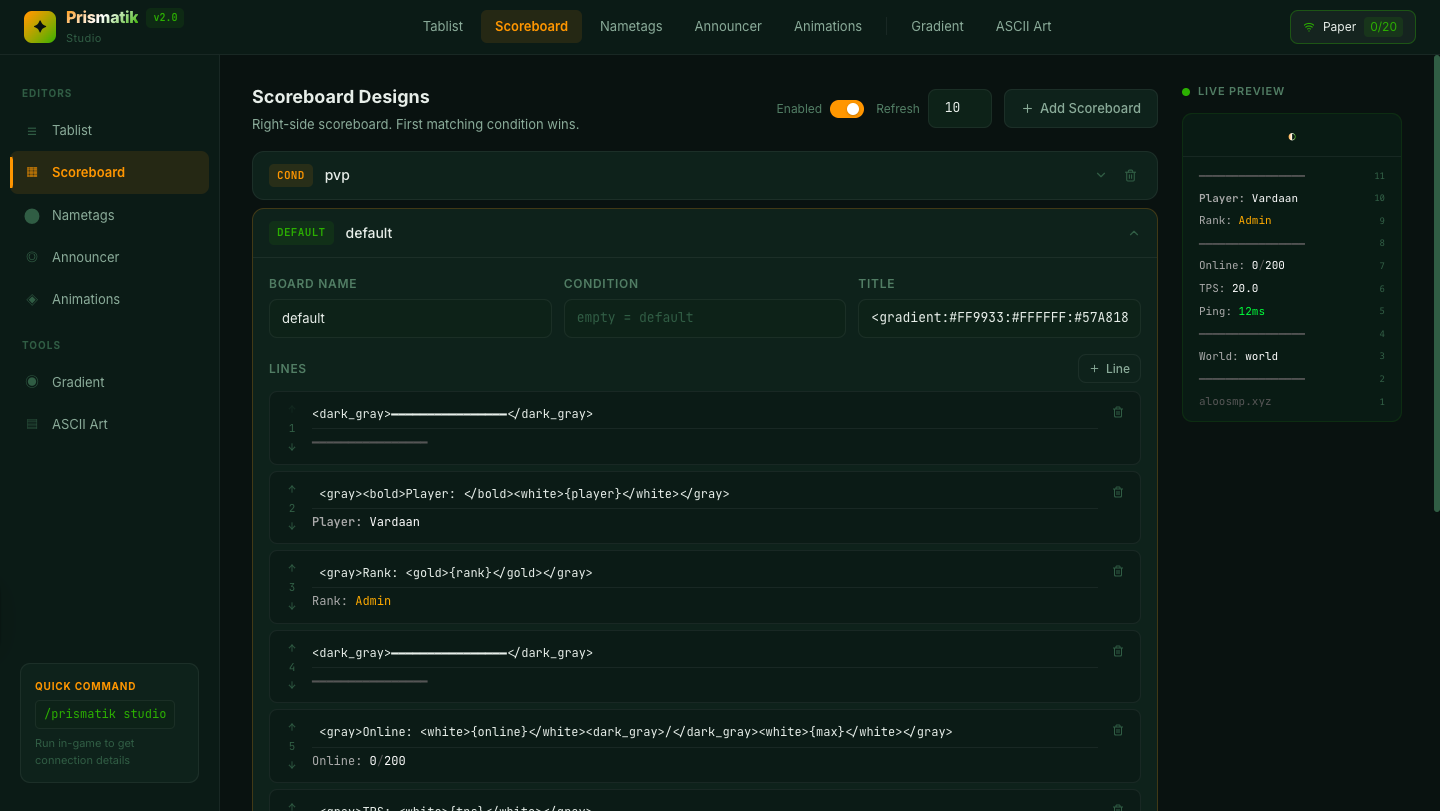
🏷️ Step 5: Editing Nametags
Click "Nametags" in the sidebar.
What you'll see:
- A list of all rank definitions (Owner, Admin, Mod, Helper, VIP, etc.)
- Each rank has fields for prefix, suffix, name color, visibility, and collision
- If LuckPerms is detected, the Studio auto-imports your existing LuckPerms groups
How to use it:
- Click a rank to expand its editor
- Edit the Prefix — this appears before the player's name (e.g.,
<red><bold>[Admin]</bold></red>) - Edit the Suffix — this appears after the player's name
- Set the Name Color — must be a MiniMessage named color (
<gold>,<red>, etc.) - Choose Name Visibility:
always,never,hideForOtherTeams, orhideForOwnTeam - Toggle Collision on/off — disable to prevent player pushing
- Set the global Refresh (ticks) interval
Important: Rank keys must exactly match your LuckPerms group names (lowercase). If a player's group doesn't match any rank, the
defaultrank is used.
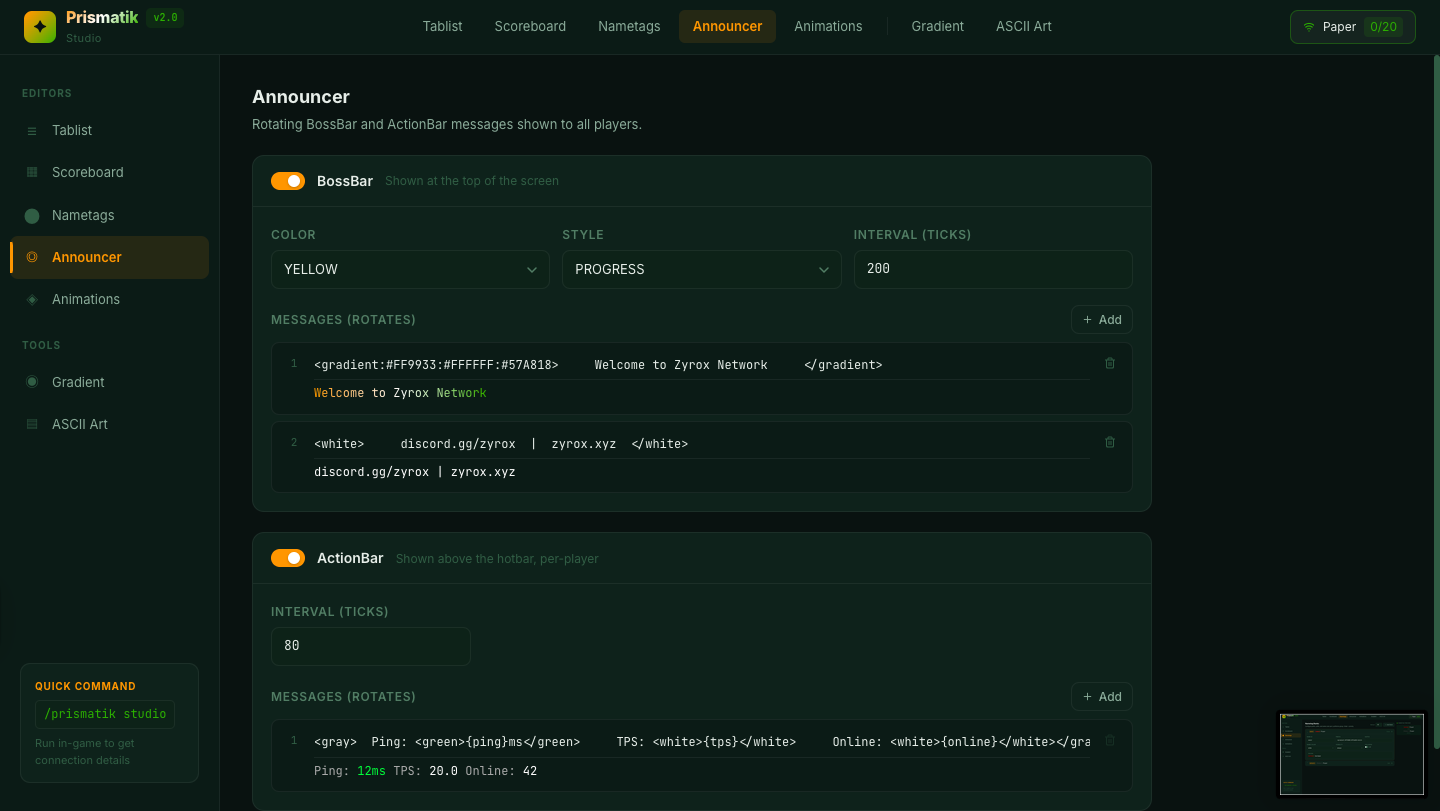
📢 Step 6: Editing the Announcer
Click "Announcer" in the sidebar.
What you'll see:
- A BossBar section with channel management
- An ActionBar section with rotating message lines
- Enable/disable toggles for each
BossBar setup:
- Toggle BossBar enabled/disabled
- Each channel has a color selector (Pink, Blue, Red, Green, Yellow, Purple, White)
- Choose an overlay style (Progress, Notched_6, Notched_10, Notched_12, Notched_20)
- Set the interval (ticks) — how long each message displays
- Add, edit, or remove rotating messages — full MiniMessage and placeholder support
ActionBar setup:
- Toggle ActionBar enabled/disabled
- Set the rotation interval in ticks
- Add and edit rotating messages — great for displaying live stats like ping, TPS, and rank
🎬 Step 7: Editing Animations
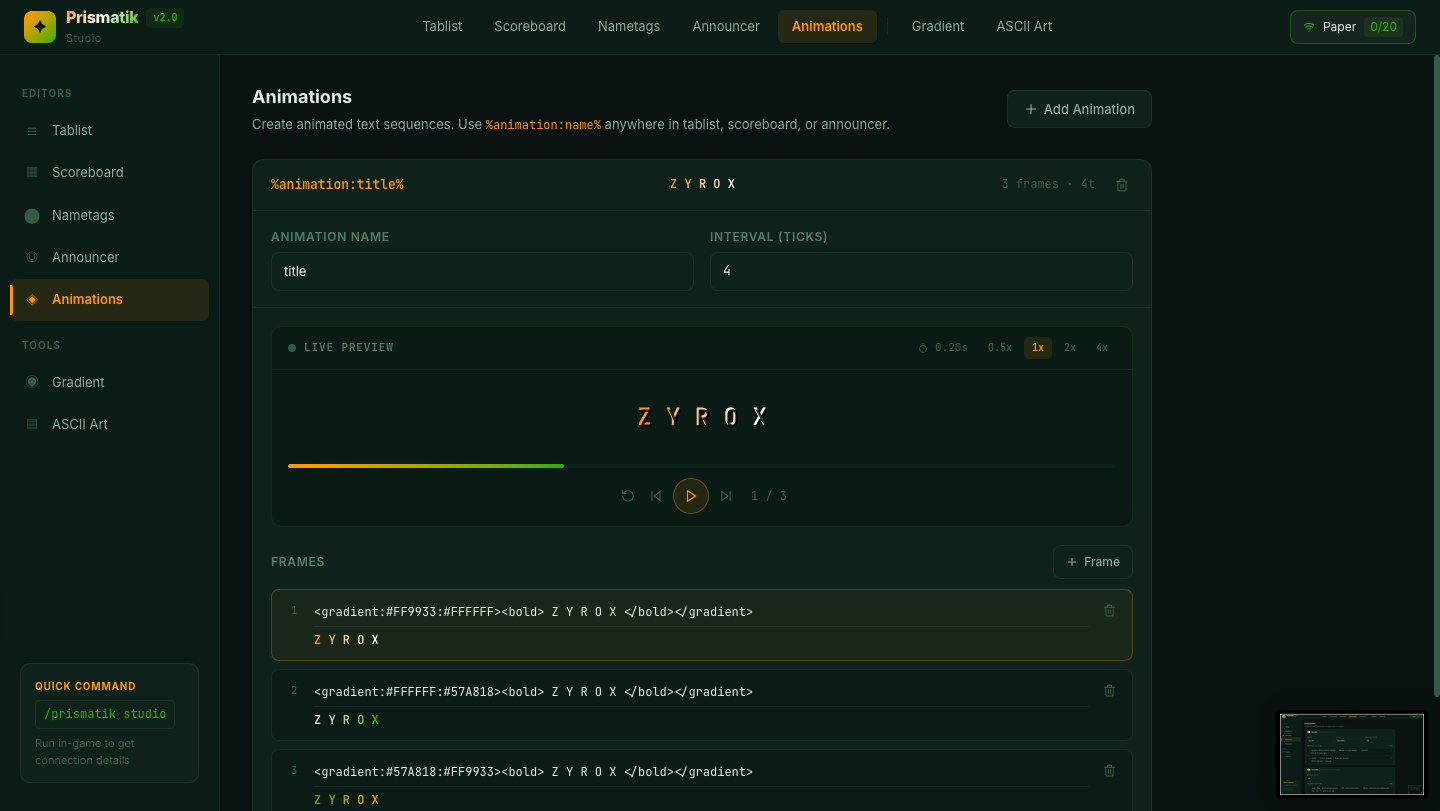
Click "Animations" in the sidebar.
What you'll see:
- A list of all defined animations (e.g., "Welcome", "title", "spinner")
- Each animation has an interval (ticks between frames) and a list of frames
How to use it:
- Click an animation to expand it
- Set the interval — how fast the frames cycle (e.g.,
40ticks = 2 seconds per frame) - Add, edit, or remove frames — each frame is a MiniMessage string
- Click "+ Add Animation" to create new ones
Using animations elsewhere:
Once you define an animation here, reference it anywhere with %animation:name%. For example:
- Scoreboard title:
<gradient:#FF9933:#FFFFFF:#57A818>%animation:title%</gradient> - Tablist header:
%animation:Welcome%
🎨 Bonus: Gradient Creator Tool
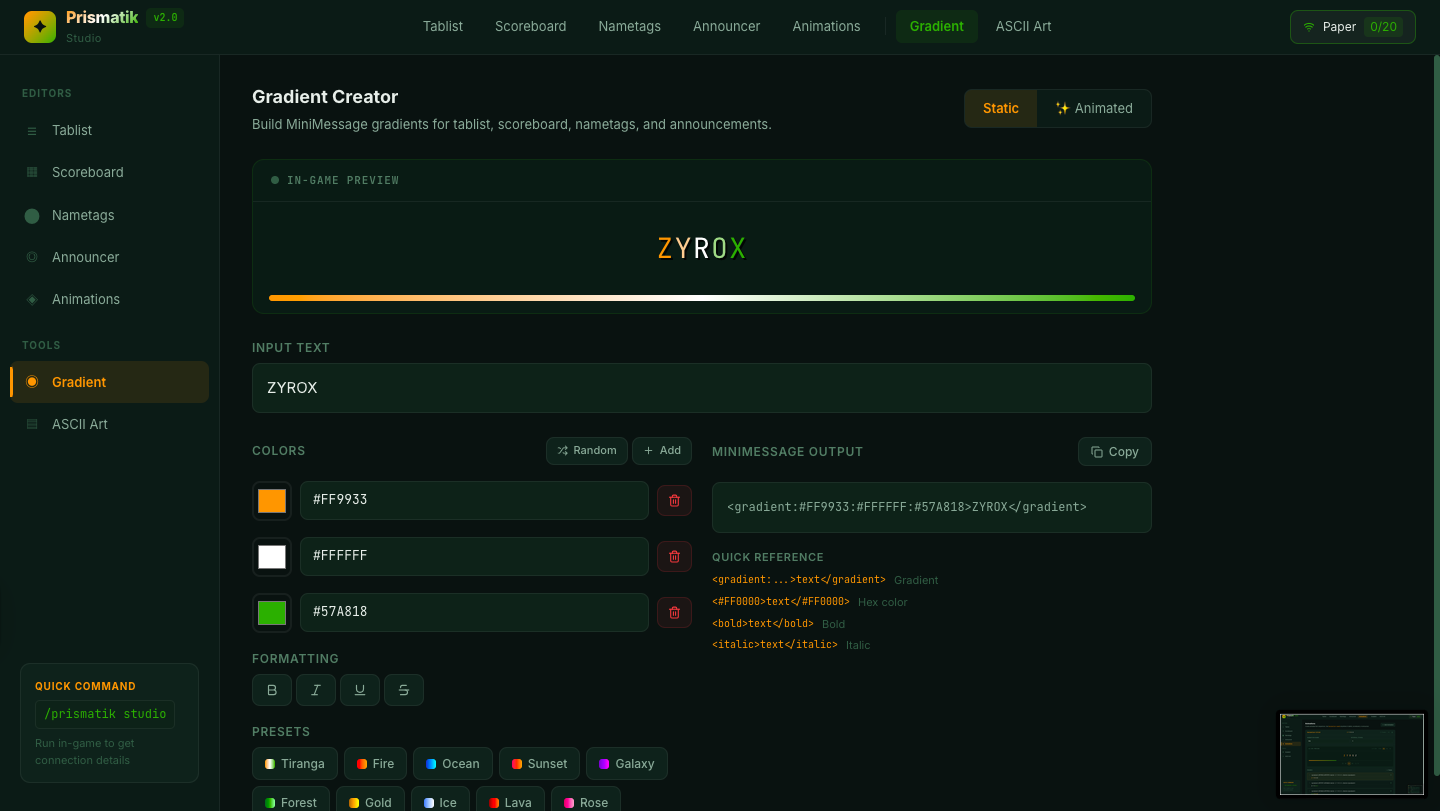
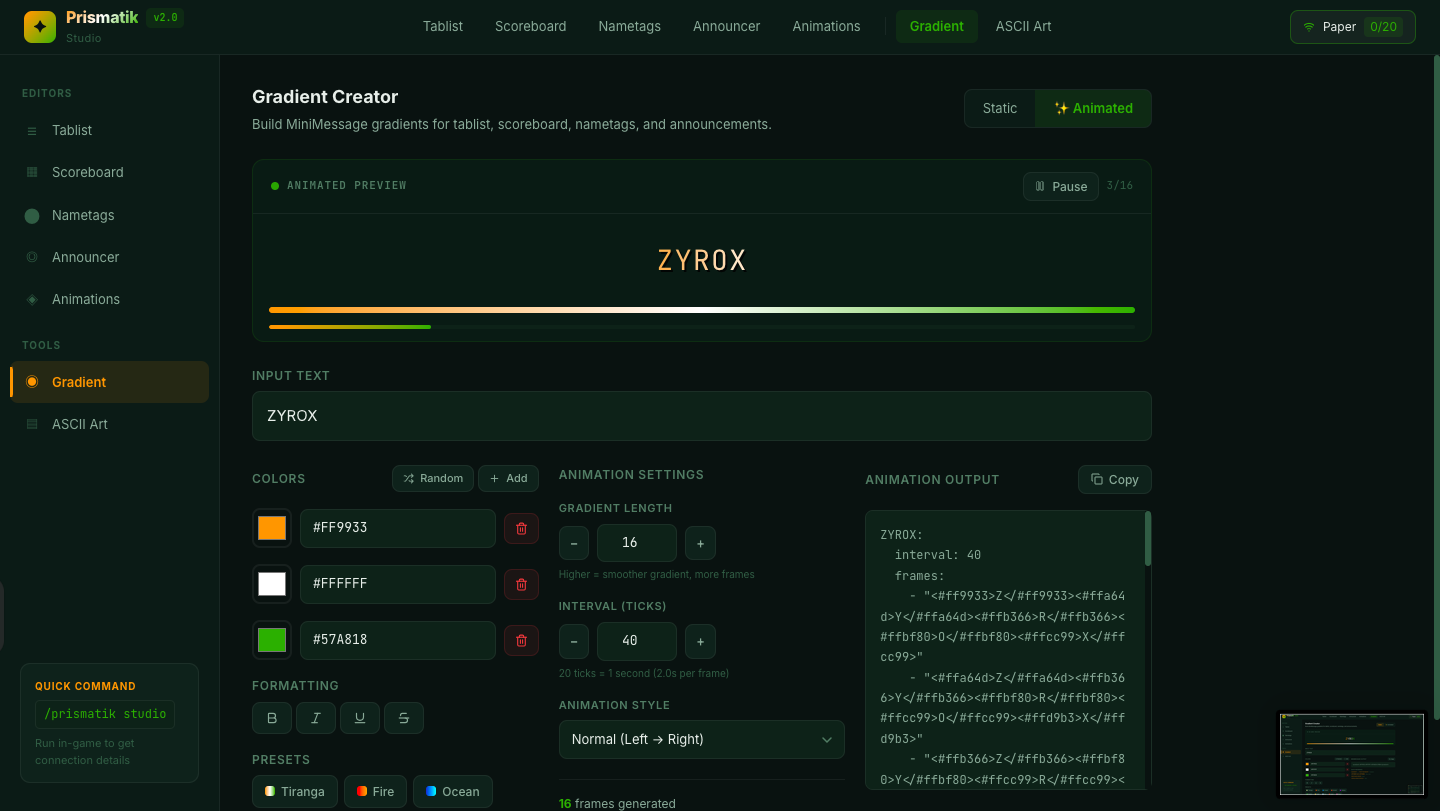
Click "Gradient" under Tools in the sidebar.
This is a visual tool for building MiniMessage gradient tags — no more guessing hex codes!
Features:
- Type your text and see a live in-game preview with accurate Minecraft font rendering
- Add up to 8 color stops with color pickers
- Toggle Bold, Italic, Strikethrough, and Underline formatting
- Choose from 10 built-in gradient presets (Tiranga, Fire, Ocean, Sunset, Galaxy, Forest, Gold, Ice, Lava, Rose)
- Click 🎲 Random for surprise gradients
- The generated MiniMessage output is shown at the bottom — click 📋 Copy to copy it
- Directly create & add the Animations effortlessly using Animated Gradient Tool
Paste the copied tag directly into any tablist, scoreboard, nametag, or announcer line.
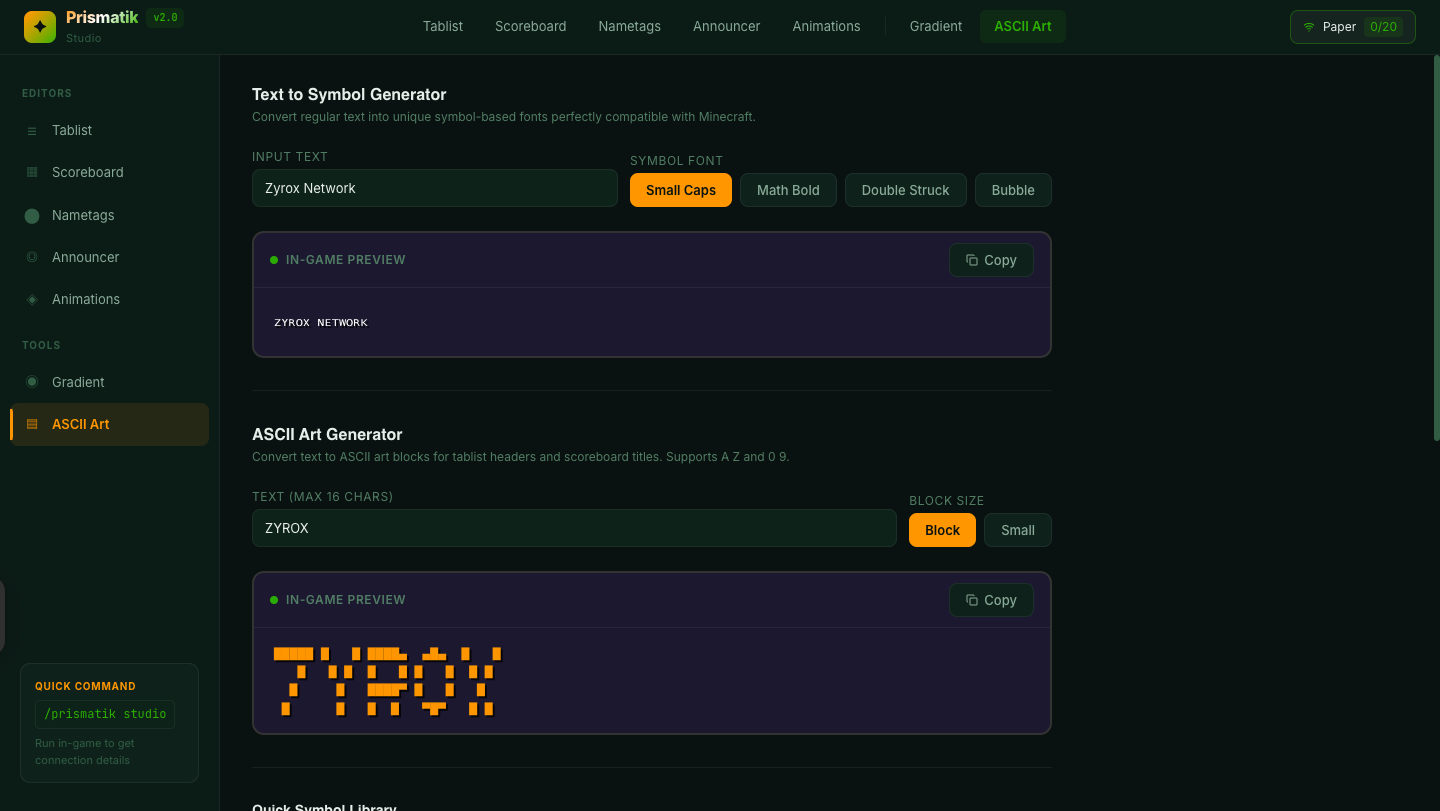
🔤 Bonus: ASCII Art & Symbols Tool
Click "ASCII Art" under Tools in the sidebar.
A built-in library of Unicode symbols and ASCII art for your configs — no more searching the internet for the right character.
Features:
- Browse categories of Unicode symbols (arrows, stars, borders, emojis, etc.)
- Click any symbol to copy it instantly
- Search and filter symbols by name
- Perfect for scoreboard separators, nametag decorations, and tablist accents
💾 Saving & Hot-Reload Workflow
The Studio's save workflow is designed for speed:
- Edit any module in the visual editors
- Select the file you want to save from the dropdown in the connection panel (tablist, scoreboard, nametag, announcer, or animations)
- Click Save (💾) — this does three things simultaneously:
- Writes the updated YAML to disk on your server
- Creates an automatic
.yml.bakbackup of the previous config - Triggers
/prismatik reload— changes apply to all online players instantly
- A green ✓ checkmark confirms the save was successful
No server restart needed. No player rejoin needed. It just works.
🎯 Display Conditions
PrismatikTabs supports powerful conditions to show different designs to different players. Use these in tablist display-condition and scoreboard display-condition:
| Condition | Example | Matches when... |
|---|---|---|
| World | %world%=pvp_arena |
Player is in world named pvp_arena |
| Rank | %group%=admin |
Player's LuckPerms primary group is admin |
| Permission | permission:vip.access |
Player has the permission node |
The first design whose condition matches the player wins. Designs without conditions act as fallbacks.
📦 Available Placeholders
Use these built-in placeholders anywhere — tablist, scoreboard, nametags, announcer:
| Placeholder | Outputs |
|---|---|
{player} |
Player's name |
{online} |
Current online player count |
{max} |
Max server slots |
{ping} |
Player's ping in ms |
{world} |
Current world name |
{tps} |
Server TPS |
{rank} |
LuckPerms primary group (or "default") |
{health} |
Player's health |
%animation:name% |
An animation from animations.yml |
%prismatik_staff_count% |
Number of online staff (PAPI) |
%any_papi_placeholder% |
Any PlaceholderAPI placeholder |
🔧 Commands & Permissions
Commands
| Command | Description |
|---|---|
/prismatik reload |
Hot-reload all config files from disk |
/prismatik refresh |
Force re-apply all displays to online players |
/prismatik studio |
Show Studio web editor connection info |
/prismatik debug |
Show version, hooks, and status info |
/prismatik help |
Show available commands |
Alias: /pt (example: /pt reload)
Permissions
| Permission | Description | Default |
|---|---|---|
prismatik.admin |
Access to all /prismatik commands |
OP |
prismatik.staff |
Player is counted in %prismatik_staff_count% |
false |
📁 Config Files
All files are auto-generated in plugins/PrismatikTabs/ on first run:
| File | What it controls |
|---|---|
config.yml |
Module toggles, staff permission, Studio settings |
tablist.yml |
TAB header & footer designs with conditions |
scoreboard.yml |
Sidebar scoreboard designs with conditions |
nametag.yml |
Rank prefix, suffix, name color, collision |
announcer.yml |
Rotating BossBar & ActionBar messages |
animations.yml |
Frame-by-frame text animation definitions |
You can disable any module you don't need in config.yml:
modules:
  tablist:    true
  scoreboard: true
  nametag:    true
  announcer:  true
💡 Why PrismatikTabs?
Most tablist/scoreboard plugins force you to choose between easy config and powerful features. PrismatikTabs gives you both:
| Feature | PrismatikTabs | TAB | AnimatedScoreboard | NametagEdit |
|---|---|---|---|---|
| Tablist header/footer | ✅ | ✅ | ❌ | ❌ |
| Sidebar scoreboard | ✅ | ✅ | ✅ | ❌ |
| Rank nametags | ✅ | ✅ | ❌ | ✅ |
| BossBar announcer | ✅ | ✅ | ❌ | ❌ |
| ActionBar announcer | ✅ | ❌ | ❌ | ❌ |
| Text animations | ✅ | ✅ | ✅ | ❌ |
| MiniMessage & gradients | ✅ | ✅ | ❌ | ❌ |
| Conditional designs | ✅ | ✅ | ❌ | ❌ |
| Web-based editor | ✅ | ❌ | ❌ | ❌ |
| Hot-reload | ✅ | ✅ | ✅ | ✅ |
| Single plugin, all features | ✅ | ❌ | ❌ | ❌ |
One JAR. One config folder. Everything your players see. No more juggling 4 different plugins with 4 different config styles. PrismatikTabs handles tablist, scoreboard, nametags, and announcements in one clean, consistent setup — with a web editor to make it even easier.
🤝 Support
- 🐛 Found a bug? Open a Ticket on our Discord Server.
- 💬 Need help? Join our Discord community
- ⭐ Like the plugin? Leave a star on Modrinth!
Made with ✦ by TechnoYashvardhan