Compatibility
Minecraft: Java Edition
Platforms
Supported environments


Tags
Creators
Details
Licensed MIT
Published 2 months ago
Updated 2 weeks ago
GregTech Calculator Board (GT Calc Board)

Description
Tired of opening external spreadsheets just to plan your production lines in yet another GregTech modpack? Well, this mod is for you!
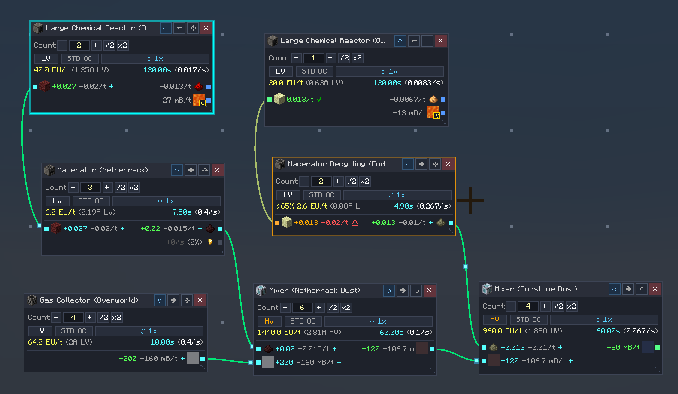
GregTech Calculator Board (GTCB) lets you build dynamic flowcharts directly inside Minecraft by pulling recipes from EMI or JEI.
Instead of making this:
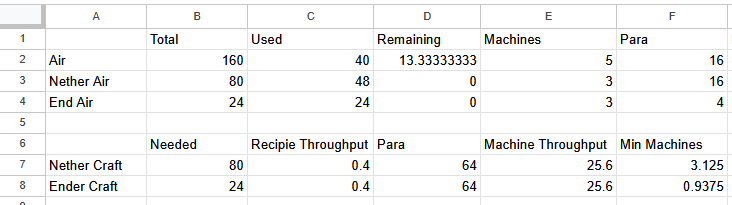
You can make this directly in-game:
Mod Main Features
- Effortless Live Flowcharts: Design dynamic flowcharts with machine inputs and outputs, linking them together to balance and simulate entire production lines.
- Intuitive GUI & Built-in Guide: Get started quickly with an interactive in-game tutorial and a comprehensive guidebook covering all features and shortcuts.
- Instant Bill Of Materials (BOM) Export: Automatically aggregate required machines and multiblock parts into a Bill of Materials, exportable directly to an EMI Recipe Tree, JEI++, or the clipboard.
- Live Multiplayer Collaboration: Work together with teammates using FTB Teams, Phoenix Guilds, or Vanilla Scoreboards in real-time shared workspaces.
Requirements & Mod Compatibility
- Minecraft:
1.20.1 - Mod Loader:
Minecraft Forge (47.2.0+) - Required Dependencies: None (Fully standalone, works client-side and server-side)
- Supported Recipe Viewers:
- EMI (Recommended)
- JEI (Just Enough Items) / JEI++ / JEI Unofficial
- Supported Tech & Automation Mods:
- GregTech CEu Modern (1.7.0+ or Star Technology forks)
- Applied Energistics 2 (AE2)
- Create, Create: New Age & Greate
- Thermal Series & Systeams
- Multiplayer Team Integration:
Community & Support
- Discord: Join our Discord Server - Discuss factory blueprints, ask questions, and chat with the community!
- Issue Tracker: GitHub Issues - Report confirmed bugs and submit suggestions.
- Source Code: GitHub Repository
Special Thanks
- The Reel One - For providing UX/UI feedback, design suggestions, and community testing.
- rafaelpnsm - For providing UX/UI feedback, design suggestions, and community testing.
- GenerusWeebius - For thorough testing, meticulous bug reporting, and mathematical verification.