
Compatibility
Minecraft: Java Edition
Platforms
Supported environments


Links
Tags
Creators
Details
Licensed MIT
Published 4 months ago
Updated 3 months ago
Green Checkmark GUI
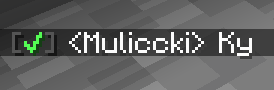
Green Checkmark GUI is a lightweight, 100% client-side Fabric mod for Minecraft 1.21+ that enhances chat interactivity. It automatically detects online player usernames in chat messages and appends a clickable green checkmark [✔] next to their names.
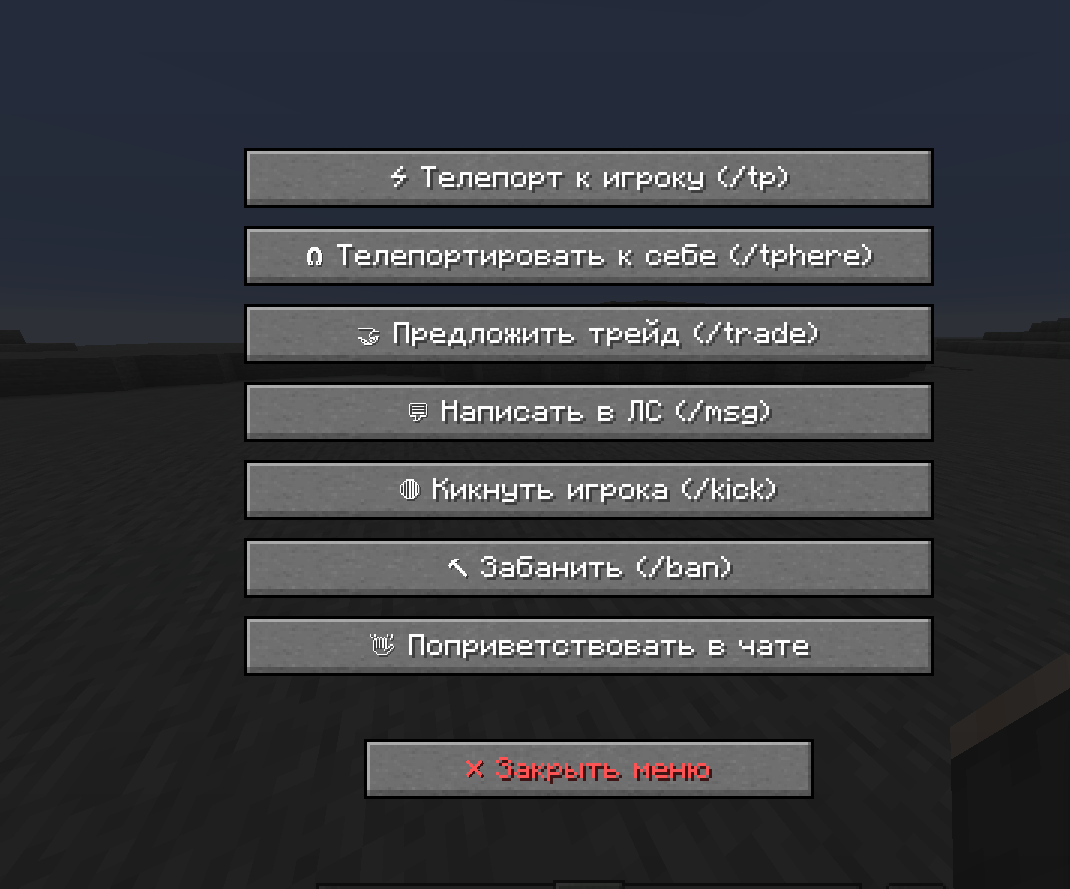
Clicking the checkmark opens a clean, customizable GUI menu with buttons that execute predefined commands or chat messages instantly.
If you encounter a mod issue, please contact me and I will fix it: Discord: Maleccki
Write me what can be added to the mod. Write me on discord: maleccki
✨ Features
- Interactive Chat Checkmarks: Automatically adds a bright green
[✔]tag next to online player nicknames in chat. - Custom Command GUI: Left-click any checkmark to open a sleek player management screen with interactive buttons.
- 100% Client-Side: Works on any multiplayer server (Vanilla, Paper, Spigot, Hypixel, modded servers, etc.) without requiring server-side installation.
- Fully Configurable Buttons: Define any command or message in the JSON config. Supports placeholders
{player}and%player%, which dynamically replace with the selected target's username. - In-Game Reloading: Edit your configuration file on the fly and apply changes instantly using
/gcm reloadwithout restarting Minecraft. - Shader & Mod Compatible: Optimized background rendering prevents crashes when used with shader packs (Iris, Sodium, Polytone) and custom GUI mods (OptiGUI).

⚙️ Configuration
Upon first launch, a configuration file is generated at .minecraft/config/greencheckmark.json. You can easily add, remove, or modify GUI buttons:
{
  "checkmarkSymbol": "✔",
  "checkmarkColor": "GREEN",
  "hoverTooltip": "§a[✔] §fClick to open command menu for §e{player}",
  "buttons": [
    {
      "label": "⚡ Teleport (/tp)",
      "command": "/tp {player}",
      "closeOnExecute": true
    },
    {
      "label": "🧲 Teleport Here (/tphere)",
      "command": "/tphere {player}",
      "closeOnExecute": true
    },
    {
      "label": "🤝 Trade (/trade)",
      "command": "/trade {player}",
      "closeOnExecute": true
    },
    {
      "label": "💬 Send PM (/msg)",
      "command": "/msg {player} Hello! How are you?",
      "closeOnExecute": true
    },
    {
      "label": "👋 Say Hello",
      "command": "Hello, {player}! Welcome to the server!",
      "closeOnExecute": true
    }
  ]
}